Table of Contents
- Building a Multimodal Chatbot with Qwen3-VL Instruct and Thinking Models
- Qwen3-VL Vision-Language Model: Architecture, Training, and Capabilities
- Qwen3-VL Architecture Overview: SigLIP2 Vision Encoder and Multimodal Transformer Design
- Training Pipeline: Multimodal Pretraining with Image-Text and Video-Text Data
- Performance Benchmarks: Image, Video, and Multi-Image Reasoning Evaluation
- Implementation: Building a Multimodal Chatbot with Qwen3-VL and Gradio
- Step 1: Installing Dependencies for Qwen3-VL and Multimodal Processing (PyTorch, Transformers, Gradio)
- Step 2: Importing Required Libraries
- Step 3: Initializing Qwen3-VL Instruct and Thinking Image-Text-to-Text Pipelines
- Step 4: Testing Multimodal Conversations with Image Uploads and Text Prompts
- Step 5: Building a Gradio Multimodal Chat Interface with Image Input Support
- Step 6: Launching the Qwen3-VL Multimodal Chatbot Application
- Multimodal Chatbot Results: Instruct Mode vs Thinking Mode Analysis
- Summary
Building a Multimodal Chatbot with Qwen3-VL Instruct and Thinking Models
In the previous lesson, we explored the power of Qwen3’s text-only models for building intelligent chatbots capable of deep reasoning. However, the real world is fundamentally multimodal: humans do not just communicate through text; we perceive and interact with the world through vision and other sensory inputs. The ability to understand and reason about visual information alongside text represents a crucial step toward more capable and human-like AI systems. This is where Qwen3-VL (Vision-Language) enters the picture, bringing state-of-the-art multimodal understanding to the open-source community.
Qwen3-VL represents a significant advancement in vision-language models, building upon the robust foundations of the Qwen3 architecture while adding sophisticated visual understanding capabilities. Like its text-only counterpart, Qwen3-VL features both Instruct and Thinking variants, enabling users to choose between fast, direct responses and deep, step-by-step reasoning for complex visual understanding tasks.
The model can process and understand images alongside text queries, making it invaluable for applications (e.g., visual question answering, image captioning, complex scene understanding, and multi-image reasoning). Whether you are analyzing medical images, interpreting charts and diagrams, or building assistive technologies for visually impaired users, Qwen3-VL provides the foundational capabilities needed for production-ready multimodal systems.
In this lesson, we extend our chatbot from Lesson 1 by integrating Qwen3-VL’s vision-language capabilities. We will learn how to handle multimodal inputs where users can upload images alongside their text queries, and the chatbot will respond with contextually appropriate answers that demonstrate understanding of both modalities. Through practical implementation using the Hugging Face Transformers library and Gradio, we will build an interactive web interface that seamlessly processes image-text pairs.
The Thinking mode will reveal the model’s visual reasoning process, showing how it analyzes images step-by-step before arriving at conclusions. By the end of this lesson, you will have a fully functional multimodal chatbot that can engage in sophisticated conversations about visual content, laying the groundwork for even more advanced capabilities we will add in subsequent lessons.
This lesson is the 2nd in a 4-part series on Building with Qwen3 Models:
- Building an Intelligent Chatbot with Qwen3 Instruct and Thinking Models
- Building a Multimodal Chatbot with Qwen3-VL Instruct and Thinking Models (this tutorial)
- Lesson 3
- Lesson 4
To learn about Qwen3 and build intelligent applications from scratch, just keep reading.

Qwen3-VL Vision-Language Model: Architecture, Training, and Capabilities
Qwen3-VL Architecture Overview: SigLIP2 Vision Encoder and Multimodal Transformer Design
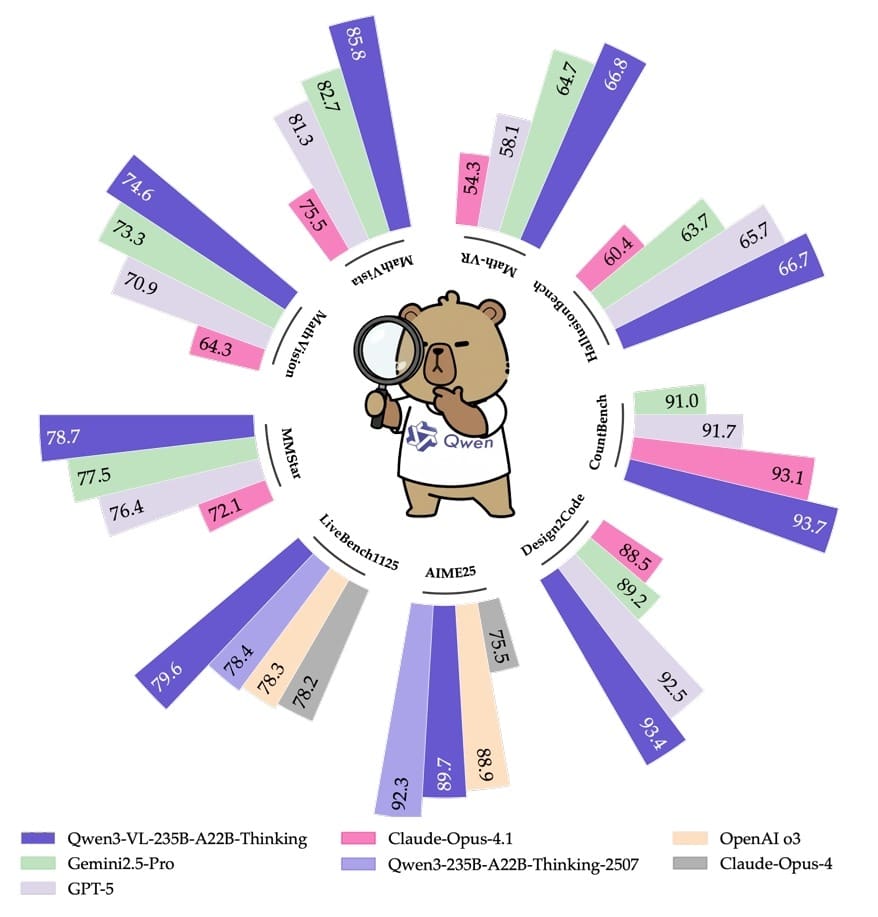
Qwen3-VL (Figure 1) builds upon the Qwen3 language model architecture by integrating a powerful vision encoder capable of processing both static images and dynamic video content. The model employs a vision encoder initialized from SigLIP2-SO-400M, containing approximately 543 million parameters specifically dedicated to visual understanding.
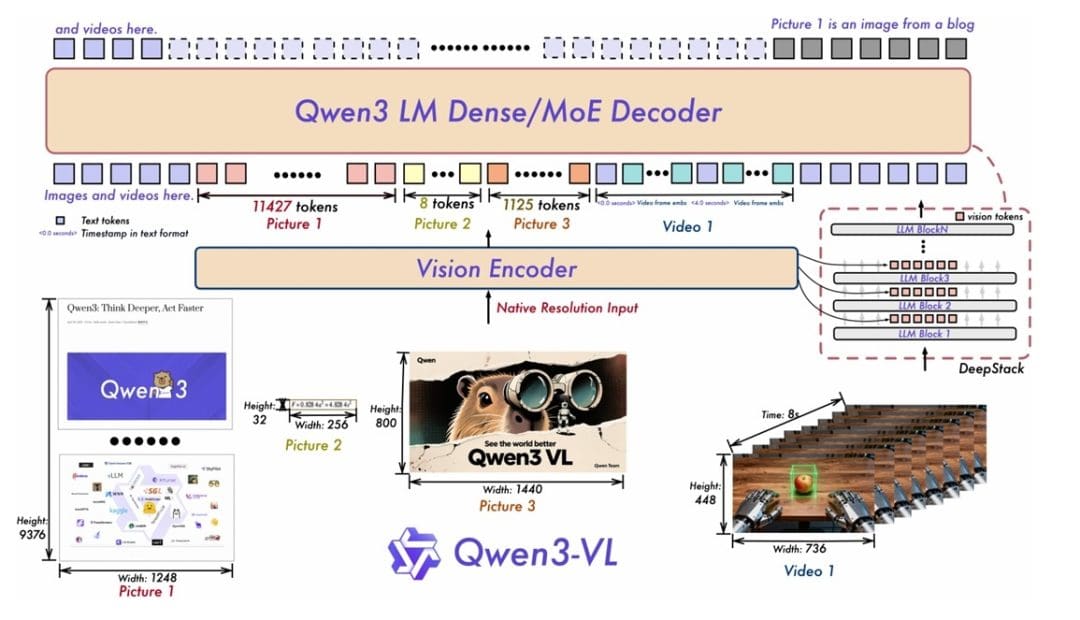
This vision encoder is trained on a carefully curated mixture of image and video data, ensuring strong performance across both image understanding tasks and video comprehension scenarios. The integration of vision and language modalities is achieved through an elegant architectural design that preserves the reasoning capabilities of the base language model while adding rich visual understanding.
The Qwen3-VL series offers multiple model sizes to accommodate different computational budgets and application requirements. The lineup includes compact models (e.g., Qwen3-VL-2B) designed for edge deployment and resource-constrained environments, mid-size variants (e.g., Qwen3-VL-4B and Qwen3-VL-8B) that balance performance and efficiency, and larger models up to Qwen3-VL-14B that push the boundaries of multimodal understanding.
Each model variant maintains the same architectural principles but scales the number of layers, attention heads, and hidden dimensions to achieve different capacity levels. All variants support extended context lengths, with smaller models handling 32K tokens and larger models supporting up to 128K tokens, enabling them to process long documents with multiple images or extended video sequences.
A key innovation in Qwen3-VL is the Time-aligned Multimodal Rotary Position Embedding (TM-RoPE), which extends the traditional Multimodal RoPE (M-RoPE) by incorporating explicit temporal information. TM-RoPE factorizes the conventional rotary position embedding into three distinct dimensions: temporal, height, and width. This design enables the model to effectively capture both fine-grained local temporal variations and long-range dependencies across video frames.
For text inputs, the three components share identical position identifiers, making TM-RoPE equivalent to one-dimensional RoPE. For images, a constant temporal ID is assigned to all visual tokens while their spatial positions determine the height and width IDs. For video, each frame receives a monotonically increasing temporal ID adjusted based on actual timestamps, ensuring consistent temporal resolution of 80 milliseconds per ID. This sophisticated positional encoding scheme enables seamless integration of information across diverse modalities.
The vision encoder processes visual inputs by first converting them into a format suitable for the transformer architecture. For images, the encoder divides the input into patches and projects these patches into the model’s hidden dimension. For videos, frames are sampled at a dynamic frame rate to preserve video information while aligning with audio sampling rates in multimodal scenarios. The vision encoder outputs a sequence of visual tokens that are then concatenated with text tokens and processed by the unified transformer backbone. This design allows the model to attend to both visual and textual information jointly, enabling rich cross-modal reasoning. The model can identify objects, understand spatial relationships, read text within images through OCR capabilities, interpret charts and diagrams, and reason about sequences of events in videos.
Both Qwen3-VL-Instruct and Qwen3-VL-Thinking variants are available, mirroring the dual-mode capability of the text-only models. The Instruct variant provides fast, direct responses to visual questions, making it ideal for applications requiring low latency (e.g., real-time image analysis or interactive user interfaces).
The Thinking variant generates explicit reasoning traces that reveal the model’s step-by-step visual analysis process. When presented with a complex image, the Thinking model verbalizes its observations, identifies relevant details, makes connections between visual elements, and systematically works toward a conclusion. This transparency is invaluable for applications requiring explainable AI, educational tools where understanding the reasoning process is important, and debugging or improving system performance.
Training Pipeline: Multimodal Pretraining with Image-Text and Video-Text Data
The training of Qwen3-VL follows a 4-stage approach (Table 1) that builds visual understanding capabilities on top of the strong language foundation established during Qwen3’s pretraining. The training corpus includes diverse sources of image-text pairs and video-text sequences, covering a wide range of domains, styles, and complexity levels.

The data encompasses natural images from everyday scenarios, professional photography, scientific charts and diagrams, screenshots of user interfaces, medical imagery, satellite imagery, artwork and historical photographs, and video sequences capturing dynamic events and actions. This diversity ensures the model develops robust visual understanding that generalizes well to novel scenarios.
The pretraining stage for Qwen3-VL employs a combination of objectives designed to align visual and textual representations. The primary training objective uses a contrastive learning approach similar to CLIP, where the model learns to associate images with their corresponding textual descriptions by maximizing the similarity between matching image-text pairs while minimizing similarity between non-matching pairs.
Additionally, the model is trained on image captioning tasks where it must generate descriptive text given an image, and visual question answering tasks where it must answer questions about image content. These complementary objectives encourage the model to develop both discriminative abilities (understanding what an image depicts) and generative abilities (producing accurate descriptions and responses).
A critical aspect of Qwen3-VL’s training is the integration of visual and language data at an early stage. Rather than training vision and language components separately and then attempting to bridge them, Qwen3-VL employs joint training from the beginning. This approach enables the model to learn shared representations that naturally capture cross-modal relationships.
The training data is carefully balanced to include both unimodal tasks (pure text or pure image understanding) and cross-modal tasks (image-text reasoning, visual question answering). This balance prevents modality-specific performance degradation (a common issue where improving one modality comes at the cost of another) and ensures the model maintains strong capabilities across all input types.
The vision encoder undergoes specialized training to extract meaningful features from images and videos. For static images, the encoder learns to identify salient objects, understand spatial relationships, recognize text through OCR, interpret abstract concepts like emotions or art styles, and extract information from specialized content (e.g., charts, graphs, and diagrams).
For video understanding, the encoder is trained to track objects across frames, understand temporal relationships and event sequences, recognize actions and activities, and maintain consistent object identity throughout clips. This comprehensive training regimen produces visual representations that are rich, detailed, and optimized for downstream reasoning tasks.
Post-training for Qwen3-VL follows a similar philosophy to the text-only models, with instruction tuning and reinforcement learning adapted for multimodal scenarios. The instruction tuning phase uses high-quality human-annotated image-text conversations where the model learns to follow user instructions that reference visual content.
These instructions span diverse task types (e.g., describing images in varying levels of detail, answering specific questions about image content, comparing multiple images, performing visual reasoning and inference, extracting structured information from images, and generating creative content inspired by images). The Thinking variant receives additional training on reasoning traces that explicitly verbalize the visual analysis process, teaching the model to describe what it observes, explain why certain observations are relevant, and show how visual evidence supports its conclusions.
Reinforcement learning fine-tuning (RLHF) further refines the model’s behavior based on human preferences. For multimodal tasks, this involves collecting feedback on the quality, accuracy, and relevance of responses to visual queries.
The model learns to prioritize responses that accurately describe visual content, provide helpful and relevant information, demonstrate appropriate levels of detail based on the query, acknowledge when visual information is ambiguous or unclear, and maintain consistency between visual observations and textual reasoning. For smaller Qwen3-VL models, knowledge distillation from larger variants transfers both visual understanding and reasoning capabilities, enabling compact models to achieve impressive performance despite their reduced parameter count.
Performance Benchmarks: Image, Video, and Multi-Image Reasoning Evaluation
Qwen3-VL demonstrates strong performance across a comprehensive suite of vision-language benchmarks, positioning it as a competitive open-source multimodal model. The model excels in traditional image understanding tasks (e.g., image classification, object detection, and visual question answering), while also showing strong capabilities in more challenging scenarios (e.g., multi-image reasoning, video understanding, and complex visual reasoning).
Across flagship benchmarks for evaluating vision-language models, Qwen3-VL consistently achieves results that rival or surpass much larger proprietary models, demonstrating the effectiveness of its architectural innovations and training methodology.
On general vision-language benchmarks, Qwen3-VL shows strong capabilities across multiple evaluation dimensions. For visual question answering tasks, the model demonstrates strong performance on datasets (e.g., ERQA and RealWorldQA) that require it to answer diverse questions about image content, ranging from simple object recognition to complex reasoning about relationships and attributes. On image captioning benchmarks (e.g., COCO and NoCaps), Qwen3-VL generates accurate, detailed, and fluent descriptions that capture both the main subjects and subtle details in images.
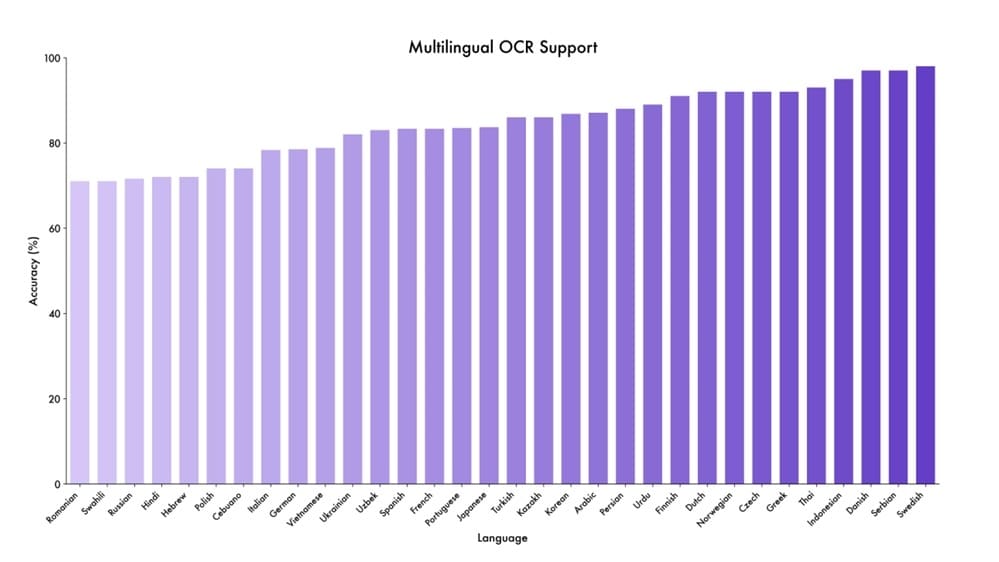
The model’s optical character recognition (OCR) capabilities are particularly strong (Figure 2), enabling it to accurately extract and understand text embedded within images across various fonts, layouts, and contexts.
Multi-image reasoning represents a particularly challenging category where models must integrate information across multiple images to answer questions or perform comparisons. Qwen3-VL excels at these tasks, demonstrating the ability to identify similarities and differences between images, track objects or concepts across a sequence of images, aggregate information from multiple sources, and reason about relationships between distinct visual inputs.
This capability is crucial for applications (e.g., analyzing time-series imagery, comparing before-and-after scenarios, or understanding narratives told through image sequences). The model’s performance on benchmarks specifically designed to test multi-image understanding consistently ranks among the top open-source alternatives.
For video understanding, Qwen3-VL processes sequences of frames to understand temporal dynamics and event structures. The model achieves strong results on video question answering benchmarks where it must comprehend actions, events, and temporal relationships depicted in video clips.
It demonstrates the ability to recognize and track objects throughout videos, understand cause-and-effect relationships between events, identify the sequence and timing of actions, and answer questions requiring temporal reasoning (“What happened before/after X?”). The integration of temporal information through TM-RoPE enables the model to maintain coherent understanding across extended video sequences, a capability that distinguishes it from models that treat videos as disconnected frames.
Specialized benchmarks reveal Qwen3-VL’s capabilities in domain-specific tasks. On mathematical and scientific diagram understanding (e.g., charts, graphs, and geometric figures), the model demonstrates the ability to extract numerical information from visualizations, understand mathematical notation and symbols, reason about spatial relationships in geometry problems, and interpret scientific diagrams and schematics.
For document understanding tasks (Figure 3), including complex layouts with mixed text and images, Qwen3-VL shows strong performance in extracting information from receipts, invoices, and forms, understanding document structure and hierarchy, reading tables and structured data, and processing multi-page documents with consistent context.
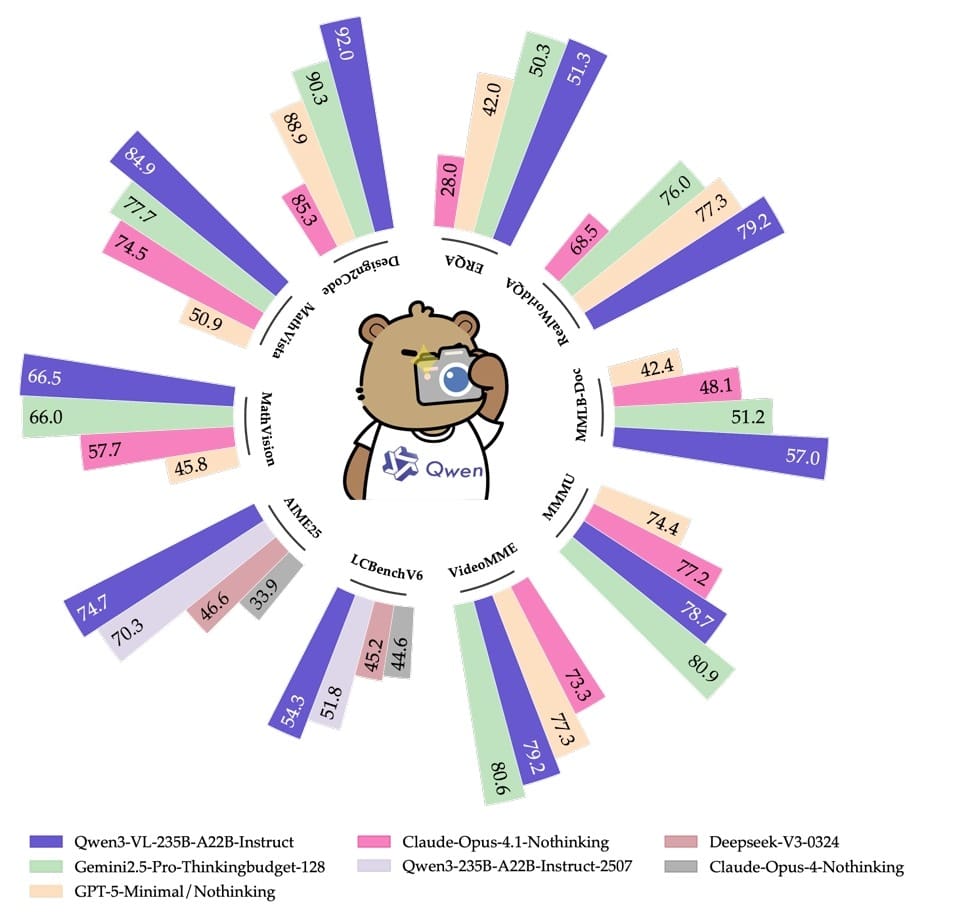
When comparing Instruct and Thinking variants, the Thinking model demonstrates particular advantages on tasks requiring complex reasoning or multi-step analysis. While the Instruct variant provides faster responses suitable for straightforward queries, the Thinking variant’s explicit reasoning traces lead to improved accuracy on challenging problems.
Users can observe the model systematically analyzing visual information, identifying relevant details, making intermediate inferences, and arriving at well-justified conclusions. This transparency not only improves performance on difficult tasks but also enables debugging, validation, and trust-building in deployment scenarios.
The Thinking variant shows the largest performance improvements over Instruct on tasks involving visual reasoning chains, ambiguous or complex images requiring careful analysis, questions that require synthesizing information from multiple parts of an image, and scenarios where explainability is valued alongside accuracy (Figure 4).
Implementation: Building a Multimodal Chatbot with Qwen3-VL and Gradio
Now, let us build on our foundation from Lesson 1 to create a multimodal chatbot that can understand and reason about images alongside text. We will integrate Qwen3-VL models and extend the Gradio interface to support image uploads.
Step 1: Installing Dependencies for Qwen3-VL and Multimodal Processing (PyTorch, Transformers, Gradio)
In addition to the packages from Lesson 1, we need a few more libraries for handling images and multimodal processing.
!pip install torch transformers accelerate gradio
!pip install flash-attn --no-build-isolation
!pip install qwen-vl-utils pillow
print("\n✅ Dependencies installed successfully!")
On Line 1, we install the same core dependencies as Lesson 1: PyTorch, Transformers, Accelerate, and Gradio. On Line 2, we include Flash Attention for optimized inference. On Line 3, we add 2 new packages: qwen-vl-utils provides utilities for processing vision inputs specific to Qwen3-VL models, including helper functions for formatting multimodal conversations, and pillow is Python’s standard image-processing library for loading, manipulating, and displaying images. These additional dependencies enable our chatbot to seamlessly handle visual inputs alongside text. On Line 4, we print a confirmation message.
Step 2: Importing Required Libraries
We extend our imports from Lesson 1 to include image processing capabilities.
import torch
from transformers import pipeline
import gradio as gr
from typing import List, Tuple, Optional
from PIL import Image
import requests
from io import BytesIO
from qwen_vl_utils import process_vision_info
from IPython.display import display, Markdown

print(f"PyTorch version: {torch.__version__}")
print(f"CUDA available: {torch.cuda.is_available()}")
if torch.cuda.is_available():
    print(f"CUDA device: {torch.cuda.get_device_name(0)}")
On Lines 1-9, we import all necessary modules for our multimodal application. Beyond the basic imports from Lesson 1, we add Image from PIL for image manipulation, requests and BytesIO for downloading and handling image data from URLs, and process_vision_info from qwen_vl_utils for preprocessing vision inputs in the format expected by Qwen3-VL models. The IPython display imports help us visualize images and formatted text in Jupyter notebooks. On Lines 11-14, we perform the same environment checks as before to verify PyTorch installation and GPU availability.
Step 3: Initializing Qwen3-VL Instruct and Thinking Image-Text-to-Text Pipelines
Now we initialize the Qwen3-VL pipelines that can process both images and text.
print("=" * 60)
print("Initializing Qwen3-VL-2B-Instruct and Qwen3-VL-2B-Thinking Text Generation Pipelines")
print("=" * 60)

qwen3vl_instruct = pipeline("image-text-to-text", model="Qwen/Qwen3-VL-2B-Instruct")
qwen3vl_thinking = pipeline("image-text-to-text", model="Qwen/Qwen3-VL-2B-Thinking")

print("\n✅ Pipelines initialized successfully!")
On Lines 1-3, we print informative messages to track initialization progress. On Lines 5 and 6, we initialize 2 pipelines using the "image-text-to-text" task type instead of "text-generation" from Lesson 1. This task type indicates that the pipeline accepts both images and text as input and generates text as output.
We use the Qwen3-VL-2B variants, which offer excellent performance while remaining lightweight enough for efficient inference. The models automatically download from Hugging Face if not cached locally (approximately 4-5 GB each for the 2B parameter versions). These pipelines will handle all the complexity of encoding images, combining them with text, and generating appropriate responses.
Step 4: Testing Multimodal Conversations with Image Uploads and Text Prompts
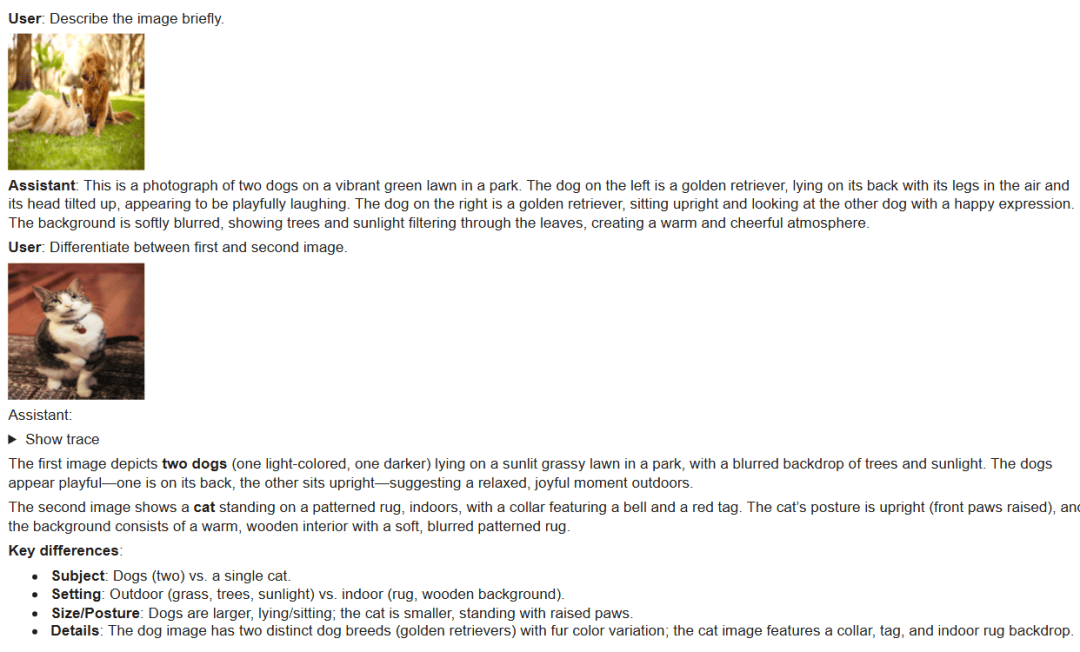
Let us test the models with a conversation that includes images to understand their multimodal capabilities.
# Initialize conversation history
conversation = []

# First message with image
img1 = Image.open(BytesIO(requests.get("https://media.istockphoto.com/photos/dogs-playing-picture-id481634156", timeout=10).content))
user_msg_1 = "Describe the image briefly."
conversation.append({"role": "user", "content": [{"type": "text", "text": user_msg_1}, {"type": "image", "image": img1}]})
display(Markdown(f"**User**: {user_msg_1}"))
display(img1)

response_1 = qwen3vl_instruct(conversation, do_sample=False, max_new_tokens=1024, return_full_text=False)
response_1 = response_1[0]['generated_text']
display(Markdown(f"\n**Assistant**: {response_1}\n"))

# Update history
conversation.append({"role": "assistant", "content": [{"type": "text", "text": response_1}]})

# Second message with different image (continuation)
img2 = Image.open(BytesIO(requests.get("https://th.bing.com/th/id/OIP.i7RVdGQWnsiTssgbUeCmsAHaLG", timeout=10).content))
user_msg_2 = "Differentiate between first and second image."
conversation.append({"role": "user", "content": [{"type": "text", "text": user_msg_2}, {"type": "image", "image": img2}]})
display(Markdown(f"**User**: {user_msg_2}"))
display(img2)

response_2 = qwen3vl_thinking(conversation, do_sample=False, max_new_tokens=1024, return_full_text=False)
trace = response_2[0]['generated_text'].split('</think>')[0]
response_2 = response_2[0]['generated_text'].split('</think>')[1]
response_2 = (
    "<details><summary>Show trace</summary>\n\n"
    "```text\n" + (trace or "").strip() + "\n```\n"
    "</details>\n\n"
    + (response_2 or "")
)
display(Markdown(f"\nAssistant: {response_2}"))
On Line 2, we initialize an empty conversation list as before. On Lines 5-7, we download an image from a URL using the requests library, load it into a PIL Image object, and create the first user message. Note the new format on Line 7: instead of a simple string, the content is now a list containing both text and image dictionaries. This structure allows us to include multiple modalities in a single message. On Lines 8 and 9, we display both the text query and the image for visibility.
On Lines 11-13, we generate a response using the Instruct model with the same parameters as Lesson 1. The model processes both the text query and the image, generating a description that demonstrates visual understanding. On Line 16, we update the conversation history with the assistant’s response, formatting it as a text-type content entry.
On Lines 19-23, we introduce a second image and ask a comparative question that requires the model to recall information from the first image while analyzing the second. This tests the model’s ability to maintain visual context across conversation turns. On Lines 25-33, we switch to the Thinking model for the response. As in Lesson 1, we parse the thinking trace from the final answer and format it as collapsible HTML. The thinking trace now reveals not just textual reasoning but also how the model analyzes visual information: describing what it observes in each image, identifying key differences, and building toward a coherent comparative answer.
Figure 5 shows the output of the code snippet above, demonstrating the reasoning capabilities of both models.
Step 5: Building a Gradio Multimodal Chat Interface with Image Input Support
Now we will build a comprehensive Gradio interface that supports image uploads alongside text input.
import base64
def create_chatbot_interface(chatbot, thinking_chatbot):
"""
Gradio interface for multimodal chatbot interaction
"""
def pil_to_base64(img):
buf = BytesIO()
img.save(buf, format="PNG")
return "data:image/png;base64," + base64.b64encode(buf.getvalue()).decode()
def add_user_message(message: str, image, conversation, history):
if not message.strip():
return history, ""
if history is None:
history = []
conversation.append({"role": "user", "content": [{"type": "text", "text": message}]})
if image is not None:
conversation.append({"role": "user", "content": [{"type": "image", "image": image}]})
display_text = message or ""
if image is not None:
img_str = pil_to_base64(image)
display_text += f"\n\n"
history.append([display_text, None])
return history, "", None # show user message immediately
On Line 1, we import the base64 module for encoding images as strings. On Lines 3-6, we define our main interface function with a docstring explaining its purpose. On Lines 8-11, we define a helper function pil_to_base64 that converts PIL images to base64-encoded strings. This is necessary because we want to display uploaded images directly in the chat history. The function resizes images to 256×256 pixels for efficient display and encodes them as PNG data URLs.
On Lines 13-28, we define the add_user_message function, which now handles both text and optional image inputs. On Lines 14-17, we validate that the message is not empty and initialize history if needed. On Lines 18-20, we append the text content to the conversation and, if an image is provided, append it as a separate content entry with type "image".
This format matches what Qwen3-VL expects. On Lines 22-26, we create a display string for the chat history. If an image was uploaded, we convert it to a base64 data URL and embed it using markdown image syntax, allowing Gradio to render it directly in the chatbot UI. On Line 28, we return the updated history, clear the text input, and clear the image input, providing immediate visual feedback.
def chat_function(message: str, conversation, history, model_choice: str):
        try:
            if model_choice == "Thinking":
                response = thinking_chatbot(conversation, do_sample=False, max_new_tokens=1024, return_full_text=False)
                trace = response[0]['generated_text'].split('</think>')[0]
                response = response[0]['generated_text'].split('</think>')[1]
                assistant_text = (
                    "<details><summary>Show thinking trace</summary>\n\n"
                    "```text\n" + (trace or "").strip() + "\n```\n"
                    "</details>\n\n"
                    + (response or "")
                )
            else:
                response = chatbot(conversation, do_sample=False, max_new_tokens=1024, return_full_text=False)
                response = response[0]['generated_text']
                assistant_text = response or ""

            conversation.append({"role": "assistant", "content": [{"type": "text", "text": assistant_text}]})
            history[-1][1] = assistant_text
            return history, "", None
        except Exception as e:
            history[-1][1] = f"Exception: {e}"
            return history, "", None
On Lines 1-23, we define the core chat function that generates responses. The logic is nearly identical to Lesson 1, but now it handles multimodal conversation contexts. On Lines 3-12, if Thinking Mode is selected, we generate a response with reasoning traces and format them as collapsible details. On Lines 13-16, if Instruct Mode is selected, we generate a direct response. The models automatically process any images in the conversation context without us needing to explicitly pass them again, since the conversation list maintains the complete multimodal history. On Lines 18-23, we update the conversation with the assistant’s response and handle any exceptions gracefully.
    with gr.Blocks() as interface:
        gr.Markdown("## 🤖 Qwen3-VL-2B Multimodal Chatbot with Deep Thinking")

        with gr.Row():
            chatbot_ui = gr.Chatbot(scale=4, height=1000)

        with gr.Row():
            msg = gr.Textbox(placeholder="Type your message here...", scale=8)
            image_input = gr.Image(
                label="Upload Image (optional)",
                type="pil",
                scale=1
            )
            send_btn = gr.Button("📤 Send", scale=1)
            stop_btn = gr.Button("⏹️ Stop", scale=1)
            model_selector = gr.Dropdown(
                choices=["Instruct", "Thinking"],
                value="Instruct",
                label="Model selection",
                scale=2
            )

        history_state = gr.State([])
        conversation_state = gr.State([])

        # Step 1: Show user message immediately
        send_btn.click(
            add_user_message,
            inputs=[msg, image_input, conversation_state, history_state],
            outputs=[chatbot_ui, msg, image_input],
        )

        # Step 2: Then process with chatbot
        send_event = send_btn.click(
            chat_function,
            inputs=[msg, conversation_state, history_state, model_selector],
            outputs=[chatbot_ui, msg, image_input],
        )

        stop_btn.click(None, None, None, cancels=[send_event])

    return interface
On Lines 1 and 2, we create the Gradio interface with an updated title reflecting multimodal capabilities. On Lines 4 and 5, we create the chatbot display area. On Lines 7-21, we build the input row with several components: a text box for messages (Line 8), an image upload widget that accepts PIL images (Lines 9-13), send and stop buttons (Lines 14 and 15), and a model selector dropdown (Lines 16-21). The type="pil" parameter on the image input ensures uploaded images are automatically converted to PIL Image objects.
On Lines 23 and 24, we initialize state variables for tracking conversation history and display state. On Lines 27-31, we configure the send button’s first action to immediately display the user’s message and uploaded image. Note that image_input is now included in both inputs and outputs, allowing us to clear it after sending. On Lines 34-38, we configure the send button’s second action to process the message with the selected model. On Line 40, we wire up the stop button to cancel ongoing generation.
Step 6: Launching the Qwen3-VL Multimodal Chatbot Application
Finally, we create and launch our multimodal chatbot interface.
# Create the interface
interface = create_chatbot_interface(qwen3vl_instruct, qwen3vl_thinking)
print("✅ Gradio interface created!")

print("Launching Gradio interface...")
print("Access the chatbot at: http://localhost:7860")
print("Press the 'Stop' button in the output to stop the server\n")

interface.launch()
On Line 2, we instantiate the interface by passing both VL model pipelines to our creation function. On Lines 5-7, we print informative messages about accessing the application. On Line 9, we launch the Gradio interface on the default port. Users can now interact with a fully multimodal chatbot that understands and reasons about both text and images.
They can upload images individually or alongside text queries, ask questions about uploaded images, request comparisons between multiple images across the conversation, and switch between Instruct and Thinking Modes to see how the model analyzes visual information. The interface provides a seamless, intuitive way to explore Qwen3-VL’s powerful multimodal capabilities.
Multimodal Chatbot Results: Instruct Mode vs Thinking Mode Analysis
To illustrate how our chatbot adapts between Instruct Mode and Thinking Mode, we tested it on 2 different multimodal tasks. Below, we start with the concise instructive response, then show how the same system expands into deeper reasoning when Thinking Mode is enabled.
In Figure 6, we tried the chatbot in Instruct Mode, where it delivered a clear and balanced summary: sales across America, EMEA, and Asia increased steadily over 4 years, with the strongest growth in Year 4. It also provided exact figures per region and year, but kept the explanation concise enough to avoid overwhelming detail.
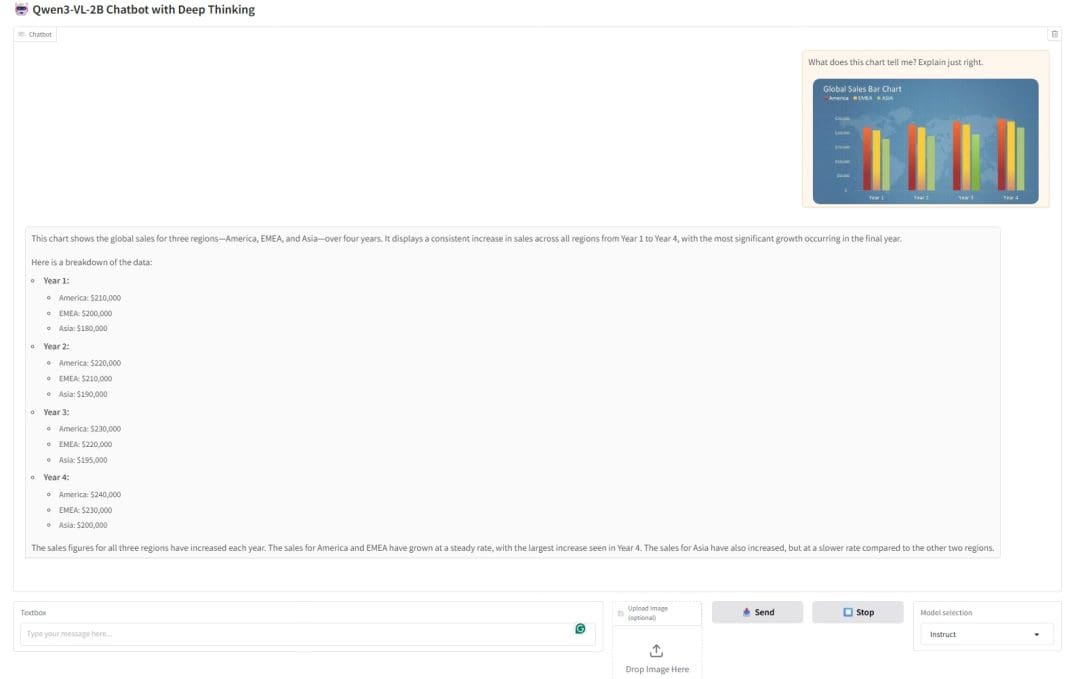
This demonstrates how Instruct Mode excels at giving direct, useful insights from visual inputs, ideal for users who want quick answers.
In Figure 7, we uploaded a cartoon-style puzzle showing 2 forest scenes and asked the chatbot to “Spot the difference between both the images. Answer briefly.”
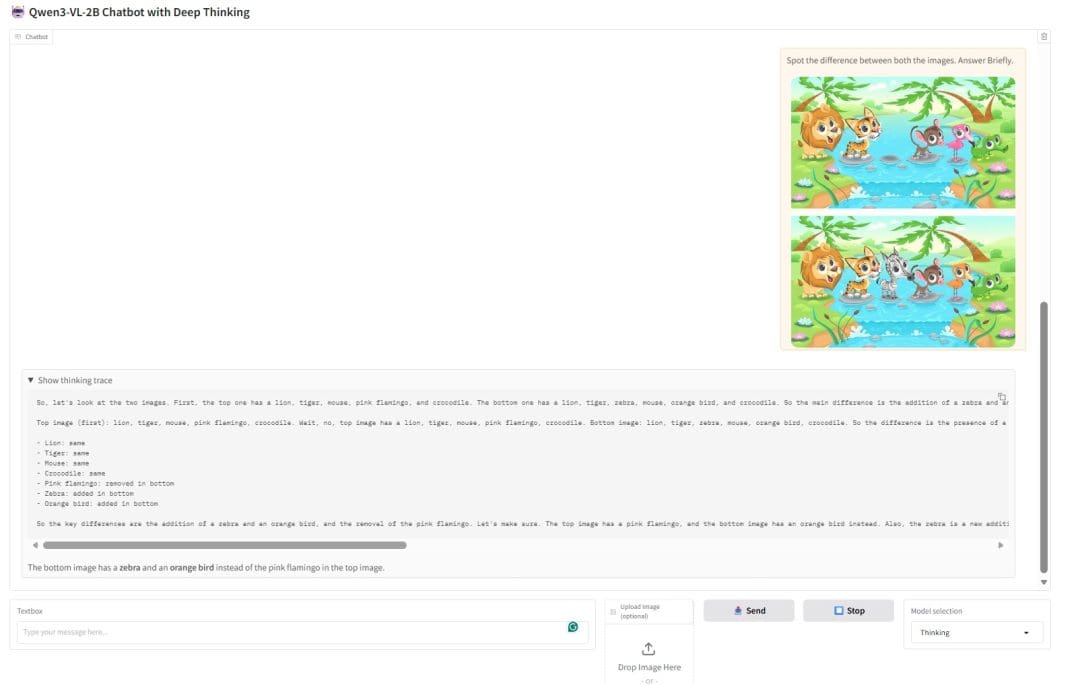
In Thinking Mode, the chatbot does not just state the differences; it walks through the reasoning: identifying the animals in each scene, comparing them, and concluding that the bottom image contains a zebra and an orange bird instead of the pink flamingo in the top image.
This shows how Thinking Mode provides step-by-step transparency, making the reasoning process visible and trustworthy.
What's next? We recommend PyImageSearch University.

86+ total classes • 115+ hours hours of on-demand code walkthrough videos • Last updated: July 2026
★★★★★ 4.84 (128 Ratings) • 16,000+ Students Enrolled
I strongly believe that if you had the right teacher you could master computer vision and deep learning.
Do you think learning computer vision and deep learning has to be time-consuming, overwhelming, and complicated? Or has to involve complex mathematics and equations? Or requires a degree in computer science?
That’s not the case.
All you need to master computer vision and deep learning is for someone to explain things to you in simple, intuitive terms. And that’s exactly what I do. My mission is to change education and how complex Artificial Intelligence topics are taught.
If you're serious about learning computer vision, your next stop should be PyImageSearch University, the most comprehensive computer vision, deep learning, and OpenCV course online today. Here you’ll learn how to successfully and confidently apply computer vision to your work, research, and projects. Join me in computer vision mastery.
Inside PyImageSearch University you'll find:
- ✓ 86+ courses on essential computer vision, deep learning, and OpenCV topics
- ✓ 86 Certificates of Completion
- ✓ 115+ hours hours of on-demand video
- ✓ Brand new courses released regularly, ensuring you can keep up with state-of-the-art techniques
- ✓ Pre-configured Jupyter Notebooks in Google Colab
- ✓ Run all code examples in your web browser — works on Windows, macOS, and Linux (no dev environment configuration required!)
- ✓ Access to centralized code repos for all 540+ tutorials on PyImageSearch
- ✓ Easy one-click downloads for code, datasets, pre-trained models, etc.
- ✓ Access on mobile, laptop, desktop, etc.
Summary
Throughout this lesson, we have explored Qwen3-VL and its remarkable multimodal capabilities that enable AI systems to understand and reason about visual information alongside text. We began by understanding the architectural innovations that make Qwen3-VL possible, including the SigLIP2-based vision encoder with 543 million parameters, the sophisticated TM-RoPE positional encoding that seamlessly integrates temporal, height, and width dimensions, and the joint training approach that prevents modality-specific performance degradation.
We learned how the model processes images by dividing them into patches, videos by sampling frames at dynamic rates, and maintains consistent understanding across extended sequences through absolute temporal encoding. The availability of both Instruct and Thinking variants provides flexibility between fast responses and transparent, step-by-step visual reasoning.
We then translated this theoretical knowledge into a practical implementation by extending our chatbot from Lesson 1 with multimodal capabilities. Through hands-on coding, we learned how to install and import additional dependencies for image processing, initialize vision-language pipelines using the “image-text-to-text” task type, structure multimodal conversations with content lists containing both text and image entries, and create a Gradio interface that supports image uploads alongside text input.
The implementation demonstrated key patterns for multimodal development: embedding images as base64 strings for display, maintaining visual context across conversation turns, parsing and displaying thinking traces for visual reasoning, and handling the complexity of mixed-modality inputs with clean, modular code. We saw firsthand how the Thinking model verbalizes its visual analysis, describing observations, identifying relevant details, and building toward well-reasoned conclusions.
This lesson represents a crucial step forward in our journey to build a comprehensive AI assistant. We have progressed from text-only interaction to sophisticated multimodal understanding, enabling applications such as visual question answering, image description and captioning, multi-image comparison and analysis, and video understanding through temporal reasoning.
In the next lesson (Lesson 3) of our series, we will add Qwen3-Guard to introduce safety moderation that protects users from harmful content in both text and image inputs. Following that (Lesson 4), we will integrate Qwen3-Embedding to enable retrieval-augmented generation, allowing our chatbot to search through knowledge bases and ground its responses in retrieved information. By combining these components (language understanding, visual reasoning, safety checks, and knowledge retrieval), we are building toward a production-ready multimodal AI assistant that demonstrates the full potential of the Qwen3 ecosystem.
Citation Information
Mangla, P. “Building a Multimodal Chatbot with Qwen3-VL Instruct and Thinking Models,” PyImageSearch, S. Huot, A. Sharma, and P. Thakur, eds., 2026, https://pyimg.co/jf6oe
@incollection{Mangla_2026_building-multimodal-chatbot-qwen3-vl-instruct-thinking-models,
  author = {Puneet Mangla},
  title = {{Building a Multimodal Chatbot with Qwen3-VL Instruct and Thinking Models}},
  booktitle = {PyImageSearch},
  editor = {Susan Huot and Aditya Sharma and Piyush Thakur},
  year = {2026},
  url = {https://pyimg.co/jf6oe},
}
To download the source code to this post (and be notified when future tutorials are published here on PyImageSearch), simply enter your email address in the form below!
Download the Source Code and FREE 17-page Resource Guide
Enter your email address below to get a .zip of the code and a FREE 17-page Resource Guide on Computer Vision, OpenCV, and Deep Learning. Inside you'll find my hand-picked tutorials, books, courses, and libraries to help you master CV and DL!


Comment section
Hey, Adrian Rosebrock here, author and creator of PyImageSearch. While I love hearing from readers, a couple years ago I made the tough decision to no longer offer 1:1 help over blog post comments.
At the time I was receiving 200+ emails per day and another 100+ blog post comments. I simply did not have the time to moderate and respond to them all, and the sheer volume of requests was taking a toll on me.
Instead, my goal is to do the most good for the computer vision, deep learning, and OpenCV community at large by focusing my time on authoring high-quality blog posts, tutorials, and books/courses.
If you need help learning computer vision and deep learning, I suggest you refer to my full catalog of books and courses — they have helped tens of thousands of developers, students, and researchers just like yourself learn Computer Vision, Deep Learning, and OpenCV.
Click here to browse my full catalog.