Table of Contents
- RAG Observability with Langfuse, vLLM, and FAISS
- Introduction to Production-Grade RAG and LLM Observability
- RAG Observability Architecture with Langfuse, vLLM, and FAISS
- Project Setup
- Building a Langfuse-Traced Retriever with FAISS
- Building a Traced LLM Wrapper for vLLM and Langfuse
- Building a Fully Traced RAG Pipeline with Langfuse
- Implementing LLM Evaluation Metrics for RAG: Relevancy and Hallucination Risk
- Running and Inspecting the RAG Pipeline End-to-End
- Viewing RAG Traces, Spans, and Scores in Langfuse
- Summary
RAG Observability with Langfuse, vLLM, and FAISS
In this lesson, you will learn how to instrument every step of your Retrieval-Augmented Generation (RAG) pipeline using Langfuse, capture traces across ingestion, retrieval, and generation, and understand exactly how your system behaves under the hood.
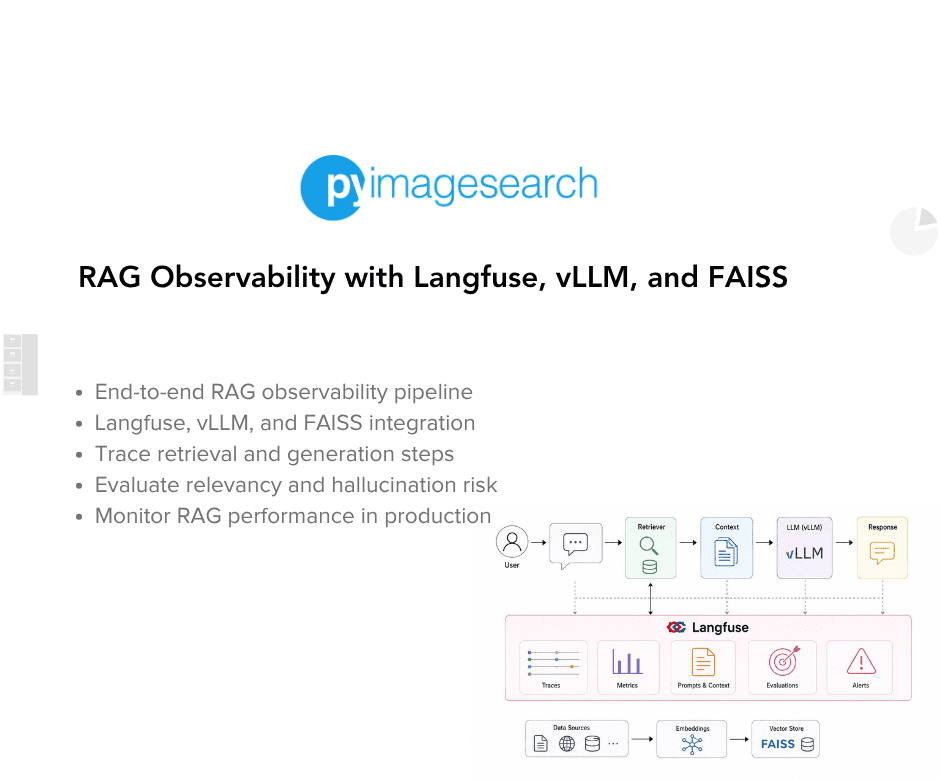
You will wire tracing into your retriever and generator, monitor latency and token usage, evaluate quality scores, and run the entire stack with vLLM and FAISS locally so you can experiment freely without any cloud dependencies.
By the end, you will have a fully transparent RAG workflow that you can debug, optimize, and scale with confidence.
This lesson is the last in a 3-part series on LLM observability with Langfuse:
- LLM Observability with Self-Hosted Langfuse and vLLM
- Manual Tracing, Scores, and Evaluation with Langfuse (Self-Hosted)
- RAG Observability with Langfuse, vLLM, and FAISS (this tutorial)
To learn how to make your RAG pipeline fully observable with Langfuse, vLLM, and FAISS, just keep reading.

Introduction to Production-Grade RAG and LLM Observability
What Makes a RAG Pipeline Production-Grade
A RAG pipeline becomes “production-grade’’ only when it consistently delivers correct, stable, and explainable outputs under real-world constraints. In development, it is easy to get an LLM to answer questions using retrieved context. In production, the challenges multiply: retrieval quality varies, embeddings may shift over time, documents evolve, and latency budgets tighten. A production RAG pipeline must remain robust even when the input data is noisy, queries are unpredictable, and traffic is high.
A production-ready RAG system must treat retrieval as a first-class subsystem, not a background detail. That means surfacing similarity scores, exposing ranking decisions, understanding how vector search behaves at scale, and ensuring retriever recall stays high across diverse query types. It also requires that the prompt construction step is deterministic, inspectable, and traceable, because subtle variations in formatting often change model behavior dramatically.
Beyond these retrieval and prompt concerns, the LLM is also a production component. That means retry logic, token accounting, consistent latency, predictable throughput, and graceful failure modes. Production pipelines need clear boundaries between retrieval failures, prompt-generation bugs, and LLM invocation issues. If these concerns remain invisible, debugging becomes guesswork and reliability collapses under load. Production-grade RAG means engineered behavior, not accidental correctness.
Why Observability Is Essential for Retrieval-Augmented Systems
RAG pipelines fail silently. Retrieval may return irrelevant documents, prompting may omit essential context, and the LLM may hallucinate confidently even when grounded context exists. Without observability, it is impossible to diagnose why a particular answer was wrong. Was the embedding model inconsistent? Did FAISS, the vector search library used to retrieve similar documents, return poor matches? Did the prompt formatting break a system instruction? Did the LLM drift or degrade?
Observability solves this by turning the RAG pipeline into a transparent execution graph. Tools like Langfuse give you hierarchical traces: one trace for the whole request, and nested spans for retrieval, LLM calls, evaluation, and supporting steps. Each span captures inputs, outputs, metadata, latencies, token usage, and even scoring metrics. With this information, problems become diagnosable:
- Retrieval returned low-relevance documents
- Prompt formatting changed unexpectedly
- LLM call degraded or hit retry logic
- Evaluation metrics began trending downward
In other words, observability provides ground truth for system behavior. Production RAG must be accountable: decisions should be explainable, errors traceable, and failures measurable. Without observability, shipping RAG to production is equivalent to flying an airplane without instruments; the system might work, but you will not know when or why it stops working.
What We Will Build: Traced Retriever, Traced LLM, Full RAG Pipeline, and Evaluation
In this lesson, you will construct a fully observable, component-wise traced RAG system using Langfuse, FAISS, SentenceTransformers, and vLLM. Each part of the pipeline is instrumented for visibility: you will build a traced retriever that logs embeddings, index sizes, similarity scores, and ranking. You will build a traced LLM wrapper that records prompts, responses, retry attempts, and token usage. These components power a fully traced RAG pipeline that captures retrieval, prompt construction, generation, and final evaluation as a single hierarchical execution tree.
You will also implement automatic RAG output evaluation, computing relevancy, hallucination risk, and an overall quality score, with each metric logged back to Langfuse dashboards with scoring nodes. This gives you a complete introspection loop: every answer is measured, every metric is recorded, and every decision is traceable through structured spans.
By the end, you will have a production-grade RAG observability stack, running locally with:
- A traced retriever
- A traced LLM client
- A fully instrumented RAG pipeline
- Automatic scoring and diagnostics
- Local dashboards for analyzing behavior
This foundation prepares you for upcoming lessons, where we extend these ideas into multi-step agents and more complex reasoning workflows.
RAG Observability Architecture with Langfuse, vLLM, and FAISS
A production-grade RAG pipeline is not a single model call. It is an orchestrated system composed of independent but cooperating components: retrieval, prompt assembly, LLM inference, and evaluation. In this section, we break down each subsystem and explain how they interact, why they are separated, and how Langfuse stitches everything together into a fully observable execution graph.
Retrieval → Prompt Construction → LLM → Scoring (The Core RAG Loop)
A well-designed RAG architecture follows a clean, linear flow where each stage has a single responsibility:
Retrieval
The system begins by embedding the user query and searching for relevant documents in a vector index. The retriever returns ranked, scored context items that will guide the LLM. In production, retrieval quality is often the primary bottleneck; if retrieval fails, generation cannot be correct. Therefore, retrieval spans log:
- embeddings used
- search distances and converted relevance scores
- number of documents returned
- FAISS query latencies
Your TracedRetriever does exactly this in the codebase, generating embeddings, searching the FAISS index, and tracing each step.
Prompt Construction
Next, the system converts retrieved documents into a structured context block and assembles a prompt that the LLM can reliably parse. Prompt construction must be deterministic to avoid instability across runs. The code in rag_pipeline.py builds a system message, a user message, and contextual references ([1] doc1, [2] doc2, etc.). This ensures:
- deterministic ordering
- visible context structure
- stable interface for downstream evaluation
LLM Generation
The prompt is sent to the LLM via an OpenAI-compatible Completion API, served by vLLM locally. The TracedLLMClient wraps this call with:
- retry logic
- token usage reporting
- error logging
- prompt and response capture
- metadata annotations
This is critical for production reliability because LLM latency, token usage, and intermittent failures must all be observable.
Scoring and Evaluation
Finally, the answer is passed through a lightweight evaluation module (evaluation.py). It computes:
- a relevancy score
- a hallucination risk score
- an overall quality score
These metrics are reported back into Langfuse as scoring nodes. Production RAG systems need this because correctness is subjective; evaluation makes correctness measurable.
This 4-step pipeline forms the backbone of every modern retrieval-augmented system.
Local Vector Store Using FAISS and SentenceTransformers
RAG pipelines must remain fast, private, and cost-efficient. This system uses FAISS as the vector index and SentenceTransformers for embedding models, giving you:
- Zero API cost (everything is local)
- GPU acceleration optional (FAISS works on CPU just fine)
- Deterministic embeddings (critical for reproducibility)
- Config-driven control over the embedding model and dimensionality
The retrieval pipeline is built around the following 3 core mechanisms:
Document Embeddings
Each document is encoded using the local model defined in config.yaml:
embeddings:
  model: "sentence-transformers/all-MiniLM-L6-v2"
  dimension: 384
The TracedRetriever loads this model and produces normalized embeddings for better retrieval precision.
FAISS Index
FAISS stores all document embeddings in a vector index created via:
self.index = faiss.IndexFlatL2(self.dimension)
IndexFlatL2 is simple, fast, and perfect for local development, while still appropriate for many production environments.
Similarity Search
Retrieval happens by computing L2 distance and converting those distances into relevance scores, ensuring consistency and interpretability.
You end up with a fully local, high-performance vector store without touching external cloud APIs.
vLLM as an OpenAI-Compatible Inference Server
Instead of relying on OpenAI or Anthropic APIs, your lesson uses vLLM, a high-throughput inference engine built for serving LLMs at scale.
Your Docker Compose file runs vLLM either on GPU (recommended) or CPU fallback, exposing it at:
http://localhost:8000/v1
This allows you to call vLLM with the exact same interface as OpenAI:
response = client.chat.completions.create(
    model=self.model,
    messages=messages,
    temperature=temperature,
    max_tokens=max_tokens
)
Benefits for production-grade RAG:
- Predictable latency
- Full control over model versioning
- No external dependencies
- High-throughput serving (paged attention)
- OpenAI API compatibility (no code rewrite needed)
Your TracedLLMClient wraps all of this with Langfuse observability, giving you:
- latency metrics
- retry attempts
- token usage breakdown
- full input/output transparency
- error-level spans when inference fails
This is how modern enterprises run private LLMs with production reliability.
Langfuse for Tracing, Metrics, Evaluation, and Span Hierarchies
Langfuse is the backbone of observability in this system. Every major component (i.e., embedding, retrieval, generation, and evaluation) becomes a span inside a single root trace.
A typical trace hierarchy looks like:
rag_pipeline (root)
│
├── retrieve_documents
│   ├── embed_text
│   ├── index_documents (only once)
│   └── retrieve_documents
│
├── llm_completion
│
└── evaluate_rag_output
    ├── evaluate_relevancy
    └── evaluate_hallucination
This structure gives you:
Full-System Visibility
Every question generates a complete execution tree revealing:
- what happened
- where it happened
- how long it took
- what went wrong
End-to-End Metrics
- token usage
- retrieval scores
- latency per component
- evaluation metrics
Rich Debugging Context
Each span stores:
- input messages
- embeddings preview
- retrieved context
- generated outputs
- error details
Continuous Quality Monitoring
Your evaluation step logs:
- a relevancy score
- a hallucination risk
- a final pass-or-fail quality metric
Langfuse becomes the single pane of glass for understanding your RAG pipeline’s behavior, serving as the missing observability layer that transforms a working prototype into a production-ready system.
Would you like immediate access to 3,457 images curated and labeled with hand gestures to train, explore, and experiment with … for free? Head over to Roboflow and get a free account to grab these hand gesture images.
Project Setup
Before we write a single line of RAG logic, the foundation must be solid: a clean folder structure, repeatable environment setup, deterministic configuration, and a reliable inference and observability stack. This section walks you through the project layout, how to launch vLLM and Langfuse via Docker Compose, how to install retrieval dependencies (FAISS and SentenceTransformers), and how to configure all components using a single config.yaml file.
Folder Structure Walkthrough
Your project is organized for production clarity, where each subsystem (RAG, LLM, agent, evaluation, and infrastructure) is isolated in its own module.
project-root/
│
├── configs/
│   └── config.yaml                # Central config: LLM, embeddings, RAG, agent, eval, Langfuse
│
├── data/
│   └── sample_docs.txt            # Example inputs for retrieval
│
├── src/
│   ├── config.py                  # Config loader utilities
│   ├── llm_utils.py               # OpenAI-compatible client initialization
│   ├── llm_client.py              # Traced LLM wrapper (retry + token usage + spans)
│   ├── retriever.py               # FAISS retriever with traced indexing + search
│   ├── evaluation.py              # RAG quality scoring (relevancy + hallucination)
│   ├── rag_pipeline.py            # Full retrieval → prompt → generation → evaluation pipeline
│   ├── agent_orchestration.py     # 3-step traced agent workflow
│   ├── langfuse_instrumentation.py# Bootstraps Langfuse + flush utilities
│
├── docker-compose.yml             # vLLM + Langfuse + Postgres (self-hosted observability)
│
├── requirements.txt               # Python dependencies
│
└── check_rag_health.py            # Full system health check (env, docker, dependencies, files)
This layout ensures:
- Decoupled components: easy for testing and future replacement
- Reproducible environment: config-driven behavior
- Portable observability: one command launches everything
- Scalable structure: supports RAG, agents, and future tools
Every file in the src/ directory corresponds to a runnable pipeline step, and each is instrumented with Langfuse decorators so all activity becomes visible in the dashboard.
Starting vLLM and Langfuse Using Docker Compose
For production-like observability, the system relies on 2 running services:
- Langfuse: tracing, metrics, and span visualization
- vLLM: inference engine serving the LLM
Both are provided in your docker-compose.yml, and both run locally, meaning:
- zero cloud dependency
- zero per-token cost
- repeatable development environment
Start the entire stack (GPU version)
docker-compose --profile gpu up -d
Or start CPU mode
docker-compose --profile cpu up -d
Confirm services are running
docker-compose ps
You should see something like:
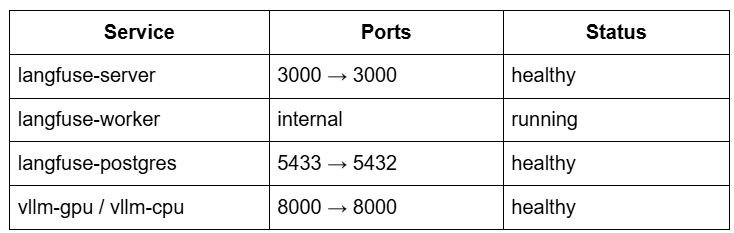
UI access
- Langfuse dashboard:
http://localhost:3000 - vLLM API:
http://localhost:8000/v1
What these services do internally
Langfuse server: stores traces, spans, scoring, and metadataLangfuse worker: processes asynchronous scoring and analyticsPostgreSQL: stores trace datavLLM: serves the Llama 2 model loaded at runtime
This cluster forms your local, production-grade observability and inference backbone.
Installing FAISS and SentenceTransformers
The retrieval layer requires:
- FAISS: similarity search
- SentenceTransformers: embedding model
These are already declared in your requirements.txt:
sentence-transformers>=2.2.0
faiss-cpu>=1.7.4
numpy>=1.24.0
Install dependencies:
pip install -r requirements.txt
After installation, verify FAISS is working:
python -c "import faiss; print(f'FAISS version: {faiss.__version__}')"
Verify embedding model loads:
python -c "from sentence_transformers import SentenceTransformer; print(SentenceTransformer('sentence-transformers/all-MiniLM-L6-v2'))"
These 2 libraries form the core retrieval engine:
- Embeddings: produced locally (MiniLM)
- Retrieval: performed locally (FAISS
IndexFlatL2)
No external API latency.
No cost.
No vendor lock-in.
Configuring config.yaml (LLM, Embeddings, RAG, and Evaluation)
The entire RAG and agent system is configurable from a single YAML file:
langfuse:
  host: "http://localhost:3000"
  project_name: "rag-selfhosted"

llm:
  base_url: "http://localhost:8000/v1"
  model: "meta-llama/Llama-2-7b-chat-hf"
  temperature: 0.7
  max_tokens: 300
  max_retries: 2

embeddings:
  model: "sentence-transformers/all-MiniLM-L6-v2"
  dimension: 384

rag:
  top_k: 3

agent:
  max_steps: 3

evaluation:
  enable_scoring: true
  min_quality_score: 0.6
Key configuration sections
LLM Configuration
Controls inference behavior:
- model name
- sampling temperature
- max tokens
- retry count
- endpoint (
vLLMserver URL)
Your TracedLLMClient loads these automatically via:
from config import get_llm_config
Embeddings Configuration
Controls vector dimension and embedding model, and is consumed by:
from config import get_embeddings_config
RAG Settings
Controls retrieval behavior:
top_k: results returned from FAISS- used inside:
TracedRetriever.retrieve()
Agent Settings
Agent workflows build on top of RAG, controlling:
- max agent steps
- model used for intent detection
Evaluation Configuration
Defines quality control thresholds:
- relevancy
- hallucination risk
- minimum acceptable quality
Used in:
from config import get_evaluation_config
This config-driven system makes your pipeline:
- reproducible
- tunable
- production-friendly
- environment-agnostic
Change models or thresholds, and no code changes are required.
Need Help Configuring Your Development Environment?

All that said, are you:
- Short on time?
- Learning on your employer’s administratively locked system?
- Wanting to skip the hassle of fighting with the command line, package managers, and virtual environments?
- Ready to run the code immediately on your Windows, macOS, or Linux system?
Then join PyImageSearch University today!
Gain access to Jupyter Notebooks for this tutorial and other PyImageSearch guides pre-configured to run on Google Colab’s ecosystem right in your web browser! No installation required.
And best of all, these Jupyter Notebooks will run on Windows, macOS, and Linux!
Building a Langfuse-Traced Retriever with FAISS
The retriever is the beating heart of any RAG pipeline. If retrieval is weak, every downstream component (i.e., prompting, LLM generation, and evaluation) will degrade. In this section, we construct a production-grade retriever built on three pillars: local embeddings, FAISS vector search, and Langfuse instrumentation. The result is a component that is fast, reproducible, fully observable, and cheap to run because it never leaves your machine or calls a cloud API.
Your TracedRetriever class in src/retriever.py handles 4 responsibilities:
- Load an embedding model
- Embed and index documents
- Perform similarity-based search
- Emit Langfuse spans for every step (embedding, indexing, and retrieval)
Loading and Embedding Documents
The retriever begins by loading a local SentenceTransformers model, which provides dense vector embeddings without any external API calls.
embeddings_config = get_embeddings_config()
model_name = embeddings_config.get("model", "sentence-transformers/all-MiniLM-L6-v2")
self.model = SentenceTransformer(model_name)
Why local embeddings?
- No rate limits or API costs after the local environment is configured
- Fast inference through optimized ONNX or Torch acceleration
- Privacy-safe since no data leaves the environment
- Predictable latency, which is critical in production
Embedding a document (with tracing)
Your embed() method is wrapped with the Langfuse @observe decorator:
@observe(name="embed_text")
def embed(self, text: str) -> np.ndarray:
This automatically creates a top-level span called embed_text in Langfuse.
Inside the span, you record:
- first 100 characters of the text
- embedding dimension
langfuse_context.update_current_observation(
    input={"text_preview": text[:100]}
)
The embedding call itself:
embedding = self.model.encode([text], normalize_embeddings=True)[0]
This normalization step ensures the embeddings have unit length, which stabilizes similarity scoring and produces better retrieval in FAISS L2 spaces.
The span finishes by storing metadata:
langfuse_context.update_current_observation(
    output={"embedding_dim": len(embedding)}
)
This is extremely useful later for debugging:
- Did documents produce embeddings with inconsistent lengths?
- Are embeddings accidentally empty?
- Are overly long texts being passed in?
Langfuse gives you full visibility.
Creating and Populating a FAISS Index
After loading the embedding model, the retriever constructs a FAISS IndexFlatL2 index:
self.index = faiss.IndexFlatL2(self.dimension)
This index:
- Stores vectors in RAM
- Uses Euclidean distance (L2) for similarity
- Has no training step, making it ideal for small and medium-sized datasets
Your retriever keeps an in-memory list of source documents:
self.documents = []
Indexing documents (with tracing)
@observe(name="index_documents")
def index_documents(self, documents: List[str]):
This span tracks:
- how many documents are being indexed
- how many embeddings were added
- previews of content for debugging
Under the hood:
- Store the raw documents
- Embed them in a batch
- Add the vectors to FAISS
embeddings = self.model.encode(documents, normalize_embeddings=True)
self.index.add(embeddings.astype(np.float32))
Because FAISS expects float32, the cast is mandatory.
Why IndexFlatL2?
- Simple
- Deterministic
- Fast for small–medium corpora (< 200k docs)
- Plays well with normalized embeddings (MiniLM, BERT, etc.)
Your pipeline achieves high throughput without additional libraries or GPUs.
Retrieving with Similarity Ranking
The retrieval process begins with the retrieve() method:
@observe(name="retrieve_documents")
def retrieve(self, query: str, top_k: int = None):
Langfuse creates a tracing span named retrieve_documents for every search operation.
Step 1. Embed the query
query_embedding = self.embed(query).reshape(1, -1)
Notice that calling self.embed() creates a nested span under the retrieval span in Langfuse.
This nesting hierarchy:
retrieve_documents
    ├── embed_text
gives you a complete view of:
- how long embedding took
- token count (if embedding model changes)
- exact query text
Step 2. Search the FAISS index
distances, indices = self.index.search(query_embedding, top_k)
FAISS returns:
indices: the closest documentsdistances: L2 distances to each doc
You convert distances into similarity scores:
relevance_score = 1.0 / (1.0 + float(distance))
This transforms smaller distances into higher scores.
Step 3. Format ranked results
results.append({
    "content": self.documents[idx],
    "score": relevance_score,
    "rank": rank + 1,
    "distance": float(distance)
})
Step 4. Log retrieval metadata to Langfuse
langfuse_context.update_current_observation(
    output={
        "result_count": len(results),
        "scores": [r["score"] for r in results],
        "results": [...]
    }
)
You even send content previews (200 characters), which appear in the Langfuse UI and make debugging dramatically easier.
Adding Langfuse Spans to Indexing and Retrieval Steps
Langfuse observability is woven into every retrieval path using the @observe decorator and metadata updates.
Spans you automatically get from your retriever
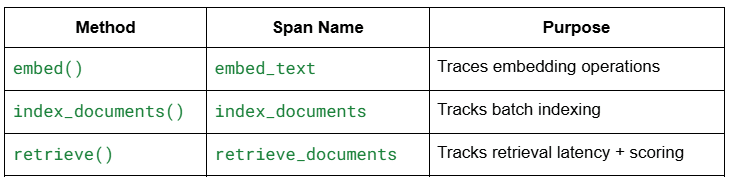
These spans appear under your RAG pipeline trace like:
rag_pipeline
    ├── retrieve_documents
    │       ├── embed_text
    │       └── result metadata
    ├── llm_completion
    ├── evaluate_rag_output
    └── final scoring
Why this matters in production
- You can identify whether latency is coming from embedding, FAISS search, or LLM inference.
- You can detect mismatches like:
- wrong embedding dimension
- missing documents
- unnormalized vectors
- misconfigured top-k
- You get complete end-to-end lineage for every query.
- You can monitor retriever performance across time.
This is the observability layer that most open-source RAG tutorials never include, but you now have it baked into the core of your retriever.
Building a Traced LLM Wrapper for vLLM and Langfuse
OpenAI-Compatible Chat Completions via vLLM
Your LLM wrapper is split into 2 layers:
- a low-level OpenAI-compatible client in
llm_utils.py, and - a high-level, Langfuse-traced wrapper in
llm_client.py.
The low-level client is created in get_llm_client():
from openai import OpenAI

def get_llm_client(timeout: int = 60, load_model_from_config: bool = False):
    if os.getenv("OPENAI_BASE_URL") is None:
        print("⚠️  OPENAI_BASE_URL not found in environment. Using default http://localhost:8000/v1")

    if os.getenv("OPENAI_API_KEY") is None:
        print("⚠️  OPENAI_API_KEY not set. Using dummy key.")

    client = OpenAI(
        base_url=os.getenv("OPENAI_BASE_URL", "http://localhost:8000/v1"),
        api_key=os.getenv("OPENAI_API_KEY", "dummy"),
        timeout=timeout,
    )
    ...
    return client
This means that as long as vLLM is running behind an OpenAI-compatible server (from docker-compose.yml on http://localhost:8000/v1), the rest of your code simply calls client.chat.completions.create(...) exactly like it would against OpenAI, without any vendor-specific changes.
At the higher level, TracedLLMClient in src/llm_client.py wraps this client and pulls model configuration from configs/config.yaml via get_llm_config():
llm:
  base_url: "http://localhost:8000/v1"
  model: "meta-llama/Llama-2-7b-chat-hf"
  temperature: 0.7
  max_tokens: 300
  max_retries: 2
class TracedLLMClient:
    def __init__(self, model: str = None, max_retries: int = 2, timeout: int = 60):
        self.client = get_llm_client(timeout=timeout)
        if model is None:
            llm_config = get_llm_config()
            model = llm_config.get("model", "meta-llama/Llama-2-7b-chat-hf")
        self.model = model
        self.max_retries = max_retries
The end result: your RAG and agent code never talks to vLLM directly; it always goes through TracedLLMClient, which is OpenAI-compatible, config-driven, and ready for tracing.
Retry Logic and Error Handling
The core of the wrapper is the complete() method:
from langfuse.decorators import observe, langfuse_context

class TracedLLMClient:
    @observe(name="llm_completion")
    def complete(self, messages: List[Dict[str, str]], **kwargs) -> Dict:
        llm_config = get_llm_config()
        temperature = kwargs.get("temperature", llm_config.get("temperature", 0.7))
        max_tokens = kwargs.get("max_tokens", llm_config.get("max_tokens", 300))

        langfuse_context.update_current_observation(
            input={"messages": messages, "model": self.model}
        )

        last_error = None
        for attempt in range(self.max_retries):
            try:
                response = self.client.chat.completions.create(
                    model=self.model,
                    messages=messages,
                    temperature=temperature,
                    max_tokens=max_tokens
                )
                ...
                return {..., "success": True}
            except Exception as e:
                last_error = e
                if attempt < self.max_retries - 1:
                    time.sleep(1)
                    continue

        error_msg = f"LLM call failed after {self.max_retries} attempts: {last_error}"
        langfuse_context.update_current_observation(
            level="ERROR",
            output={"error": error_msg}
        )
        return {"content": None, "error": error_msg, "success": False}
A few production-grade details are baked in here:
- Config-driven defaults:
temperatureandmax_tokenscome fromconfig.yamlbut can be overridden per-call via kwargs. - Retry loop: the method tries up to
self.max_retriestimes (default 2), with a shorttime.sleep(1)backoff between attempts. - Graceful failure: if all attempts fail, you get a structured response
{content: None, error: "...", success: False}instead of a hard crash, and the Langfuse span is explicitly marked as"ERROR".
When you call this from rag_pipeline.py or agent_orchestration.py, you can safely check result["success"] and decide whether to return a fallback answer, propagate the error, or short-circuit the pipeline.
Logging Request and Response Payloads
Because TracedLLMClient is decorated with @observe(name="llm_completion"), every call automatically becomes a Langfuse span, and you manually enrich that span with inputs and outputs via langfuse_context.
At the start of the call, you log the request payload:
langfuse_context.update_current_observation(
    input={"messages": messages, "model": self.model}
)
This means that in the Langfuse UI you will see:
- the full chat history (messages) you sent to the model
- which model was used (e.g.,
"meta-llama/Llama-2-7b-chat-hf")
After a successful LLM call, you log the response content:
content = response.choices[0].message.content

langfuse_context.update_current_observation(
    output={"content": content},
    usage={
        "input": response.usage.prompt_tokens,
        "output": response.usage.completion_tokens,
        "total": response.usage.total_tokens
    },
    metadata={"attempt": attempt + 1}
)
So every Langfuse span for llm_completion will show:
- the raw answer text the model generated
- which attempt succeeded (first try or retry)
- the token usage for that call
On failure, the wrapper logs the error message instead of content:
langfuse_context.update_current_observation(
    level="ERROR",
    output={"error": error_msg}
)
This gives you debuggable traces when vLLM is down, you hit timeouts, or your model name is misconfigured.
Capturing Token Usage and Metadata in Langfuse
vLLM exposes response.usage in an OpenAI-like shape, and you forward that directly into Langfuse as part of the span:
langfuse_context.update_current_observation(
    output={"content": content},
    usage={
        "input": response.usage.prompt_tokens,
        "output": response.usage.completion_tokens,
        "total": response.usage.total_tokens
    },
    metadata={"attempt": attempt + 1}
)

return {
    "content": content,
    "usage": response.usage.model_dump(),
    "success": True
}
This gives you 2 layers of observability:
- Inside Langfuse
- You can filter and inspect spans by
usage.total, see which prompts are expensive, and spot unusually long generations. - You can correlate token usage with overall RAG or agent traces because
llm_completionspans sit inside higher-level pipeline spans such asrag_pipelineoragent_workflow.
- You can filter and inspect spans by
- Inside your Python code
- Callers receive
result["usage"]and can log or aggregate it themselves (e.g., cost dashboards, quotas, or alerting in future lessons). - Because usage is returned as
response.usage.model_dump(), it is just a normal Python dict you can serialize or send elsewhere.
- Callers receive
The metadata={"attempt": attempt + 1} block gives you a clean way to see how often retries are needed; if you start seeing a lot of second or third attempts in Langfuse, you know vLLM or your infra is becoming unreliable and needs attention.
Example: Using the Traced LLM Client
Your __main__ block in llm_client.py shows a minimal end-to-end example:
if __name__ == "__main__":
    client = TracedLLMClient()

    result = client.complete(
        messages=[
            {"role": "user", "content": "What is RAG in AI?"}
        ]
    )

    print(f"Response: {result['content']}")
    print(f"Tokens: {result['usage']['total_tokens']}")

    trace_id = langfuse_context.get_current_trace_id()
    langfuse_host = os.getenv("LANGFUSE_HOST", "http://localhost:3000")
    print(f"🔍 View trace: {langfuse_host}/trace/{trace_id}")
This script:
- verifies that
vLLMis responding correctly - verifies that
Langfusekeys and host are properly configured - gives you a direct URL to the exact trace for this LLM call in the
LangfuseUI
In the next sections, you will see this same TracedLLMClient reused inside the RAG pipeline and RAG evaluation, where it becomes just one span in a larger, nested trace tree.
Building a Fully Traced RAG Pipeline with Langfuse
The run_rag_pipeline Orchestrator
Your full RAG flow is implemented in src/rag_pipeline.py as a single orchestrator function:
@observe(name="rag_pipeline")
def run_rag_pipeline(
    question: str,
    retriever: TracedRetriever,
    llm_client: TracedLLMClient,
    top_k: int = 3
) -> Dict:
    ...
This one function wires together everything you have built so far: it takes a user question, uses the traced retriever to find context, calls the traced LLM client to generate an answer, and then runs RAG evaluation to compute relevancy and hallucination scores. Because it is decorated with @observe(name="rag_pipeline"), the entire run shows up in Langfuse as a top-level trace, with all retrieval, LLM, and evaluation spans nested underneath.
Step 1: Retrieve
The first step is retrieving documents with your TracedRetriever:
langfuse_context.update_current_observation(
    input={"question": question, "top_k": top_k}
)

print("Step 1: Retrieving documents...")
docs = retriever.retrieve(query=question, top_k=top_k)

if not docs:
    print("❌ No documents found")
    return {"answer": "No relevant information found.", "success": False}
Here is what happens in this step:
- The pipeline span is enriched with the incoming question and the top_k parameter via
langfuse_context.update_current_observation. retriever.retrieve(...)is itself decorated with@observe(name="retrieve_documents"), so Langfuse automatically creates a child span underrag_pipeline. Inside that span, you log the query, scores, and content previews.- If the index is empty or nothing is returned, you fail fast with a friendly message and
success=Falseinstead of trying to prompt the LLM with no context.
By the end of Step 1, you have a ranked list of documents such as:
[
    {"content": "...", "score": 0.93, "rank": 1, "distance": 0.12},
    {"content": "...", "score": 0.88, "rank": 2, "distance": 0.18},
    ...
]
and their retrieval details are already captured in Langfuse.
Step 2: Build Prompt from Retrieved Docs
Next, you turn those retrieved documents into a single, structured prompt:
print("Step 2: Building prompt...")
context = "\n\n".join([f"[{i+1}] {d['content']}" for i, d in enumerate(docs)])
messages = [
    {"role": "system", "content": "Answer based on the provided context."},
    {"role": "user", "content": f"Context:\n{context}\n\nQuestion: {question}\n\nAnswer:"}
]
A few important details:
- Each document is tagged with an index (
[1],[2],[3]) so it is easy to map parts of the final answer back to specific sources, both as a human and when you are debugging traces. - The system message explicitly constrains the model: “Answer based on the provided context.” This is a simple but effective guardrail against hallucinations.
- The user message includes both the stitched context and the original question, finishing with “Answer:” to bias the model toward a direct response.
Because messages are later passed into the traced LLM client, the entire prompt (including context) is visible inside the llm_completion span in Langfuse.
Step 3: Generate with vLLM
You then hand off the prompt to your TracedLLMClient:
print("Step 3: Generating answer...")
result = llm_client.complete(messages)

if not result["success"]:
    print(f"❌ Generation failed: {result.get('error')}")
    return {"answer": None, "error": result.get("error"), "success": False}

answer = result["content"]
print(f"✅ Answer generated\n")
Under the hood:
TracedLLMClient.complete()callsclient.chat.completions.create(...)against the vLLM OpenAI-compatible server (configured viaOPENAI_BASE_URLandOPENAI_API_KEY, with model and temperature fromconfig.yaml).- The method is decorated with
@observe(name="llm_completion"), so a child span is created inside therag_pipelinetrace. - Inside that span, you log:
- the messages and model as input
- the generated content as output
- detailed token usage (
prompt_tokens,completion_tokens,total_tokens) as usage, plusmetadata={"attempt": ...}indicating which retry succeeded
If vLLM is down, misconfigured, or times out, the wrapper returns {"success": False, "error": ...} and updates the Langfuse span with level="ERROR", so you get a clear red node in the trace instead of a mysterious failure.
Step 4: Evaluate Response Quality
Once you have an answer, you pass everything into the evaluation layer in src/evaluation.py:
print("Step 4: Evaluating quality...")
evaluation_results = evaluate_rag_output(question, docs, answer)
evaluate_rag_output is itself annotated with @observe(name="evaluate_rag_output"), and it calls 2 more traced helpers under the hood:
evaluate_relevancy(query, retrieved_docs, answer)evaluate_hallucination_risk(retrieved_docs, answer)
The process inside evaluate_rag_output looks like this:
langfuse_context.update_current_observation(
    input={
        "query": query,
        "doc_count": len(retrieved_docs),
        "answer_length": len(answer)
    }
)

relevancy_score = evaluate_relevancy(query, retrieved_docs, answer)
hallucination_risk = evaluate_hallucination_risk(retrieved_docs, answer)
overall_quality = (relevancy_score + (1.0 - hallucination_risk)) / 2.0

eval_config = get_evaluation_config()
min_quality = eval_config.get("min_quality_score", 0.6)

results = {
    "relevancy_score": relevancy_score,
    "hallucination_risk": hallucination_risk,
    "overall_quality": overall_quality,
    "passed": overall_quality >= min_quality
}
In more detail:
- Relevancy scoring (
evaluate_relevancy): computes how well the answer overlaps with both the query and the retrieved documents using simple word-level heuristics. - Hallucination risk (
evaluate_hallucination_risk): estimates how many of the answer’s content words are grounded in the retrieved documents; low grounding means higher risk. - Overall quality: is a simple average of
relevancyand1 − hallucination_risk, giving a single number between 0 and 1. - A minimum quality threshold (
min_quality_score) comes from theevaluationsection ofconfig.yamland is used to set apassedboolean.
The function then:
langfuse_context.score_current_observation(
    name="relevancy",
    value=relevancy_score,
    comment="Keyword and document relevance"
)

langfuse_context.score_current_observation(
    name="hallucination_risk",
    value=hallucination_risk,
    comment="Risk of ungrounded claims"
)

langfuse_context.score_current_observation(
    name="overall_quality",
    value=overall_quality,
    comment=f"Combined quality score (threshold: {min_quality})"
)

langfuse_context.update_current_observation(output=results)
So you get 3 named scores on the evaluation span inside Langfuse: relevancy, hallucination_risk, and overall_quality, each with a numeric value and a human-readable comment.
Tracing the Entire RAG Pipeline with Nested Spans
Back in run_rag_pipeline, you finalize the top-level observation and return a structured result:
langfuse_context.update_current_observation(
    output={
        "answer": answer,
        "sources_count": len(docs),
        "evaluation": evaluation_results
    }
)

print(f"✅ Evaluation complete")
print(f"  Relevancy: {evaluation_results['relevancy_score']:.2f}")
print(f"  Hallucination Risk: {evaluation_results['hallucination_risk']:.2f}")
print(f"  Overall Quality: {evaluation_results['overall_quality']:.2f}")
print(f"  Passed: {'✅' if evaluation_results['passed'] else '❌'}\n")
Then you expose the trace URL:
trace_id = langfuse_context.get_current_trace_id()
langfuse_host = os.getenv("LANGFUSE_HOST", "http://localhost:3000")

print(f"{'='*50}")
print(f"✅ Pipeline Complete")
print(f"🔍 View trace: {langfuse_host}/trace/{trace_id}")
print(f"{'='*50}\n")
At this point, a single pipeline run creates a hierarchy of spans roughly like this in Langfuse:
rag_pipeline(top-level)retrieve_documents(fromTracedRetriever.retrieve)embed_text(fromTracedRetriever.embed)
llm_completion(fromTracedLLMClient.complete)evaluate_rag_outputevaluate_relevancyevaluate_hallucination
Each node contains its own inputs, outputs, usage, and scores, giving you a complete picture of where time is spent, how the model behaved, and whether the final answer passed your quality threshold.
Returned Structure and Downstream Use
Finally, the function returns a rich Python dictionary :
return {
    "answer": answer,
    "sources": docs,
    "evaluation": evaluation_results,
    "success": True
}
This shape is deliberate:
answer: can be rendered in a UI, CLI, or logged for later inspection.sources: lets you show which documents backed the answer (e.g., for “source citations” in a frontend).evaluation: gives your downstream systems a simple way to gate responses (e.g., only show answers whereoverall_quality >= 0.7).success: makes it easy to distinguish between “no documents”, “LLM error”, and “normal completion”.
Together, this section gives you not just a RAG pipeline, but a fully traced, quality-scored RAG system that is ready to plug into dashboards, UIs, or further production hardening.
Implementing LLM Evaluation Metrics for RAG: Relevancy and Hallucination Risk
Relevancy Scoring
Relevancy is implemented in evaluate_relevancy() and answers a simple but crucial question: “How well does the model’s answer align with the retrieved documents and the user’s query?”
Your scoring function uses a lightweight, keyword-overlap heuristic, which is ideal for debugging and observability without introducing another model dependency. The implementation:
@observe(name="evaluate_relevancy")
def evaluate_relevancy(query: str, retrieved_docs: List[Dict], answer: str) -> float:
    langfuse_context.update_current_observation(
        input={"query": query, "doc_count": len(retrieved_docs), "answer_length": len(answer)}
    )

    query_words = set(query.lower().split())
    answer_words = set(answer.lower().split())

    overlap_with_query = len(answer_words & query_words) / max(len(query_words), 1)

    doc_words = set()
    for doc in retrieved_docs:
        doc_words |= set(doc["content"].lower().split())

    overlap_with_docs = len(answer_words & doc_words) / max(len(answer_words), 1)

    relevancy_score = (overlap_with_query + overlap_with_docs) / 2.0

    langfuse_context.score_current_observation(
        name="relevancy",
        value=relevancy_score,
        comment="Keyword and doc overlap relevance"
    )

    langfuse_context.update_current_observation(output={"relevancy": relevancy_score})
    return relevancy_score
What the algorithm evaluates:
- Query–Answer overlap: Ensures the model is addressing the question.
- Document–Answer overlap: Checks that the model grounds its answer in retrieved context.
- The final score is the average of both signals.
While simple, this gives you an interpretable, production-friendly metric that appears directly in Langfuse traces.
Hallucination Risk Estimation
Hallucination risk is implemented in evaluate_hallucination_risk() and estimates how much of the answer is unsupported by the retrieved documents.
@observe(name="evaluate_hallucination")
def evaluate_hallucination_risk(retrieved_docs: List[Dict], answer: str) -> float:
    all_doc_words = set()
    for doc in retrieved_docs:
        all_doc_words |= set(doc["content"].lower().split())

    answer_words = set(answer.lower().split())

    grounding_ratio = len(answer_words & all_doc_words) / max(len(answer_words), 1)
    hallucination_risk = 1.0 - grounding_ratio
Interpretation:
- If every important token in the answer appears in the retrieved context, the hallucination risk is low.
- If the answer relies heavily on tokens not present in any source document, the hallucination risk is high.
Langfuse logs this as:
langfuse_context.score_current_observation(
    name="hallucination_risk",
    value=hallucination_risk,
    comment="Ungrounded token ratio"
)
This trace node helps you immediately visualize how close an answer is to going “off the rails.”
Overall Quality Metric
Your master scoring function evaluate_rag_output() combines the 2 metrics:
overall_quality = (relevancy_score + (1.0 - hallucination_risk)) / 2.0
This means:
- high relevancy and low hallucination risk indicate high quality
- low relevancy and high hallucination risk indicate low quality
config.yaml defines the minimum acceptable score:
evaluation:
  min_quality_score: 0.6
Then:
passed = overall_quality >= min_quality
This allows your downstream systems to treat RAG evaluation like a gatekeeper:
passed=True: show the answer to the user, store it, or send it downstreampassed=False: trigger fallback mode, self-reflection, or agentic repair workflows
All 3 metrics (relevancy, hallucination_risk, and overall_quality) are scored and attached to the current Langfuse span.
How Langfuse Displays Evaluation and Scoring Nodes
The evaluation subsystem produces one of the most informative trace segments in Langfuse. A typical structure:
rag_pipeline
 ├── retrieve_documents
 ├── llm_completion
 └── evaluate_rag_output
       ├── relevancy (score)
       ├── hallucination_risk (score)
       ├── overall_quality (score)
Each node includes:
Inputs
- user query
- document count
- answer length
Outputs
- numeric scores
- pass-or-fail status
- evaluation metadata
Visual Benefits Inside Langfuse
- Color-coded score nodes help you spot failing RAG runs instantly.
- Timeline alignment shows you evaluation overhead and where bottlenecks appear.
- Nested spans reveal exactly which part of the pipeline caused a failure.
- JSON detail view allows exporting evaluation metrics for dashboards or analytics.
With these evaluation spans, your Langfuse trace evolves from a simple log viewer into a quality monitoring dashboard for your RAG system.
Running and Inspecting the RAG Pipeline End-to-End
Running rag_pipeline.py End-to-End
With all components in place (the retriever, the traced LLM wrapper, and the evaluation module), you can now run the complete production-grade RAG pipeline. The script rag_pipeline.py orchestrates the entire flow:
python src/rag_pipeline.py
This script loads documents, indexes them, retrieves the top_k matches, builds a contextual prompt, generates an answer using vLLM, evaluates the output quality, and logs every step into Langfuse. If all services are running (Langfuse UI on port 3000 and vLLM on port 8000), the run completes with a final console message showing the trace URL:
🔍 View trace: http://localhost:3000/trace/<trace_id>
This makes it trivial to jump directly into the corresponding trace in your observability dashboard and inspect the entire RAG execution, including nested spans and evaluation scores.
Example Trace Outputs
A successful run produces a hierarchical trace structure in Langfuse that mirrors your pipeline architecture. A typical RAG trace looks like this:
rag_pipeline
 ├── retrieve_documents
 │     ├── embed_text
 │     └── FAISS search metadata
 ├── llm_completion
 │     ├── request payload
 │     ├── response payload
 │     └── token usage
 └── evaluate_rag_output
        ├── relevancy (score)
        ├── hallucination_risk (score)
        └── overall_quality (score)
What you will see in the trace:
Retrieval metadata
top_kvalue- query text
- relevance scores
- FAISS distances
- document preview snippets
LLM generation metadata
- system and user messages used for prompting
- token usage breakdown
- retry attempts
vLLMlatency and response time
Evaluation metrics
- numeric relevancy score
- hallucination risk estimation
- overall quality score
- pass-or-fail decision using the threshold in
config.yaml
Together, these give you a full audit trail for each RAG run, which is perfect for debugging, monitoring, or offline analysis.
Debugging with the Langfuse UI (Span Trees, Scores, and Metadata)
Langfuse is not just a logger; it acts as a visual debugger for your entire RAG system. When you open the trace URL, you will see several powerful debugging tools:
Span Tree View
This hierarchical tree shows the exact execution order and timing of:
- retrieval
- embedding
- indexing
- LLM generation
- evaluation steps
It helps you detect:
- slow spans (bottlenecks)
- failed or retried LLM calls
- missing or empty retrieval results
Scoring Nodes
Evaluation scores appear as structured nodes:
relevancyhallucination_riskoverall_quality
Langfuse color-codes these (green, yellow, and red), making it instantly clear when a RAG answer is degrading in quality.
Metadata Panels
Each span contains:
- input and output payloads
- token counts
FAISSdistances- processed document counts
- retry counts
- trace-level summaries
This makes debugging extremely fast:
- Wrong documents retrieved? Inspect retrieval span input and output.
- Unexpected LLM answer? Check the exact prompt in the generation span.
- Poor evaluation scores? Expand the scoring spans to see the raw metrics.
Because traces are stored locally in your self-hosted Langfuse instance, you get complete transparency without relying on cloud telemetry.
Viewing RAG Traces, Spans, and Scores in Langfuse
Once your RAG pipeline is running end-to-end, the real magic happens inside Langfuse. This is where retrieval steps, LLM calls, evaluation metrics, token usage, and pipeline-level metadata condense into a single, navigable trace. In this section, you will learn how to interpret that trace, span by span, so you can debug, understand, and improve RAG behavior with production-grade visibility.
Understanding Hierarchical Spans (Retrieve → Prompt → Generate → Evaluate)
Langfuse automatically groups each step of your rag_pipeline into a nested hierarchy of spans. A typical RAG trace looks like this:
rag_pipeline(root trace)retrieve_documentsembed_text
llm_completionevaluate_rag_outputevaluate_relevancyevaluate_hallucination
- scoring nodes (
overall_quality,relevancy,hallucination_risk)
This hierarchy corresponds directly to your source code:
TracedRetriever.retrieve(): retrieval spanTracedLLMClient.complete(): generation spanevaluate_rag_output(): evaluation span
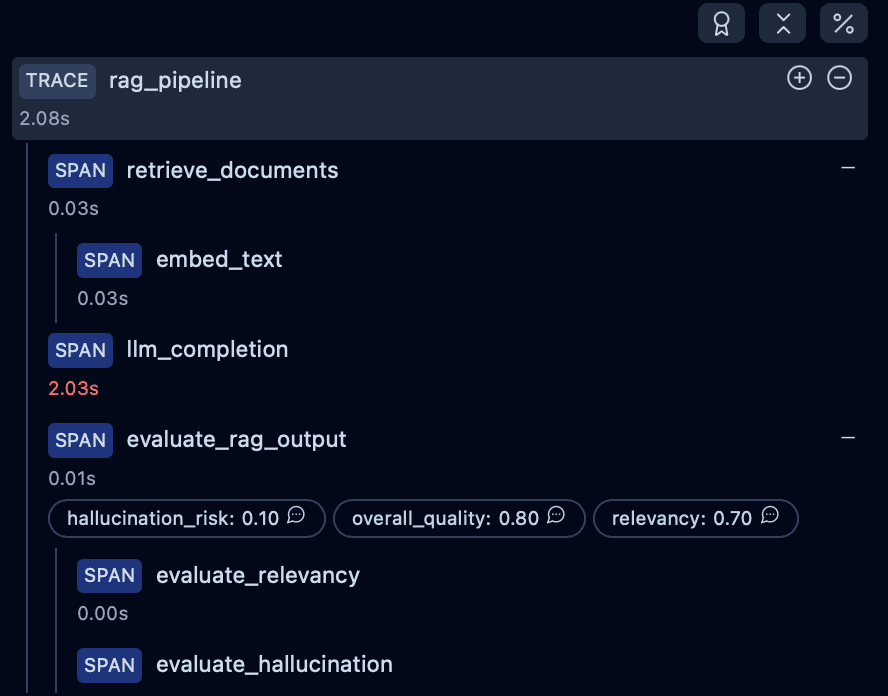
How to Navigate the Span Tree
Each span reveals:
- execution time (critical for latency bottlenecks)
- inputs and outputs captured via
langfuse_context.update_current_observation() - whether nested operations (e.g., embedding calls) executed successfully
- metadata from FAISS search, document previews, and query text
Langfuse becomes a timeline and debugger for your RAG system.
Inspecting Retrieval: Document Scores and Previews
The retrieval stage is your first major insight point. The retrieve_documents span logs:
- the query that was embedded
- the
top_kused forFAISSsearch - distance scores returned
- converted relevancy scores (your
1/(1+d)heuristic) - ranked documents with text previews
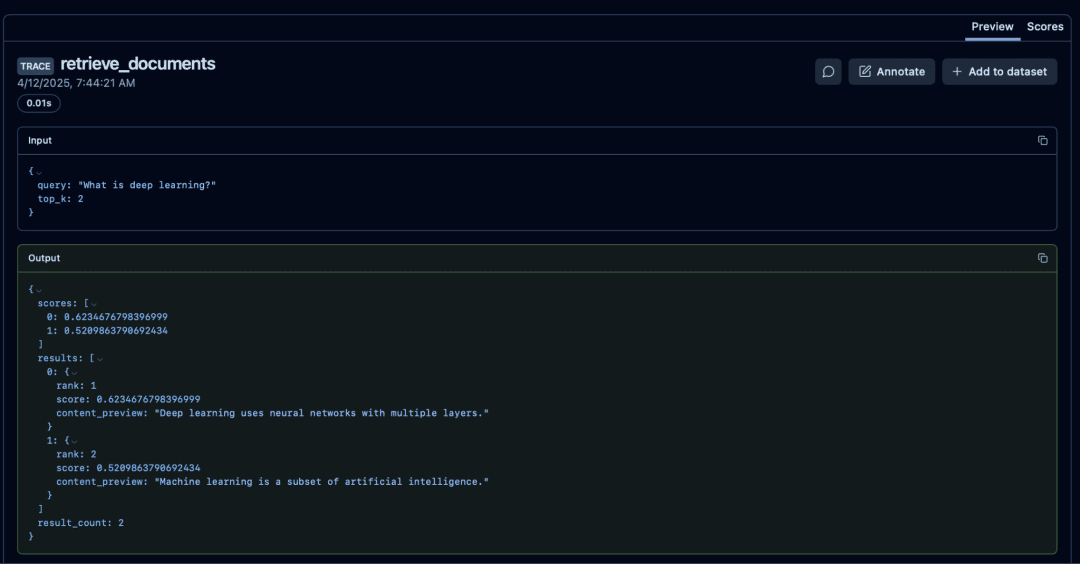
What to Look For
- High distances and low scores: embedding mismatch or poor docs
- Same document repeatedly ranking #1: indexing error
- Empty results: index not built or FAISS dimension mismatch
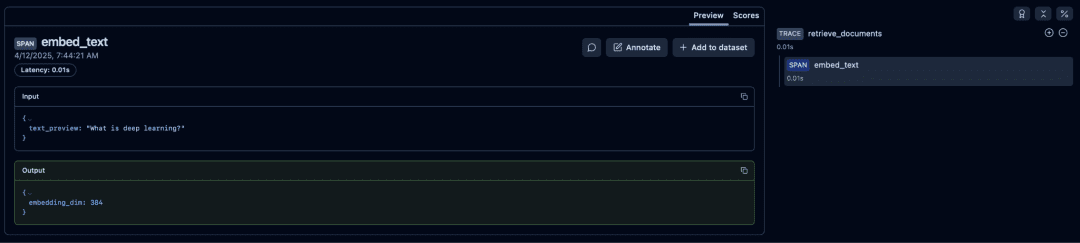
Embedded Text Span
The embed_text span reveals the preview of text used for embeddings:
- inspect embeddings length
- detect empty or malformed documents
- verify embeddings model configuration
Inspecting Prompt Construction (Optional View)
Prompt creation happens between retrieval and generation. Although you do not create a separate Langfuse span for this step, the constructed prompt appears inside the LLM span input.
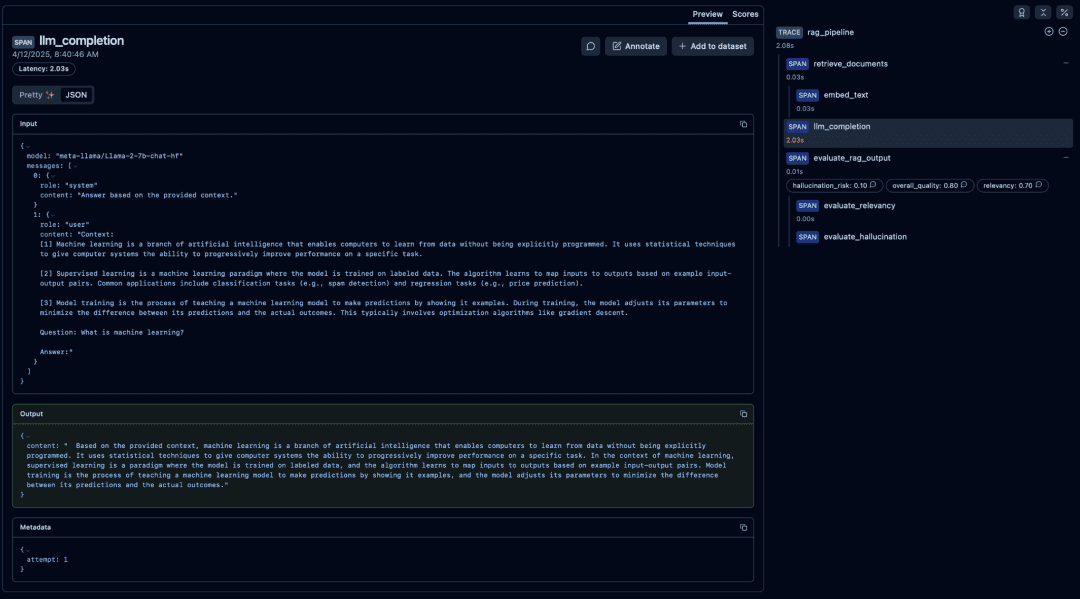
[1], [2], and [3].What you verify here:
- context formatting
- numbering
- whitespace
- hallucination-reducing systems instructions
This becomes essential when debugging wrong answers.
Token Usage and Generation Metadata
Inside the llm_completion span, Langfuse records:
- input tokens
- output tokens
- total tokens
- retry count
- model name
- latency breakdown
- response content
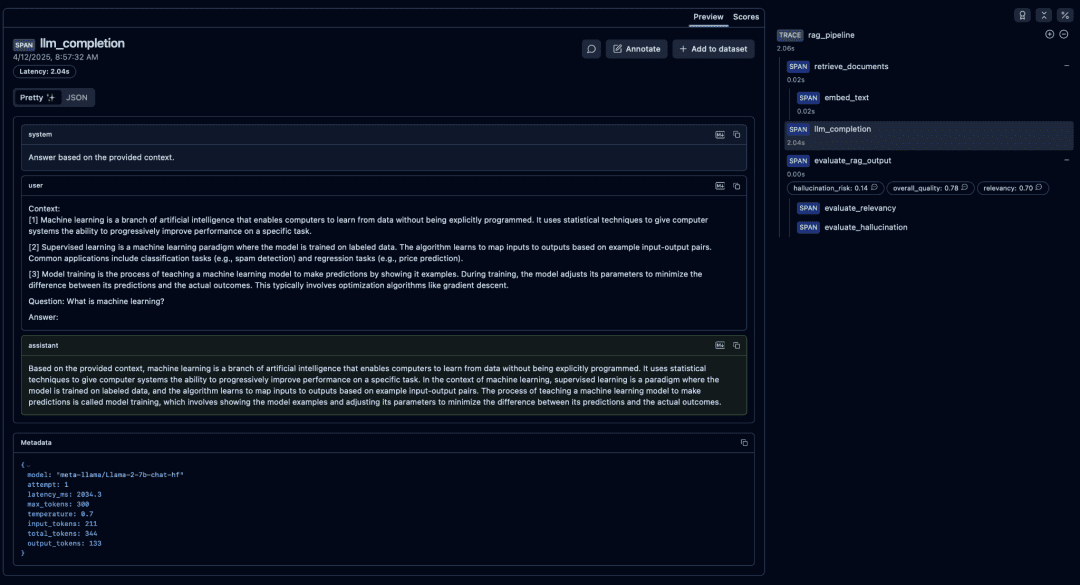
What to Look For
- Unusually high input tokens: prompt too large
- High output tokens: model drifting or verbose
- Repeated retries:
vLLMthroughput issue - Very long latency: GPU under-provisioned or CPU fallback
Evaluation Scoring Nodes (Relevancy, Hallucination, and Overall Quality)
Your evaluation functions (evaluate_relevancy, evaluate_hallucination_risk, evaluate_rag_output) create 3 scoring nodes inside Langfuse:
relevancyhallucination_riskoverall_quality
These appear alongside the evaluation span.
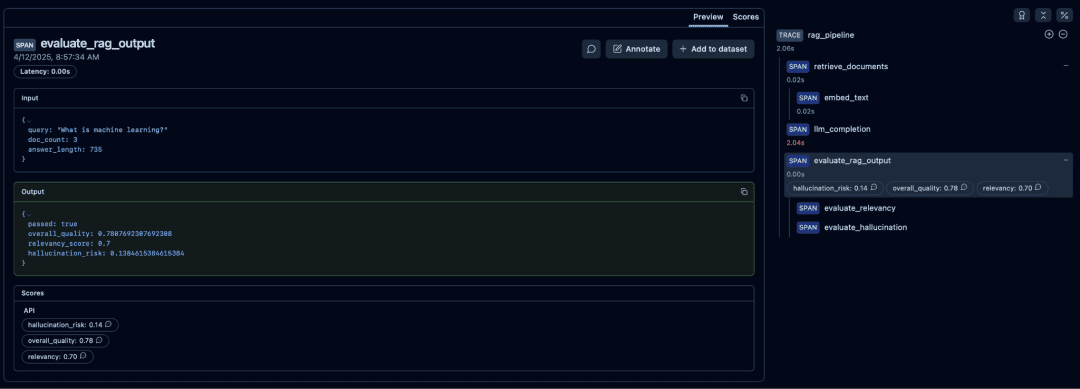
How to Interpret Them
- High relevancy and low hallucination risk: high
overall_quality - Low relevancy and high hallucination risk: RAG failure
passed=Truemeans the response met themin_quality_scorethreshold inconfig.yaml
Debugging Failures
- Relevancy low: retrieval needs improvement
- Hallucination high: prompt needs grounding
- Both low: LLM ignoring context, bad retrieval, or noisy docs
Visual Timeline and Performance Profiling
The timeline view shows exact timings:
- embedding
- retrieval
- prompt construction
- LLM generation
- evaluation
This allows profiling end-to-end latency.

How Langfuse Helps Production Debugging
Langfuse tracing helps answer real production questions:
“Why was this answer wrong?”
Open the evaluation spans, review the hallucination score, inspect the prompt, and then inspect the retrieved documents.
“Which part is slowing down?”
Open the timeline and locate the bottleneck, which is often embeddings or the LLM.
“Did the LLM actually use the retrieved documents?”
Compare:
- retrieval previews
- answer keywords
- relevancy score
“Why did this query fail?”
The trace will show:
- empty index
- retries
- exceptions
- malformed inputs
- missing environment variables
In production, this becomes indispensable.
What's next? We recommend PyImageSearch University.

120+ total classes • 115+ hours of on-demand code walkthrough videos • Last updated: October 2026
★★★★★ 4.84 (128 Ratings) • 16,000+ Students Enrolled
I strongly believe that if you had the right teacher you could master computer vision and deep learning.
Do you think learning computer vision and deep learning has to be time-consuming, overwhelming, and complicated? Or has to involve complex mathematics and equations? Or requires a degree in computer science?
That’s not the case.
All you need to master computer vision and deep learning is for someone to explain things to you in simple, intuitive terms. And that’s exactly what I do. My mission is to change education and how complex Artificial Intelligence topics are taught.
If you're serious about learning computer vision, your next stop should be PyImageSearch University, the most comprehensive computer vision, deep learning, and OpenCV course online today. Here you’ll learn how to successfully and confidently apply computer vision to your work, research, and projects. Join me in computer vision mastery.
Inside PyImageSearch University you'll find:
- ✓ 120+ courses on essential computer vision, deep learning, and OpenCV topics
- ✓ 94+ Certificates of Completion
- ✓ 115+ hours of on-demand video
- ✓ Brand new courses released regularly, ensuring you can keep up with state-of-the-art techniques
- ✓ Pre-configured Jupyter Notebooks in Google Colab
- ✓ Run all code examples in your web browser — works on Windows, macOS, and Linux (no dev environment configuration required!)
- ✓ Access to centralized code repos for all 540+ tutorials on PyImageSearch
- ✓ Easy one-click downloads for code, datasets, pre-trained models, etc.
- ✓ Access on mobile, laptop, desktop, etc.
Summary
In this lesson, you built a fully instrumented, production-grade RAG pipeline and learned how observability transforms retrieval-augmented systems from “black boxes” into transparent, debuggable, measurable workflows. You started by setting up the core infrastructure (self-hosted Langfuse, vLLM for fast local inference, and FAISS and SentenceTransformers for efficient retrieval) and then wired all these components together using a clean, traceable architecture.
With tracing enabled end-to-end, every stage of your RAG pipeline became inspectable: document embedding, FAISS indexing, retrieval scoring, prompt construction, LLM generation, and quality evaluation. You saw how Langfuse automatically visualizes these steps as nested spans, how it captures token usage and metadata for LLM calls, and how your evaluation functions produce relevancy, hallucination risk, and overall-quality scores directly inside the trace.
By running the pipeline and examining the traces, you learned how to debug retrieval quality, diagnose prompt-related issues, inspect model behavior, and identify performance bottlenecks using Langfuse’s hierarchical tree view and timeline profiler. The final result is an observability-first RAG stack: fully local, fast, and transparent, designed exactly the way production systems must operate.
This foundation prepares you for upcoming lessons, where we extend the same tracing principles to multi-step agents, adding reasoning chains, intent analysis, and multi-span agent workflows on top of the RAG engine you constructed here.
Citation Information
Singh, V. “RAG Observability with Langfuse, vLLM, and FAISS,” PyImageSearch, S. Huot, A. Sharma, and P. Thakur, eds., 2026, https://pyimg.co/g20yk
@incollection{Singh_2026_rag-observability-langfuse-vllm-faiss,
  author = {Vikram Singh},
  title = {{RAG Observability with Langfuse, vLLM, and FAISS}},
  booktitle = {PyImageSearch},
  editor = {Susan Huot and Aditya Sharma and Piyush Thakur},
  year = {2026},
  url = {https://pyimg.co/g20yk},
}
To download the source code to this post (and be notified when future tutorials are published here on PyImageSearch), simply enter your email address in the form below!

Download the Source Code and FREE 17-page Resource Guide
Enter your email address below to get a .zip of the code and a FREE 17-page Resource Guide on Computer Vision, OpenCV, and Deep Learning. Inside you'll find my hand-picked tutorials, books, courses, and libraries to help you master CV and DL!


Comment section
Hey, Adrian Rosebrock here, author and creator of PyImageSearch. While I love hearing from readers, a couple years ago I made the tough decision to no longer offer 1:1 help over blog post comments.
At the time I was receiving 200+ emails per day and another 100+ blog post comments. I simply did not have the time to moderate and respond to them all, and the sheer volume of requests was taking a toll on me.
Instead, my goal is to do the most good for the computer vision, deep learning, and OpenCV community at large by focusing my time on authoring high-quality blog posts, tutorials, and books/courses.
If you need help learning computer vision and deep learning, I suggest you refer to my full catalog of books and courses — they have helped tens of thousands of developers, students, and researchers just like yourself learn Computer Vision, Deep Learning, and OpenCV.
Click here to browse my full catalog.