Table of Contents
- Apache Airflow Document Ingestion Pipeline for RAG Systems
- Introduction to Production-Grade Document Ingestion Pipelines
- Apache Airflow Document Ingestion Pipeline Architecture
- Project Structure
- Database Schema Design for Document Ingestion Pipelines
- The documents Table
- The chunks Table
- The pipeline_runs Table
- Why Hashes Matter
- Why Idempotency Matters
- Database Session Management
- Building a FastAPI Document Ingestion Service
- Designing an Apache Airflow DAG
- Task 1: Fetch Pending Documents
- Task 2: Parse Documents
- Task 3: Chunk Documents
- Task 4: Validate Chunks
- Task 5: Mark Complete
- Why This DAG Structure Works
- Summary
Apache Airflow Document Ingestion Pipeline for RAG Systems
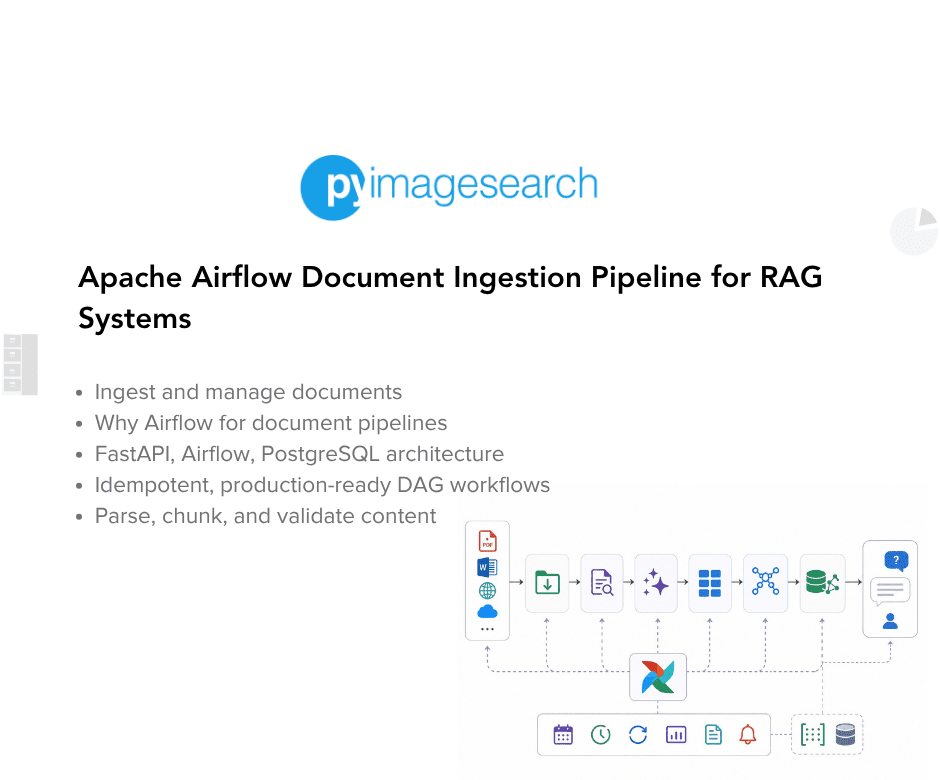
In this lesson, you will learn how to design a production-grade document ingestion pipeline using Apache Airflow. We will build a system that accepts PDF uploads via FastAPI and orchestrates their processing using an Airflow DAG (Directed Acyclic Graph). You will see how to structure ingestion pipelines with idempotency, status tracking, and PostgreSQL-backed metadata. By the end of this lesson, you will understand how Airflow fits into modern RAG-style document ingestion workflows.
This lesson is the 1st in a 2-part series on Document Ingestion with Airflow:
- Apache Airflow Document Ingestion Pipeline for RAG Systems (this tutorial)
- Lesson 2
To learn how to design and orchestrate a production-ready ingestion pipeline with Apache Airflow, FastAPI, and PostgreSQL, just keep reading.

Introduction to Production-Grade Document Ingestion Pipelines
If you have ever built a Retrieval-Augmented Generation (RAG) system, you know that ingestion is the hardest part. Not the embeddings. Not the vector search. Not even the prompt engineering. The hardest part is reliably getting documents into your system, parsing them correctly, chunking them intelligently, and tracking every step along the way.
Why? Because ingestion is where the real world meets your clean ML architecture. PDFs are corrupted. Files are massive. Network requests fail halfway through. And when something breaks, you need to know exactly which document failed, why it failed, and how to restart processing without duplicating work or losing data.
This is where orchestration becomes critical. You need a system that can schedule work, retry failures, track progress, and give you observability into every stage of your pipeline. For ML ingestion pipelines, Apache Airflow is one of the best tools for this job.
Why Airflow Instead of Cron Jobs or Celery?
You might ask: why not just use cron jobs to trigger a Python script every minute? Or why not use Celery for task queueing? The answer is observability and resilience.
Cron jobs give you scheduling, but no visibility into what failed or why. When a cron job fails at 3am, you find out when users complain. You have no task history, no retry logic, and no dependency management. Celery gives you distributed task execution, but it does not provide workflow orchestration. You have to manually chain tasks, handle retries, and build your own monitoring.
Airflow gives you all of this out of the box. Think of it as a conveyor belt with inspection stations. Every document moves through the same sequence of steps (parse, chunk, validate), and at each station, Airflow records what happened. If a step fails, Airflow retries it automatically. If the entire system crashes, Airflow resumes from where it left off. The web UI shows you exactly which documents are stuck and why.
For production ML systems, this observability is not optional. It is the difference between debugging for hours and knowing immediately which PDF caused the parser to crash.
In this lesson, you will learn how to build a production-grade document ingestion pipeline using Apache Airflow. We will design a complete system that accepts PDF uploads via a REST (Representational State Transfer) API and orchestrates their processing using an Airflow DAG, with full deduplication and idempotency guarantees backed by PostgreSQL.
More importantly, you will understand why Airflow fits ingestion better than training or inference, and where its limitations begin. This foundation prepares you for the next lesson, where we implement the shared parsing and chunking logic and later transition to Argo Workflows for GPU-based ML compute.
By the end of this part, you will have a working control plane for your ingestion pipeline that you can extend for your own RAG systems and document processing workflows.
Let’s get started.
Apache Airflow Document Ingestion Pipeline Architecture
Before we dive into code, let’s understand what we are building. Figure 1 shows the high-level architecture of our ingestion pipeline.
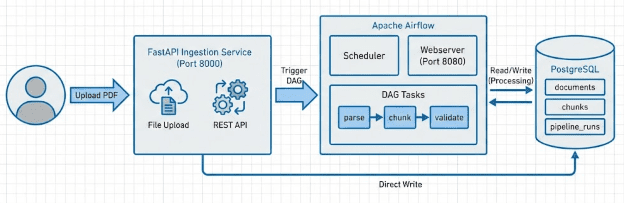
Our system consists of the following 4 main components.
Component 1: FastAPI Ingestion Service
This is the entry point for documents. It exposes a REST API on port 8000 that accepts PDF uploads. When a document arrives, the service performs three critical operations. First, it computes a SHA-256 hash of the file content to detect duplicates. Second, it saves the file to a shared volume that Airflow can access. Third, it inserts a record into the documents table in PostgreSQL with status set to PENDING.
The service does not process the document. It only accepts it and marks it for processing. This separation of concerns is intentional. Ingestion and processing are different responsibilities with different scaling characteristics.
Component 2: Apache Airflow
Airflow is the orchestration layer. It runs two main processes: the scheduler and the webserver. The scheduler monitors our DAG (Directed Acyclic Graph) and triggers it on a schedule. In our case, the DAG runs every minute and looks for documents with status PENDING.
When the DAG runs, it executes a series of tasks in order: fetch pending documents, parse PDFs into pages, chunk the text, validate chunk quality, and mark documents as complete. Each task is idempotent, meaning you can run it multiple times safely. Each task also has retry logic, so transient failures do not require manual intervention.
The webserver provides a UI on port 8080 where you can monitor DAG runs, inspect task logs, and manually trigger runs when needed.
Component 3: PostgreSQL Database
PostgreSQL serves 2 purposes in our system. First, it stores Airflow’s own metadata (DAG runs, task instances, logs). Second, it stores our application data in a separate database called ml_orchestration.
Our application database has 3 main tables. The documents table tracks every uploaded file with its hash, path, and processing status. The chunks table stores the parsed and chunked text with deduplication via content hashes. The pipeline_runs table records every DAG execution with metrics like how many documents were processed and how many chunks were created.
Component 4: Shared Volume
The fourth component is not visible in the diagram, but it is critical. All containers share a Docker volume mounted at /tmp/ml_orchestration/uploads. When the FastAPI service saves a file, Airflow tasks can read it directly without network transfers or complex file synchronization.
This architecture gives us several important properties. First, we have a clear separation between ingestion (FastAPI) and processing (Airflow). Second, we have observability through Airflow’s UI and PostgreSQL queries. Third, we have idempotency through content hashing and status tracking. Fourth, we have reliability through Airflow’s retry mechanisms.
Now let us see how this maps to the actual codebase.
Would you like immediate access to 3,457 images curated and labeled with hand gestures to train, explore, and experiment with … for free? Head over to Roboflow and get a free account to grab these hand gesture images.
Need Help Configuring Your Development Environment?

All that said, are you:
- Short on time?
- Learning on your employer’s administratively locked system?
- Wanting to skip the hassle of fighting with the command line, package managers, and virtual environments?
- Ready to run the code immediately on your Windows, macOS, or Linux system?
Then join PyImageSearch University today!
Gain access to Jupyter Notebooks for this tutorial and other PyImageSearch guides pre-configured to run on Google Colab’s ecosystem right in your web browser! No installation required.
And best of all, these Jupyter Notebooks will run on Windows, macOS, and Linux!
Project Structure
We first need to review our project directory structure.
Start by accessing this tutorial’s “Downloads” section to retrieve the source code and example images.
From there, take a look at the directory structure:
├── airflow_project/ # Airflow orchestration system
│ ├── dags/
│ │ └── ingest_documents_dag.py # Main DAG: orchestrates PDF→chunks pipeline
│ │
│ ├── ingestion_service/ # FastAPI REST API for file uploads
│ │ ├── __init__.py
│ │ ├── main.py # Upload endpoint with deduplication
│ │ └── requirements.txt # FastAPI, Uvicorn dependencies
│ │
│ ├── docker-compose.yml # Orchestrates 5 services (Postgres, Airflow, API)
│ ├── Dockerfile # Airflow container image
│ ├── Dockerfile.service # FastAPI service container image
│ └── init-db.sh # PostgreSQL database initialization script
│
└── shared/ # Shared utilities (used by Airflow)
├── data_models/
│ ├── __init__.py
│ └── models.py # Pydantic schemas (Document, Chunk, PipelineRun)
│
├── parsing/
│ ├── __init__.py
│ ├── pdf_parser.py # PyPDF extraction logic
│ ├── chunker.py # Sliding window text chunking
│ └── deduplication.py # Content hashing utilities
│
├── storage/
│ ├── __init__.py
│ ├── database.py # SQLAlchemy session management (session_scope, get_session)
│ └── models.py # ORM models (DocumentModel, ChunkModel, PipelineRunModel)
│
├── utils/
│ ├── __init__.py
│ ├── hashing.py # SHA-256 file/content hashing
│ └── logging.py # Structured logging (get_logger)
│
├── __init__.py
└── requirements.txt # Shared dependencies (SQLAlchemy, Pydantic, PyPDF)
Understanding the Structure
This project consists of 2 main directories that work together to create a production-grade document ingestion pipeline.
The airflow_project/ Directory
This folder contains everything for document ingestion using Apache Airflow. Think of it as your document processing factory – where raw PDFs enter the system and emerge as structured, searchable chunks.
The dags/ingest_documents_dag.py file defines our workflow with five sequential tasks: fetch pending documents from the database, parse PDFs with PyPDF, split text into overlapping chunks, validate chunk quality, and mark documents complete. Each task is idempotent (safe to retry) and includes granular error handling so one corrupted PDF does not block an entire batch.
The ingestion_service/ subdirectory runs a FastAPI REST API on port 8000. Users upload PDFs via HTTP POST. The service computes a SHA-256 hash, checks for duplicates, saves the file to a shared volume, and inserts a database record with status=PENDING. It deliberately does not process the file — that separation keeps uploads fast (users get immediate feedback) while heavy processing happens asynchronously in Airflow.
The docker-compose.yml file orchestrates five containers: PostgreSQL (dual purpose: stores Airflow’s metadata and our application data in separate databases), Airflow webserver (UI on port 8080), Airflow scheduler (triggers the DAG every minute), init container (one-time database setup), and the ingestion service (API on port 8000). The critical piece is the shared
/tmp/ml_orchestration/uploads volume mounted into both Airflow containers and the API service – this lets Airflow read files the API writes without network transfers.
The Dockerfile builds the Airflow container with necessary Python dependencies. The Dockerfile.service builds the FastAPI container. The init-db.sh script runs automatically when PostgreSQL starts, creating the ml_orchestration database and mlops user with proper permissions.
The shared/ Directory
This is your reusable logic layer. Everything here is pure Python business logic with zero Airflow dependencies.
The data_models/models.py file contains Pydantic schemas that enforce data structure. Every document has a filename, file path, content hash, and status. Every chunk has text, a content hash, and a document reference. These schemas validate data at the API boundary and prevent type mismatches.
The parsing/ subdirectory implements document processing. The pdf_parser.py module uses PyPDF to extract text page by page, preserving metadata like title and author. The chunker.py module implements sliding window chunking (512 words with 50-word overlap) to split long documents while maintaining context across boundaries. The deduplication.py module computes SHA-256 hashes to detect identical content both at the document and chunk level.
The storage/ subdirectory manages all database interaction. The database.py file provides 2 session management utilities: session_scope() (context manager for Airflow tasks with automatic commit/rollback) and get_session() (generator for FastAPI dependency injection). The models.py file defines SQLAlchemy ORM classes that map Python objects to PostgreSQL tables – DocumentModel, ChunkModel, and PipelineRunModel.
The utils/ subdirectory contains 2 essential helpers. The hashing.py module computes SHA-256 hashes for both files (read in chunks to handle large PDFs) and strings (for chunk deduplication). The logging.py module provides the get_logger() function that returns a configured logger with consistent formatting across the entire system.
Now that you understand where everything lives and why, let’s dive into building the system.
Database Schema Design for Document Ingestion Pipelines
The database schema is the backbone of our ingestion pipeline. Figure 2 shows the 3 main tables and their relationships.
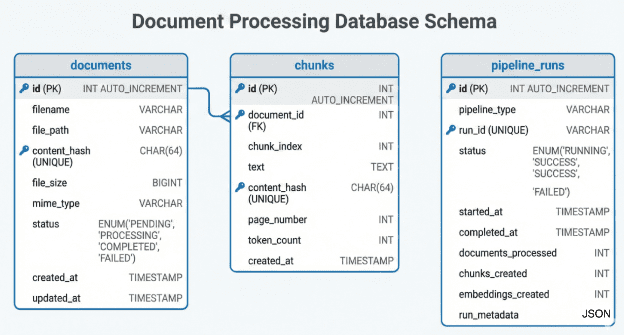
documents, chunks, and pipeline_runs tables with their relationships and key columns.Let’s examine each table and understand the design decisions.
The documents Table
This table tracks every uploaded file. The id column is an auto-incrementing primary key. The filename stores the original name (e.g., research_paper.pdf). The file_path stores the absolute path where the file is saved on disk.
The content_hash column is critical. It stores the SHA-256 hash of the entire file content. This hash serves 2 purposes. First, it detects duplicate uploads. If 2 users upload the same PDF with different filenames, we catch it immediately. Second, it enables idempotency. If we need to reprocess a document, we can verify the file content has not changed.
The status column uses a PostgreSQL ENUM with 4 values: PENDING, PROCESSING, COMPLETED, and FAILED. This drives the entire workflow. The FastAPI service sets status to PENDING. When the DAG completes successfully, Airflow updates it to COMPLETED. If any task fails, it becomes FAILED. (The PROCESSING state is available for systems that want to mark documents as in-progress, though our implementation goes directly from PENDING to COMPLETED or FAILED.)
The created_at and updated_at columns provide audit trails. We know exactly when each document entered the system and when it was last modified.
The chunks Table
This table stores the processed text chunks. The document_id foreign key creates a one-to-many relationship with documents. One document produces many chunks.
The chunk_index tracks the order of chunks within a document. Chunk 0 is the first chunk, chunk 1 is the second, and so on. This ordering is important for maintaining context.
The text column holds the actual chunk content. The content_hash is the SHA-256 of this text. Just like with documents, this prevents duplicate chunks. If the same text appears in multiple places (common in academic papers with repeated abstracts), we store it once.
The page_number tracks which PDF page the chunk came from. This is useful for providing citations back to users. The token_count provides a rough estimate of length (we use word count as a proxy for tokens), which helps with embedding model limits later.
The pipeline_runs Table
This table tracks every DAG execution. The pipeline_type column will eventually distinguish between airflow and argo runs. For now, it is always airflow.
The run_id is Airflow’s unique execution identifier. It looks like manual__2026-01-26T09:56:12.565856+00:00. This connects our table to Airflow’s internal metadata.
The status column tracks whether the entire pipeline run succeeded or failed. The started_at and completed_at timestamps measure execution time.
The metrics columns (documents_processed, chunks_created, embeddings_created) provide observability. You can query this table to see how many documents you have processed over time or track your processing rate.
The run_metadata column is a JSON field for flexible additional data. We store the DAG ID and execution date here.
Why Hashes Matter
Content hashing is not optional in production ML systems. Without hashes, you cannot detect duplicates. Users will upload the same research paper five times, creating 5 sets of chunks and wasting embedding compute and storage.
Without hashes, you cannot implement idempotency. If Airflow retries a task, you might create duplicate chunks or corrupt existing data. With hashes, every operation checks “does this hash already exist?” before creating new records.
Why Idempotency Matters
Idempotency means you can run an operation multiple times and get the same result. This is essential in distributed systems where failures are normal. If your DAG fails halfway through, you should be able to restart it safely.
Our design achieves idempotency through 3 mechanisms. First, content hashes prevent duplicate records. Second, status tracking prevents reprocessing completed documents. Third, task-level checks (e.g., “does this chunk hash already exist?”) ensure partial failures are recoverable.
Database Session Management
Before we dive into the ingestion service and DAG code, we need to understand how we connect to the database. All our code uses 2 key utilities from shared/storage/database.py: session_scope() for Airflow tasks and get_session() for FastAPI.
Here is the complete database connection code:
# shared/storage/database.py
import logging
import os
from contextlib import contextmanager
from typing import Generator
from sqlalchemy import create_engine
from sqlalchemy.ext.declarative import declarative_base
from sqlalchemy.orm import sessionmaker, Session

logger = logging.getLogger(__name__)

# Base class for all ORM models
Base = declarative_base()

# Database connection string from environment
DATABASE_URL = os.getenv(
    "ML_ORCHESTRATION_DB_URI",
    "postgresql://mlops:mlops_password@localhost:5432/ml_orchestration"
)

def get_engine():
    """
    Create and return a SQLAlchemy engine with connection pooling.
    """
    engine = create_engine(
        DATABASE_URL,
        pool_pre_ping=True,  # Verify connections before using
        pool_size=5,
        max_overflow=10,
        echo=False  # Set to True for SQL query logging
    )
    return engine

@contextmanager
def session_scope():
    """
    Provide a transactional scope for database operations.

    Usage in Airflow tasks:
        with session_scope() as session:
            documents = session.query(DocumentModel).all()

    This ensures:
    - Automatic commit on success
    - Automatic rollback on exception
    - Proper connection cleanup
    """
    engine = get_engine()
    SessionLocal = sessionmaker(bind=engine)
    session = SessionLocal()
    try:
        yield session
        session.commit()
    except Exception:
        session.rollback()
        raise
    finally:
        session.close()

def get_session() -> Generator[Session, None, None]:
    """
    FastAPI dependency for database sessions.

    Usage:
        @app.post("/documents")
        async def upload(session: Session = Depends(get_session)):
            # Use session here

    FastAPI calls this function for each request and handles cleanup.
    """
    engine = get_engine()
    SessionLocal = sessionmaker(bind=engine)
    session = SessionLocal()
    try:
        yield session
    finally:
        session.close()
Let us break down these utilities.
The get_engine() function creates a SQLAlchemy engine, which manages the connection pool to PostgreSQL. The pool_pre_ping=True parameter tells SQLAlchemy to test each connection before using it. This handles cases where the database was restarted or connections went stale.
The pool_size=5 and max_overflow=10 settings control connection pooling. We maintain 5 persistent connections and can create up to 10 additional temporary connections under load. This prevents overwhelming the database with thousands of connections.
The session_scope() context manager is used throughout our Airflow DAG tasks. It provides a transactional scope with automatic cleanup. When you use with session_scope() as session:, the context manager creates a session, executes your code, commits the transaction if successful, or rolls back if an exception occurs. The finally block ensures the connection is always closed.
This pattern prevents common bugs like forgetting to commit, leaking connections, or leaving transactions open after errors.
The get_session() generator is designed for FastAPI’s dependency injection system. FastAPI calls this function for each HTTP request and automatically handles cleanup when the request completes. You never need to manually close the session in your endpoint code.
These 2 utilities ensure database operations are safe, consistent, and clean across both Airflow and FastAPI. Now let us see how the ingestion service uses get_session().
Building a FastAPI Document Ingestion Service
The FastAPI service is the entry point for documents. Let us walk through the code line by line to understand how it works.
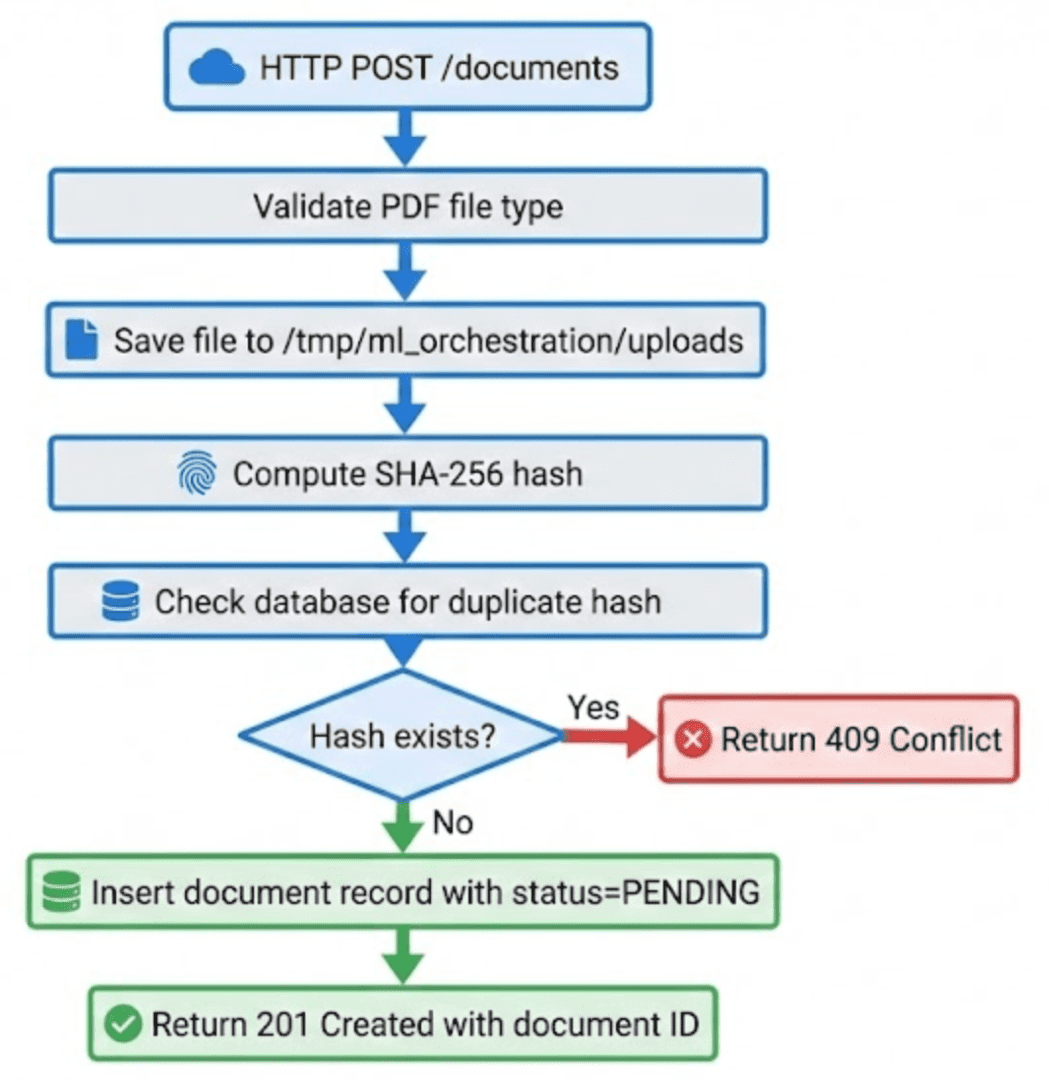
Here is the complete upload endpoint from airflow_project/ingestion_service/main.py:
@app.post("/documents", response_model=DocumentResponse, status_code=201)
async def upload_document(
    file: UploadFile = File(...),
    session: Session = Depends(lambda: next(get_session()))
):
    """
    Upload a new document.

    The document will be stored and marked as PENDING for processing.
    """
    logger.info(f"Uploading document: {file.filename}")

    # Validate file type
    if not file.filename.lower().endswith('.pdf'):
        raise HTTPException(
            status_code=400,
            detail="Only PDF files are supported"
        )

    try:
        # Save file to disk
        file_path = UPLOAD_DIR / f"{datetime.utcnow().timestamp()}_{file.filename}"

        with open(file_path, "wb") as buffer:
            shutil.copyfileobj(file.file, buffer)

        # Compute file hash and size
        content_hash = hash_file(str(file_path))
        file_size = file_path.stat().st_size

        # Check for duplicates
        existing_doc = session.query(DocumentModel).filter(
            DocumentModel.content_hash == content_hash
        ).first()

        if existing_doc:
            logger.warning(f"Duplicate document detected: {content_hash}")
            file_path.unlink()
            raise HTTPException(
                status_code=409,
                detail=f"Document already exists with ID {existing_doc.id}"
            )

        # Create document record
        document = DocumentModel(
            filename=file.filename,
            file_path=str(file_path),
            content_hash=content_hash,
            file_size=file_size,
            mime_type="application/pdf",
            status=DocumentStatus.PENDING
        )

        session.add(document)
        session.commit()
        session.refresh(document)

        logger.info(f"Document uploaded successfully: ID {document.id}")

        return DocumentResponse.from_orm(document)

    except HTTPException:
        raise
    except Exception as e:
        logger.error(f"Failed to upload document: {str(e)}")
        raise HTTPException(status_code=500, detail=str(e))
Let us break this down step by step.
The function signature uses FastAPI’s dependency injection. The file parameter comes from the HTTP request as multipart form data. The session parameter is injected by FastAPI using Depends(). This gives us a database session without manual connection management.
The first operation is file type validation. We only accept PDFs for this lesson, so we check the filename extension. If it is not a PDF, we raise an HTTP 400 error immediately. Production systems might also validate file size, scan for malware, or check MIME types, but we keep it simple here.
Next, we save the file to disk. The UPLOAD_DIR is /tmp/ml_orchestration/uploads. This directory is mounted as a Docker volume, which means all containers can access it. We prefix the filename with a UTC timestamp to avoid collisions. If 2 users upload files named paper.pdf, they become 1769421678.801241_paper.pdf and 1769421690.123456_paper.pdf.
We use shutil.copyfileobj() to stream the file content from the upload to disk. This is memory-efficient because it processes the file in chunks rather than loading the entire file into RAM.
After saving, we compute 2 important values. The hash_file() function reads the entire file and computes its SHA-256 hash. This is a cryptographic hash function that produces a unique 64-character hexadecimal string for the file content. Even a single byte change produces a completely different hash. We also get the file size in bytes using file_path.stat().st_size.
The next step is critical: duplicate detection. We query the database for any existing document with the same content hash. If we find one, we know this exact file has been uploaded before, even if it has a different filename. We delete the newly uploaded file with file_path.unlink() and return an HTTP 409 Conflict error with the ID of the existing document. This prevents duplicate processing.
If the document is unique, we create a new DocumentModel instance. Notice the status field is set to DocumentStatus.PENDING. This tells Airflow that the document needs processing. We do not set it to PROCESSING or COMPLETED because the upload service does not process documents. It only accepts them.
We add the model to the session, commit the transaction, and refresh the model to get the auto-generated ID. Finally, we return a DocumentResponse with all the document details. The HTTP status code is 201 Created, which is the correct status for successful resource creation.
The error handling is worth noting. We re-raise HTTPException instances without modification because FastAPI knows how to convert them to HTTP responses. For all other exceptions, we log the error and return an HTTP 500 with the error message. In production, you would want more sophisticated error handling (do not expose internal errors to clients), but this is sufficient for a lesson.
What This Service Does Not Do
Notice what is missing from this code. There is no PDF parsing. No text chunking. No embedding generation. The service has one responsibility: accept files and mark them for processing. This separation is intentional.
Ingestion and processing are different concerns. Ingestion must be fast and available. Users should be able to upload files without waiting for heavyweight processing. Processing can happen asynchronously, can retry on failure, and can take as long as needed.
This is where Airflow enters the picture. Let us see how the DAG processes these pending documents.
Designing an Apache Airflow DAG
The DAG is the heart of our orchestration logic. Figure 4 shows the task graph and execution order.
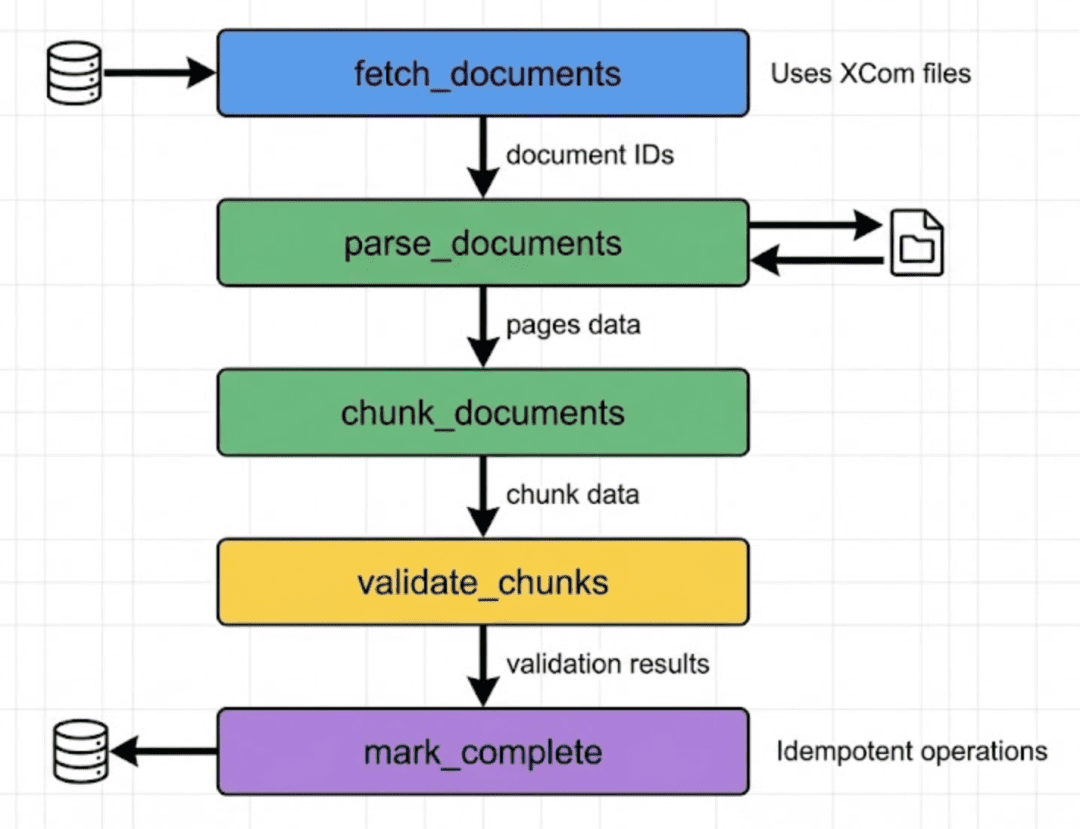
Here is how the DAG is defined in airflow_project/dags/ingest_documents_dag.py:
with DAG(
    dag_id='ingest_documents_dag',
    default_args=default_args,
    description='Ingest and process documents for ML pipeline',
    schedule_interval=timedelta(minutes=1),
    start_date=days_ago(1),
    catchup=False,
    tags=['ingestion', 'documents', 'ml-pipeline'],
) as dag:

    fetch_documents_task = PythonOperator(
        task_id='fetch_documents',
        python_callable=fetch_pending_documents,
        provide_context=True,
    )

    parse_documents_task = PythonOperator(
        task_id='parse_documents',
        python_callable=parse_documents,
        provide_context=True,
    )

    chunk_documents_task = PythonOperator(
        task_id='chunk_documents',
        python_callable=chunk_documents,
        provide_context=True,
    )

    validate_chunks_task = PythonOperator(
        task_id='validate_chunks',
        python_callable=validate_chunks,
        provide_context=True,
    )

    mark_complete_task = PythonOperator(
        task_id='mark_complete',
        python_callable=mark_documents_complete,
        provide_context=True,
    )

    # Define task dependencies
    fetch_documents_task >> parse_documents_task >> chunk_documents_task
    chunk_documents_task >> validate_chunks_task >> mark_complete_task
Let us understand each configuration parameter.
The dag_id is the unique identifier for this workflow. It appears in the Airflow UI and logs. The default_args dictionary contains settings that apply to all tasks. This includes retry behavior, execution timeout, and owner information.
The schedule_interval is set to timedelta(minutes=1). This means Airflow runs this DAG every minute. In production, you might use hourly or daily schedules, but for demos and development, 1 minute lets you see results quickly.
The start_date is set to days_ago(1), which means the DAG is eligible to run starting yesterday. The catchup=False parameter is important. Without this, Airflow would try to run the DAG for every missed interval since the start date. We do not want that. We only care about processing current pending documents, not creating historical backfill runs.
The tags list helps organize DAGs in the UI. You can filter by tag to find related workflows.
Each task uses a PythonOperator, which executes a Python function. The task_id must be unique within the DAG. The python_callable is the function to execute. The provide_context=True parameter gives the function access to Airflow’s execution context.
Why does context matter? Because it provides critical runtime information: the unique run_id (for creating file names that do not collide across runs), the execution timestamp (for audit trails), and XCom access (for passing data between tasks). Without context, your task functions would be isolated and unable to coordinate or share state.
The task dependencies are defined using the >> operator. This creates a directed graph. fetch_documents_task >> parse_documents_task means parse documents cannot start until fetch documents completes. The final line creates a longer chain: fetch, then parse, then chunk, then validate, then mark complete. This ensures strict ordering.
Now let us examine what each task function does.
Task 1: Fetch Pending Documents
def fetch_pending_documents(**context) -> List[int]:
    """
    Task 1: Fetch documents that need processing.

    Returns list of document IDs to process.
    """
    logger.info("Fetching pending documents...")

    with session_scope() as session:
        pending_docs = session.query(DocumentModel).filter(
            DocumentModel.status == DocumentStatus.PENDING
        ).all()

        doc_ids = [doc.id for doc in pending_docs]
        logger.info(f"Found {len(doc_ids)} pending documents: {doc_ids}")

        run_id = context['dag_run'].run_id
        filepath = write_data_to_file(doc_ids, f'{run_id}_document_ids.json')

        context['task_instance'].xcom_push(key='document_ids_file', value=filepath)

        return doc_ids
This function queries the database for all documents where status = PENDING. It extracts just the IDs into a list. If there are no pending documents, the list is empty and subsequent tasks have no work to do.
The interesting part is how we pass data to the next task. We do not use Airflow’s XCom directly for the document IDs. Instead, we write them to a JSON file and pass only the file path through XCom. Why? Because XCom stores data in the Airflow metadata database. Large payloads slow down the database and can hit size limits. By using files, we keep XCom small and handle arbitrary data sizes.
The write_data_to_file() helper function writes JSON to /tmp/***_dag_data/ and returns the full path. The next task reads from this path.
Task 2: Parse Documents
def parse_documents(**context) -> Dict[str, int]:
    """
    Task 2: Parse PDF documents into pages.

    Reads document IDs from previous task and parses each PDF.
    """
    logger.info("Parsing documents...")

    doc_ids_file = context['task_instance'].xcom_pull(
        key='document_ids_file',
        task_ids='fetch_documents'
    )
    doc_ids = read_data_from_file(doc_ids_file)

    parsed_count = 0

    with session_scope() as session:
        for doc_id in doc_ids:
            pages_file = TEMP_DIR / f'{run_id}_doc_{doc_id}_pages.json'
            if pages_file.exists():
                logger.info(f"Document {doc_id} already parsed, skipping")
                parsed_count += 1
                continue

            doc = session.query(DocumentModel).filter(
                DocumentModel.id == doc_id
            ).first()

            if not doc:
                logger.warning(f"Document {doc_id} not found")
                continue

            try:
                pages = parse_pdf(doc.file_path)
                logger.info(f"Parsed {len(pages)} pages from {doc.filename}")

                pages_file = write_data_to_file(pages, f'{run_id}_doc_{doc_id}_pages.json')
                parsed_count += 1

            except Exception as e:
                logger.error(f"Failed to parse document {doc_id}: {str(e)}")
                doc.status = DocumentStatus.FAILED
                session.commit()

    logger.info(f"Successfully parsed {parsed_count} documents")
    return {'parsed': parsed_count}
This task pulls the document IDs from the previous task, loads the document record from the database, and calls parse_pdf() on the file path. The parse_pdf() function (from shared/parsing/pdf_parser.py) uses PyPDF to extract text page by page.
Notice the idempotency check at the top of the loop. If a file named {run_id}_doc_{doc_id}_pages.json already exists, we skip parsing. This means if the task retries or reruns, it does not waste time reparsing documents that succeeded before.
The error handling is important. If parsing fails for any reason (corrupted PDF, missing file, permission error), we catch the exception, mark that document as FAILED, and continue with the next one. This prevents one bad document from blocking the entire batch.
The parsed pages are written to a file, one file per document. The next task will read these files.
Task 3: Chunk Documents
def chunk_documents(**context) -> Dict[str, int]:
    """
    Task 3: Chunk parsed pages into text segments.

    Reads pages from previous task and creates chunks.
    """
    logger.info("Chunking documents...")

    doc_ids_file = context['task_instance'].xcom_pull(
        key='document_ids_file',
        task_ids='fetch_documents'
    )
    doc_ids = read_data_from_file(doc_ids_file)

    total_chunks = 0

    with session_scope() as session:
        for doc_id in doc_ids:
            run_id = context['dag_run'].run_id
            pages_file = TEMP_DIR / f'{run_id}_doc_{doc_id}_pages.json'

            if not pages_file.exists():
                logger.warning(f"No pages file found for document {doc_id}")
                continue

            pages = read_data_from_file(str(pages_file))

            existing_chunks = session.query(ChunkModel).filter(
                ChunkModel.document_id == doc_id
            ).count()

            if existing_chunks > 0:
                logger.info(f"Document {doc_id} already has {existing_chunks} chunks, skipping")
                total_chunks += existing_chunks
                continue

            try:
                full_text = "\n\n".join(page['text'] for page in pages)
                chunks = chunk_text(full_text, chunk_size=512, overlap=50)

                chunk_index = 0
                for chunk in chunks:
                    chunk_hash = hash_content(chunk)

                    existing_chunk = session.query(ChunkModel).filter(
                        ChunkModel.content_hash == chunk_hash
                    ).first()

                    if existing_chunk:
                        continue

                    chunk_model = ChunkModel(
                        document_id=doc_id,
                        chunk_index=chunk_index,
                        text=chunk,
                        content_hash=chunk_hash,
                        page_number=None,
                        token_count=len(chunk.split())
                    )
                    session.add(chunk_model)
                    chunk_index += 1

                session.commit()
                logger.info(f"Created {chunk_index} chunks for document {doc_id}")
                total_chunks += chunk_index

            except Exception as e:
                logger.error(f"Failed to chunk document {doc_id}: {str(e)}")

    logger.info(f"Total chunks created: {total_chunks}")
    return {'chunks': total_chunks}
This task joins all pages into a single text string, then calls chunk_text() to split it into overlapping segments. The default chunk size is 512 words (we use whitespace-separated words as an approximate proxy for tokens) with 50-word overlap. Think of this like cutting a long rope into segments with intentional overlap at the ends — if an important concept spans a boundary, the overlap ensures it appears fully in at least one segment.
For each chunk, we compute a content hash and check if that exact text already exists in the database. This is duplicate detection at the chunk level. If the same sentence appears in multiple documents, we store it once. This saves storage and embedding compute later.
Notice we track chunk_index to maintain ordering within a document. This is important for reconstruction or citation purposes.
The task again has idempotency checks. If the document already has chunks in the database, we skip it. This lets us safely retry the task.
Task 4: Validate Chunks
def validate_chunks(**context) -> Dict[str, int]:
    """
    Task 4: Validate chunk quality.

    Checks for empty chunks, excessive length, etc.
    """
    logger.info("Validating chunks...")

    doc_ids_file = context['task_instance'].xcom_pull(
        key='document_ids_file',
        task_ids='fetch_documents'
    )
    doc_ids = read_data_from_file(doc_ids_file)

    valid_count = 0
    invalid_count = 0

    with session_scope() as session:
        for doc_id in doc_ids:
            chunks = session.query(ChunkModel).filter(
                ChunkModel.document_id == doc_id
            ).all()

            for chunk in chunks:
                # Too short
                if len(chunk.text) < 50:
                    logger.warning(f"Chunk {chunk.id} too short: {len(chunk.text)} chars")
                    invalid_count += 1
                    continue

                # Too long
                if len(chunk.text) > 2000:
                    logger.warning(f"Chunk {chunk.id} too long: {len(chunk.text)} chars")
                    invalid_count += 1
                    continue

                # Empty or whitespace only
                if not chunk.text.strip():
                    logger.warning(f"Chunk {chunk.id} is empty or whitespace only")
                    invalid_count += 1
                    continue

                valid_count += 1

    logger.info(f"Validation complete: {valid_count} valid, {invalid_count} invalid chunks")
    return {'valid': valid_count, 'invalid': invalid_count}
This task performs quality checks on chunks. It checks for chunks that are too short (less than 50 characters), too long (more than 2000 characters), or empty. In production, you might delete invalid chunks or mark them in a separate table. Here, we just log warnings.
Task 5: Mark Complete
def mark_documents_complete(**context) -> Dict[str, int]:
    """
    Task 5: Mark documents as complete.

    Updates document status and creates pipeline run record.
    """
    logger.info("Marking documents complete...")

    doc_ids_file = context['task_instance'].xcom_pull(
        key='document_ids_file',
        task_ids='fetch_documents'
    )
    doc_ids = read_data_from_file(doc_ids_file)

    chunks_result = context['task_instance'].xcom_pull(task_ids='chunk_documents')
    total_chunks = chunks_result.get('chunks', 0)

    with session_scope() as session:
        for doc_id in doc_ids:
            doc = session.query(DocumentModel).filter(
                DocumentModel.id == doc_id
            ).first()

            if doc and doc.status == DocumentStatus.PROCESSING:
                doc.status = DocumentStatus.COMPLETED

        run_id = context['dag_run'].run_id
        pipeline_run = PipelineRunModel(
            pipeline_type='airflow',
            run_id=run_id,
            status=PipelineRunStatus.COMPLETED,
            started_at=context['dag_run'].start_date,
            completed_at=datetime.utcnow(),
            documents_processed=len(doc_ids),
            chunks_created=total_chunks,
            embeddings_created=0,
            run_metadata={
                'dag_id': context['dag'].dag_id,
                'execution_date': str(context['execution_date'])
            }
        )

        session.add(pipeline_run)
        session.commit()

        logger.info(f"Pipeline run {run_id} completed: {len(doc_ids)} docs, {total_chunks} chunks")

    return {'documents_completed': len(doc_ids)}
The final task updates document status to COMPLETED and creates a PipelineRunModel record. This record captures metrics about the entire DAG run. Later, you can query this table to track throughput, find bottlenecks, or generate reports.
Why This DAG Structure Works
This 5-task structure enforces 4 critical principles.
First, each task has a single responsibility. Fetch finds work. Parse extracts text. Chunk splits text. Validate checks quality. Mark complete updates status. This makes debugging easier. If chunking fails, you know exactly which task to inspect.
Second, each task is idempotent. You can retry tasks without creating duplicate data or corrupting state. This is essential for reliability.
Third, we have observability at every step. Each task logs its progress. You can see exactly how many documents were parsed, how many chunks were created, and which documents failed.
Fourth, failure handling is granular. The pipeline is designed to continue processing other documents when individual documents fail, rather than aborting the entire batch. We catch exceptions at the document level, mark failed documents with FAILED status, and let the task continue with the remaining documents.
In an upcoming lesson, we will implement the shared parsing and chunking logic and see how these tasks operate on real documents end to end.
What's next? We recommend PyImageSearch University.

120+ total classes • 115+ hours of on-demand code walkthrough videos • Last updated: October 2026
★★★★★ 4.84 (128 Ratings) • 16,000+ Students Enrolled
I strongly believe that if you had the right teacher you could master computer vision and deep learning.
Do you think learning computer vision and deep learning has to be time-consuming, overwhelming, and complicated? Or has to involve complex mathematics and equations? Or requires a degree in computer science?
That’s not the case.
All you need to master computer vision and deep learning is for someone to explain things to you in simple, intuitive terms. And that’s exactly what I do. My mission is to change education and how complex Artificial Intelligence topics are taught.
If you're serious about learning computer vision, your next stop should be PyImageSearch University, the most comprehensive computer vision, deep learning, and OpenCV course online today. Here you’ll learn how to successfully and confidently apply computer vision to your work, research, and projects. Join me in computer vision mastery.
Inside PyImageSearch University you'll find:
- ✓ 120+ courses on essential computer vision, deep learning, and OpenCV topics
- ✓ 94+ Certificates of Completion
- ✓ 115+ hours of on-demand video
- ✓ Brand new courses released regularly, ensuring you can keep up with state-of-the-art techniques
- ✓ Pre-configured Jupyter Notebooks in Google Colab
- ✓ Run all code examples in your web browser — works on Windows, macOS, and Linux (no dev environment configuration required!)
- ✓ Access to centralized code repos for all 540+ tutorials on PyImageSearch
- ✓ Easy one-click downloads for code, datasets, pre-trained models, etc.
- ✓ Access on mobile, laptop, desktop, etc.
Summary
In this lesson, you built the foundation of a production-grade document ingestion pipeline using Apache Airflow. You learned how to design a FastAPI service for uploading PDF documents with built-in deduplication, how to model ingestion state in PostgreSQL, and how to define a reliable Airflow DAG to orchestrate document processing.
You saw how to separate ingestion from processing, use content hashing for idempotency, and construct a task graph that represents each stage of the pipeline. By the end of this part, you had a complete orchestration design for moving documents from raw uploads into a scheduled workflow.
This architecture forms the control plane of your ingestion pipeline and prepares you to implement the parsing and chunking logic in the next part.
Citation Information
Singh, V. “Apache Airflow Document Ingestion Pipeline for RAG Systems,” PyImageSearch, S. Huot, A. Sharma, and P. Thakur, eds., 2026, https://pyimg.co/8b2ey
@incollection{Singh_2026_apache-airflow-document-ingestion-pipeline-rag-systems,
  author = {Vikram Singh},
  title = {{Apache Airflow Document Ingestion Pipeline for RAG Systems}},
  booktitle = {PyImageSearch},
  editor = {Susan Huot and Aditya Sharma and Piyush Thakur},
  year = {2026},
  url = {https://pyimg.co/8b2ey},
}
To download the source code to this post (and be notified when future tutorials are published here on PyImageSearch), simply enter your email address in the form below!

Download the Source Code and FREE 17-page Resource Guide
Enter your email address below to get a .zip of the code and a FREE 17-page Resource Guide on Computer Vision, OpenCV, and Deep Learning. Inside you'll find my hand-picked tutorials, books, courses, and libraries to help you master CV and DL!



Comment section
Hey, Adrian Rosebrock here, author and creator of PyImageSearch. While I love hearing from readers, a couple years ago I made the tough decision to no longer offer 1:1 help over blog post comments.
At the time I was receiving 200+ emails per day and another 100+ blog post comments. I simply did not have the time to moderate and respond to them all, and the sheer volume of requests was taking a toll on me.
Instead, my goal is to do the most good for the computer vision, deep learning, and OpenCV community at large by focusing my time on authoring high-quality blog posts, tutorials, and books/courses.
If you need help learning computer vision and deep learning, I suggest you refer to my full catalog of books and courses — they have helped tens of thousands of developers, students, and researchers just like yourself learn Computer Vision, Deep Learning, and OpenCV.
Click here to browse my full catalog.