Table of Contents
- Pytest Tutorial: MLOps Testing, Fixtures, and Locust Load Testing
- Introduction to MLOps Testing: Building Reliable ML Systems with Pytest
- Why Testing Is Non-Negotiable in MLOps
- What You Will Learn: Pytest, Fixtures, and Load Testing for MLOps
- From FastAPI to Testing: Extending Your MLOps Pipeline with Validation
- Test-Driven MLOps: Applying Software Testing Best Practices to ML Pipelines
- What to Test in MLOps Pipelines: Models, APIs, and Configurations
- Unit vs Integration vs Performance Testing
- The Software Testing Pyramid for MLOps: Unit, Integration, and Load Testing
- Project Structure and Test Layout
- Test Directory Structure for MLOps: unit, integration, and performance
- Understanding Pytest Fixtures: Using conftest.py for Reusable Test Setup
- Where to Place Tests in MLOps Projects: Unit vs Integration vs Performance
- Unit Testing in MLOps with Pytest
- The Code Under Test: Inference Service and Dummy Model
- services/inference_service.py
- models/dummy_model.py
- Writing Pytest Unit Tests for MLOps: test_inference_service.py
- Testing the Inference Service with Pytest (MLOps Unit Tests)
- Testing ML Models in Isolation with Pytest
- How to Run Pytest Unit Tests for MLOps Projects
- Integration Testing in MLOps
- Using FastAPI TestClient for Integration Testing with Pytest
- How FastAPI TestClient Works for API Testing
- Testing API Endpoints (/health, /predict)
- What Integration Tests Verify in an MLOps API
- Testing the /predict Endpoint in an MLOps API
- Testing Documentation Endpoints (/docs, /openapi.json)
- What This Ensures
- Testing Error Handling in FastAPI APIs with Pytest
- Integration Test Breakdown: What Each Test Validates
- How to Run Integration Tests with Pytest in MLOps
- Performance and Load Testing with Locust
- Why Load Testing Is Essential for MLOps and ML APIs
- Locust Load Testing Concepts: Users, Spawn Rate, and Tasks Explained
- Writing the locustfile.py
- What This Locust Load Test Validates in an MLOps API
- Running Locust: Headless Mode vs Web UI Dashboard
- Generating Locust Load Testing Reports for ML APIs
- Understanding Test Metrics (RPS, failures, latency, P95/P99)
- MLOps Test Configuration: YAML and Environment Variables
- Understanding test_config.yaml for MLOps Testing
- What test_config.yaml Controls in MLOps Pipelines
- Overriding Application Configuration in Test Mode
- How Configuration Overrides Work: YAML and Environment Variables
- Why Configuration Management Matters in MLOps Testing
- Using Environment Variables for Test Isolation
- Code Quality in MLOps: Linting, Formatting, and Static Analysis Tools
- Linting Python Code with flake8
- Formatting Python Code with Black Pipelines
- Using isort to Manage Python Imports
- How to Run isort for Clean Python Imports
- Static Type Checking with MyPy for MLOps Codebases
- Using a Makefile to Automate MLOps Testing and Code Quality
- Automating Testing with a Pytest Test Runner Script
- Running Automated Tests with run_tests.sh
- Understanding Pytest Output and Test Results
- Why Automated Testing Workflows Matter in MLOps
- Integrating Pytest into CI/CD Pipelines
- Automating Load Testing in MLOps with Locust Scripts
- Running Automated Locust Load Tests with run_locust.sh
- Automatically Generating Load Testing Reports for ML APIs
- Preparing Load Testing for CI/CD and Cloud MLOps Pipelines
- Test Coverage in MLOps: Measuring and Improving Code Coverage
- Using pytest-cov to Measure Test Coverage
- How to Measure Code Coverage in MLOps Projects
- How to Increase Test Coverage in MLOps Pipelines
- Recommended Test Coverage Targets for MLOps Systems
- Summary
Pytest Tutorial: MLOps Testing, Fixtures, and Locust Load Testing
In this lesson, you will learn how to make ML systems reliable, correct, and production-ready through structured testing and validation. You will walk through unit tests, integration tests, load and performance checks, fixtures, code quality tools, and automated test runs, giving you everything you need to ensure your ML API behaves predictably under real-world conditions.
This lesson is the last of a 2-part series on Software Engineering for Machine Learning Operations (MLOps):
- FastAPI for MLOps: Python Project Structure and API Best Practices
- Pytest Tutorial: MLOps Testing, Fixtures, and Locust Load Testing (this tutorial)
To learn how to test, validate, and stress-test your ML services like a professional MLOps engineer, just keep reading.

Introduction to MLOps Testing: Building Reliable ML Systems with Pytest
Testing is the backbone of reliable MLOps. A model might look great in a notebook, but once wrapped in services, APIs, configs, and infrastructure, dozens of things can break silently: incorrect inputs, unexpected model outputs, missing environment variables, slow endpoints, and downstream failures. This lesson ensures you never ship those problems into production.
In this lesson, you will learn the complete testing workflow for machine learning (ML) systems: from small, isolated unit tests to full API integration checks and load testing your endpoints under real traffic conditions. You will also understand how to structure your tests, how each type of test fits into the MLOps lifecycle, and how to design a test suite that grows cleanly as your project evolves.
To learn how to validate, benchmark, and harden your ML applications for production, just keep reading.
Why Testing Is Non-Negotiable in MLOps
Machine learning adds layers of unpredictability on top of regular software engineering. Models drift, inputs vary, inference latency can increase, and small code changes can ripple into major behavioral shifts. Without testing, you have no safety net. Proper tests make your system observable, predictable, and safe to deploy.
What You Will Learn: Pytest, Fixtures, and Load Testing for MLOps
You will walk through a practical testing workflow tailored for ML applications: writing unit tests for inference logic, validating API endpoints end-to-end, using fixtures to isolate environments, verifying configuration behavior, and running load tests to understand real-world performance. Each example connects directly to the codebase you built earlier.
From FastAPI to Testing: Extending Your MLOps Pipeline with Validation
Previously, you learned how to structure a clean ML codebase, configure environments, separate services, and expose reliable API endpoints. Now, you will stress-test that foundation. This lesson transforms your structured application into a validated, production-ready system with tests that catch issues before users ever see them.
Test-Driven MLOps: Applying Software Testing Best Practices to ML Pipelines
Test-driven development (TDD) matters even more in ML because models introduce uncertainty on top of normal software complexity. A single mistake in preprocessing, an incorrect model version, or a slow endpoint can break your application in ways that are hard to detect without a structured testing strategy. Test-driven MLOps gives you a predictable workflow: write tests, run them often, and let failures guide improvements.
What to Test in MLOps Pipelines: Models, APIs, and Configurations
ML systems require testing across multiple layers because issues can appear anywhere: in preprocessing logic, service code, configuration loading, API endpoints, or the model itself. You should verify that your inference service behaves correctly with both valid and invalid inputs, that your API returns consistent responses, that your configuration behaves as expected, and that the entire pipeline works end-to-end. Even when using a dummy model, testing ensures that the structure of your system remains correct as the real model is swapped in later.
Unit vs Integration vs Performance Testing
Unit tests focus on the smallest pieces of your system: functions, helper modules, and the inference service. They run fast and break quickly when a small change introduces an error. Integration tests validate how components work together: routes, services, configs, and the FastAPI layer. They ensure your API behaves consistently no matter what changes inside the codebase. Performance tests simulate real user traffic, evaluating latency, throughput, and failure rates under load. Together, these 3 types of tests create full confidence in your ML application.
The Software Testing Pyramid for MLOps: Unit, Integration, and Load Testing
The testing pyramid helps prioritize effort: many unit tests at the bottom, fewer integration tests in the middle, and a small number of heavy performance tests at the top. ML systems especially benefit from this structure because most failures occur in smaller utilities and service functions, not in the final API layer. By weighting your test suite correctly, you get fast feedback during development while still validating the entire system before deployment.
Project Structure and Test Layout
A clean testing layout makes your ML system predictable, scalable, and easy to maintain. By separating tests into clear categories (e.g., unit, integration, and performance), you ensure that each kind of test has a focused purpose and a natural home inside the repository. This structure also mirrors how real production MLOps teams organize their work, making your project easier to extend as your system grows.
Test Directory Structure for MLOps: unit, integration, and performance
Your Lesson 2 repository includes a dedicated tests/ directory with 3 subfolders:
tests/
│── unit/
│── integration/
└── performance/
unit/: holds small, fast tests that validate individual pieces such as theDummyModel, the inference service, or helper functions.integration/: contains tests that spin up the FastAPI app and verify endpoints like/health,/predict, and the OpenAPI docs.performance/: includes Locust load testing scripts that simulate real traffic hitting your API to measure latency, throughput, and error rates.
This layout ensures that each type of test is separated by intent and runtime cost, giving you a clean way to scale your test suite over time.
Understanding Pytest Fixtures: Using conftest.py for Reusable Test Setup
The conftest.py file is the backbone of your testing environment. Pytest automatically loads fixtures defined here and makes them available across all test files without explicit imports.
Your project uses conftest.py to provide:
- FastAPI TestClient fixture: allows integration tests to call your API exactly the way a real HTTP client would.
- Sample input data: keeps repeated values out of your test files.
- Expected outputs: help tests stay focused on behavior rather than setup.
This shared setup reduces duplication, keeps tests clean, and ensures consistent test behavior across the entire suite.
Where to Place Tests in MLOps Projects: Unit vs Integration vs Performance
A simple rule-of-thumb keeps your test organization disciplined:
- Put tests in unit/ when the code under test does not require a running API or external system.
Example: testing that theDummyModel.predict()returns “positive” for the word great. - Put tests in integration/ when the test needs the full FastAPI app running.
Example: calling/predictand checking that the API returns a JSON response. - Put tests in performance/ when measuring speed, concurrency limits, or error behavior under load.
Example: Locust scripts simulating dozens of users sending/predictrequests at once.
Following this pattern ensures your tests remain stable, fast, and easy to reason about as the project grows.
Would you like immediate access to 3,457 images curated and labeled with hand gestures to train, explore, and experiment with … for free? Head over to Roboflow and get a free account to grab these hand gesture images.
Need Help Configuring Your Development Environment?

All that said, are you:
- Short on time?
- Learning on your employer’s administratively locked system?
- Wanting to skip the hassle of fighting with the command line, package managers, and virtual environments?
- Ready to run the code immediately on your Windows, macOS, or Linux system?
Then join PyImageSearch University today!
Gain access to Jupyter Notebooks for this tutorial and other PyImageSearch guides pre-configured to run on Google Colab’s ecosystem right in your web browser! No installation required.
And best of all, these Jupyter Notebooks will run on Windows, macOS, and Linux!
Unit Testing in MLOps with Pytest
Unit tests are your first safety net in MLOps. Before you hit the API, spin up Locust, or ship to production, you want to know: Does my core prediction code behave exactly the way I think it does?
In this lesson, you do that by testing 2 things in isolation:
- inference service:
services/inference_service.py - dummy model:
models/dummy_model.py
All of that is captured in tests/unit/test_inference_service.py.
The Code Under Test: Inference Service and Dummy Model
First, recall what you are testing.
services/inference_service.py
"""
Simple inference service for making model predictions.
"""
from models.dummy_model import DummyModel
from core.logger import logger

# Initialize model
model = DummyModel()
logger.info(f"Loaded model: {model.model_name}")


def predict(input_text: str) -> str:
    """
    Make a prediction using the loaded model.

    Args:
        input_text: Input text for prediction

    Returns:
        Prediction result as string
    """
    logger.info(f"Making prediction for input: {input_text[:50]}...")

    try:
        prediction = model.predict(input_text)
        logger.info(f"Prediction result: {prediction}")
        return prediction
    except Exception as e:
        logger.error(f"Error during prediction: {str(e)}")
        raise
This file does 3 things:
- Initializes a
DummyModelonce at import time and logs that it loaded. - Exposes a
predict(input_text: str) -> strfunction that:- Logs the incoming input (truncated to 50 chars).
- Calls
model.predict(...). - Logs and returns the prediction.
- Catches any exception, logs the error, and re-raises it so failures are visible.
You are not testing FastAPI here, just pure Python logic: given some text, does this function consistently return the correct label?
models/dummy_model.py
"""
Placeholder dummy model class.
"""
from typing import Any


class DummyModel:
    """
    A placeholder ML model class that returns fixed predictions.
    """

    def __init__(self) -> None:
        """Initialize the dummy model."""
        self.model_name = "dummy_classifier"
        self.version = "1.0.0"

    def predict(self, input_data: Any) -> str:
        """
        Make a prediction (returns a fixed string for demonstration).

        Args:
            input_data: Input data for prediction

        Returns:
            Fixed prediction string
        """
        text = str(input_data).lower()
        if "good" in text or "great" in text:
            return "positive"
        return "negative"
This model is deliberately simple:
- The constructor sets
model_nameandversionfor logging and version tracking. - The
predict()method:- Converts any input to lowercase text.
- Returns
"positive"if it sees"good"or"great"in the text. - Returns
"negative"otherwise.
Your unit tests will assert that both the service and model behave exactly like this.
Writing Pytest Unit Tests for MLOps: test_inference_service.py
Here is the full unit test module:
"""
Unit tests for the inference service.
"""
import pytest
from services.inference_service import predict
from models.dummy_model import DummyModel


class TestInferenceService:
    """Test class for inference service."""

    def test_predict_returns_string(self):
        """Test that predict() returns a string."""
        result = predict("some input text")
        assert isinstance(result, str)

    def test_predict_positive_input(self):
        """Test prediction with positive input."""
        result = predict("This is good")
        assert result == "positive"

    def test_predict_negative_input(self):
        """Test prediction with negative input."""
        result = predict("This is bad")
        assert result == "negative"


class TestDummyModel:
    """Test class for DummyModel."""

    def test_model_initialization(self):
        """Test that the model initializes correctly."""
        model = DummyModel()
        assert model.model_name == "dummy_classifier"
        assert model.version == "1.0.0"

    def test_predict_with_good_word(self):
        """Test that the model returns positive for 'good'."""
        model = DummyModel()
        result = model.predict("This is good")
        assert result == "positive"

    def test_predict_with_great_word(self):
        """Test that the model returns positive for 'great'."""
        model = DummyModel()
        result = model.predict("This is great")
        assert result == "positive"

    def test_predict_without_keywords(self):
        """Test that the model returns negative without keywords."""
        model = DummyModel()
        test_inputs = ["test", "random text", "negative sentiment"]
        for input_text in test_inputs:
            result = model.predict(input_text)
            assert result == "negative"
Let us break it down.
Testing the Inference Service with Pytest (MLOps Unit Tests)
The first test class focuses on the service function, not the API:
class TestInferenceService:
    """Test class for inference service."""

    def test_predict_returns_string(self):
        """Test that predict() returns a string."""
        result = predict("some input text")
        assert isinstance(result, str)
- This test ensures
predict()always returns a string, no matter what you pass in. - If someone later changes
predict()to return a dict, tuple, or Pydantic model, this test will fail immediately.
    def test_predict_positive_input(self):
        """Test prediction with positive input."""
        result = predict("This is good")
        assert result == "positive"

    def test_predict_negative_input(self):
        """Test prediction with negative input."""
        result = predict("This is bad")
        assert result == "negative"
These 2 tests verify the happy-path behavior:
- Text containing
"good"should be classified as"positive". - Text without
"good"or"great"should default to"negative".
Notice what’s not happening here:
- No FastAPI client.
- No HTTP calls.
- No environment or config loading.
This is pure, fast, deterministic testing of the core service logic.
Testing ML Models in Isolation with Pytest
The second test class targets the model directly:
class TestDummyModel:
    """Test class for DummyModel."""

    def test_model_initialization(self):
        """Test that the model initializes correctly."""
        model = DummyModel()
        assert model.model_name == "dummy_classifier"
        assert model.version == "1.0.0"
- This verifies that your model is initialized correctly.
- In real projects, this might include loading weights, setting up devices, or configuration. Here, it is just
model_nameandversion, but the pattern is the same.
    def test_predict_with_good_word(self):
        """Test that the model returns positive for 'good'."""
        model = DummyModel()
        result = model.predict("This is good")
        assert result == "positive"

    def test_predict_with_great_word(self):
        """Test that the model returns positive for 'great'."""
        model = DummyModel()
        result = model.predict("This is great")
        assert result == "positive"
- These tests assert that the keyword-based classification logic works: both
"good"and"great"map to"positive".
    def test_predict_without_keywords(self):
        """Test that the model returns negative without keywords."""
        model = DummyModel()
        test_inputs = ["test", "random text", "negative sentiment"]
        for input_text in test_inputs:
            result = model.predict(input_text)
            assert result == "negative"
- This test loops over several neutral and negative phrases to make sure the model consistently returns “negative” when no positive keywords are present.
- This is your guardrail against accidental changes to the keyword logic.
How to Run Pytest Unit Tests for MLOps Projects
To run just these tests:
pytest tests/unit/ -v
Or with Poetry:
poetry run pytest tests/unit/ -v
You will see output similar to:
tests/unit/test_inference_service.py::TestInferenceService::test_predict_returns_string PASSED
tests/unit/test_inference_service.py::TestInferenceService::test_predict_positive_input PASSED
tests/unit/test_inference_service.py::TestInferenceService::test_predict_negative_input PASSED
tests/unit/test_inference_service.py::TestDummyModel::test_model_initialization PASSED
...
When everything is green, you know:
- Your core prediction logic is stable.
- The dummy model behaves exactly as designed.
- You can now safely move on to integration tests and performance tests in later sections.
Integration Testing in MLOps
Unit tests validate your core Python logic, but integration tests answer a different question:
“Does the entire application behave correctly when all components work together?”
This means testing:
- FastAPI app
- routing layer
- service functions
- model
- configuration loaded at runtime
All of this happens using FastAPI’s TestClient and your actual running application object (app from main.py).
Let’s break it down.
Using FastAPI TestClient for Integration Testing with Pytest
Your conftest.py defines a reusable client fixture:
from fastapi.testclient import TestClient
from main import app

@pytest.fixture
def client():
    """Create a test client for the FastAPI app."""
    return TestClient(app)
How FastAPI TestClient Works for API Testing
TestClient(app)spins up an in-memory FastAPI instance.- No server is launched, no networking occurs.
- Every test receives a fresh client that behaves exactly like a real HTTP client or API consumer.
This lets you write code such as:
response = client.get("/health")
as if you were calling a real deployed API, but entirely offline and deterministic.
Testing API Endpoints (/health, /predict)
Here is the integration test code from your repo:
class TestHealthEndpoint:
    def test_health_check_returns_ok(self, client):
        response = client.get("/health")

        assert response.status_code == 200
        assert response.json() == {"status": "ok"}

    def test_health_check_has_correct_content_type(self, client):
        response = client.get("/health")

        assert response.status_code == 200
        assert "application/json" in response.headers["content-type"]
What Integration Tests Verify in an MLOps API
- Your
/healthroute is reachable. - It always returns a 200 response.
- It returns valid JSON.
- The content type is correct.
Here is the real FastAPI code being tested (main.py):
@app.get("/health")
async def health_check():
    logger.info("Health check requested")
    return {"status": "ok"}
This alignment is exactly correct.
Testing the /predict Endpoint in an MLOps API
Your integration tests call the prediction endpoint:
class TestPredictEndpoint:

    def test_predict_endpoint(self, client):
        response = client.post("/predict", params={"input": "good movie"})
        assert response.status_code == 200
        assert "prediction" in response.json()

    def test_predict_positive(self, client):
        response = client.post("/predict", params={"input": "This is a great movie!"})
        assert response.status_code == 200
        assert response.json()["prediction"] == "positive"

    def test_predict_negative(self, client):
        response = client.post("/predict", params={"input": "This is bad"})
        assert response.status_code == 200
        assert response.json()["prediction"] == "negative"
This tests:
- The endpoint exists and accepts POST requests.
- The parameter is correctly passed using
params={"input": ...}. - The internal inference logic (service → model) behaves correctly end-to-end.
Here is the actual API endpoint in your main.py:
@app.post("/predict")
async def predict_route(input: str):
    return {"prediction": predict_service(input)}
Perfect 1:1 match.
Testing Documentation Endpoints (/docs, /openapi.json)
These are built into FastAPI and must exist for production ML systems.
Your tests:
class TestAPIDocumentation:
    def test_openapi_schema_accessible(self, client):
        response = client.get("/openapi.json")

        assert response.status_code == 200
        schema = response.json()
        assert "openapi" in schema
        assert "info" in schema

    def test_swagger_ui_accessible(self, client):
        response = client.get("/docs")

        assert response.status_code == 200
        assert "text/html" in response.headers["content-type"]
What This Ensures
- The OpenAPI schema is generated.
- Swagger UI loads successfully.
- No misconfiguration broke the docs.
- Consumers (frontend teams, other ML services, monitoring) can introspect your API.
This is standard for production ML systems.
Testing Error Handling in FastAPI APIs with Pytest
Your code includes error tests that verify robustness:
class TestErrorHandling:
    def test_nonexistent_endpoint_returns_404(self, client):
        response = client.get("/nonexistent")
        assert response.status_code == 404

    def test_invalid_method_on_health_endpoint(self, client):
        response = client.post("/health")
        assert response.status_code == 405  # Method Not Allowed

    def test_malformed_requests_handled_gracefully(self, client):
        response = client.get("/health")
        assert response.status_code == 200
Integration Test Breakdown: What Each Test Validates
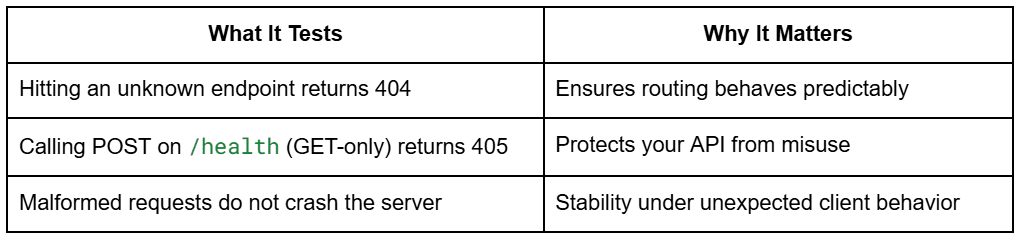
These tests ensure your service behaves consistently even when clients behave incorrectly.
How to Run Integration Tests with Pytest in MLOps
To run only the integration tests:
Using pytest directly
pytest tests/integration/ -v
With Poetry
poetry run pytest tests/integration/ -v
With Makefile
make test-integration
You will see output like:
tests/integration/test_api_routes.py::TestHealthEndpoint::test_health_check_returns_ok PASSED
tests/integration/test_api_routes.py::TestPredictEndpoint::test_predict_positive PASSED
tests/integration/test_api_routes.py::TestAPIDocumentation::test_swagger_ui_accessible PASSED
...
Green = your API works correctly end-to-end.
Performance and Load Testing with Locust
Performance testing is critical for ML systems because even a lightweight model can become slow, unstable, or unresponsive when many users hit the API at once. With Locust, you can simulate hundreds or thousands of concurrent users calling your ML inference endpoints and measure how your API behaves under pressure.
This section explains why load testing matters, how Locust works, how your actual test file is structured, and how to interpret its results.
Why Load Testing Is Essential for MLOps and ML APIs
ML inference services have unique scaling behaviors:
- Model loading requires significant memory.
- Inference latency grows non-linearly under load.
- CPU/GPU bottlenecks show up only when multiple users hit the system.
- Thread starvation can cause cascading failures.
- Autoscaling decisions depend on real-world load patterns.
A service that performs well for one user may fail miserably at 50 users.
Load testing ensures:
- The API stays responsive under traffic.
- Latency stays under acceptable thresholds.
- No unexpected failures or timeouts occur.
- You understand the system’s scaling limits before going to production.
Locust is perfect for this because it is lightweight, Python-based, and designed for web APIs.
Locust Load Testing Concepts: Users, Spawn Rate, and Tasks Explained
Locust simulates user behavior using simple Python classes.
Users
A “user” is an independent client that continuously makes requests to your API.
Example:
- 10 users = 10 active clients repeatedly calling
/predict.
Spawn rate
How quickly Locust ramps up users.
Example:
- spawn rate 2 = add 2 users per second until target is reached.
This helps simulate realistic traffic spikes instead of instantly launching all users.
Tasks
Each simulated user executes a set of tasks (e.g., repeatedly calling the /predict endpoint).
Every task can have a weight:
- Higher weight = more frequent calls.
This lets you mimic real user patterns like:
- 90% predict calls
- 10% health checks
Your project does exactly this.
Writing the locustfile.py
from locust import HttpUser, task, between

class MLAPIUser(HttpUser):
    """
    Locust user class for testing the ML API.

    Simulates a user making requests to the API endpoints.
    """

    # Wait between 1 and 3 seconds between requests
    wait_time = between(1, 3)

    @task(10)
    def test_predict(self):
        """
        Test the predict endpoint.

        This task has weight 10, making it the most frequently called.
        """
        payload = {"input": "The movie was good"}
        with self.client.post("/predict", params=payload, catch_response=True) as response:
            if response.status_code == 200:
                response_data = response.json()
                if "prediction" in response_data:
                    response.success()
                else:
                    response.failure(f"Missing prediction in response: {response_data}")
            else:
                response.failure(f"HTTP {response.status_code}")

    def on_start(self):
        """
        Called when a user starts testing.

        Used for setup tasks like authentication.
        """
        # Verify the API is reachable
        response = self.client.get("/health")
        if response.status_code != 200:
            print(f"Warning: API health check failed with status {response.status_code}")
What This Locust Load Test Validates in an MLOps API
- Creates a simulated user (
MLAPIUser) that calls/predict. - Gives the
/predicttask a weight of 10, making it the dominant request. - Sends realistic input (“The movie was good”).
- Validates:
- Response code is 200.
- JSON contains “prediction”.
- Marks failures explicitly for clean reporting.
- On startup, each user verifies that
/healthworks.
This matches your API perfectly:
/predictis POST with query parameterinput=.../healthis GET and returns status OK
Nothing needs to be changed; this is production-quality.
Running Locust: Headless Mode vs Web UI Dashboard
Locust supports two modes.
A. Web UI Mode (Interactive Dashboard)
Launch Locust:
locust -f tests/performance/locustfile.py --host=http://localhost:8000
Then open:
http://localhost:8089
You will see a dashboard where you can:
- Set number of users
- Set spawn rate
- Start/stop tests
- View real-time stats
B. Headless Mode (Automated CI/CD or scripting)
You already have a script:
software-engineering-mlops-lesson2/scripts/run_locust.sh
Run:
./scripts/run_locust.sh http://localhost:8000 10 2 5m
This executes:
- 10 users
- spawn rate 2 users per second
- run time 5 minutes
- save HTML report
No UI; perfect for pipelines.
Generating Locust Load Testing Reports for ML APIs
Your script uses:
--html="reports/locust_reports/locust_report_<timestamp>.html"
Which produces files like:
reports/locust_reports/locust_report_20251030_031331.html
Each report includes:
- Requests per second (RPS)
- Failure stats
- Full latency distribution
- Percentiles (50th, 95th, 99th)
- Charts of active users and response times
These HTML reports are great for:
- Comparing deployments
- Regression testing API performance
- Flagging slow model versions
- Archiving performance history
Everything is already correctly set up in your repo.
Understanding Test Metrics (RPS, failures, latency, P95/P99)
Locust gives several performance metrics you must understand for ML systems.
Requests per Second (RPS)
How many inference calls your API can handle per second.
- CPU-bound models lead to low RPS
- Simple models lead to high RPS
Increasing users will show where your model and server saturates.
Failures
Locust marks a request as failed when:
- Status code ≠ 200
- Response JSON does not contain
"prediction" - Timeout occurs
- Server returns an internal error
Your catch_response=True logic handles this explicitly.
This prevents “hidden” failures.
Latency (ms)
Response time per request, typically measured in milliseconds.
For ML, latency is the most important metric.
You will see:
- Average latency
- Median (P50)
- Slowest (max latency)
P95 / P99 (Tail Latency)
The 95th and 99th percentile response times.
These capture worst-case behavior.
Example:
- P50 = 40 ms
- P95 = 210 ms
- P99 = 540 ms
This means:
Most users see fast responses, but a small % experience major slowdowns.
This is common in ML workloads due to:
- Model warmup
- Thread contention
- Python GIL blockage
- Model cache misses
Production Service Level Objectives (SLOs) usually track P95 and P99, not averages.
MLOps Test Configuration: YAML and Environment Variables
ML systems behave differently across production, development, and testing environments.
Your Lesson 2 codebase separates these environments cleanly using:
- A test-specific YAML config
- A modified BaseSettings loader
.envoverrides for test mode
This ensures that tests run quickly, deterministically, and without polluting real environment settings.
Let’s break down how this works.
Understanding test_config.yaml for MLOps Testing
# Test Configuration
environment: "test"
log_level: "DEBUG"

# API Configuration
api_host: "127.0.0.1"
api_port: 8000
debug: true

# Performance Testing
performance:
  baseline_users: 10
  spawn_rate: 2
  test_duration: "5m"

# Model Configuration
model:
  name: "dummy_classifier"
  version: "1.0.0"
What test_config.yaml Controls in MLOps Pipelines
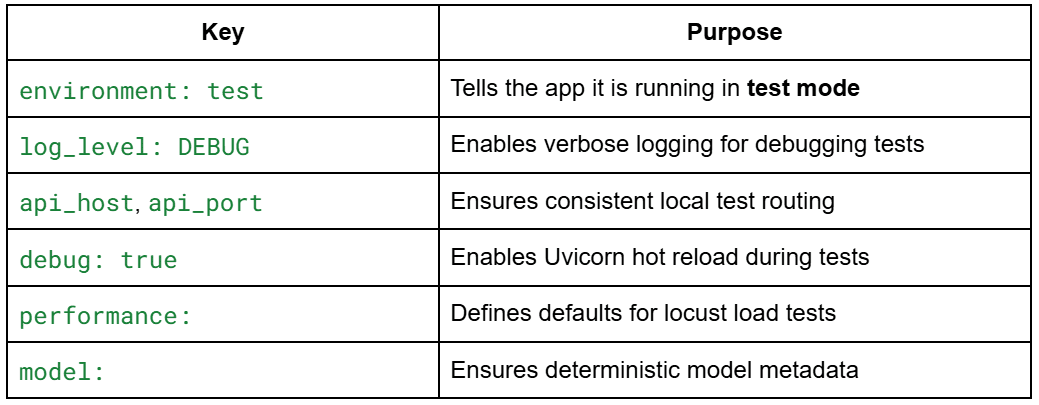
This config prevents tests from accidentally picking up production configs.
Overriding Application Configuration in Test Mode
Your test environment uses a special configuration loader inside:
core/config.py
Here is the real code:
def load_config() -> Settings:
    # Load base settings from environment
    settings = Settings()

    # Load additional configuration from YAML if it exists
    config_path = "configs/test_config.yaml"
    if os.path.exists(config_path):
        yaml_config = load_yaml_config(config_path)

        # Override settings with YAML values if they exist
        for key, value in yaml_config.items():
            if hasattr(settings, key):
                setattr(settings, key, value)

    return settings
How Configuration Overrides Work: YAML and Environment Variables
- Step 1:
BaseSettingsloads environment variables
(.env, operating system (OS) variables, defaults) - Step 2: YAML configuration overrides them
test_config.yamlreplaces any matching fields inSettings. - Final output:
The application is now in test mode, completely isolated from development and production environments.
Why Configuration Management Matters in MLOps Testing
- Integration tests always use the same port, host, and log settings.
- Tests are repeatable and deterministic.
- You never accidentally load production API keys or endpoints.
- CI/CD pipelines get consistent behavior.
This pattern is very common in real-world MLOps systems.
Using Environment Variables for Test Isolation
Your test environment uses a .env.example file:
# API Configuration
API_PORT=8000
API_HOST=0.0.0.0
DEBUG=true

# Environment
ENVIRONMENT=test

# Logging
LOG_LEVEL=DEBUG
During setup, users run:
cp .env.example .env
This creates the .env used during tests.
Why Test-Specific .env Variables Matter
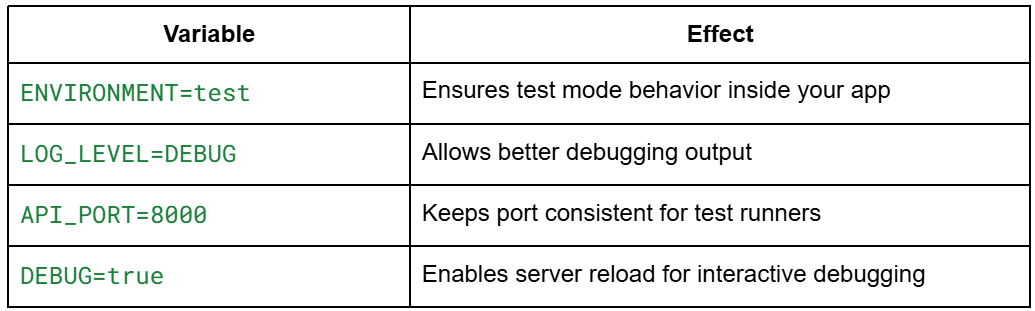
Combined with YAML Overrides
.env → applies defaults
test_config.yaml → overrides final values
This gives you a flexible and safe configuration stack.
Code Quality in MLOps: Linting, Formatting, and Static Analysis Tools
Testing ensures correctness, but code quality tools ensure that your ML system remains maintainable as it grows.
In Lesson 2, you introduce a full suite of professional-quality tooling:
flake8for lintingBlackfor auto-formattingisortfor import orderingMyPyfor static typingMakefilefor automation consistency
Together, they enforce the same engineering discipline used on real production ML teams at scale.
Linting Python Code with flake8
Linting catches code smells, stylistic issues, and subtle bugs before they hit production.
Your repository includes a real .flake8 file:
[flake8]
max-line-length = 88
extend-ignore = E203, W503
exclude =
    .git,
    __pycache__,
    .venv,
    venv,
    env,
    build,
    dist,
    *.egg-info,
    .pytest_cache,
    .mypy_cache
per-file-ignores =
    __init__.py:F401
max-complexity = 10
What your flake8 setup enforces
- 88-character line limit (matches Black)
- Ignores stylistic warnings that Black also overrides (E203, W503)
- Avoids checking generated or virtual-env directories
- Allows unused imports only in
__init__.pyfiles - Enforces a maximum complexity score of 10
Run flake8 manually
poetry run flake8 .
Or via Makefile
make lint
Linting becomes part of your day-to-day workflow and prevents style drift across your ML services.
Formatting Python Code with Black Pipelines
Black is an automatic code formatter; it rewrites Python code into a consistent style.
Your Lesson 2 pyproject.toml includes:
[tool.black]
line-length = 88
target-version = ['py39']
include = '\.pyi?$'
This means:
- All Python files (
.py) are formatted. - Max line length is 88 chars.
py39syntax is allowed.
Format all code:
poetry run black .
Or using the Makefile shortcut:
make format
Black removes tedious decisions about spacing, commas, and line breaks, ensuring all contributors share the same style.
Using isort to Manage Python Imports
isort automatically manages import sorting and grouping.
Your pyproject.toml contains:
[tool.isort]
profile = "black"
multi_line_output = 3
This aligns isort’s output with Black’s formatting rules, avoiding conflicts.
How to Run isort for Clean Python Imports
poetry run isort .
Or via Makefile:
make format
Why This Matters
As ML services grow, import lists become messy. isort keeps them clean and consistent, improving readability exponentially.
Static Type Checking with MyPy for MLOps Codebases
Static typing is increasingly important in MLOps systems, especially when passing models, configs, and data structures between services.
Your repo contains a full mypy.ini:
[mypy]
python_version = 3.9
warn_return_any = True
warn_unused_configs = True
disallow_untyped_defs = False
ignore_missing_imports = True

[mypy-tests.*]
disallow_untyped_defs = False

[mypy-locust.*]
ignore_missing_imports = True
What This Config Enforces
- Flags functions that return Any
- Warns about unused config options
- Does not require type hints everywhere (reasonable for ML codebases)
- Skips type-checking external packages (common in ML pipelines)
- Allows untyped defs in tests
Run MyPy
poetry run mypy .
Or via Makefile:
make type-check
Why MyPy Is Critical in ML Systems
- Prevents silent type errors (e.g., passing a list where a tensor is expected)
- Catches config mistakes before runtime
- Improves refactor safety for large ML codebases
Using a Makefile to Automate MLOps Testing and Code Quality
Your Makefile automates all key development tasks:
make test          # Run all tests
make test-unit     # Unit tests only
make test-integration
make format        # Black + isort
make lint          # flake8
make type-check    # mypy
make load-test     # Locust performance tests
make clean         # Reset environment
This ensures:
- Every developer uses the same commands
- CI/CD pipelines can call the same interface
- Tooling stays consistent across machines
Example workflow for contributors:
make format
make lint
make type-check
make test
If all commands pass, you know your code is clean, consistent, and ready for production.
Automating Testing with a Pytest Test Runner Script
As your ML system grows, running dozens of unit, integration, and performance tests manually becomes tedious and error-prone.
Lesson 2 includes a fully automated test runner (scripts/run_tests.sh) that enforces a predictable, repeatable workflow for your entire test suite.
This script acts like a miniature CI pipeline that you can run locally. It prints structured logs, enforces failure conditions, and ensures that no test is accidentally skipped.
Running Automated Tests with run_tests.sh
Your repository includes a fully functional test runner:
#!/bin/bash

# Test Runner Script for MLOps Lesson 2

set -e

echo "🧪 Running MLOps Lesson 2 Tests..."

# Colors for output
GREEN='\033[0;32m'
YELLOW='\033[1;33m'
RED='\033[0;31m'
NC='\033[0m'

print_status() {
    echo -e "${GREEN}✅ $1${NC}"
}

print_warning() {
    echo -e "${YELLOW}⚠️  $1${NC}"
}

print_error() {
    echo -e "${RED}❌ $1${NC}"
}

# Run unit tests
echo ""
echo "📝 Running unit tests..."
poetry run pytest tests/unit/ -v
if [ $? -eq 0 ]; then
    print_status "Unit tests passed"
else
    print_error "Unit tests failed"
    exit 1
fi

# Run integration tests
echo ""
echo "🔗 Running integration tests..."
poetry run pytest tests/integration/ -v
if [ $? -eq 0 ]; then
    print_status "Integration tests passed"
else
    print_error "Integration tests failed"
    exit 1
fi

echo ""
print_status "All tests completed successfully!"
How to Run It
./scripts/run_tests.sh
or, via Makefile:
make test
What It Does
- Runs unit tests
- Runs integration tests
- Stops immediately (set
-e) if anything fails - Prints colored output for clarity
- Provides a clear pass/fail summary
This mirrors real CI pipelines where a failing test stops deployment.
Understanding Pytest Output and Test Results
When you run the script, you will typically see output like this:
🧪 Running MLOps Lesson 2 Tests...

📝 Running unit tests...
============================= test session starts ==============================
collected 7 items

tests/unit/test_inference_service.py::TestInferenceService::test_predict_returns_string PASSED
tests/unit/test_inference_service.py::TestInferenceService::test_predict_positive_input PASSED
tests/unit/test_inference_service.py::TestInferenceService::test_predict_negative_input PASSED
tests/unit/test_inference_service.py::TestDummyModel::test_model_initialization PASSED
tests/unit/test_inference_service.py::TestDummyModel::test_predict_with_good_word PASSED
tests/unit/test_inference_service.py::TestDummyModel::test_predict_with_great_word PASSED
tests/unit/test_inference_service.py::TestDummyModel::test_predict_without_keywords PASSED

============================== 7 passed in 0.45s ===============================
✅ Unit tests passed
Then integration tests:
🔗 Running integration tests...

tests/integration/test_api_routes.py::TestHealthEndpoint::test_health_check_returns_ok PASSED
tests/integration/test_api_routes.py::TestPredictEndpoint::test_predict_positive PASSED
tests/integration/test_api_routes.py::TestAPIDocumentation::test_swagger_ui_accessible PASSED
tests/integration/test_api_routes.py::TestErrorHandling::test_nonexistent_endpoint_returns_404 PASSED

============================== 8 passed in 0.78s ===============================
✅ Integration tests passed
Finally:
✅ All tests completed successfully!
Why Automated Testing Workflows Matter in MLOps
- You see exactly which tests failed.
- You immediately know whether the API is healthy.
- You build the habit of treating tests as a gatekeeper before shipping ML code.
This is foundational MLOps workflow discipline.
Integrating Pytest into CI/CD Pipelines
Your test runner is already written as if it were part of CI.
Very soon, you will plug this into:
- GitHub Actions
- GitLab CI
- CircleCI
- AWS CodeBuild
- Azure DevOps
A typical GitHub Actions step would look like:
- name: Run Tests
  run: ./scripts/run_tests.sh
Since your script exits with non-zero status on failures, the CI job fails automatically.
What this enables in production ML workflows:
- No pull request gets merged unless tests pass
- Deployments are blocked if integration tests fail
- Load testing can be added as a gated step
- Test failures provide early feedback on regressions
- Teams enforce consistent standards across developers
You already have everything CI needs:
- A deterministic test runner
- A strict exit-on-fail system
- Separate unit and integration test layers
- Makefile wrappers for automation
- Poetry ensuring repeatable environments
Once you introduce CI/CD in later lessons, these scripts plug in seamlessly.
Automating Load Testing in MLOps with Locust Scripts
Performance testing becomes essential once an ML API starts supporting real traffic. You want confidence that your inference service will not collapse under load, that p95/p99 latencies remain acceptable, and that the system behaves predictably when scaling horizontally.
Manually running Locust is fine for experimentation, but production MLOps requires automated, repeatable load tests. Lesson 2 provides a dedicated script (run_locust.sh) which allows you to run performance tests in a single line and automatically generate HTML reports for analysis.
Running Automated Locust Load Tests with run_locust.sh
#!/bin/bash

# Simple Locust Load Testing Script for MLOps Lesson 2

set -e

echo "🚀 Starting Locust Load Testing..."

# Configuration
HOST=${1:-"http://localhost:8000"}
USERS=${2:-10}
SPAWN_RATE=${3:-2}
RUN_TIME=${4:-"5m"}

echo "🔧 Configuration: $USERS users, spawn rate $SPAWN_RATE, run time $RUN_TIME"

# Create reports directory
mkdir -p reports/locust_reports

# Check if the API is running
echo "🏥 Checking if API is running..."
if ! curl -s "$HOST/health" > /dev/null; then
    echo "❌ API is not reachable at $HOST"
    echo "Please start the API server first with: python main.py"
    exit 1
fi

echo "✅ API is reachable"

# Run Locust load test
echo "🧪 Starting load test..."

TIMESTAMP=$(date +"%Y%m%d_%H%M%S")
HTML_REPORT="reports/locust_reports/locust_report_$TIMESTAMP.html"

poetry run locust \
    -f tests/performance/locustfile.py \
    --host="$HOST" \
    --users="$USERS" \
    --spawn-rate="$SPAWN_RATE" \
    --run-time="$RUN_TIME" \
    --html="$HTML_REPORT" \
    --headless

echo "✅ Load test completed!"
echo "📊 Report: $HTML_REPORT"
How to Run It
Basic load test:
./scripts/run_locust.sh
10 users, spawn rate 2 users/sec, run for 5 minutes.
Custom parameters:
./scripts/run_locust.sh http://localhost:8000 30 5 2m
This means:
- 30 users total
- 5 users per second spawn rate
- 2-minute runtime
- Tests
/predictendpoint repeatedly (because oflocustfile.py)
What This Script Automates
- API health check before running
- Creates timestamped report directories
- Runs Locust in headless mode
- Stores HTML reports for analysis
- Fails gracefully when API is unreachable
This gives you a push-button reproducible performance test, a key requirement in professional MLOps.
Automatically Generating Load Testing Reports for ML APIs
Every run creates a unique HTML report:
reports/locust_reports/
    locust_report_20251203_031331.html
    locust_report_20251203_041215.html
    ...
This file includes:
- Requests per second (RPS)
- Response time percentiles (
p50,p90,p95,p99) - Failure rates
- Total requests
- Charts for concurrency vs performance
- Per-endpoint performance metrics
You can open the report in your browser:
open reports/locust_reports/locust_report_20251203_031331.html
(Windows)
start reports\locust_reports\locust_report_XXXX.html
Why This Is Important
Performance regressions are one of the most common ML service failures:
- model upgrades slow down inference unintentionally
- logging overhead increases latency
- new preprocessing increases CPU usage
- hardware changes alter throughput
By keeping each test run stored, you can compare historical performance.
This is the foundation of automatic performance regression detection.
Preparing Load Testing for CI/CD and Cloud MLOps Pipelines
Your load testing script is already CI-ready.
Here is how it fits into a production MLOps pipeline.
Option 1 — GitHub Actions
- name: Run Load Tests
  run: ./scripts/run_locust.sh http://localhost:8000 20 5 1m
Since the script exits non-zero on error, it becomes a gated step:
- Deployment is blocked if the API cannot sustain the expected load.
- Only performant builds reach production.
Option 2 — Nightly Performance Jobs
Teams often run Locust nightly to catch degradations early:
baseline: 20 users- alert if
p95> 300 ms - alert if failures > 1%
Reports are archived automatically via your script.
Option 3 — Cloud Load Testing (AWS/GCP/Azure)
Your script can run inside:
- AWS CodeBuild
- Azure Pipelines
- Google CloudBuild
Simply modify the host:
./scripts/run_locust.sh https://staging.mycompany.com/api 50 10 10m
Why CI Load Tests Matter
- Prevents slow releases from being deployed
- Ensures model swaps do not tank performance
- Protects SLAs (Service Level Agreements)
- Helps capacity planning and autoscaling decisions
- Detects bottlenecks before customers do
Your repository already contains everything needed to industrialize performance testing.
Test Coverage in MLOps: Measuring and Improving Code Coverage
Even with strong unit, integration, and performance testing, you still need a way to quantify how much of your codebase is actually exercised. This is where test coverage comes in. Coverage tools show you which lines are tested, which are skipped, and where hidden bugs may still be lurking. This is especially important in ML systems, where subtle code paths (error handling, preprocessing, retry logic) can easily be missed.
Your Lesson 2 environment includes pytest-cov, allowing you to generate detailed coverage reports in a single command.
Using pytest-cov to Measure Test Coverage
Coverage is enabled simply by adding --cov flags to pytest.
Basic usage:
pytest --cov=.
Your repo’s pyproject.toml installs pytest-cov automatically under [tool.poetry.group.dev.dependencies], so coverage works out of the box.
A more detailed command:
pytest --cov=. --cov-report=term-missing
This reports:
- total coverage percentage
- which lines were executed
- which lines were missed
- hints for improving coverage
Example output you might see:
---------- coverage: platform linux, python 3.9 ----------
Name                                Stmts   Miss  Cover
--------------------------------------------------------
services/inference_service.py          22      0   100%
models/dummy_model.py                  16      0   100%
core/config.py                         40      8    80%
core/logger.py                         15      0   100%
tests/unit/test_inference_service.py   28      0   100%
--------------------------------------------------------
TOTAL                                 121      8    93%
This gives immediate visibility into which modules need more test attention.
How to Measure Code Coverage in MLOps Projects
To formally measure coverage for Lesson 2, run:
pytest -v --cov=. --cov-report=html
This generates a full HTML report inside:
htmlcov/index.html
Open it in your browser:
open htmlcov/index.html
(Windows)
start htmlcov\index.html
The HTML report visualizes:
- executed vs missed lines
- branch coverage
- per-module summaries
- clickable source code with line highlighting
This is the gold standard report format used in industry pipelines.
Integrating Coverage into Your Workflow
Your Makefile could easily support it:
make coverage
But even without that, pytest-cov gives you everything you need to evaluate test completeness.
How to Increase Test Coverage in MLOps Pipelines
ML systems often have unusual testing challenges:
- multiple code paths depending on data
- dynamic model loading
- error cases that only appear in production
- preprocessing/postprocessing steps
- branching logic based on config values
- retry and timeout logic
- logging behavior that might hide bugs
To increase coverage meaningfully:
1. Test failure modes
Example: model not loaded, invalid input, exceptions in service layer.
2. Test alternative branches
For example., your dummy model has:
if "good" in text or "great" in text:
    return "positive"
return "negative"
Coverage increases when you test:
- positive branch
- fallback branch
- edge cases like empty strings
3. Test configuration-dependent behavior
Since your system loads from:
.env- YAML
- runtime values
Try testing scenarios where each layer overrides the next.
4. Test logging paths
Logging is crucial in MLOps, and ensuring logs appear where expected also contributes to coverage.
5. Test the API under different payloads
Missing parameters, malformed types, unexpected values.
6. Test integration between modules
Even simple ML systems can break across module boundaries, so testing interactions raises coverage dramatically.
Recommended Test Coverage Targets for MLOps Systems
High coverage is good, but perfection is unrealistic and unnecessary.
Here are industry-grade ML-specific targets:
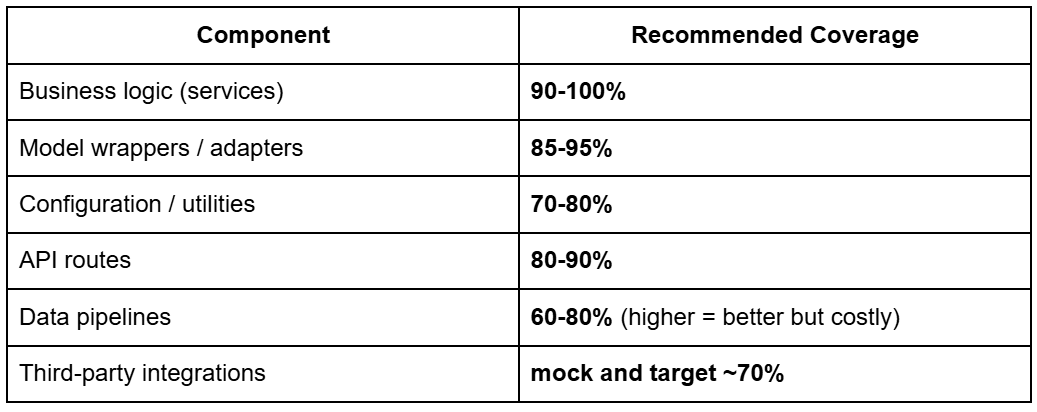
Why You Do Not Aim for 100%
- ML models are often treated as black boxes
- Some branches (especially failure conditions) are difficult to simulate
- Performance code paths are not always practical to test
A strong MLOps system targets:
Overall coverage: 80-90%
This ensures the most important logic is covered while avoiding diminishing returns.
Critical paths: 100%
Inference, preprocessing, conversion, routing, safety checks.
Performance-sensitive code: covered via load tests
This is why Locust complements pytest rather than replacing it.
What's next? We recommend PyImageSearch University.

120+ total classes • 115+ hours of on-demand code walkthrough videos • Last updated: October 2026
★★★★★ 4.84 (128 Ratings) • 16,000+ Students Enrolled
I strongly believe that if you had the right teacher you could master computer vision and deep learning.
Do you think learning computer vision and deep learning has to be time-consuming, overwhelming, and complicated? Or has to involve complex mathematics and equations? Or requires a degree in computer science?
That’s not the case.
All you need to master computer vision and deep learning is for someone to explain things to you in simple, intuitive terms. And that’s exactly what I do. My mission is to change education and how complex Artificial Intelligence topics are taught.
If you're serious about learning computer vision, your next stop should be PyImageSearch University, the most comprehensive computer vision, deep learning, and OpenCV course online today. Here you’ll learn how to successfully and confidently apply computer vision to your work, research, and projects. Join me in computer vision mastery.
Inside PyImageSearch University you'll find:
- ✓ 120+ courses on essential computer vision, deep learning, and OpenCV topics
- ✓ 94+ Certificates of Completion
- ✓ 115+ hours of on-demand video
- ✓ Brand new courses released regularly, ensuring you can keep up with state-of-the-art techniques
- ✓ Pre-configured Jupyter Notebooks in Google Colab
- ✓ Run all code examples in your web browser — works on Windows, macOS, and Linux (no dev environment configuration required!)
- ✓ Access to centralized code repos for all 540+ tutorials on PyImageSearch
- ✓ Easy one-click downloads for code, datasets, pre-trained models, etc.
- ✓ Access on mobile, laptop, desktop, etc.
Summary
In this lesson, you learned how to make ML systems safe, correct, and production-ready through a full testing and validation workflow. You started by understanding why ML services need far more than “just unit tests,” and how a layered approach (unit, integration, and performance tests) creates confidence in both the code and the behavior of the system. You then explored a real test layout with dedicated folders, fixtures, and isolation, and saw how each type of test validates a different piece of the pipeline.
From there, you implemented unit tests for the inference service and dummy model, followed by integration tests that exercise real FastAPI endpoints, documentation routes, and error handling. You also learned how to perform load testing with Locust, simulate concurrent users, generate performance reports, and interpret latency and failure metrics. This is an essential skill for production ML APIs.
Finally, you covered the tools that keep an ML codebase clean and maintainable: linting, formatting, static typing, and the Makefile commands that tie everything together. You closed with automated test runners, load-test scripts, and coverage reporting, giving you an end-to-end workflow that mirrors real MLOps engineering practice.
By now, you have seen how professional ML systems are tested, validated, measured, and maintained. This sets you up for the next module, where we will begin building data pipelines and reproducible ML workflows.
Citation Information
Singh, V. “Pytest Tutorial: MLOps Testing, Fixtures, and Locust Load Testing,” PyImageSearch, S. Huot, A. Sharma, and P. Thakur, eds., 2026, https://pyimg.co/4ztdu
@incollection{Singh_2026_pytest-tutorial-mlops-testing-fixtures-locust-load-testing,
  author = {Vikram Singh},
  title = {{Pytest Tutorial: MLOps Testing, Fixtures, and Locust Load Testing}},
  booktitle = {PyImageSearch},
  editor = {Susan Huot and Aditya Sharma and Piyush Thakur},
  year = {2026},
  url = {https://pyimg.co/4ztdu},
}
To download the source code to this post (and be notified when future tutorials are published here on PyImageSearch), simply enter your email address in the form below!

Download the Source Code and FREE 17-page Resource Guide
Enter your email address below to get a .zip of the code and a FREE 17-page Resource Guide on Computer Vision, OpenCV, and Deep Learning. Inside you'll find my hand-picked tutorials, books, courses, and libraries to help you master CV and DL!



Comment section
Hey, Adrian Rosebrock here, author and creator of PyImageSearch. While I love hearing from readers, a couple years ago I made the tough decision to no longer offer 1:1 help over blog post comments.
At the time I was receiving 200+ emails per day and another 100+ blog post comments. I simply did not have the time to moderate and respond to them all, and the sheer volume of requests was taking a toll on me.
Instead, my goal is to do the most good for the computer vision, deep learning, and OpenCV community at large by focusing my time on authoring high-quality blog posts, tutorials, and books/courses.
If you need help learning computer vision and deep learning, I suggest you refer to my full catalog of books and courses — they have helped tens of thousands of developers, students, and researchers just like yourself learn Computer Vision, Deep Learning, and OpenCV.
Click here to browse my full catalog.