The commoditization of Optical Character Recognition (OCR) has historically been a race to the bottom on price, often at the expense of structural fidelity. However, the release of Mistral OCR 3 signals a distinct shift in the market. By claiming state-of-the-art accuracy on complex tables and handwriting—while undercutting AWS Textract and Google Document AI by significant margins—Mistral is positioning its proprietary model not just as a cheaper alternative, but as a technically superior parsing engine for RAG (Retrieval-Augmented Generation) pipelines.
This technical analysis dissects the architecture, benchmark performance against hyperscalers, and the operational realities of deploying Mistral OCR 3 in production environments.
The Innovation: Structure-Aware Architecture
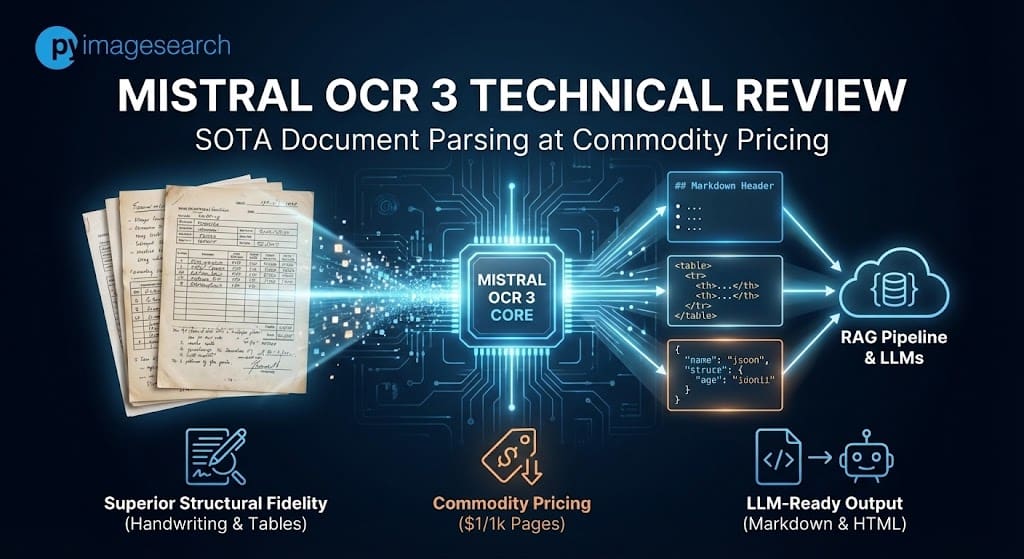
Mistral OCR 3 is a proprietary, efficient model optimized specifically for converting document layouts into LLM-ready Markdown and HTML. Unlike general multimodal LLMs, it focuses on structure preservation—specifically specifically table reconstruction and dense form parsing—available via the mistral-ocr-2512 endpoint.
While traditional OCR engines (like Tesseract or early AWS Textract iterations) focused primarily on bounding box coordinates and raw text extraction, Mistral OCR 3 is architected to solve the “structure loss” problem that plagues modern RAG pipelines.
The model is described as “much smaller than most competitive solutions” [1], yet it outperforms larger vision-language models in specific density tasks. Its primary innovation lies in its output modality: rather than returning a JSON of coordinates (which requires post-processing to reconstruct), Mistral OCR 3 outputs Markdown enriched with HTML-based table reconstruction [1].
This implies the model is trained to recognize document semantics—identifying that a grid of numbers is a <table> with specific colspan and rowspan attributes—rather than just recognized isolated characters. This allows downstream agents to ingest document structure natively without complex heuristic parsers.
Benchmark Showdown: Mistral vs. The Hyperscalers
Internal benchmarks indicate Mistral OCR 3 holds a double-digit accuracy lead over Azure AI and AWS Textract in handwriting and complex table extraction. It achieves an 88.9% accuracy rate on handwriting compared to Azure’s 78.2%, and 96.6% on tables versus Textract’s 84.8%.
We examined the comparative data provided in Mistral’s technical release. The following tables illustrate the performance delta against incumbents Azure Document Intelligence (formerly Form Recognizer), AWS Textract, Google Document AI, and the newcomer DeepSeek OCR.
 Figure 1: Multilingual performance comparison showing Mistral OCR 3’s lead over DeepSeek and Textract.
Segment 1: The “Messy Data” Test (Handwriting & Scans)
Handwriting recognition has long been the bottleneck for digitizing archival records. Mistral OCR 3 shows a significant divergence from the competition here.
| Metric | Mistral OCR 3 | Azure Doc Intelligence | DeepSeek OCR | Google DocAI |
|---|---|---|---|---|
| Handwritten Accuracy | 88.9 | 78.2 | 57.2 | 73.9 |
| Historical Scanned Accuracy | 96.7 | 83.7 | 81.1 | 87.1 |
Note: The 57.2 score for DeepSeek highlights that general-purpose open-weights models still struggle with cursive variance compared to specialized proprietary endpoints.
Segment 2: Structural Integrity (Tables & Forms)
For financial analysis and RAG, table fidelity is binary: it is either usable or it is not. Mistral OCR 3 demonstrates superior detection of merged cells and headers.
| Metric | Mistral OCR 3 | AWS Textract | Azure Doc Intelligence |
|---|---|---|---|
| Complex Tables Accuracy | 96.6 | 84.8 | 85.9 |
| Forms Accuracy | 95.9 | 84.5 | 86.2 |
| Multilingual (English) | 98.6 | 93.9 | 93.5 |
 Figure 2: Comparative accuracy across document tasks. Note the significant delta in “Complex Tables” and “Handwritten” categories.
Balanced Critique: Edge Cases and Failure Modes
Despite high aggregate scores, early adopters report inconsistency in complex multi-column layouts and image format sensitivity. While it excels at logical structure, developers should be aware of specific quirks regarding PDF vs. JPEG input handling.
At PyImageSearch, we emphasize that benchmark scores rarely tell the whole story. Analysis of early adopter feedback and community testing reveals specific constraints:
- Format Sensitivity (PDF vs. Image): Developers have noted a “JPEG vs. PDF” inconsistency. In some instances, converting a PDF page to a high-resolution JPEG before submission yielded better table extraction results than submitting the raw PDF. This suggests the pre-processing pipeline for PDF rasterization within the API may introduce noise.
- Multi-Column Hallucinations: While table extraction is state-of-the-art, “complex multi-column layouts” (such as magazine-style formatting with irregular text flows) remain a challenge. The model occasionally attempts to force a table structure onto non-tabular columnar text.
- The “Black Box” Limitation: Unlike open-weight alternatives, this is a strictly SaaS offering. You cannot fine-tune this model on niche proprietary datasets (e.g., specific medical forms) as you could with a local Vision Transformer.
- Production Supervision: Despite a 74% win rate over version 2, enterprise users caution that “clean” structure outputs can sometimes mask OCR hallucination errors. High-fidelity Markdown looks correct to a human eye even if specific digits are flipped, necessitating Human-in-the-Loop (HITL) verification for financial data.
Pricing & Deployment Specs
Mistral OCR 3 aggressively disrupts the market with a Batch API price of $1 per 1,000 pages, undercutting legacy providers by up to 97%. It is a purely SaaS-based model, eliminating local VRAM requirements but introducing data privacy considerations for regulated industries.
The economic argument for Mistral OCR 3 is as strong as the technical one. For high-volume archival digitization, the cost difference is non-trivial.
| Feature | Spec / Cost |
|---|---|
| Model ID | mistral-ocr-2512 |
| Standard API Price | $2 per 1,000 pages [1] |
| Batch API Price | $1 per 1,000 pages (50% discount) [1] |
| Hardware Requirements | None (SaaS). Accessible via API or Document AI Playground. |
| Output Format | Markdown, Structured JSON, HTML (for tables) |
 Figure 3: Improvement rates: Mistral OCR 3 boasts a 74% overall win rate against its predecessor, v2.
The Batch API pricing is particularly notable for developers migrating from AWS Textract, where complex table and form extraction can cost significantly more per page depending on the region and feature flags used.
FAQ: Mistral OCR 3
How does Mistral OCR 3 pricing compare to AWS Textract and Google Document AI? Mistral OCR 3 costs $1 per 1,000 pages via the Batch API [1]. In comparison, AWS Textract and Google Document AI can cost between $1.50 and $15.00 per 1,000 pages depending on advanced features (like Tables or Forms), making Mistral significantly more cost-effective for high-volume processing.
Can Mistral OCR 3 recognize cursive and messy handwriting? Yes. Benchmarks show it achieves 88.9% accuracy on handwriting, outperforming Azure (78.2%) and DeepSeek (57.2%). Community tests, such as the “Santa Letter” demo, confirmed its ability to parse messy cursive.
What are the differences between Mistral OCR 3 and Pixtral Large? Mistral OCR 3 is a specialized model optimized for document parsing, table reconstruction, and markdown output [1]. Pixtral Large is a general-purpose multimodal LLM. OCR 3 is smaller, faster, and cheaper for dedicated document tasks.
How to use the Mistral OCR 3 Batch API for lower costs? Developers can specify the batch processing endpoint when making API requests. This processes documents asynchronously (ideal for archival backlogs) and applies a 50% discount, bringing the cost to $1/1k pages [1].
Is Mistral OCR 3 available as an open-weight model? No. Currently, Mistral OCR 3 is a proprietary model available only via the Mistral API and the Document AI Playground.

Comment section
Hey, Adrian Rosebrock here, author and creator of PyImageSearch. While I love hearing from readers, a couple years ago I made the tough decision to no longer offer 1:1 help over blog post comments.
At the time I was receiving 200+ emails per day and another 100+ blog post comments. I simply did not have the time to moderate and respond to them all, and the sheer volume of requests was taking a toll on me.
Instead, my goal is to do the most good for the computer vision, deep learning, and OpenCV community at large by focusing my time on authoring high-quality blog posts, tutorials, and books/courses.
If you need help learning computer vision and deep learning, I suggest you refer to my full catalog of books and courses — they have helped tens of thousands of developers, students, and researchers just like yourself learn Computer Vision, Deep Learning, and OpenCV.
Click here to browse my full catalog.