Table of Contents
- Semantic Caching for LLMs: FastAPI, Redis, and Embeddings
- Introduction: Why Semantic Caching Matters for LLM Systems
- How Semantic Caching Works for LLMs: Embeddings and Similarity Search Explained
- Semantic Caching Architecture and Request Flow
- Configuring Your Environment for Semantic Caching: FastAPI, Redis, and Ollama Setup
- Project Structure
- FastAPI Entry Point for Semantic Caching: Wiring the API Service
- FastAPI Ask Endpoint: End-to-End Semantic Caching Request Flow
- Embeddings: Turning Text into Semantic Vectors
- The Semantic Cache: Cosine Similarity, Redis Storage, and Reusing Meaning
- Cache Entries: What Exactly Gets Stored?
- End-to-End Demo: Verifying Core Cache Behavior
- Summary
Semantic Caching for LLMs: FastAPI, Redis, and Embeddings
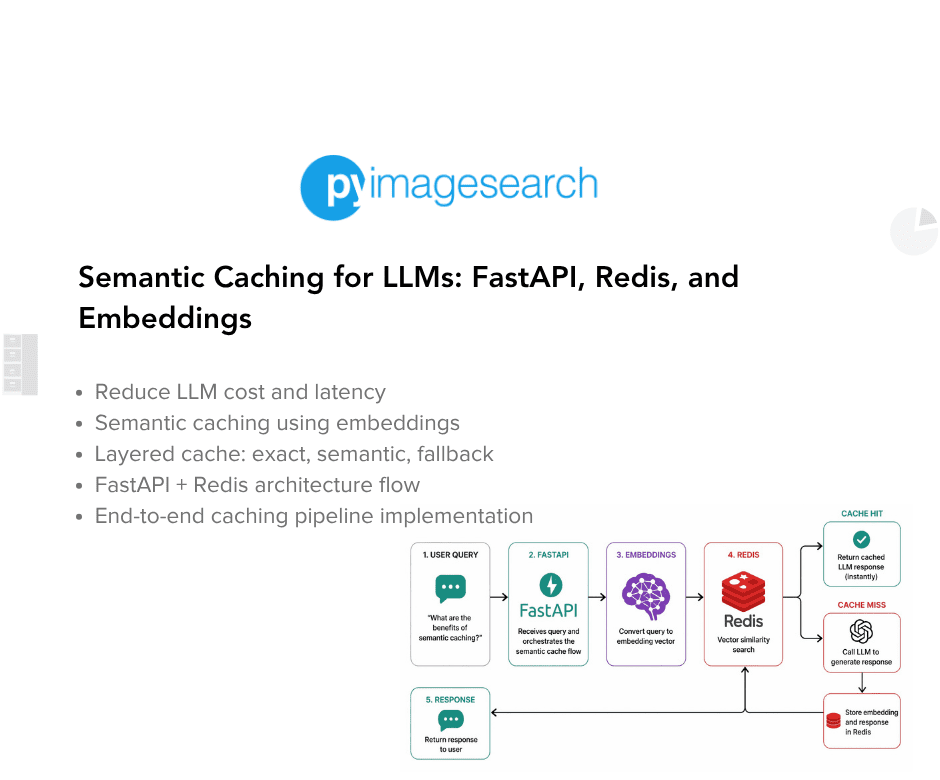
In this lesson, you will learn how to build a semantic cache for LLM applications using FastAPI, Redis, and embedding-based similarity search, and how requests flow from exact matches to semantic matches before falling back to the LLM.
This lesson is the 1st in a 2-part series on Semantic Caching for LLMs:
- Semantic Caching for LLMs: FastAPI, Redis, and Embeddings (this tutorial)
- Lesson 2
To learn how to build a semantic cache for LLM applications using embeddings and Redis, just keep reading.

Introduction: Why Semantic Caching Matters for LLM Systems
Cost, Latency, and Redundant LLM Calls
Large language models are powerful, but they are not cheap. Every request to an LLM involves tokenization, inference, decoding, and network overhead. Even when models are hosted locally, response times are measured in hundreds of milliseconds or seconds rather than microseconds.
In real applications, this cost compounds quickly. Users often ask similar questions repeatedly, either across sessions or within the same workflow. Each request is treated as a fresh LLM invocation, even when the underlying intent has already been handled before.
This leads to 3 systemic problems:
- High latency: Users wait for responses that could have been reused instantly
- Increased cost: Identical reasoning is paid for multiple times
- Wasted capacity: LLM throughput is consumed by redundant requests
These issues become especially visible under load, where repeated paraphrased queries can overwhelm an otherwise well-sized system.
Why Exact-Match Caching Breaks Down for Natural Language
Traditional caching assumes that identical inputs produce identical outputs. This works well for APIs, database queries, and deterministic functions. It fails for natural language.
From a string-matching perspective, the following queries are completely unrelated:
- “What is semantic caching?”
- “Can you explain how semantic caching works?”
- “How does caching based on embeddings work for LLMs?”
A traditional cache keyed on raw strings will miss all three. As a result, the system calls the LLM three times, even though a human would expect the same answer.
This brittleness causes exact-match caches to have extremely low hit rates in LLM-backed systems. Worse, it gives a false sense of optimization. The cache exists, but it almost never helps in practice.
Where Semantic Caching Fits in Real Systems
Semantic caching addresses this mismatch by caching meaning instead of exact text.
Rather than asking “have I seen this string before?”, a semantic cache asks “have I answered something semantically similar before?”. It does this by converting queries into embeddings and comparing them using a similarity metric such as cosine similarity.
In a real system, semantic caching sits between the application layer and the LLM:
- The application sends a query
- The cache evaluates whether a prior response is reusable
- Only true cache misses reach the LLM
When designed correctly, this layer is invisible to the user. Responses feel faster, costs drop, and the system scales more gracefully without changing the frontend or prompt logic.
This lesson focuses on building that layer explicitly and transparently, using FastAPI, Redis, and embeddings, without hiding the mechanics behind heavy abstractions.
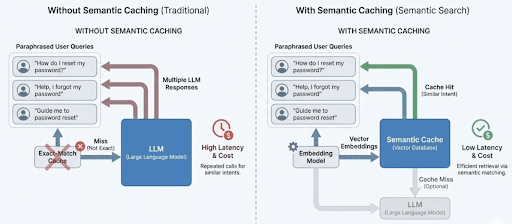
Exact-match caching treats paraphrased queries as unique requests, resulting in repeated LLM calls. Semantic caching groups similar queries by meaning, allowing responses to be reused and reducing both latency and cost.
How Semantic Caching Works for LLMs: Embeddings and Similarity Search Explained
Section 1 explained why semantic caching exists.
This section explains how it works, conceptually, before we touch any FastAPI, Redis, or code.
The goal here is to give the reader a mental execution model they can keep in their head while reading the implementation.
From Text to Meaning: Embeddings as the Cache Key
Semantic caching replaces raw text comparison with vector similarity.
Instead of caching responses under the literal query string, the system converts each query into an embedding: a high-dimensional numeric vector that captures semantic meaning. Queries that are worded differently but mean the same thing produce embeddings that are close together in vector space.
This is what allows the cache to recognize paraphrases as equivalent:
- “How do I reset my password?”
- “I forgot my password, what should I do?”
- “Guide me through password recovery”
Exact strings differ. Embeddings do not.
At a high level, semantic caching works by:
- Generating an embedding for the incoming query
- Comparing it against embeddings stored in the cache
- Reusing a cached response if similarity is high enough
The similarity metric used in this lesson is cosine similarity, which measures the angle between two vectors rather than their raw magnitude.
Why a Layered Cache Beats Semantic-Only Caching
While semantic matching is powerful, it is also computationally expensive.
Embedding generation requires a model call. Similarity search requires vector math. Doing this for every request, even when the exact same query has already been seen, would be wasteful.
That is why this lesson uses a layered caching strategy.
Layer 1: Exact Match (Fast Path)
The query is normalized and hashed.
If the same query has already been answered, the response is returned immediately.
- No embedding generation
- No similarity computation
- Minimal latency
This handles repeated identical queries efficiently.
Layer 2: Semantic Match (Flexible Path)
If no exact match exists, the query is embedded and compared against cached embeddings.
This layer catches:
- paraphrases
- minor wording differences
- reordered phrases
Semantic matches trade compute cost for much higher cache hit rates.
Layer 3: LLM Fallback (Slow Path)
If neither exact nor semantic matches succeed, the request is forwarded to the LLM.
The response is then stored in the cache so future requests can reuse it.
This layered approach ensures:
- the cheapest checks happen first
- expensive operations are only used when necessary
Confidence, Freshness, and Cache Safety
Semantic similarity alone is not enough to decide whether a cached response should be reused.
This lesson introduces the idea of confidence scoring, which combines:
- Similarity: how close the embeddings are
- Freshness: how old the cached entry is
A highly similar but stale response should not necessarily be trusted. Likewise, a fresh response with low similarity should be rejected.
In addition, cached entries are validated to prevent:
- expired responses
- poisoned entries (errors, empty outputs)
These checks ensure the cache improves correctness and performance rather than degrading them.
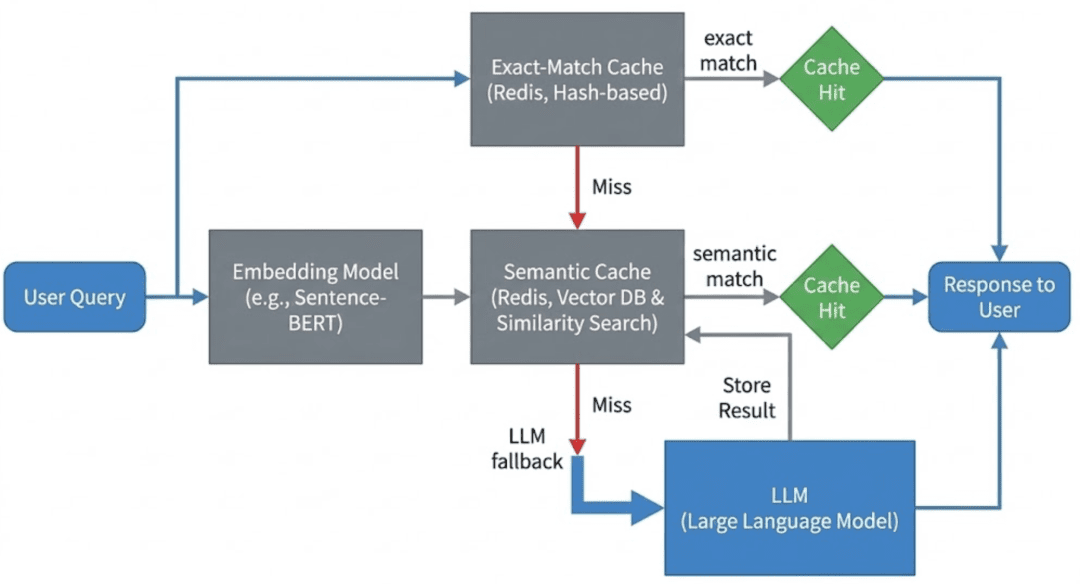
Incoming queries first attempt an exact-match lookup, then fall back to semantic similarity search using embeddings, and finally call the LLM only on cache miss. This ordering minimizes latency and unnecessary model calls.
Note: In this lesson, we implement this flow using Redis as a simple embedding store with linear similarity scans, rather than a dedicated vector database.
Semantic Caching Architecture and Request Flow
In Section 2, you learned how semantic caching works conceptually.
In this section, we map that mental model to a real request flow in an LLM-backed service.
The goal is to answer one question clearly:
What happens, step by step, when a user sends a request to this system?
We will stay implementation-aware, but not code-specific yet. That comes next.
High-Level System Components
At a high level, the system consists of 5 logical components:
- API layer: Receives user requests and orchestrates the caching pipeline.
- Exact-match cache: Performs fast hash-based lookups for identical queries.
- Embedding model: Converts text queries into semantic vectors when needed.
- Semantic cache: Stores embeddings and responses and performs similarity matching.
- LLM: Acts as the final fallback when no cache entry is suitable.
Each component has a narrowly defined responsibility. This separation is intentional and keeps the system easy to reason about and extend.
In this implementation:
- The API layer is built using FastAPI and acts as the orchestration point.
- Redis is used as the backing store for both exact-match and semantic cache layers.
- Ollama provides both embedding generation and LLM inference locally.
These choices keep the system lightweight, self-contained, and easy to reason about while still reflecting real production patterns.
End-to-End Request Flow
When a user sends a query, the system processes it in the following order.
Step 1: Request enters the API
The API receives a text query along with optional flags, such as whether to use the bypass_cache. Input validation happens immediately to prevent meaningless or malformed queries from entering the pipeline.
This ensures the cache is not polluted with empty or invalid entries.
Step 2: Exact-match cache lookup
The query is normalized and hashed.
The system checks whether an identical query has already been answered.
- If an exact match exists and is valid, the response is returned immediately.
- No embeddings are generated.
- The LLM is not touched.
This is the fastest possible path through the system.
Step 3: Embedding generation
If the exact-match lookup fails, the query is passed to the embedding model.
The model converts the text into a numeric vector that captures semantic meaning. This vector becomes the key for semantic comparison.
This step is intentionally skipped when an exact match succeeds.
Step 4: Semantic cache lookup
The embedding is compared against cached embeddings using a similarity metric.
A cached response is reused only if:
similarityexceeds a defined threshold- the entry has not expired
- the entry is not poisoned
- the computed
confidenceis high enough
If a suitable match is found, the response is returned to the user without calling the LLM.
Step 5: LLM fallback and cache population
If both cache layers miss, the request is forwarded to the LLM.
Once a response is generated:
- it is returned to the user
- it is stored in the cache with metadata, timestamps, and TTL (Time To Live)
This ensures future requests can reuse the result.
Why This Architecture Works Well
This architecture is intentionally conservative and explicit.
- Cheap operations happen first.
- Expensive operations are deferred.
- Every step is observable and debuggable.
- No component hides complexity behind opaque abstractions.
Most importantly, the system degrades gracefully. Even when the cache provides no benefit, the request still succeeds via the LLM.
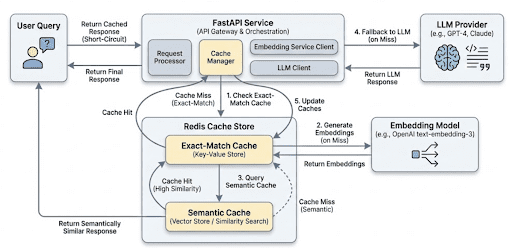
User queries enter the API, attempt an exact-match lookup, fall back to semantic similarity search using embeddings, and call the LLM only when both cache layers miss. Successful LLM responses are stored for future reuse.
Would you like immediate access to 3,457 images curated and labeled with hand gestures to train, explore, and experiment with … for free? Head over to Roboflow and get a free account to grab these hand gesture images.
Configuring Your Environment for Semantic Caching: FastAPI, Redis, and Ollama Setup
To follow this guide, you need a small set of Python libraries and system services that support API orchestration, vector similarity, and LLM interaction. The goal is to keep the environment lightweight, reproducible, and easy to reason about.
At a minimum, you will need:
- Python 3.10 or newer
- Redis (used as the cache backing store)
- An LLM + embedding provider (Ollama in this tutorial)
All required Python dependencies are pip-installable.
Installing Python Dependencies
Create and activate a virtual environment (recommended), then install the required packages:
$ pip install fastapi uvicorn redis httpx python-dotenv numpy
These libraries provide the following functionality:
fastapi: API layer and request orchestrationuvicorn: ASGI server for running the serviceredis: client Communication with the cache storehttpx: HTTP client for embedding and LLM callsnumpy: Vector math for cosine similaritypython-dotenv: Environment-based configuration
Verifying Redis
This lesson assumes Redis is running locally on the default port.
You can verify Redis is available with:
$ redis-cli ping
PONG
If Redis is not installed, you can start it quickly using Docker (but you also can spin it up using the docker-compose.yml we provide in the code zip):
$ docker run -p 6379:6379 redis:7
Setting Up Ollama
This system uses Ollama for both embedding generation and LLM inference. Make sure Ollama is installed and running, and that the required models are available.
For example:
$ ollama pull nomic-embed-text
$ ollama pull llama3.2
Once running, Ollama exposes local HTTP endpoints that the application will call directly for embeddings and text generation.
Need Help Configuring Your Development Environment?

All that said, are you:
- Short on time?
- Learning on your employer’s administratively locked system?
- Wanting to skip the hassle of fighting with the command line, package managers, and virtual environments?
- Ready to run the code immediately on your Windows, macOS, or Linux system?
Then join PyImageSearch University today!
Gain access to Jupyter Notebooks for this tutorial and other PyImageSearch guides pre-configured to run on Google Colab’s ecosystem right in your web browser! No installation required.
And best of all, these Jupyter Notebooks will run on Windows, macOS, and Linux!
Project Structure
Before diving into individual components, let’s take a moment to understand how the project is organized.
A clear directory structure is especially important in LLM-backed systems, where responsibilities span API orchestration, caching, embeddings, model calls, and observability. In this project, each concern is isolated into its own module so the request flow remains easy to trace and reason about.
After downloading the source code from the “Downloads” section, your directory structure should look like this:
.
├── app
│   ├── api
│   │   ├── __init__.py
│   │   └── ask.py
│   ├── cache
│   │   ├── __init__.py
│   │   ├── poisoning.py
│   │   ├── schemas.py
│   │   ├── semantic_cache.py
│   │   └── ttl.py
│   ├── config
│   │   ├── __init__.py
│   │   └── settings.py
│   ├── embeddings
│   │   ├── __init__.py
│   │   └── embedder.py
│   ├── llm
│   │   ├── __init__.py
│   │   └── ollama_client.py
│   ├── main.py
│   └── observability
│       └── metrics.py
├── complete-codebase.txt
├── docker-compose.yml
├── Dockerfile
├── README.md
└── requirements.txt
Let’s break this down at a high level.
The app/ Package
The app/ directory contains all runtime application code. Nothing outside this folder is imported at execution time.
This keeps the service self-contained and makes it easy to reason about deployment and dependencies.
app/main.py: Application Entry Point
This file defines the FastAPI application and registers all routers.
It contains no business logic — only service wiring. Every request into the system enters through this file.
app/api/: API Layer
The api/ package defines HTTP-facing endpoints.
ask.py: Implements the/askendpoint and acts as the orchestration layer for the entire semantic caching pipeline.
The API layer is responsible for:
- input validation
- enforcing cache ordering
- coordinating cache, embeddings, and LLM calls
- returning structured debug information
It does not implement caching or similarity logic directly.
app/cache/: Caching Logic
This package contains all cache-related functionality.
semantic_cache.py: Core semantic cache implementation (exact match, semantic match, Redis storage, similarity search).schemas.py: Defines the cache entry schema used for Redis storage.ttl.py: Application-level TTL configuration and expiration checks.poisoning.py: Safety checks to prevent invalid or error responses from being reused.
By isolating caching logic here, the API layer stays clean and reusable.
app/embeddings/: Embedding Generation
embedder.py: Handles embedding generation via Ollama’s embedding endpoint.
This module has a single responsibility: convert text into semantic vectors.
It does not cache, rank, or validate embeddings.
app/llm/: LLM Client
ollama_client.py: Wraps calls to the Ollama text-generation endpoint.
Keeping LLM interaction isolated allows the rest of the system to remain model-agnostic.
app/observability/: Metrics
metrics.py: Implements simple in-memory counters for cache hits, misses, and LLM calls.
These metrics are intentionally lightweight and meant for learning and debugging, not production monitoring.
Configuration and Infrastructure
Outside the app/ directory:
config/settings.py: Centralizes environment-based configuration (Redis host, TTLs, model names).Dockerfileanddocker-compose.yml: Define a reproducible runtime environment for the API and Redis.requirements.txt: Lists all Python dependencies required to run the service.
FastAPI Entry Point for Semantic Caching: Wiring the API Service
Before we look at caching logic, embeddings, or Redis, it’s important to understand how the service itself is wired together. Every request to the semantic cache enters the system through a single FastAPI application, defined in app/main.py.
This file acts as the entry point of the service. Its responsibility is not to implement business logic, but to connect the application components and expose HTTP routes.
Application Entry Point (app/main.py)
from fastapi import FastAPI
from api.ask import router as ask_router

app = FastAPI(title="Semantic Cache Basics")
app.include_router(ask_router)
Let’s break this down.
The FastAPI() call creates the application object. This object represents the entire web service and is what the ASGI (Asynchronous Server Gateway Interface) server (uvicorn) runs when the container starts.
The application itself contains no knowledge of caching, embeddings, or LLMs. It simply defines a runtime container that will host those capabilities.
Router Registration
Instead of defining endpoints directly in main.py, the application imports a router from api/ask.py and registers it using include_router().
This pattern serves several purposes:
- Separation of concerns: Routing and request handling live outside the application entry point.
- Scalability: As the system grows, additional routers (for health checks, metrics, or admin endpoints) can be added without modifying core application wiring.
- Readability:
main.pyremains easy to understand at a glance, even as the codebase expands.
At runtime, FastAPI merges the routes defined in ask_router into the main application. When a request arrives at the /ask endpoint, FastAPI resolves it through the registered router and forwards it to the appropriate handler function.
Why This Matters
Keeping the entry point minimal is intentional. It ensures that:
- The application startup process is predictable
- Routing logic is easy to trace
- Core functionality can evolve independently of service wiring
With the application structure in place, we can now focus on what actually happens when a request reaches the system.
In the next section, we will walk through the /ask endpoint and see how it orchestrates exact-match caching, semantic search, and LLM fallback step by step.
FastAPI Ask Endpoint: End-to-End Semantic Caching Request Flow
This section makes the architecture concrete. We now walk through the /ask endpoint, which orchestrates the entire semantic caching pipeline from request arrival to response delivery.
The goal here is not to memorize code, but to understand why each step exists, where it lives, and how it protects performance, cost, and correctness.
The Role of the Ask Endpoint
The Ask endpoint is the control plane of the system.
It does not:
- Compute similarity
- Store embeddings
- Talk directly to Redis internals
Instead, it:
- Validates input
- Decides which cache layers to consult
- Enforces ordering between cheap and expensive operations
- Collects observability signals
- Guarantees a response even on cache failure
This separation is intentional. Cache logic remains reusable and testable, while orchestration logic stays explicit at the API boundary.
Defining the API Contract
We begin by defining the request and response models.
class AskRequest(BaseModel):
    query: str
    bypass_cache: bool = False
The request consists of a user query and an optional bypass_cache flag. This flag allows us to force a cache miss during debugging or testing, ensuring that the LLM and embedding pipeline still function correctly.
Before the request ever reaches the cache, the query field is validated.
@field_validator('query')
@classmethod
def validate_query(cls, v: str) -> str:
    if not v or not v.strip():
        raise ValueError("Query cannot be empty or whitespace-only")
    return v.strip()
This validation step protects the system at the boundary. Rejecting empty or whitespace-only queries prevents:
- wasted embedding computation
- cache pollution with meaningless entries
- unnecessary LLM calls
This is a recurring pattern in production systems: fail fast, before expensive operations are triggered.
class AskResponse(BaseModel):
    response: str
    from_cache: bool
    similarity: float
    debug: dict
The response model intentionally exposes diagnostic information through fields such as from_cache, similarity, and debug. During development, this makes cache behavior transparent rather than opaque.
Initializing the Cache
Before handling requests, we create a SemanticCache instance:
cache = SemanticCache()
The endpoint itself remains stateless. All persistence and reuse live inside the cache layer.
Step 1: Entering the Endpoint
The endpoint is registered using FastAPI’s routing mechanism:
@router.post("/ask", response_model=AskResponse)
def ask_endpoint(request: AskRequest):
FastAPI automatically validates incoming requests and outgoing responses using the schemas defined earlier. If invalid data enters or exits the system, FastAPI raises an error instead of silently failing.
Inside the handler, we extract the query and initialize tracking state:
query = request.query
miss_reason = None
The miss_reason variable exists purely for observability. Rather than treating cache misses as a black box, we explicitly track why a miss occurred.
Step 2: Exact-Match Cache Lookup (Fast Path)
The first decision point is the exact-match cache lookup:
if not request.bypass_cache:
    cached = cache.search(None, exact_query=query)
This is the cheapest path through the system.
If the same query has already been answered, the response can be returned immediately:
- no embeddings are generated
- no similarity computation occurs
- the LLM is not touched
If a cached entry is found, it is validated:
if is_expired(cached):
    miss_reason = "expired"
elif is_poisoned(cached):
    miss_reason = "poisoned"
elif cached.get("confidence", 0.0) < 0.7:
    miss_reason = "low_confidence"
Only entries that are fresh, valid, and confident are allowed to short-circuit the pipeline.
When all checks pass, the endpoint returns immediately:
metrics.cache_hit()
return AskResponse(...)
This path typically completes in milliseconds and handles repeated identical queries efficiently.
Step 3: Embedding Generation (Escalation Point)
If the exact-match lookup fails or is bypassed, the endpoint escalates:
embedding = embed_text(query)
Embedding generation is expensive, even when running locally. For this reason, it is intentionally delayed until all cheaper options have been exhausted.
This single design choice has a significant impact on system efficiency.
Step 4: Semantic Cache Lookup
With the embedding available, the endpoint attempts a semantic search:
cached = cache.search(embedding)
This path catches paraphrased and reworded queries. As before, cached entries are validated to ensure they are safe to reuse.
If a suitable match is found, the response is returned without calling the LLM.
Step 5: Explicit Cache Bypass
The bypass_cache flag is handled explicitly:
if request.bypass_cache:
    miss_reason = "bypass"
This allows controlled testing and debugging without modifying code or disabling cache logic globally.
Step 6: LLM Fallback and Cache Population
If both cache layers miss, the request is forwarded to the LLM:
metrics.cache_miss()
response = generate_llm_response(query)
metrics.llm_call()
This is the slowest path through the system, but it guarantees correctness.
Successful responses are stored in the cache:
if not response.startswith("[LLM Error]"):
    cache.store(query, embedding, response, metadata=metadata)
Responses beginning with [LLM Error] are intentionally not cached, preventing cache poisoning and ensuring failures do not propagate to future requests.
Control Flow Summary
The endpoint follows a simple, explicit sequence:
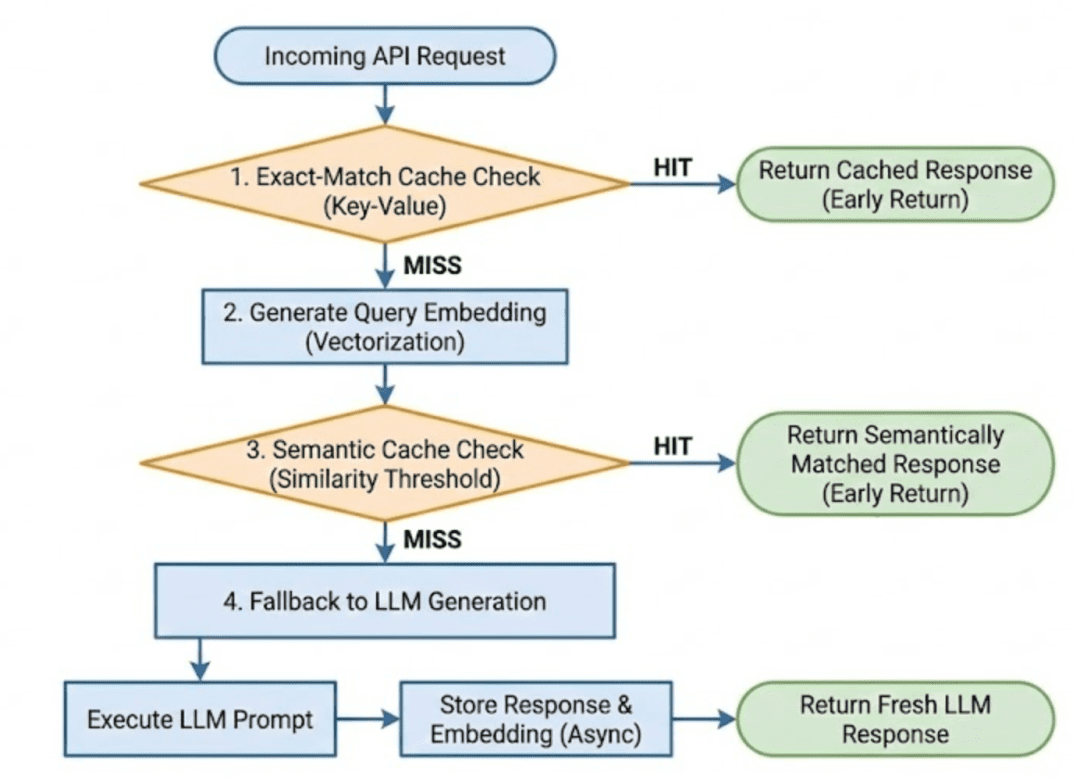
Every expensive operation is deferred until absolutely necessary.
Embeddings: Turning Text into Semantic Vectors
Up to this point, we have treated embeddings as a black box: something expensive that we try to avoid unless absolutely necessary.
In this section, we will open that box just enough to understand what embeddings are, when they are generated, and why they enable semantic caching without diving into vector math or model internals.
Why Embeddings Exist in This System
Exact-match caching works only when queries are identical at the string level. As soon as wording changes, exact matching breaks down.
Embeddings solve this problem by converting text into a numeric representation that captures meaning rather than surface form.
Queries that mean the same thing tend to produce vectors that are close together in vector space, even if their wording differs significantly.
This is the foundation that makes semantic caching possible.
Embedding Generation Happens on Demand
In our implementation, embeddings are generated only after the exact-match cache fails.
This decision is intentional.
Embedding generation involves:
- a model invocation
- network overhead
- serialization and deserialization
- non-trivial latency
Because of this cost, embeddings are treated as an escalation step, not a default operation.
This is why the /ask endpoint first attempts an exact-match lookup before calling embed_text().
The embed_text Function
def embed_text(text: str):
This function has one responsibility: Convert input text into a semantic vector representation.
It does not perform caching, similarity search, or validation. Those concerns live elsewhere.
Calling the Embedding Model
url = f"http://{settings.OLLAMA_HOST}:{settings.OLLAMA_PORT}/api/embeddings"
Here, we construct the Ollama embedding endpoint using configuration values (e.g., settings.OLLAMA_HOST, settings.OLLAMA_PORT, etc.).
This allows the embedding service to run locally, inside Docker, or on a remote host without changing code.
resp = httpx.post(
    url,
    json={"model": settings.EMBEDDING_MODEL, "prompt": text},
    timeout=10.0
)
This request sends 2 key pieces of information to the embedding service:
- the embedding model name (e.g.,
nomic-embed-text) - the input text to embed
The timeout ensures the request does not hang indefinitely. Embedding generation is expensive, but it should still fail fast if something goes wrong.
Handling the Response
resp.raise_for_status()
return resp.json().get("embedding", [])
If the request succeeds, the embedding model returns a numeric vector — typically a list of floating-point values.
This vector represents the semantic meaning of the input text and becomes the key used for similarity comparison in the cache.
At this stage, we treat the vector as an opaque object. We do not inspect its dimensionality or normalize it here.
Error Handling Strategy
except Exception as e:
    raise RuntimeError(f"Failed to generate embedding: {e}")
If embedding generation fails for any reason (network issues, model errors, timeouts), the function raises an exception.
This is intentional.
If embeddings cannot be generated, the system cannot safely perform semantic matching. Silently continuing would lead to unpredictable behavior, so we fail loudly instead.
Why the Embedder Is Intentionally Simple
Notice what this function does not do:
- it does not store embeddings
- it does not perform similarity search
- it does not retry failed requests
- it does not fall back to alternative models
Those decisions are deliberate.
For Lesson 1, the embedder exists purely to convert text into vectors. Keeping it small and focused makes the system easier to understand and test.
How the Embedder Is Used in the Pipeline
At runtime, the embedder is called only when necessary:
- Exact-match cache fails
- The query is passed to
embed_text() - The returned vector is sent to the semantic cache
- Similarity is computed against stored embeddings
This ensures embeddings are generated only when cheaper paths have already failed.
Key Takeaways
- Embeddings are generated via a simple HTTP call to a local model
- The embedder has a single responsibility
- Errors are surfaced immediately
- Embeddings act as semantic keys for cache lookup
With embedding generation understood, we are now ready to look at the semantic cache itself, how embeddings and responses are stored, scanned, and matched.
In the next section, we will walk through the semantic cache implementation, starting with a deliberately naive but correct linear scan approach.
The Semantic Cache: Cosine Similarity, Redis Storage, and Reusing Meaning
At this point, we understand how queries enter the system and how text is converted into embeddings. What remains is the component that ties everything together: the semantic cache itself.
The semantic cache is responsible for 2 things:
- Storing past queries, embeddings, and responses
- Retrieving the best reusable response for a new query
In Lesson 1, we intentionally implement the cache in the simplest correct way possible: a linear scan over cached entries. This keeps the implementation easy to reason about and makes the request flow fully transparent.
The Semantic Cache Module
The cache logic lives in semantic_cache.py:
class SemanticCache:
This class encapsulates all Redis interaction and similarity logic. The API layer never talks to Redis directly.
Initializing the Cache
def __init__(self):
    self.r = redis.Redis(
        host=settings.REDIS_HOST,
        port=settings.REDIS_PORT,
        decode_responses=True
    )
    self.similarity_threshold = 0.85
    self.namespace = "semantic_cache:v1"
Here we establish a Redis connection and configure 2 important parameters:
- Similarity threshold: Only responses with sufficiently high semantic similarity are eligible for reuse.
- Namespace prefix: All Redis keys are namespaced to avoid collisions and allow future versioning.
For Lesson 1, the exact threshold value is not important. What matters is that a threshold exists and is applied consistently.
Storing Cache Entries
The first core operation is storing new entries.
def store(self, query, embedding, response, metadata=None):
This method is called only after a successful LLM response.
Creating a Cache Entry
entry = CacheEntry(
    id=entry_uuid,
    query=query,
    query_hash=query_hash,
    embedding=json.dumps(embedding),
    response=response,
    created_at=int(time.time()),
    ttl=default_ttl(),
    metadata=metadata or {}
)
Each cache entry stores:
- the original query
- a normalized query hash (used for exact matching)
- the embedding (serialized for Redis storage)
- the LLM response
- timestamps and TTL
- optional metadata for observability
This structure allows the cache to support both exact-match and semantic lookups.
Writing to Redis
self.r.hset(redis_key, mapping=entry.dict())
self.r.sadd(f"{self.namespace}:keys", redis_key)
Each cache entry is stored as a Redis hash, and all entry keys are tracked in a Redis set.
This allows the cache to iterate over all entries during search operations.
For Lesson 1, this approach is intentionally simple and explicit.
Searching the Cache
The second core operation is lookup.
def search(self, embedding, exact_query=None):
This method supports 2 search modes, which map directly to the layered cache strategy used in the API.
Exact-Match Lookup (Fast Path)
if exact_query:
    query_hash = self._hash_query(exact_query)
When an exact query is provided, the cache first attempts a hash-based lookup.
Each cached entry is scanned until a matching hash is found. If found, the entry is returned immediately with a similarity score of 1.0.
No embeddings are involved in this path.
Semantic Lookup (Flexible Path)
If no exact match is found and an embedding is provided, the cache performs a semantic search:
sim = self.cosine_similarity(query_embedding, cached_embedding)
Each cached embedding is compared against the query embedding using cosine similarity.
Only entries that exceed the configured similarity threshold are considered candidates.
Selecting the Best Match
During the scan, the cache tracks the highest similarity score and returns the best matching entry.
This ensures that even when multiple entries are similar, the most relevant response is reused.
Why This Implementation Is O(N)
Every search scans all cached entries.
This is not an accident.
For Lesson 1, a linear scan has 3 advantages:
- the behavior is easy to understand
- the logic is fully visible
- debugging is straightforward
More advanced indexing strategies belong in later lessons.
Why Expired Entries Are Cleaned During Search
While scanning entries, expired items are removed opportunistically.
This prevents stale data from accumulating indefinitely without introducing background workers or schedulers.
Key Takeaways
- The semantic cache owns all
Redisinteractions - Exact-match lookup is attempted before semantic matching
- Semantic similarity is computed using embeddings
- A linear scan trades performance for clarity
- The cache returns the best reusable response, not just the first match
At this stage, the system is fully functional: queries can be answered, cached, and reused.
Cache Entries: What Exactly Gets Stored?
So far, we’ve treated the cache as a logical concept: something that stores queries, embeddings, and responses.
In this section, we’ll make that concrete by looking at the structure of a cache entry. Understanding this structure is important because it explains why the cache can support both exact-match and semantic lookup — without duplicating data or logic.
The Cache Entry Schema
Cache entries are defined using a Pydantic model:
class CacheEntry(BaseModel):
    id: str
    query: str
    query_hash: str
    embedding: str
    response: str
    created_at: int
    ttl: int
    metadata: Optional[Dict] = Field(default_factory=dict)
Each field exists for a specific reason. Let’s walk through them one by one.
Identity and Query Fields
id: str
query: str
query_hash: str
id: uniquely identifies the cache entry and is used to construct the Redis key.query: stores the original user input. This is useful for debugging and inspection.query_hash: stores a normalized hash of the query and enables exact-match lookup.
At this stage, it’s enough to know that the hash ensures identical queries can be matched quickly. We’ll revisit how and why this normalization matters in a later lesson.
Embedding Storage
embedding: str
Embeddings are stored as a JSON-serialized string, not as a raw Python list.
This choice is deliberate:
- Redis stores strings efficiently
- Serialization keeps the schema simple
- Deserialization happens only when similarity needs to be computed
For Lesson 1, the important takeaway is that embeddings are stored once, alongside the response they produced.
Response and Timing Information
response: str
created_at: int
ttl: int
response: is the text returned by the LLM.created_at: records when the entry was generated.ttl: defines how long the entry is considered valid.
The cache does not rely on Redis expiration here. Instead, validity is checked at read time. This gives the application full control over when an entry should be reused or rejected.
We intentionally avoid deeper TTL semantics in this lesson.
Metadata and Safety
metadata: Optional[Dict] = Field(default_factory=dict)
Metadata allows the cache to store contextual information such as:
- pipeline name
- model identifier
- request origin
The use of default_factory=dict avoids shared mutable state across cache entries — a subtle but important correctness detail.
At this stage, metadata is informational rather than functional.
Why This Schema Works Well
This schema supports the layered caching strategy naturally:
- Exact match uses
query_hash - Semantic match uses embedding
- Freshness checks use
created_atandttl - Safety checks use response and metadata
All required information is co-located in a single cache entry, making lookup and validation straightforward.
End-to-End Demo: Verifying Core Cache Behavior
In this section, we will verify that the semantic cache behaves as expected under a small set of controlled scenarios.
These examples are meant to be run locally by the reader. The responses shown below are representative and may vary slightly depending on the model and configuration.
Demo Case 1: Cold Request (LLM Fallback)
We begin with a query that has not been seen before.
curl -X POST http://localhost:8000/ask \
  -H "Content-Type: application/json" \
  -d '{"query": "What is semantic caching?"}'
Expected behavior
- Exact-match cache miss
- Semantic cache miss
- LLM call
- Cache population
Response
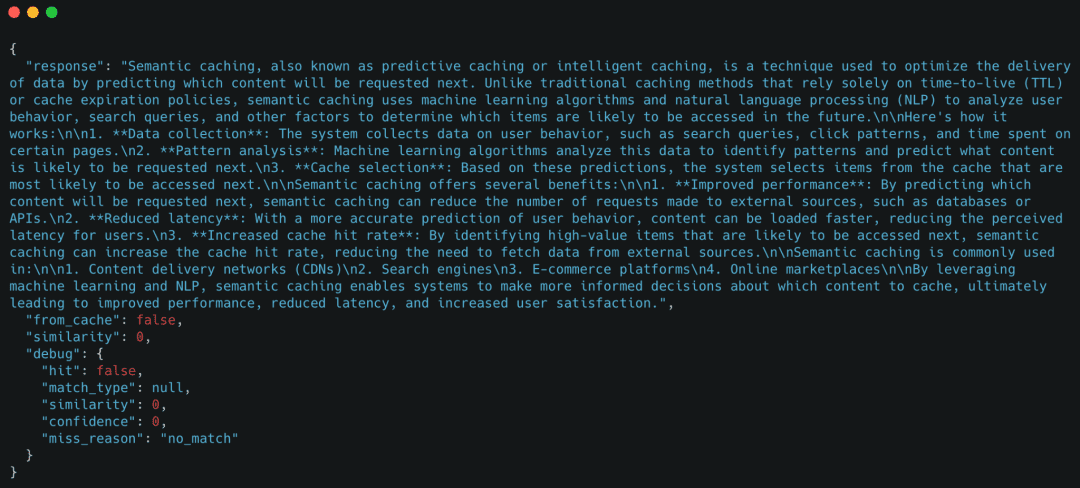
The key signal here is "from_cache": false, confirming the request fell back to the LLM.
Demo Case 2: Exact-Match Cache Hit
Now we send the same query again.
curl -X POST http://localhost:8000/ask \
  -H "Content-Type: application/json" \
  -d '{"query": "What is semantic caching?"}'
Expected behavior
- Exact-match cache hit
- No embedding generation
- No LLM call
Example response
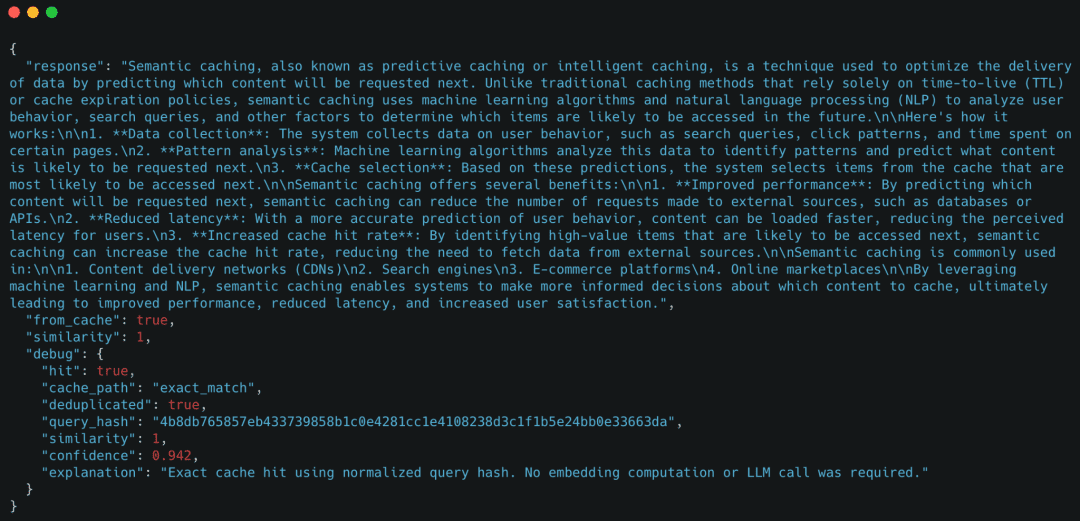
Here, the cache reused the response immediately using an exact-match lookup.
Optional Demo: Whitespace Normalization
curl -X POST http://localhost:8000/ask \
  -H "Content-Type: application/json" \
  -d '{"query": "   What   is   semantic   caching?   "}'
This will hit the exact-match cache due to query normalization.
Demo Case 3: Semantic Cache Hit (Paraphrased Query)
Next, we send a paraphrased version of the original query.
curl -X POST http://localhost:8000/ask \
  -H "Content-Type: application/json" \
  -d '{"query": "Can you explain how semantic caching works?"}'
Expected behavior
- Exact-match cache miss
- Embedding generation
- Semantic cache hit
- No LLM call
Example response
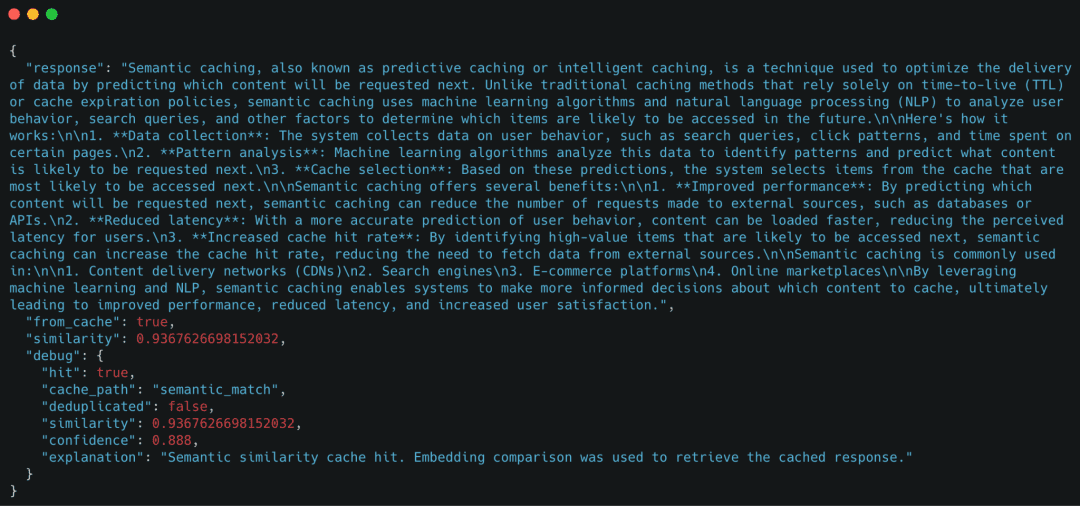
Even though the query text is different, the cache successfully reused the response based on semantic similarity.
Demo Case 4: Forcing a Cache Miss with bypass_cache
The bypass_cache flag allows us to force the system to skip both cache layers.
curl -X POST http://localhost:8000/ask \
  -H "Content-Type: application/json" \
  -d '{"query": "What is semantic caching?", "bypass_cache": true}'
Expected behavior
- Exact-match cache skipped
- Semantic cache skipped
- LLM called unconditionally
Example response
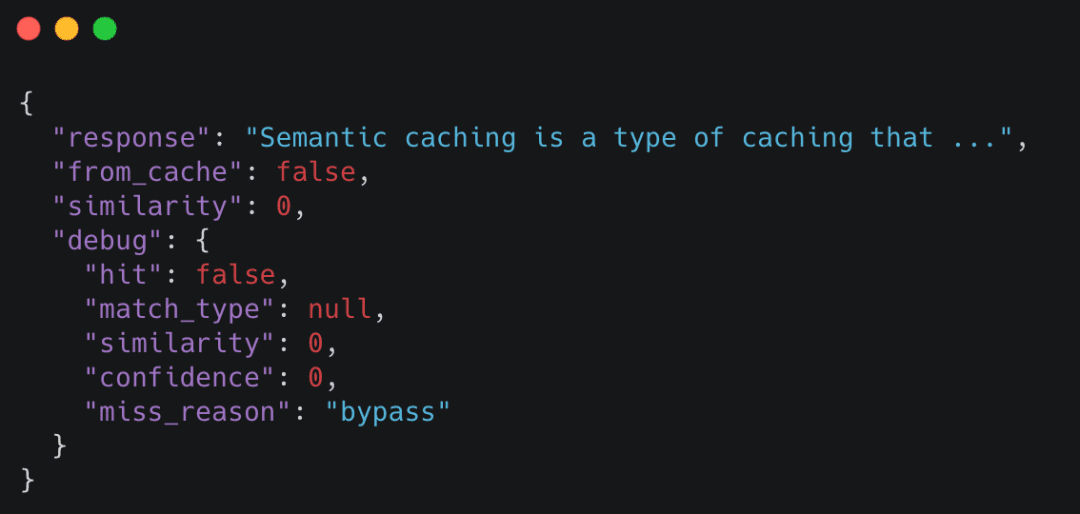
bypass_cache, ensuring the LLM pipeline executes independently of cached responses (source: image by the author).This is useful for debugging and validating that the LLM pipeline still works independently of the cache.
Observing Cache Metrics (Optional)
You can inspect basic cache statistics using the /internal/metrics endpoint:
curl http://localhost:8000/internal/metrics
Example response
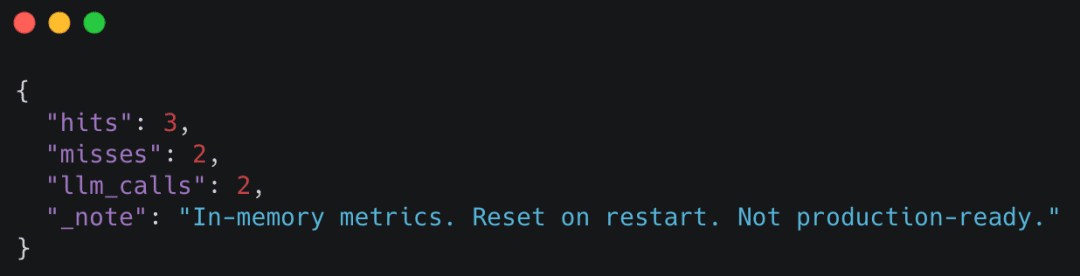
These metrics make cache behavior observable without requiring external tooling.
If you can reproduce these behaviors locally, you’ve successfully implemented a working semantic cache.
In the next lesson, we will take this system and begin hardening it for real-world use.
What's next? We recommend PyImageSearch University.

120+ total classes • 115+ hours of on-demand code walkthrough videos • Last updated: October 2026
★★★★★ 4.84 (128 Ratings) • 16,000+ Students Enrolled
I strongly believe that if you had the right teacher you could master computer vision and deep learning.
Do you think learning computer vision and deep learning has to be time-consuming, overwhelming, and complicated? Or has to involve complex mathematics and equations? Or requires a degree in computer science?
That’s not the case.
All you need to master computer vision and deep learning is for someone to explain things to you in simple, intuitive terms. And that’s exactly what I do. My mission is to change education and how complex Artificial Intelligence topics are taught.
If you're serious about learning computer vision, your next stop should be PyImageSearch University, the most comprehensive computer vision, deep learning, and OpenCV course online today. Here you’ll learn how to successfully and confidently apply computer vision to your work, research, and projects. Join me in computer vision mastery.
Inside PyImageSearch University you'll find:
- ✓ 120+ courses on essential computer vision, deep learning, and OpenCV topics
- ✓ 94+ Certificates of Completion
- ✓ 115+ hours of on-demand video
- ✓ Brand new courses released regularly, ensuring you can keep up with state-of-the-art techniques
- ✓ Pre-configured Jupyter Notebooks in Google Colab
- ✓ Run all code examples in your web browser — works on Windows, macOS, and Linux (no dev environment configuration required!)
- ✓ Access to centralized code repos for all 540+ tutorials on PyImageSearch
- ✓ Easy one-click downloads for code, datasets, pre-trained models, etc.
- ✓ Access on mobile, laptop, desktop, etc.
Summary
In this lesson, we built a complete semantic caching system for LLM applications from the ground up. We started by wiring a FastAPI service and defining a clean request–response contract, then implemented a layered caching strategy that prioritizes cheap exact-match lookups before escalating to semantic similarity and, finally, LLM inference.
We walked through how text queries are converted into embeddings on demand, how cached responses and embeddings are stored in Redis, and how the cache decides whether a prior response can be safely reused. By keeping the implementation intentionally simple and explicit, every step in the request flow remains observable and easy to reason about.
Finally, we verified the system end-to-end by running controlled demos: a cold request falling back to the LLM, an exact-match cache hit, a semantic cache hit for a paraphrased query, and an explicit cache bypass. At this point, you have a working semantic cache that behaves correctly, makes its decisions visible, and serves as a solid foundation for further hardening and optimization.
Citation Information
Singh, V. “Semantic Caching for LLMs: FastAPI, Redis, and Embeddings,” PyImageSearch, S. Huot, A. Sharma, and P. Thakur, eds., 2026, https://pyimg.co/yso6f
@incollection{Singh_2026_semantic-caching-for-llms-fastapi-redis-and-embeddings,
  author = {Vikram Singh},
  title = {{Semantic Caching for LLMs: FastAPI, Redis, and Embeddings}},
  booktitle = {PyImageSearch},
  editor = {Susan Huot and Aditya Sharma and Piyush Thakur},
  year = {2026},
  url = {https://pyimg.co/yso6f},
}
To download the source code to this post (and be notified when future tutorials are published here on PyImageSearch), simply enter your email address in the form below!

Download the Source Code and FREE 17-page Resource Guide
Enter your email address below to get a .zip of the code and a FREE 17-page Resource Guide on Computer Vision, OpenCV, and Deep Learning. Inside you'll find my hand-picked tutorials, books, courses, and libraries to help you master CV and DL!



Comment section
Hey, Adrian Rosebrock here, author and creator of PyImageSearch. While I love hearing from readers, a couple years ago I made the tough decision to no longer offer 1:1 help over blog post comments.
At the time I was receiving 200+ emails per day and another 100+ blog post comments. I simply did not have the time to moderate and respond to them all, and the sheer volume of requests was taking a toll on me.
Instead, my goal is to do the most good for the computer vision, deep learning, and OpenCV community at large by focusing my time on authoring high-quality blog posts, tutorials, and books/courses.
If you need help learning computer vision and deep learning, I suggest you refer to my full catalog of books and courses — they have helped tens of thousands of developers, students, and researchers just like yourself learn Computer Vision, Deep Learning, and OpenCV.
Click here to browse my full catalog.