Table of Contents
- DVC for MLOps: Versioning Your Data and Models the Right Way
- DVC for MLOps: Data and Model Versioning Explained
- Project Setup
- Dataset Versioning with DVC
- Model Versioning with DVC
- Configuring DVC Remotes
- Using DVC Push and Pull to Sync Data and Model Artifacts
- Building a Reproducible Machine Learning Pipeline with DVC
- Full Real-World Workflow with Lightning, DVC, and GitHub
- Summary
DVC for MLOps: Versioning Your Data and Models the Right Way
In this lesson, you will learn how to use DVC (Data Version Control) to version datasets, track model checkpoints, and create reproducible ML (machine learning) pipelines without bloating your Git repository. You will see how DVC integrates seamlessly with modern MLOps (machine learning operations) workflows and how it solves the versioning challenges that Git alone cannot handle.
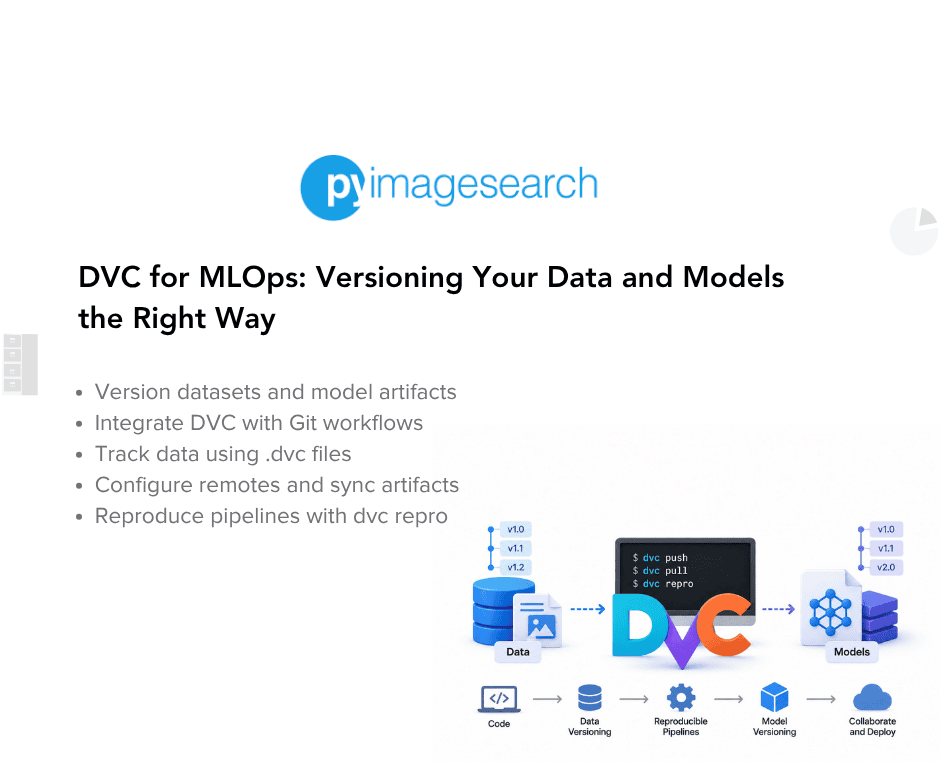
This lesson is the 1st in a 2-part series on Data and Model Versioning with DVC:
- DVC for MLOps: Versioning Your Data and Models the Right Way (this tutorial)
- Lesson 2
To learn how to version your data, manage checkpoints, configure remotes, and reproduce pipelines with confidence, just keep reading.

DVC for MLOps: Data and Model Versioning Explained
Modern ML systems rely on large datasets, evolving model checkpoints, and pipeline stages that must be rerun reliably. Git alone was never built for multi-GB datasets or binary artifacts, and that is exactly where DVC (Data Version Control) becomes essential. In this introduction, we will explore why ML projects need a tool like DVC, how it elevates MLOps workflows, and what you will build by the end of this lesson.
What DVC Is and Why Git Alone Is Not Enough
Git excels at tracking text files, but it breaks down when you try to version datasets or model checkpoints:
- Large files slow down Git: A single dataset or checkpoint can be hundreds of megabytes (MB) or several gigabytes (GB), making Git repositories heavy and slow.
- Git cannot store multiple versions efficiently: Binary diffs do not compress well, so Git history becomes huge over time.
- Teams end up sharing data manually: Emailing zip files, keeping “final_v3_really_final.csv,” or relying on someone’s local drive.
DVC solves all these problems:
- Stores data outside Git, while Git tracks only lightweight metadata (
.dvcfiles). - Guarantees reproducibility using hashes and dependency tracking.
- Makes datasets and checkpoints shareable across the team via remotes (local, Amazon S3 (Amazon Simple Storage Service), GCS (Google Cloud Storage), Azure, SSH (Secure Shell)).
- Integrates naturally with existing Git workflows without changing how you commit or create branches.
Think of it as “Git for data and models”, tailor-made for machine learning.
How DVC Fits Into Modern MLOps
MLOps has 3 pillars:
- Reproducible code
- Reproducible environments
- Reproducible data and model artifacts
Docker or virtual environments solve the first two.
DVC completes the third.
With DVC, teams can:
- Version datasets the same way they version code
- Recreate any training run using DVC’s hashes and pipeline engine
- Store multi-GB artifacts in efficient, cache-backed, cloud-friendly storage
- Collaborate without duplicating files or manually syncing assets
- Build DAG (directed acyclic graph)-style ML pipelines (
dvc.yaml) for preprocessing, training, and evaluation
Most importantly, DVC integrates smoothly with:
- PyTorch Lightning (for checkpoints)
- FastAPI and Flask apps (for deployed models)
- CI/CD (continuous integration and continuous delivery) systems (GitHub Actions, GitLab, Jenkins)
- Cloud storage providers (S3, GCS, Azure, etc.)
In short: DVC brings software engineering discipline to ML artifact management.
What We Will Build in This Lesson
In this lesson, you will build a complete DVC-enabled workflow around the provided repository:
- Dataset Versioning: You will track the sample IMDb dataset (
data/raw/imdb_sample.csv) usingdvc add, inspect its.dvcmetadata, and understand how DVC moves the real file into its cache. - Model Checkpoint Versioning: You will generate a dummy model checkpoint by running
src/noop_train.py, then version it with DVC in the same way that you would track real PyTorch Lightning checkpoints. - Local Remote Storage: You will configure a
.dvc_remote/folder to simulate real cloud remotes, learning how DVC pushes and pulls artifacts. - A Mini Training Pipeline: You will run the auto-generated DVC pipeline (dvc repro) that recreates model artifacts and updates dvc.lock.
By the end, you will have a fully working data and model versioning workflow, complete with remotes, metadata, pipeline execution, and team-ready reproducibility.
It is simple enough to understand but realistic enough to scale into a real MLOps project.
Would you like immediate access to 3,457 images curated and labeled with hand gestures to train, explore, and experiment with … for free? Head over to Roboflow and get a free account to grab these hand gesture images.
Project Setup
Before we begin versioning datasets and model artifacts, let us walk through the repository structure, install dependencies, and initialize Git and DVC. This gives us a consistent, reproducible foundation for everything we will build later in the lesson.
Overview of the Lesson 1 Repository Structure
Your dvc-lesson1/ project is intentionally small, mirroring a real ML workflow but without unnecessary complexity. Here is the structure you will be working with:
dvc-lesson1/
├── data/
│   └── raw/
│       └── imdb_sample.csv
├── models/
├── src/
│   └── noop_train.py
├── .dvc/
├── .dvcignore
├── .gitignore
├── dvc.yaml
├── requirements.txt
└── README.md
What each part does:
data/raw/: Contains your raw dataset (IMDb sample).models/: Stores model checkpoints generated by the training script.src/noop_train.py: A dummy training script that outputsmodel.ckpt.dvc.yaml: Defines a single DVC pipeline stage (generate_model).requirements.txt: Dependencies: DVC + pandas..dvcignoreand.gitignore: Ensure Git and DVC track the right files..dvc/: Will hold DVC metadata and cache configuration once initialized.
This structure is simple but realistic: data, models, and code are cleanly separated, making it easy to scale toward multi-stage pipelines later.
Installing Dependencies (requirements.txt)
Your project uses only 2 core dependencies: DVC and pandas:
# DVC for data and model versioning
dvc==3.48.4

# Python basics
pandas==2.1.4
Install them using:
pip install -r requirements.txt
This installs:
- DVC core (local filesystem support)
- Optional cloud backends (S3, GCS, Azure, and SSH) can be added later using extras such as the following:
pip install 'dvc[s3]'
After installation, verify that DVC is available:
dvc --version
You should see output similar to the following:
3.48.4
If DVC installs successfully, you are ready for initialization.
Initializing Git and DVC (git init, dvc init)
DVC is designed to work on top of Git, not instead of it.
Let us initialize both:
Step 1: Initialize Git
git init
This creates the .git/ folder and prepares the repository for tracking metadata.
Step 2: Initialize DVC
dvc init
DVC sets up:
.dvc/: internal DVC configuration and cache references.dvcignore: patterns for files DVC should ignore- Git hooks for pipeline reproducibility
Commit them:
git add .dvc .dvcignore
git commit -m "Initialize DVC"
After this step, your project is now:
- Git-tracked: for code and metadata
- DVC-enabled: for datasets and model artifacts
- Pipeline-ready: via the included
dvc.yaml
You now have everything required to start tracking data and model files the right way.
Need Help Configuring Your Development Environment?

All that said, are you:
- Short on time?
- Learning on your employer’s administratively locked system?
- Wanting to skip the hassle of fighting with the command line, package managers, and virtual environments?
- Ready to run the code immediately on your Windows, macOS, or Linux system?
Then join PyImageSearch University today!
Gain access to Jupyter Notebooks for this tutorial and other PyImageSearch guides pre-configured to run on Google Colab’s ecosystem right in your web browser! No installation required.
And best of all, these Jupyter Notebooks will run on Windows, macOS, and Linux!
Dataset Versioning with DVC
Your dataset is the first artifact you will version with DVC. In this section, you will inspect the raw IMDb dataset, add it to DVC tracking, understand the resulting .dvc metadata file, and see how DVC uses its cache behind the scenes. By the end, you will understand precisely why Git stores the metadata while DVC manages the actual data files.
Inspecting the Raw IMDb Dataset
Your dataset lives here:
data/raw/imdb_sample.csv
It contains 10 short IMDb movie reviews labeled positive or negative.
Here are the first few rows:
text,label
"This movie was absolutely fantastic! I loved every minute of it.",positive
"Terrible waste of time. Do not watch this movie.",negative
Even though this dataset is tiny, the workflow you are learning works identically for:
- gigabyte-scale comma-separated values (CSV) files
- multi-GB image folders
- terabyte-scale corpora
DVC applies the same versioning workflow to all these data types.
Tracking Data with DVC
To version this dataset, run:
dvc add data/raw/imdb_sample.csv
DVC automatically performs several steps:
- Calculates an MD5 hash of the file
- Stores the CSV file content in the DVC cache (
.dvc/cache/) - Makes
models/model.ckptavailable in the workspace as a link or copy, depending on the configuration - Generates a metadata file:
data/raw/imdb_sample.csv.dvc
- Updates (or creates) a
.gitignoreinsidedata/raw/so Git does not track the actual CSV.
Now add the generated metadata to Git:
git add data/raw/imdb_sample.csv.dvc data/raw/.gitignore
git commit -m "Track IMDB dataset with DVC"
Git now tracks the dataset version, not the dataset itself.
Understanding DVC Metadata Files
Let us inspect the metadata:
cat data/raw/imdb_sample.csv.dvc
You will see configuration similar to the following:
outs:
- md5: a1b2c3d4e5f6...
  size: 512
  path: imdb_sample.csv
What each field means:
md5: fingerprint of the exact dataset contentsize: file sizepath: original location relative to its.dvcfile
DVC uses the MD5 checksum to:
- detect changes
- ensure reproducibility
- retrieve the correct version from the cache or remote
This .dvc file is a small text file that represents a specific version of your dataset.
How DVC Uses Its Cache
When you ran dvc add, the physical CSV file was moved into:
.dvc/cache/
Inside the cache, every file is stored using its MD5 hash:
.dvc/cache/a1/b2c3d4e5f6...
Why?
- Hash-based storage allows deduplication
- Identical files can reference the same cached object
- Cached or remotely stored versions can be restored when needed
- Remote storage (S3, GCS, local) becomes trivial
Your working directory (data/raw/) contains either:
- a hardlink
- a symlink
- a simple copy
depending on the operating system (OS) and configuration.
If the dataset changes, DVC computes a new hash and creates a new cached version, without overwriting the old one.
This is what makes dataset versioning possible.
Why Git Tracks Metadata, Not Data
Git is excellent at managing:
- small files
- code
- configuration
However, Git is not designed to efficiently manage:
- large files
- binary blobs
- constantly evolving datasets
- large model checkpoints
Git repositories can become slow and difficult to manage when they contain large or frequently changing binary files.
DVC solves this by splitting responsibilities:

When you:
git checkout <commit>
Git restores the correct .dvc files.
Then:
dvc pull
DVC restores the exact dataset version associated with that commit.
This workflow allows Git and DVC to coordinate source-code and dataset versions.
Model Versioning with DVC
Datasets evolve over time. Model artifacts do too. Checkpoints, weights, embeddings, tokenizers, and trained models must be versioned with the same rigor as your data. In this section, you will use DVC to track a dummy checkpoint file produced by noop_train.py, and you will see how this workflow directly maps to real PyTorch Lightning training workflows.
Reviewing the Dummy Training Script
Your repository includes a tiny training script designed to simulate a real ML training job:
# src/noop_train.py
def generate_model():
    print("🚀 Starting model generation...")
    time.sleep(1)
    os.makedirs("models", exist_ok=True)

    model_path = "models/model.ckpt"
    with open(model_path, "wb") as f:
        dummy_data = b"PYTORCH_LIGHTNING_CHECKPOINT_v1.0\n" * 30
        f.write(dummy_data)

    print(f"✅ Model checkpoint generated at: {model_path}")
    print(f"📦 File size: {os.path.getsize(model_path)} bytes")
When executed, it:
- Creates a models/ directory (if it does not exist)
- Writes a 1KB dummy checkpoint called
model.ckpt - Produces stable output so you can track it with DVC
This script plays the role of your “training job” in an actual ML workflow.
Generating the Model Checkpoint
Run the dummy training script:
python src/noop_train.py
You should see:
🚀 Starting model generation...
✅ Model checkpoint generated at: models/model.ckpt
📦 File size: 960 bytes
At this point, your project structure now includes:
models/model.ckpt
This file is exactly what you would typically receive from:
- PyTorch Lightning
- Hugging Face Trainer
- Keras and TensorFlow training loops
- Custom PyTorch training scripts
In every real-world ML project, these checkpoints must be versioned.
Adding Model Artifacts to DVC
To version the checkpoint, run:
dvc add models/model.ckpt
Behind the scenes, DVC:
- Computes an MD5 checksum of the checkpoint
- Moves the physical
.ckptfile into DVC’s cache (.dvc/cache/*) - Recreates a link or copy at
models/model.ckpt - Generates:
models/model.ckpt.dvc
- Updates
models/.gitignoreso Git no longer tracksmodel.ckpt
Next, commit the metadata:
git add models/model.ckpt.dvc models/.gitignore
git commit -m "Version model checkpoint with DVC"
Your Git history now records:
- when the checkpoint changed
- why it changed (commit message)
- how to reproduce it (via DVC pipeline or scripts)
Git remains lightweight; DVC handles the binary file safely.
What the DVC Metadata Looks Like
outs:
- md5: e3b0c44298fc...
  size: 960
  path: model.ckpt
This metadata supports:
- Reproducibility: DVC knows the exact checksum of the checkpoint.
- Integrity: If the file changes, the hash changes too.
- Recoverability: DVC can restore the checkpoint from cache or remote.
This makes your ML experiments auditable and reversible.
Integrating with Real PyTorch Lightning Workflows (Conceptual)
In real-world ML pipelines, PyTorch Lightning generates checkpoints automatically:
lightning_logs/
    version_0/
        checkpoints/
            epoch=3-step=500.ckpt
            best.ckpt
To version these with DVC, you would:
1. Train Your Lightning Model
python train.py
2. Identify the Checkpoint
Lightning saves checkpoints to:
lightning_logs/version_X/checkpoints/
Pick a file (e.g., best.ckpt)
3. Add It to DVC
dvc add lightning_logs/version_0/checkpoints/best.ckpt
git add lightning_logs/version_0/checkpoints/best.ckpt.dvc
git commit -m "Track best Lightning checkpoint"
4. Push It to Your Remote
dvc push
5. Teammates or Deployment Servers Restore It
git pull
dvc pull
This gives every engineer:
- the exact model version used for inference
- the exact dataset used for training
- a reproducible pipeline state
In production settings (e.g., serving through FastAPI, TorchServe, vLLM, BentoML, or Lambda), DVC helps ensure that the intended model version is available.
Configuring DVC Remotes
Up to this point, you have tracked datasets and model artifacts with DVC. However, everything still lives locally inside your .dvc/cache/ directory. For real collaboration across team members, machines, or deployment environments, you need a remote storage backend.
A DVC remote is simply a storage location (e.g., a local directory, S3 bucket, GCS bucket, Azure Blob container, or SSH server) where DVC stores cached versions of your datasets and model files. Git tracks the metadata, while the remote stores the actual bytes.
Let us break it down.
What Are DVC Remotes and Why They Matter?
DVC remotes solve the biggest challenge in ML collaboration:
How do we store and share datasets and model checkpoints without bloating Git?
A DVC remote gives you:
Centralized artifact storage
All team members sync to the same dataset and model versions.
Lightweight Git history
Git stores only .dvc files, not large binaries.
Reproducible experiments
Anyone can restore the exact dataset and model checkpoint for a given commit.
Separation of concerns
- Git: Versions metadata
- DVC remote: versioning large files
This is essential for training consistency, debugging, deployments, and CI/CD.
Setting Up a Local DVC Remote
Your lesson uses a local folder remote, which is perfect for beginners or offline environments.
Step 1: Create the Remote Directory
Run this at the project root:
mkdir -p .dvc_remote
Step 2: Add It as a DVC Remote
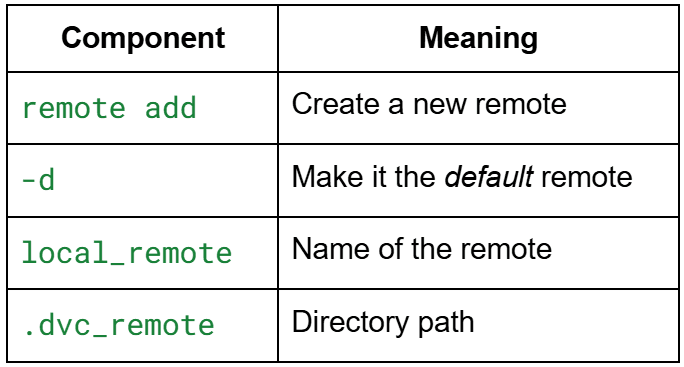
dvc remote add -d local_remote .dvc_remote
Here is what this command does:
dvc remote add CommandStep 3: Commit the New DVC Configuration
git add .dvc/config
git commit -m "Configure local DVC remote for dataset and model storage"
Now your project has a fully functional remote for storing versioned artifacts.
Understanding .dvc/config
After configuring the remote, open the file:
cat .dvc/config
You will see configuration similar to the following:
['core']
    remote = 'local_remote'

['remote "local_remote"']
    url = '.dvc_remote'
Let us decode this:
1. [core]
Specifies the default remote used whenever you run:
dvc push
dvc pull
2. remote “local_remote”
Defines the remote’s properties:

If you were using S3, GCS, or Azure, this section would include the applicable paths and protocol details.
Where Does the Actual Data Go?
Inside .dvc_remote/, DVC stores files under a hash-based directory structure:
.dvc_remote/
└── aa/
    └── bbcd1234...
Each stored artifact is:
- Broken into chunks (optional)
- Named by checksum (similar to
.git/objects/)
This ensures deduplication and integrity.
Optional: Cloud Remotes (S3, GCS, Azure, SSH)
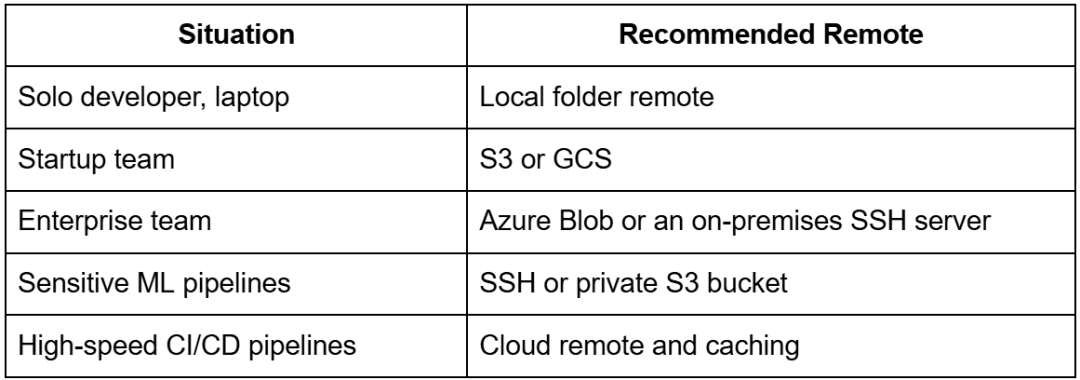
Even though this lesson uses a local remote, most real MLOps pipelines use cloud remotes so training jobs, teammates, and CI systems can all access the same data.
The following examples show commands for each storage option.
AWS S3 Remote
dvc remote add -d myremote s3://mybucket/dvc-storage
dvc remote modify myremote access_key_id <AWS_ACCESS_KEY>
dvc remote modify myremote secret_access_key <AWS_SECRET_KEY>
DVC will store:
s3://mybucket/dvc-storage/aa/bbcd123...
Google Cloud Storage Remote
dvc remote add -d myremote gs://mybucket/dvc-storage
Authenticate with:
gcloud auth application-default login
Azure Blob Storage Remote
dvc remote add -d myremote azure://mycontainer/dvc-storage
dvc remote modify myremote connection_string "<AZURE_CONNECTION_STRING>"
SSH and SFTP Remote (Self-Hosted)
dvc remote add -d myremote ssh://user@server:/path/to/storage
dvc remote modify myremote keyfile ~/.ssh/id_rsa
Great for on-premise teams.
When Should You Use Cloud Remotes?
Using DVC Push and Pull to Sync Data and Model Artifacts
So far, you have tracked:
- A dataset (
data/raw/imdb_sample.csv) - A model checkpoint (
models/model.ckpt) - A pipeline stage (
dvc.yaml→generate_model)
However, all of these artifacts still live locally in your .dvc/cache/ directory.
To actually share them, back them up, and restore them anywhere, you need to sync them with your configured DVC remote.
This is where dvc push and dvc pull come in.
Uploading Artifacts to a DVC Remote
Once a remote is configured (e.g., .dvc_remote/), DVC can upload any tracked artifacts to it.
Command
dvc push
What happens?
DVC performs several steps under the hood:
- Scans all
.dvcfiles anddvc.lockto determine which files are tracked.
Example tracked files:
data/raw/imdb_sample.csv
models/model.ckpt
- Locates these files in the local
.dvc/cache/: Remember: DVC stores the real data in the cache using checksum names. - Copies the cache objects to the remote: For example, a file might be uploaded to:
.dvc_remote/aa/bbcd1234...
- Skips uploading duplicates: If the checksum already exists in the remote, DVC does not upload it again.
Output Example
When pushing your dataset and model:
$ dvc push
100%|████████████████████████|1/1 [00:00<00:00, 101.23file/s]
This confirms your artifacts are safely stored in the remote.
Restoring Artifacts (dvc pull)
Imagine a teammate clones your Git repository:
git clone <your-repo>
cd dvc-lesson1
They now have:
- Your code
- Your
.dvcmetadata files - Your
dvc.yamlpipeline definition - Your
.dvc/configpointing to the remote
But they do not have the data or model artifacts.
To restore them, they run:
dvc pull
With this single command, DVC:
- Reads your
.dvcfiles to know which artifacts should exist - Downloads their cache objects from the remote into
.dvc/cache/ - Recreates the original directory structure:
data/raw/imdb_sample.csv
models/model.ckpt
Real Output Example
$ dvc pull
100%|█████████████████████|1/1 [00:00<00:00, 250.50file/s]
Now your teammate has:
- The exact same dataset you used.
- The same model checkpoint.
- A fully reproducible environment.
How Git and DVC Work Together
The magic of DVC comes from how it pairs with Git while keeping responsibilities clean.
Git Stores:
- Code (
src/) - Pipeline definitions (
dvc.yaml,dvc.lock) - Metadata (
*.dvc) - Remote configuration (
.dvc/config) - Docs and scripts
Git never stores large binaries.
DVC Remote Stores:
- Actual dataset files
- Actual model checkpoints
- Other large ML artifacts (e.g., features, embeddings, plots, and metrics)
All files are stored by checksum, ensuring:
- Deduplication
- Integrity
- Fast restoration
Workflow Example for a Team of 3
Let us imagine you run:
python src/noop_train.py
dvc add models/model.ckpt
git add models/model.ckpt.dvc
git commit -m "Add v1 checkpoint"
dvc push
git push
Now the remote contains the checkpoint, and Git contains its metadata.
Teammate Workflow
Your teammate runs:
git pull
dvc pull
They instantly get:
- The same model checkpoint
- The same dataset
- The same pipeline configuration
They can:
- Reproduce training
- Evaluate the model
- Extend experiments
- Debug issues using the same data
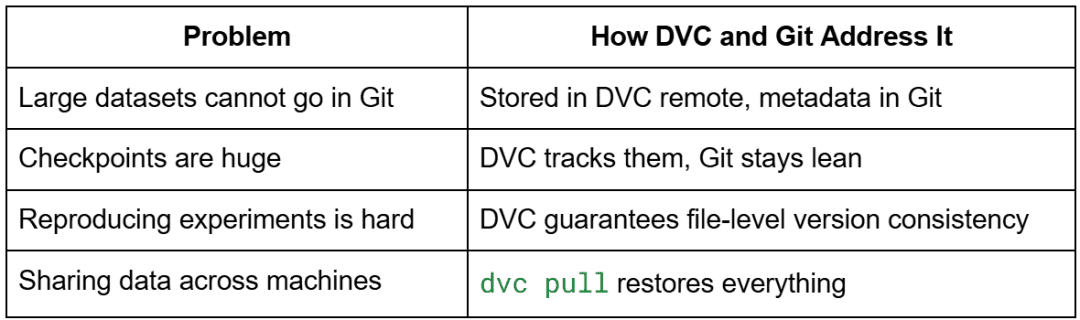
Why This Is a Game-Changer for ML Teams
Building a Reproducible Machine Learning Pipeline with DVC
One of DVC’s superpowers is that it can turn arbitrary commands (e.g., training scripts, preprocessing steps, feature generation, evaluation) into reproducible pipelines.
Even though this lesson uses a simple “noop” model generator, the ideas scale directly to real PyTorch Lightning workflows.
In this section, you will learn how DVC automatically:
- Creates a pipeline stage (
dvc.yaml) - Tracks script dependencies
- Tracks model artifacts
- Rebuilds outputs only when something changes
- Guarantees reproducibility using
dvc.lock
Understanding the Auto-Generated DVC Pipeline Configuration
When you ran:
dvc add models/model.ckpt
DVC tracked the artifact, but did not create a pipeline.
To turn model generation into a reproducible pipeline, you used:
dvc run -n generate_model -d src/noop_train.py -o models/model.ckpt python src/noop_train.py
Alternatively, a prewritten dvc.yaml file can define the stage.
Your repository now contains the following file:
dvc.yaml
stages:
  generate_model:
    cmd: python src/noop_train.py
    deps:
      - src/noop_train.py
    outs:
      - models/model.ckpt
Let us break this down:
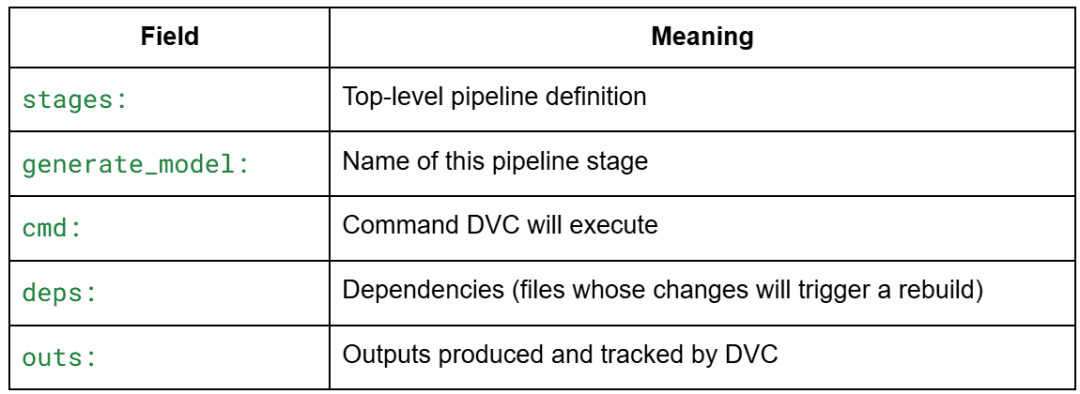
dvc.yaml Pipeline DefinitionWhy This Matters
If you modify src/noop_train.py, DVC knows the dependency changed and will rerun the pipeline.
If nothing changed, DVC skips execution.
It is like make, but designed for ML.
Running the DVC Pipeline Stage
To execute the pipeline stage, run:
dvc repro
Example output:
$ dvc repro

Running stage 'generate_model':
> python src/noop_train.py
🚀 Starting model generation...
✅ Model checkpoint generated at: models/model.ckpt
📦 File size: 870 bytes

Updating lock file 'dvc.lock'
What happened?
- DVC checked whether
src/noop_train.pychanged. - Since it is the first run, DVC executed the command.
- The checkpoint was generated.
- DVC updated
dvc.lockwith:- Hash of the script
- Hash of the output
- Command used
Now the pipeline is fully reproducible.
Rerunning Without Changes
Run again:
dvc repro
Output:
Stage 'generate_model' didn't change, skipping
DVC intelligently avoids unnecessary work.
Modify the Script and Rerun
Add a comment or modify noop_train.py:
# Added comment
def generate_model():
    ...
Run:
dvc repro
Now DVC sees the dependency changed, so it rebuilds the stage automatically.
Inspecting the DVC Lock File
Next to dvc.yaml, you will find the auto-generated lock file:
dvc.lock
stages:
  generate_model:
    cmd: python src/noop_train.py
    deps:
      - path: src/noop_train.py
        md5: <hash>
        size: <bytes>
    outs:
      - path: models/model.ckpt
        md5: <hash>
        size: <bytes>
This file stores:
- Exact command used
- Checksums of dependencies
- Checksums of outputs
- File sizes
Why This Is Important
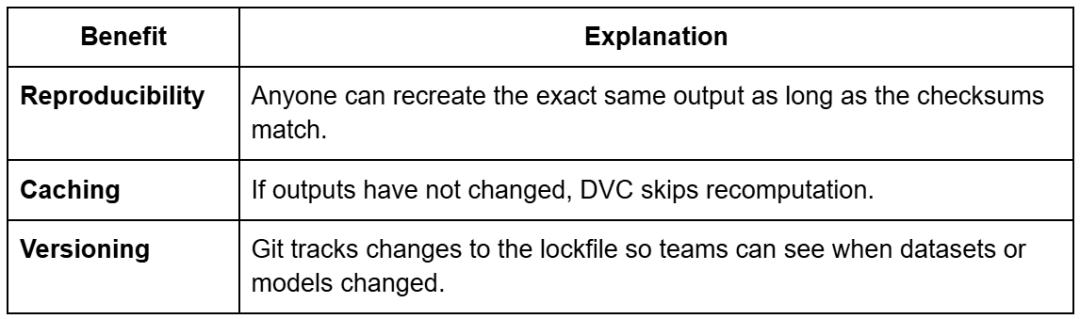
dvc.lock FileIf model.ckpt changes, its MD5 checksum will also change, signaling a new version.
Verify the Lock State
dvc status
Example output:
Data and pipelines are up to date.
Change the script and the output becomes:
Stage 'generate_model' changed.
Full Real-World Workflow with Lightning, DVC, and GitHub
Everything you have done so far, including tracking datasets, tracking checkpoints, and defining a DVC pipeline, maps to a real-world workflow.
This section stitches it all together into a workflow where:
- Lightning handles training
- DVC handles dataset and checkpoint versioning
- GitHub handles code and metadata
- A remote store (e.g., S3, GCS, or Azure) stores large files
This is the pattern used by most mature MLOps teams.
Mapping Lightning Checkpoints to DVC Artifacts
In DVC Lesson 1, you generated a dummy checkpoint (model.ckpt) using noop_train.py.
In real projects, PyTorch Lightning generates checkpoints automatically:
lightning_logs/
└── version_0/
    └── checkpoints/
        ├── epoch=4-step=500.ckpt
        ├── last.ckpt
        └── best.ckpt
These files can easily reach hundreds of MB and change frequently.
This makes them terrible candidates for Git, but perfect candidates for DVC.
How Lightning and DVC Connect
Your workflow looks like this:
- Lightning trains the model
- Lightning saves a checkpoint in
checkpoints/ - You tell DVC to track it:
dvc add lightning_logs/version_0/checkpoints/best.ckpt
git add lightning_logs/version_0/checkpoints/best.ckpt.dvc
git commit -m "Track best Lightning checkpoint for experiment A"
- Push to remote storage:
dvc push
- Commit code and metadata to GitHub:
git push
Now teammates can reproduce your training output exactly:
git pull
dvc pull  # downloads the checkpoint
No need to upload .ckpt files manually, no need to Slack someone a 500 MB file, and no more “which model version did you use?” chaos.
What Files Go to Git, DVC, and Remote Storage
A clean ML workflow is all about putting each file in the right place.
Table 8 shows what goes where:
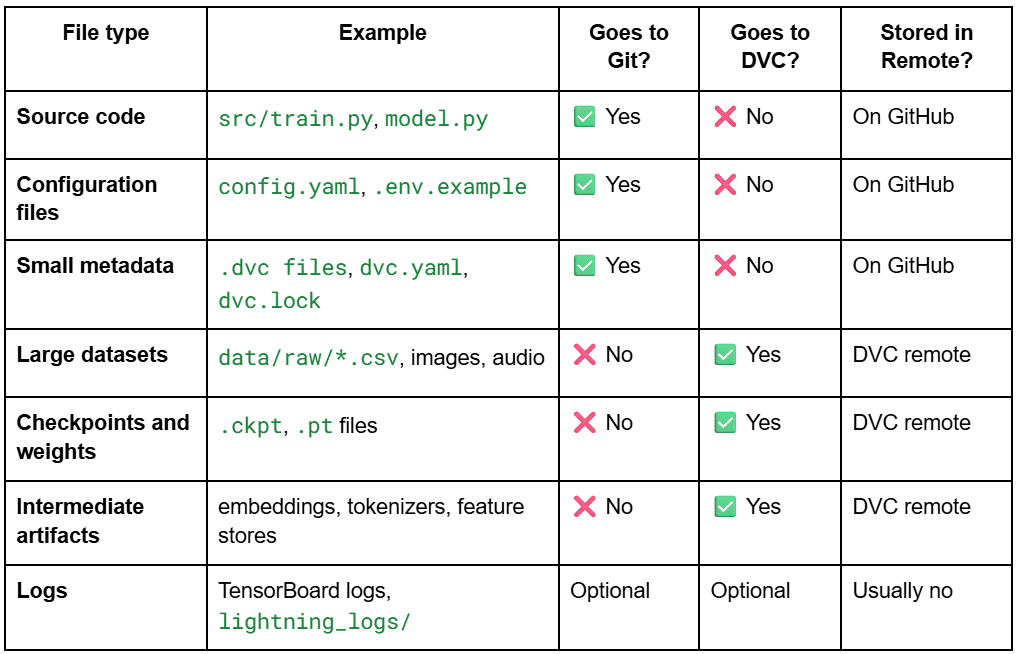
The Core Rule: Git tracks the metadata, DVC tracks the large files, a remote storage backend stores the bytes.
This separation prevents Git from bloating and keeps your repo lightning fast.
Suggested Team Workflow (Industry-Grade)
Below is the recommended daily workflow for ML teams using Lightning, DVC, and GitHub.
This is exactly how large production teams work.
Step 1: Pull Code and Artifacts
When starting on a fresh machine:
git pull
dvc pull
You now have:
- Latest code
- Latest dataset
- Latest checkpoints
Step 2: Train Using Lightning
python train.py
Lightning writes:
lightning_logs/version_3/checkpoints/best.ckpt
Step 3: Version the New Checkpoint
dvc add lightning_logs/version_3/checkpoints/best.ckpt
git add lightning_logs/version_3/checkpoints/best.ckpt.dvc
git commit -m "Add checkpoint for experiment: bigger batch size"
Step 4: Push Artifacts and Git Metadata
dvc push   # Uploads large files to DVC remote
git push   # Pushes code + metadata
Everyone on the team can now reproduce your run.
Workflow Diagram (Textual)
Lightning → produces checkpoint.ckpt
        ↓
DVC add → creates .dvc file
        ↓
git add *.dvc → store metadata
        ↓
dvc push → upload model to remote
        ↓
git push → sync metadata + code
Perfect reproducibility, every time.
Bonus: Branch-Based Experimentation Pattern
Teams often create experiment branches:
experiments/
    ├── exp-bigger-lr
    ├── exp-more-layers
    ├── exp-new-augmentation
Each branch has:
- Code changes
- DVC-tracked checkpoints
- Git-tracked
.dvcmetadata
Merging into main requires:
git merge <branch>
dvc pull
DVC then restores the artifacts referenced by the merged metadata.
What's next? We recommend PyImageSearch University.

120+ total classes • 115+ hours of on-demand code walkthrough videos • Last updated: September 2026
★★★★★ 4.84 (128 Ratings) • 16,000+ Students Enrolled
I strongly believe that if you had the right teacher you could master computer vision and deep learning.
Do you think learning computer vision and deep learning has to be time-consuming, overwhelming, and complicated? Or has to involve complex mathematics and equations? Or requires a degree in computer science?
That’s not the case.
All you need to master computer vision and deep learning is for someone to explain things to you in simple, intuitive terms. And that’s exactly what I do. My mission is to change education and how complex Artificial Intelligence topics are taught.
If you're serious about learning computer vision, your next stop should be PyImageSearch University, the most comprehensive computer vision, deep learning, and OpenCV course online today. Here you’ll learn how to successfully and confidently apply computer vision to your work, research, and projects. Join me in computer vision mastery.
Inside PyImageSearch University you'll find:
- ✓ 120+ courses on essential computer vision, deep learning, and OpenCV topics
- ✓ 94+ Certificates of Completion
- ✓ 115+ hours of on-demand video
- ✓ Brand new courses released regularly, ensuring you can keep up with state-of-the-art techniques
- ✓ Pre-configured Jupyter Notebooks in Google Colab
- ✓ Run all code examples in your web browser — works on Windows, macOS, and Linux (no dev environment configuration required!)
- ✓ Access to centralized code repos for all 540+ tutorials on PyImageSearch
- ✓ Easy one-click downloads for code, datasets, pre-trained models, etc.
- ✓ Access on mobile, laptop, desktop, etc.
Summary
In this lesson, you learned why Git alone cannot support modern machine-learning workflows and how DVC solves that gap by versioning large datasets and model checkpoints without bloating your repository. You saw how DVC keeps Git lightweight by storing only metadata while placing real artifacts in a structured cache and optional remote storage.
You then worked through a hands-on workflow: inspecting a real dataset, adding it to DVC with dvc add, generating a model checkpoint through a dummy training script, and versioning that checkpoint just like data. Along the way, you learned how .dvc files, .dvc/cache/, and auto-generated .gitignore entries work together to make data tracking seamless.
Next, you configured remotes for artifact storage. You started with a local directory and then examined how easily DVC integrates with cloud backends (e.g., S3, GCS, Azure, and SSH). You pushed and pulled artifacts, simulating team collaboration, and explored how Git manages code while DVC synchronizes the corresponding data.
Finally, you ran a mini DVC pipeline using the auto-generated dvc.yaml, reproduced it with dvc repro, and inspected dvc.lock to understand how DVC captures reproducibility. You also connected these concepts back to real PyTorch Lightning workflows, mapping where datasets, checkpoints, and code naturally fit into a Git and DVC ecosystem.
Together, these steps form a strong foundation for reproducible ML projects. In the next lesson, you will expand this foundation into multi-stage DVC pipelines, experiment tracking, and full workflow automation.
Citation Information
Singh, V. “DVC for MLOps: Versioning Your Data and Models the Right Way,” PyImageSearch, S. Huot, A. Sharma, and P. Thakur, eds., 2026, https://pyimg.co/bu1ya
@incollection{Singh_2026_dvc-for-mlops-versioning-data-models-right-way,
  author = {Vikram Singh},
  title = {{DVC for MLOps: Versioning Your Data and Models the Right Way}},
  booktitle = {PyImageSearch},
  editor = {Susan Huot and Aditya Sharma and Piyush Thakur},
  year = {2026},
  url = {https://pyimg.co/bu1ya},
}
To download the source code to this post (and be notified when future tutorials are published here on PyImageSearch), simply enter your email address in the form below!

Download the Source Code and FREE 17-page Resource Guide
Enter your email address below to get a .zip of the code and a FREE 17-page Resource Guide on Computer Vision, OpenCV, and Deep Learning. Inside you'll find my hand-picked tutorials, books, courses, and libraries to help you master CV and DL!


Comment section
Hey, Adrian Rosebrock here, author and creator of PyImageSearch. While I love hearing from readers, a couple years ago I made the tough decision to no longer offer 1:1 help over blog post comments.
At the time I was receiving 200+ emails per day and another 100+ blog post comments. I simply did not have the time to moderate and respond to them all, and the sheer volume of requests was taking a toll on me.
Instead, my goal is to do the most good for the computer vision, deep learning, and OpenCV community at large by focusing my time on authoring high-quality blog posts, tutorials, and books/courses.
If you need help learning computer vision and deep learning, I suggest you refer to my full catalog of books and courses — they have helped tens of thousands of developers, students, and researchers just like yourself learn Computer Vision, Deep Learning, and OpenCV.
Click here to browse my full catalog.