Table of Contents
- Scaling, Optimizing, and Exporting Transformers with PyTorch Lightning
- Introduction to Scaling PyTorch Lightning Transformer Training
- Configuring Your Development Environment
- Preparing PyTorch Lightning Models for Scalable Multi-GPU Training
- Revisiting the Code Architecture
- Enabling Mixed Precision Training with PyTorch Lightning AMP
- Distributed Training with PyTorch Lightning DDP for Multi-GPU Scaling
- Gradient Accumulation for Large Effective Batch Sizes
- Exporting PyTorch Lightning Transformer Models to ONNX and TorchScript
- Summary
Scaling, Optimizing, and Exporting Transformers with PyTorch Lightning
In this lesson, you will learn how to scale, optimize, and export Transformer models using PyTorch Lightning, from enabling mixed precision and distributed training to generating ONNX and TorchScript exports ready for production inference. You will see how Lightning’s configuration-driven design, combined with Hydra, lets you take the exact same training code from Lesson 1 and push it into a high-performance, deployment-friendly workflow.
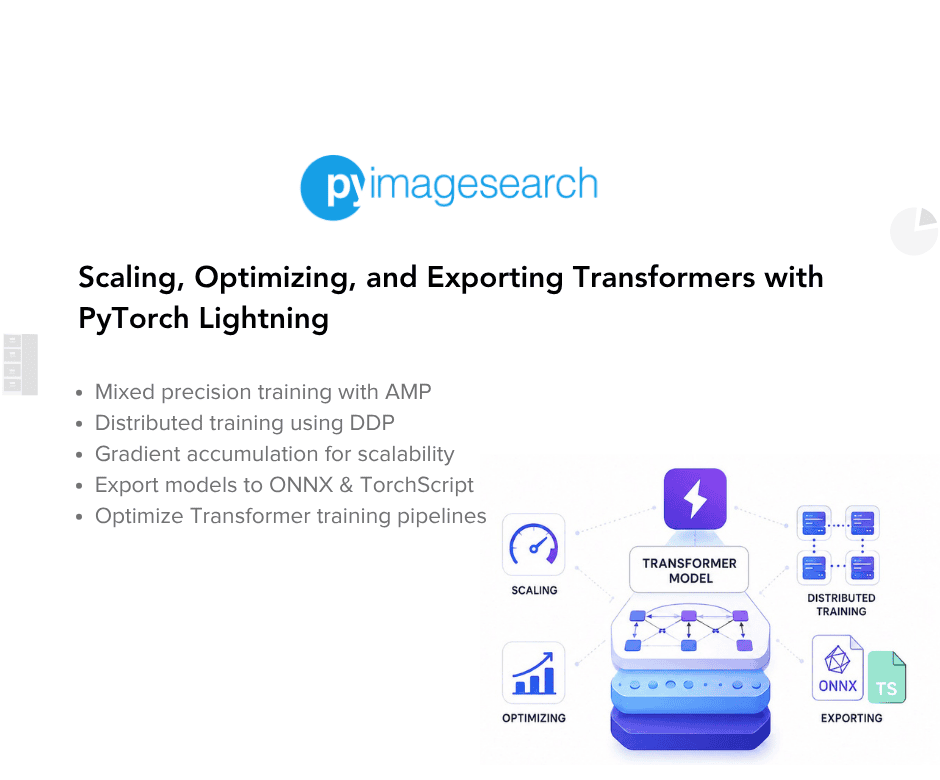
This lesson is the last in a 2-part series on PyTorch Lightning:
- Training with PyTorch Lightning: Structured MLOps Development
- Scaling, Optimizing, and Exporting Transformers with PyTorch Lightning (this tutorial)
To learn how to scale, optimize, and export Transformer models with PyTorch Lightning, just keep reading.

Introduction to Scaling PyTorch Lightning Transformer Training
Scaling Transformer training and preparing models for real-world deployment typically requires complex engineering effort such as distributed training, mixed-precision optimization, and multiple export formats. But thanks to PyTorch Lightning and Hydra, you can achieve all of this without rewriting your codebase or adding low-level boilerplate. In this lesson, we will take the sentiment-classification project you built earlier and upgrade it into a fast, scalable, and deployment-ready workflow.
What We Built Previously
In the previous tutorial, you created a complete sentiment classification pipeline using DistilBERT.
You structured your project with:
- A LightningDataModule to handle dataset loading, tokenization, and data loaders
- A LightningModule containing the model, forward pass, loss, metrics, and optimizer
- A clean Hydra configuration hierarchy that controlled every part of the training run
- A flexible training script that handled seeding, callbacks, logging, and TensorBoard
- An inference script for single, batch, and interactive predictions
This foundation gave you a fully reproducible training workflow that runs the same way on CPU, GPU, or MPS, with settings that can be overridden easily using Hydra’s command-line syntax.
However, training a base model is only the first step in a production ML workflow.
Why Scaling and Exporting Matter
Real-world Transformer workloads often push beyond what a single GPU or even a single machine can handle.
Teams need:
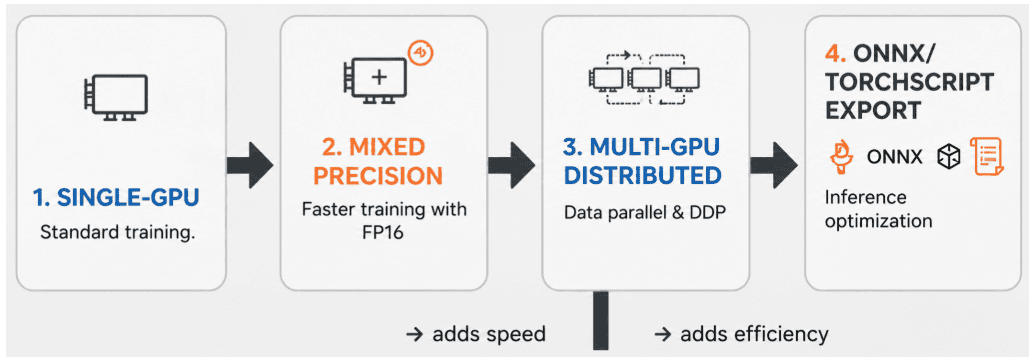
- Mixed precision (FP16 or BF16): for faster training and lower memory usage
- Distributed data parallel training: to use multiple GPUs efficiently
- Gradient accumulation: to simulate large batch sizes
- Model exports (ONNX or TorchScript): for deployment in production systems
- Lightweight inference runtimes: faster than PyTorch eager mode
- Stable artifact folders: ready for DVC, CI/CD, or cloud deployment pipelines
These features turn a research-grade script into an MLOps-grade training system, and that is exactly what you will build in this lesson.
How Lightning Makes It Easy
The best part is that none of this requires rewriting your training loop.
PyTorch Lightning abstracts the hard parts:
- Mixed precision: uses a single configuration key
- Distributed training (DDP or FSDP): requires only a strategy change
- Export logic: can be cleanly added without modifying model code
- Hydra: lets you switch between configurations instantly
- Checkpoints, logs, and metrics: remain fully reproducible
Instead of modifying your DataModule or LightningModule, you will extend the trainer configuration and add a dedicated export script.
That is the power of Lightning: the same codebase now supports single-GPU training, multi-GPU scaling, and deployment-ready exports with minimal changes.
Would you like immediate access to 3,457 images curated and labeled with hand gestures to train, explore, and experiment with … for free? Head over to Roboflow and get a free account to grab these hand gesture images.
Configuring Your Development Environment
Lesson 2 introduces new capabilities (e.g., distributed training, mixed precision, and exporting models to ONNX or TorchScript), so the environment now includes additional dependencies specifically meant for scaling and production-grade inference.
Below is the exact requirements.txt used in this lesson:
# Lesson 2 Requirements
# Additional dependencies for production features

# PyTorch and Lightning
torch>=2.1.0
torchvision>=0.16.0
torchaudio>=2.1.0
pytorch-lightning>=2.1.0

# Hugging Face ecosystem
transformers>=4.35.0
datasets>=2.14.0
tokenizers>=0.15.0

# Configuration management
hydra-core>=1.3.0
omegaconf>=2.3.0

# Metrics and monitoring
torchmetrics>=1.2.0
tensorboard>=2.15.0

# Model export (LESSON 2 specific)
onnx>=1.15.0
onnxruntime>=1.16.0  # CPU version works on all platforms

# Data processing
numpy>=1.24.0
pandas>=2.0.0

# Utilities
tqdm>=4.66.0
pyyaml>=6.0.0

# Note: For NVIDIA GPUs on Linux, you can optionally install:
# onnxruntime-gpu>=1.16.0  # Requires CUDA, Linux only
This environment enables 3 major Lesson 2 features:
1. Multi-GPU Distributed Training
Powered by:
- PyTorch Lightning (DDP or FSDP strategies)
- Hydra configurations for trainer selection
2. Mixed Precision
torch >= 2.x unlocks CPU BF16, GPU AMP, and faster matrix kernels.
3. ONNX Export and Runtime Inference
The addition of onnx and onnxruntime enables:
- model export to ONNX format
- cross-platform CPU inference
- benchmarking ONNX vs PyTorch (optional)
If you are using an NVIDIA GPU on Linux, you can optionally install:
pip install onnxruntime-gpu
This is not required for the lesson (we stay framework-agnostic), but readers who want GPU ONNX inference can enable it easily.
Need Help Configuring Your Development Environment?

All that said, are you:
- Short on time?
- Learning on your employer’s administratively locked system?
- Wanting to skip the hassle of fighting with the command line, package managers, and virtual environments?
- Ready to run the code immediately on your Windows, macOS, or Linux system?
Then join PyImageSearch University today!
Gain access to Jupyter Notebooks for this tutorial and other PyImageSearch guides pre-configured to run on Google Colab’s ecosystem right in your web browser! No installation required.
And best of all, these Jupyter Notebooks will run on Windows, macOS, and Linux!
Preparing PyTorch Lightning Models for Scalable Multi-GPU Training
Before we scale training, enable DDP or FSDP, or export models to ONNX or TorchScript, it is important that the project structure and configuration layout are set up correctly. Lesson 2 builds directly on the modular design from Lesson 1, but introduces specialized trainer configs and improved environment setup that unlock multi-GPU training and optimized inference.
Your updated project structure now reflects these goals.
Project Structure Refresher (Updated for Lesson 2)
Below is the exact directory layout used in this lesson:
.
├── configs
│   ├── config.yaml
│   ├── data
│   │   └── imdb.yaml
│   ├── model
│   │   └── distilbert.yaml
│   └── trainer
│       ├── ddp.yaml
│       ├── fsdp.yaml
│       └── single_gpu.yaml
├── README.md
├── requirements.txt
├── RUN.md
├── sample_reviews.txt
└── src
    ├── data_module.py
    ├── inference.py
    ├── model_module.py
    └── train.py
This layout introduces 3 major upgrades compared to Lesson 1:
Dedicated Trainer Configurations
You now have separate Hydra configurations under configs/trainer/ for:
single_gpu.yaml: standard 1-GPU or CPU trainingddp.yaml: multi-GPU Distributed Data Parallel (DDP)fsdp.yaml: Fully Sharded Data Parallel (memory-efficient large-model training)
This keeps the scaling logic completely outside the Python code (a major MLOps advantage).
Unified Root Configuration (config.yaml)
The root configuration composes the model, data, and trainer settings into a single experiment specification.
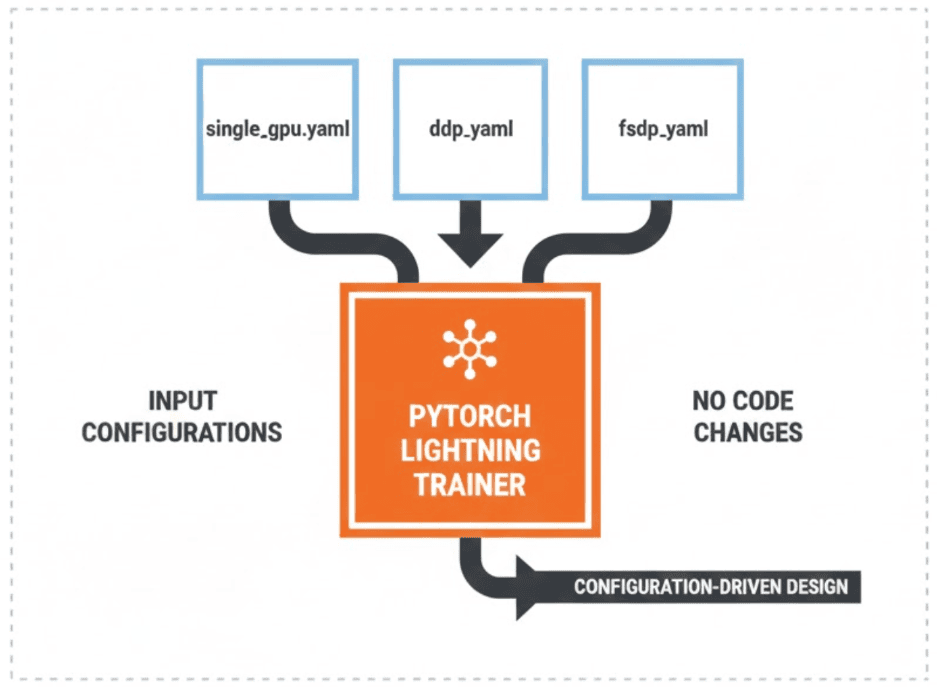
Switching between single-GPU and DDP training is as simple as:
python src/train.py trainer=ddp
No code changes or additional flags are required. By default, the project uses the DDP trainer (trainer=ddp), but you can switch to single-GPU training by running python src/train.py trainer=single_gpu.
Clean Separation of Code Files
Your src/ folder remains identical to Lesson 1 (data_module.py, model_module.py, train.py, and inference.py). This reinforces the Lesson 2 philosophy:
“Scaling and exporting should not require modifying your model code.”
Only the configs/ files change, not the implementation.
Hydra Enhancements for Scaling
Lesson 2 is where Hydra truly shines.
Instead of hardcoding distributed training logic in Python, you now have clean trainer profiles:
configs/trainer/
│── single_gpu.yaml
│── ddp.yaml
└── fsdp.yaml
Each YAML file defines:
acceleratordevicesstrategy(ddporfsdp)precision- logging settings
Examples a reader will use later:
python src/train.py trainer=single_gpu
python src/train.py trainer=ddp
python src/train.py trainer=fsdp
Hydra swaps in the right configuration automatically.
This is exactly what you expect in a real MLOps pipeline.
Why This Setup Matters (Before We Scale)
This lightweight structure unlocks all the heavy features coming next:
- Training: can scale from CPU to GPU to multi-GPU without touching code
- Export pipelines (ONNX or TorchScript): work consistently because configs capture preprocessing
- FSDP and mixed precision: require stable config-driven Trainer settings
- Model reproducibility: is guaranteed across environments
Most importantly:
You now have a production-grade pattern:
- Model logic: stays in
model_module.py - Data logic: stays in
data_module.py - Training logic: stays in
train.py - Scaling and exporting logic: stays in
configs/*
This is the exact separation used in serious MLOps workflows.
Revisiting the Code Architecture
Before we introduce mixed precision, distributed training, gradient accumulation, and model export, it is important to ground ourselves in the architecture we built in the previous tutorial. Lesson 1 gave us a clean, modular foundation. Lesson 2 builds directly on this foundation without changing most of the code. That is the real strength of PyTorch Lightning and Hydra: scaling does not require rewriting your project.
DataModule, LightningModule, and Hydra Recap
Our project continues to rely on the same 3 core abstractions:
LightningDataModule
Handles all data concerns:
- Dataset: downloading the IMDB dataset
- Tokenization: using a Hugging Face tokenizer
- Data loaders: creating training, validation, and test DataLoaders
- Separation of concerns: keeping preprocessing separate from training logic
This structure remains untouched in Lesson 2. AMP, DDP, and export do not require modifying data_module.py.
LightningModule
Encapsulates the model architecture and training logic:
- Encoder: DistilBERT
- Forward pass: processing model inputs
- Loss and metrics: computing training loss and evaluation metrics
- Optimizer: configuring optimization
Lesson 2 also does not modify the internal model logic.
Instead, we scale training through the Trainer and Hydra configuration.
Hydra
Hydra remains the central controller of the entire workflow.
It composes the configuration from:
configs/model/*.yamlconfigs/data/*.yamlconfigs/trainer/*.yaml
Lesson 2 extends Hydra with:
- DDP trainer configurations
- FSDP configurations (if desired)
- AMP configurations
- gradient accumulation
- export configurations
But the training code (train.py) stays nearly the same.
This consistent architecture is what makes the next steps (i.e., scaling, exporting, and optimizing) feel incremental rather than overwhelming.
Preparing for Advanced Training
Lesson 2 introduces new capabilities commonly needed in real-world pipelines:
- multi-GPU distributed training
- mixed precision training
- larger effective batch sizes
- ONNX or TorchScript model export
- ONNX Runtime production inference
Here is the key design rule we follow:
We scale the system without touching the model or data code unless absolutely necessary.
Lightning was built exactly for this: features (e.g., AMP and DDP) are injected through the Trainer, not through the model.
Hydra was built to help you swap configurations without modifying Python files. This keeps your codebase stable (a critical requirement for teams and MLOps pipelines).
We continue using Lightning’s ModelCheckpoint and LearningRateMonitor callbacks to automatically track the best model and log learning-rate schedules during training.
Configuration Extensions
Lesson 2 adds new YAML files to support advanced features, but again, no source code changes are required. Each Hydra run is automatically logged to outputs/YYYY-MM-DD/HH-MM-SS/, keeping experiments isolated and reproducible.
Your directory now includes:
configs/
    trainer/
        single_gpu.yaml
        ddp.yaml
        fsdp.yaml
These configurations enable:
single_gpu.yaml: local trainingddp.yaml: distributed GPU trainingfsdp.yaml: model sharding for large models- future extensions (AMP, gradient accumulation, etc.)
Because of Hydra’s override system, switching between them is as simple as:
python src/train.py trainer=ddp
python src/train.py trainer=fsdp
python src/train.py trainer=single_gpu
No code changes. No rewriting loops. No new training scripts.
This is exactly why Lightning and Hydra are so powerful: the same codebase can serve research, training at scale, and export pipelines without branching or duplication.
Enabling Mixed Precision Training with PyTorch Lightning AMP
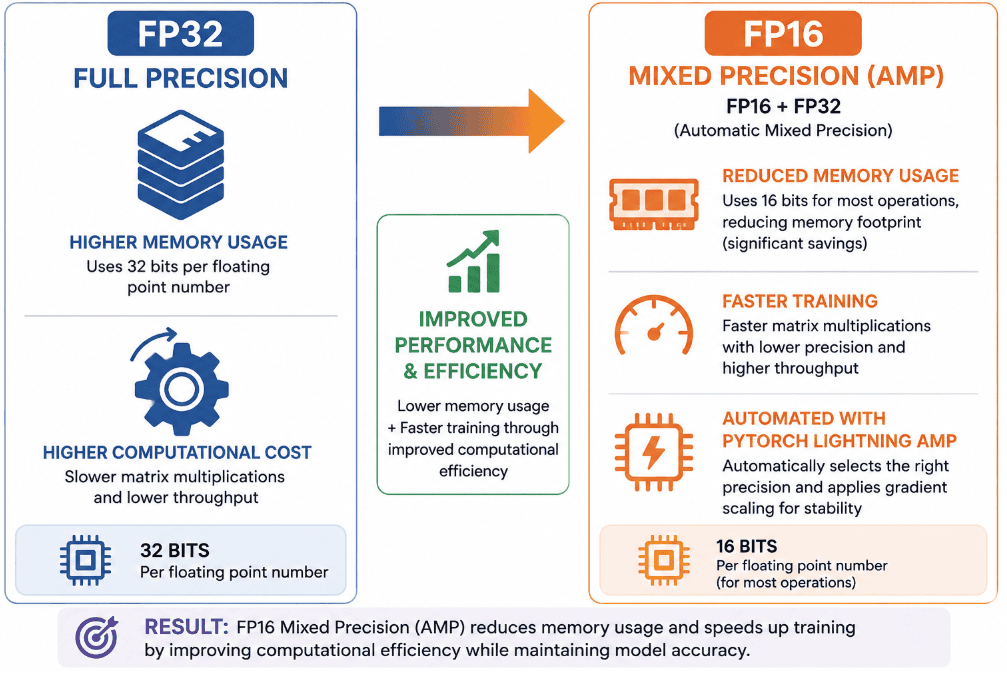
Mixed precision training is one of the easiest “free wins” you can get when training Transformer models. Instead of doing every operation in full 32-bit floating point (FP32), we let the GPU run most of the math in 16-bit (FP16 or BF16) while keeping a few critical values in FP32 for numerical stability. The result is faster training, lower memory usage, and almost identical accuracy, especially on modern GPUs and Apple Silicon.
PyTorch Lightning wraps all of this inside the Trainer so you do not have to touch autocast contexts or manual gradient scaling. In this lesson, we will enable mixed precision purely through Hydra configurations, and Lightning will handle the rest.
Why Mixed Precision Boosts Transformers
Transformer models are heavy on matrix multiplications, which GPUs are extremely good at accelerating in half precision. When you switch from FP32 to a mixed precision mode (e.g., 16-mixed or bf16-mixed):
- Many tensor operations run 1.5-2.5× faster.
- Activations and gradients consume roughly half the memory.
- You can often increase batch size without running out of video random-access memory (VRAM).
Lightning uses PyTorch’s Automatic Mixed Precision (AMP) under the hood, so you still get stable training through automatic loss scaling. From an MLOps point of view, this is a small configuration change that can dramatically reduce training time and GPU cost without changing your codebase.
Updating Hydra: precision: 16-mixed
You do not need to modify data_module.py or model_module.py. Mixed precision is controlled entirely through the trainer configuration.
Here is the single-GPU trainer configuration in configs/trainer/single_gpu.yaml:
# Single GPU Configuration with Mixed Precision
# For experimentation and development

strategy: auto
devices: 1
accelerator: auto

# Mixed precision for faster training
precision: 16-mixed

# Training configuration
max_epochs: 3

# Performance
deterministic: false
benchmark: true

# Checkpointing
enable_checkpointing: true

# Progress
enable_progress_bar: true
log_every_n_steps: 10
Compared with an FP32 trainer, the required configuration change for mixed precision is:
precision: 16-mixed
Your DDP trainer in configs/trainer/ddp.yaml is already AMP-ready too:
# DDP (Distributed Data Parallel) Strategy
# Best for: Multi-GPU training on single node or multi-node setups
# Use when: Model fits in GPU memory, you want data parallelism
# Core distributed settings
strategy: ddp
devices: auto  # Use all available GPUs
accelerator: auto  # Auto-detect GPU/CPU

# Mixed precision for faster training
precision: 16-mixed  # FP16 automatic mixed precision

# Training configuration
max_epochs: 5  # More epochs for production
accumulate_grad_batches: 1  # Gradient accumulation (increase if OOM)

# Performance optimizations
deterministic: false  # Set to true for full reproducibility (slower)
benchmark: true  # Optimize CUDA kernels for input size

# Checkpointing
enable_checkpointing: true

# Progress tracking
enable_progress_bar: true
log_every_n_steps: 10

# DDP-specific optimizations
# ddp_find_unused_parameters: false  # Uncomment if you get DDP warnings
For FSDP, you are using BF16 mixed precision by default (better stability on very large models):
# FSDP (Fully Sharded Data Parallel) Strategy
# Best for: Very large models that don't fit in single GPU memory
# Use when: Model parameters exceed GPU memory, need memory efficiency

# Core distributed settings
strategy: fsdp
devices: auto  # Use all available GPUs
accelerator: auto

# Mixed precision - BF16 recommended for FSDP
precision: bf16-mixed  # Better stability than FP16 for large models

# Training configuration
max_epochs: 5
accumulate_grad_batches: 1

# Performance settings
deterministic: false
benchmark: true

# Checkpointing
enable_checkpointing: true

# Progress tracking
enable_progress_bar: true
log_every_n_steps: 10
# FSDP-specific settings
# Note: FSDP automatically shards model parameters, gradients, and optimizer states
# This allows training models that wouldn't fit on a single GPU
All of these configurations are passed to the Trainer through:
trainer = pl.Trainer(
    **cfg.trainer,
    callbacks=callbacks,
    logger=logger,
)
So switching between FP32, FP16, and BF16 is just a matter of changing precision in YAML (no changes to the training loop, no new context managers, and no extra boilerplate).
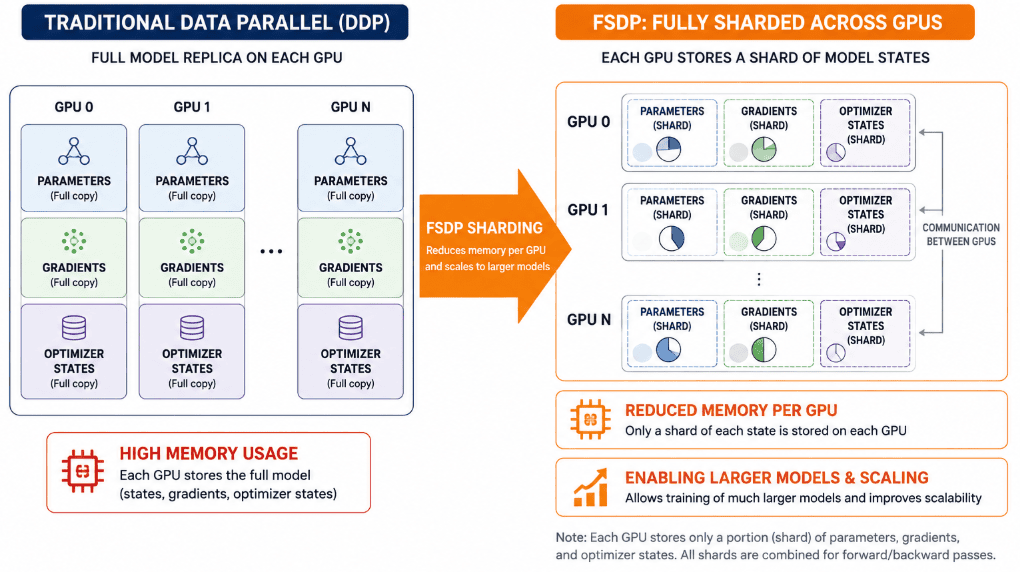
When to Use FSDP (Fully Sharded Data Parallel)
While DDP works well when the entire model fits on one GPU, FSDP is designed for cases where it doesn’t.
Instead of replicating the whole model on each GPU, FSDP shards parameters, gradients, and optimizer states across GPUs, allowing you to train models many times larger than a single GPU’s memory.
Lightning makes this just as simple as DDP:
python src/train.py trainer=fsdp
FSDP uses BF16 mixed precision by default (configured in configs/trainer/fsdp.yaml), which provides better stability for large-scale Transformer models.
Use FSDP if:
- you are hitting OOM even with small batch sizes
- you are experimenting with larger Transformer backbones
- you want memory-efficient training across multiple GPUs
Running AMP on NVIDIA GPUs or Apple Silicon
Once the configurations are in place, running AMP simply requires choosing the right trainer preset from the CLI.
Single GPU with Mixed Precision (NVIDIA GPU or Apple Silicon):
# From the lesson2 directory
python src/train.py trainer=single_gpu
Because trainer=single_gpu already sets:
accelerator: auto
devices: 1
precision: 16-mixed
Lightning will:
- Use CUDA if an NVIDIA GPU is available,
- Use MPS on a Mac with Apple Silicon,
- Fall back to the CPU otherwise (mixed precision provides little benefit there).
If you want to be explicit, you can override precision on the command line:
python src/train.py trainer=single_gpu trainer.precision=32        # FP32 baseline
python src/train.py trainer=single_gpu trainer.precision=16-mixed # FP16 AMP
The same pattern applies to DDP:
# Use all available GPUs with AMP
python src/train.py trainer=ddp

# Or force 2 GPUs with mixed precision
python src/train.py trainer=ddp trainer.devices=2 trainer.precision=16-mixed
For very large models using FSDP:
python src/train.py trainer=fsdp trainer.precision=bf16-mixed
In every case, you are only changing Hydra configuration values, while the underlying Lightning code path remains exactly the same.
What Speedups Should You Expect?
The exact speedup depends on your GPU, batch size, and model size, but for Transformer-style models like DistilBERT, you may see:
1.5-2×faster iteration times~50%lower activation memory usage- Similar validation accuracy to FP32
If you want to quantify performance in your own environment, you can run a simple timing experiment:
# FP32 (baseline)
time python src/train.py trainer=single_gpu trainer.precision=32 trainer.max_epochs=1

# FP16 mixed precision
time python src/train.py trainer=single_gpu trainer.precision=16-mixed trainer.max_epochs=1
You can compare the wall-clock time and VRAM usage between the 2 runs. In real MLOps pipelines, this can translate into lower training costs and the ability to run larger experiments on the same hardware.
Distributed Training with PyTorch Lightning DDP for Multi-GPU Scaling
Scaling your model across multiple GPUs is one of the fastest ways to reduce training time for Transformer architectures. PyTorch Lightning makes this dramatically easier by handling the boilerplate (process spawning, gradient synchronization, device management, and checkpoint coordination). In Lesson 2, we enable Distributed Data Parallel (DDP) using a Hydra configuration file and a single command-line override.
Let us walk through how this works and how you can run multi-GPU training without changing a single line of Python code.
What Distributed Data Parallel (DDP) Is
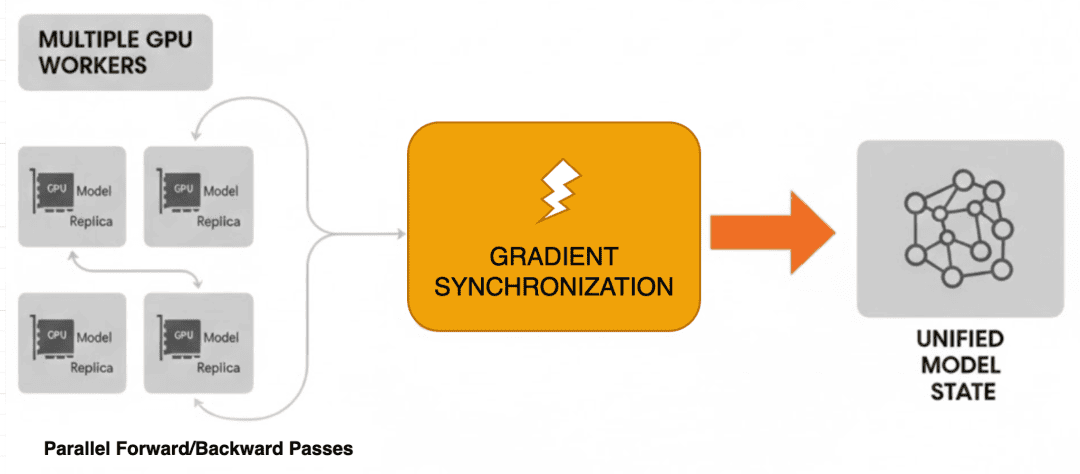
Distributed Data Parallel (DDP) is PyTorch’s recommended approach for training models across multiple GPUs. Each GPU receives:
- a full copy of the model
- a shard of the dataset
- parallel forward and backward passes
After each backward pass, gradients are synchronized across all GPUs so that every model replica remains synchronized.
The benefit is simple:
More GPUs → Larger global batch size → Faster training
Lightning abstracts the entire DDP workflow, so you do not need to manually write any multiprocessing logic, barrier synchronization, or device placement. All of this is handled by Trainer(strategy="ddp").
Hydra and Lightning Configuration (strategy: ddp)
DDP is enabled entirely through configuration, not code.
Here is the Hydra configuration file you include in Lesson 2:
configs/trainer/ddp.yaml
# Distributed training with DDP
strategy: ddp
accelerator: auto
devices: auto
precision: 16-mixed
max_epochs: 3

# Optional: helps stabilize multi-GPU runs
num_nodes: 1
This file replaces the default trainer settings when you select it from the CLI.
Lightning reads this configuration and automatically enables:
- automatic GPU detection
- multi-process spawning
- distributed samplers for the DataModule
- synchronized batch normalization
- gradient synchronization across devices
- safe checkpointing on rank 0
You do not need to modify train.py, DataModule, or LightningModule.
Running Multi-GPU Training
Use the following command to launch DDP:
$ python src/train.py trainer=ddp
To explicitly choose the number of devices:
$ python src/train.py trainer=ddp trainer.devices=2
To train on all visible GPUs:
$ python src/train.py trainer=ddp trainer.devices=auto
You can also combine overrides:
$ python src/train.py trainer=ddp trainer.precision=bf16-mixed data.batch_size=16
Hydra composes the configurations, Lightning spawns the GPU workers, and DDP executes the training loop.
No additional code is required.
Gradient Accumulation for Large Effective Batch Sizes
Modern Transformer models often benefit from larger batch sizes because they produce smoother gradients, more stable optimization, and sometimes higher accuracy in fewer iterations. However, large batches require more GPU memory, and even a mid-sized GPU may not be able to process them directly.
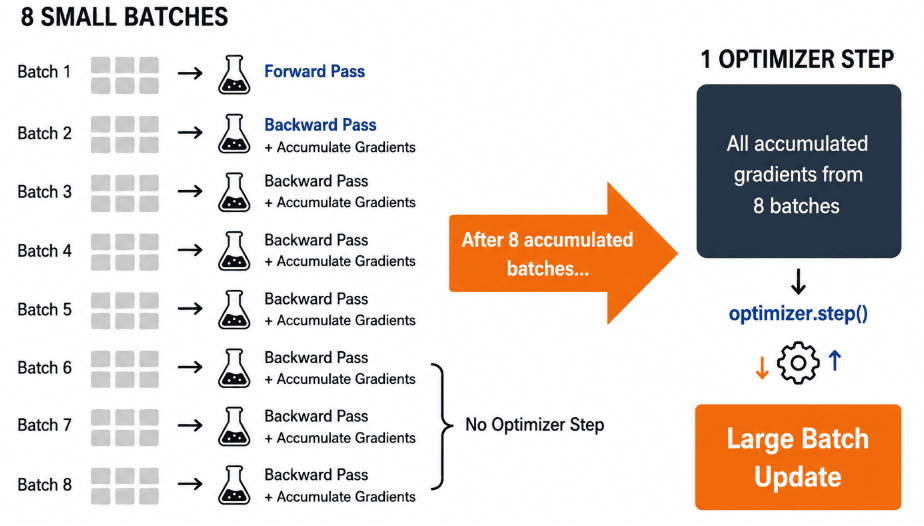
Gradient accumulation solves this by splitting a large batch across multiple smaller forward passes. Lightning collects gradients over several steps before performing one optimizer update, giving you the effect of large-batch training without increasing memory usage.
Why Gradient Accumulation Helps
Instead of running:
Batch size = 64(requires large GPU memory)
…you can simulate it as:
batch_size = 8accumulate_grad_batches = 8
Lightning will:
- Run 8 forward and backward passes
- Accumulate gradients internally
- Call
optimizer.step()only once
This produces the same gradient update you would get from a single batch of size 64 while using only the memory required for a batch of 8.
This is especially useful when:
- You hit CUDA OOM errors during DDP or FSDP training
- You want larger effective batch sizes for stability
- You are training with mixed precision, which can benefit from larger batches
- You are using limited GPU hardware, including Apple Silicon
Updating Hydra Configurations
Your Lesson 2 repository supports gradient accumulation through Hydra overrides.
The primary trainer configurations (ddp.yaml, fsdp.yaml, single_gpu.yaml) set:
accumulate_grad_batches: 1
This means accumulation is opt-in and controlled by command-line overrides.
You can also create a dedicated Hydra configuration:
configs/trainer/accum.yaml (optional)
accumulate_grad_batches: 4
However, this is not required because the command-line interface (CLI) override is often clearer and more flexible.
Using Gradient Accumulation via CLI
Because Hydra merges configurations top-down, you can override accumulation using the following options:
Single GPU
python src/train.py trainer=single_gpu trainer.accumulate_grad_batches=4
DDP (multi-GPU)
python src/train.py trainer=ddp trainer.accumulate_grad_batches=4
With Mixed Precision
python src/train.py trainer=ddp trainer.precision=16-mixed trainer.accumulate_grad_batches=8
With Large Batches
python src/train.py trainer=ddp data.batch_size=4 trainer.accumulate_grad_batches=8
In this case:
effective_batch_size = batch_size × accumulate_grad_batches × num_gpus
For example, with:
batch_size = 4accumulate_grad_batches = 8num_gpus = 2
the effective batch size is:
4 × 8 × 2 = 64
This configuration normally requires ~16-20 GB of GPU memory but is now possible even on a laptop GPU.
Batch Size vs Memory Tradeoffs
Gradient accumulation directly affects:
- Lower Memory Consumption: Only the small per-step batch must fit in memory.
- Equivalent Gradient Updates: The optimizer receives the same gradient update as full-size training.
- Slightly Longer Training Time: Lightning performs more forward and backward passes before each update. However, this approach is still more efficient than dealing with out-of-memory (OOM) errors or reducing the sequence length or tokenizer settings.
Lightning Integration (Zero Code Changes)
Your Lesson 2 train.py requires zero code modification.
Lightning handles:
- gradient scaling
- accumulation logic
- optimizer stepping
- multi-GPU gradient synchronization
- mixed-precision scaling
You control the behavior through Hydra configurations.
Exporting PyTorch Lightning Transformer Models to ONNX and TorchScript
Training a model is only half the story because real-world ML systems need fast, portable, and framework-agnostic inference. In Lesson 2, you extend your training pipeline to automatically export your best checkpoint into two production-ready formats:
- ONNX: for cross-platform, high-performance inference (ONNX Runtime, TensorRT, OpenVINO)
- TorchScript: for PyTorch-native, C++ or mobile deployment
The key design goal is that none of this export logic lives inside the LightningModule. Instead, the export code is isolated in train.py and driven entirely by Hydra configuration. This keeps your model clean and your training loop reusable in both research and production settings.
Why Export?
Exported models provide several benefits:
Fast inference: ONNX Runtime routinely delivers 2-5× faster CPU inference than PyTorch eager mode.
Portability: A single ONNX file runs on:
- Linux, macOS, and Windows
- mobile devices
- GPU runtimes (e.g., TensorRT)
- serverless platforms (AWS Lambda with ONNX Runtime)
Reproducible Production Pipelines: TorchScript provides a stable, serialized version of your model for:
- C++ backends
- embedded devices
- custom inference servers
- TorchServe
DVC-ready artifact tracking: Exports drop cleanly into:
artifacts/models/
artifacts/metrics/
These artifacts can be versioned and tracked, just like code.
Enabling Export via Hydra
Exports are controlled by your root configuration:
configs/config.yaml
# Export configuration (LESSON 2 feature)
export:
  enabled: true       # Enable model export after training
  onnx: true         # Export to ONNX format
  torchscript: true  # Export to TorchScript format
You can override these settings at runtime:
Export Both Formats
python src/train.py trainer=ddp export.enabled=true
Export Only ONNX
python src/train.py export.enabled=true export.torchscript=false
Export Only TorchScript
python src/train.py export.enabled=true export.onnx=false
Lightning handles training, ModelCheckpoint saves the best checkpoint, and then your script reloads that checkpoint for export.
How the Export Pipeline Works
During export, the script automatically reloads the best checkpoint saved by ModelCheckpoint, ensuring the exported ONNX or TorchScript files always correspond to the best validation score.
Your train.py contains 2 production-grade export utilities:
ONNX Export
export_to_onnx(best_model, onnx_path, cfg.data.max_length)
TorchScript Export
export_to_torchscript(best_model, ts_path, cfg.data.max_length)
Both functions:
- load the best checkpoint
- switch the model to evaluation mode
- move it to the CPU
- construct a dummy input of shape
(1, max_length) - save the exported file under
artifacts/models/
This separation ensures:
- no modification to
model_module.py - clean Transformer traceability
- reproducibility across runs
ONNX Export Details
The utility inside train.py uses:
torch.onnx.export(
    model,
    (dummy_input_ids, dummy_attention_mask),
    str(output_path),
    opset_version=14,
    input_names=["input_ids", "attention_mask"],
    output_names=["logits"],
    dynamic_axes={
        "input_ids": {0: "batch_size", 1: "sequence_length"},
        "attention_mask": {0: "batch_size", 1: "sequence_length"},
        "logits": {0: "batch_size"},
    },
)
Key features:
Dynamic axes: Allow variable batch sizes and sequence lengths at inference time.
Opset 14: Compatible with ONNX Runtime and TensorRT.
Framework-agnostic: You can deploy the same .onnx file using:
- ONNX Runtime
- NVIDIA TensorRT
- OpenVINO
- Triton Inference Server
- AWS Lambda (serverless inference)
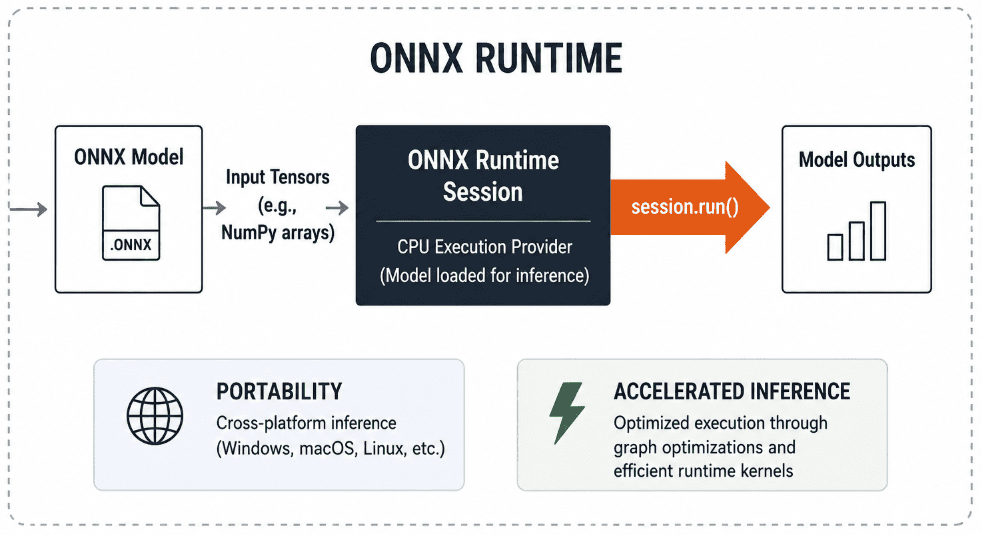
ONNX Runtime Inference Example
Readers can test the exported model using:
import onnxruntime as ort
import numpy as np

session = ort.InferenceSession("artifacts/models/sentiment_classifier.onnx")

input_ids = np.random.randint(0, 1000, (1, 128), dtype=np.int64)
attention_mask = np.ones((1, 128), dtype=np.int64)

outputs = session.run(None, {
    "input_ids": input_ids,
    "attention_mask": attention_mask
})

print("Logits:", outputs[0])
This should produce logits similar to those from PyTorch inference.
TorchScript Export Details
The utility inside train.py uses:
traced_model = torch.jit.trace(
    model,
    (dummy_input_ids, dummy_attention_mask)
)
traced_model.save(str(output_path))
TorchScript provides:
PyTorch-Native Deployment
Works with:
- TorchServe
- custom C++ services
- mobile runtimes
- embedded systems
Stable, Production-Safe Serialization
Unlike Python pickles, TorchScript provides a stable serialized format for multi-process and multi-node systems.
Artifacts Stored in a DVC-Ready Structure
After export completes, your script creates:
artifacts/
├── models/
│   ├── sentiment_classifier.onnx
│   ├── sentiment_classifier.pt
└── metrics/
    └── metrics.json
Your script also generates artifacts/metrics/metrics.json, which contains the final validation loss and accuracy. Your continuous integration and continuous deployment (CI/CD) pipeline, Data Version Control (DVC), or model registry can consume this file.
This folder is well suited for DVC tracking:
dvc add artifacts/models/
dvc add artifacts/metrics/
End-to-End Export Command
A typical production run:
python src/train.py \
    trainer=ddp \
    trainer.precision=16-mixed \
    export.enabled=true
produces:
Exported: sentiment_classifier.onnx
Exported: sentiment_classifier.pt
Saved metrics.json
Both formats are validated, versioned, and ready for deployment.
Zero Modifications to Model Code
Because the LightningModule remains unchanged, you maintain:
- readability
- testability
- modularity
- compatibility with future lessons (CI/CD, DVC, deployments)
The entire export logic is kept in one place.
What's next? We recommend PyImageSearch University.

120+ total classes • 115+ hours of on-demand code walkthrough videos • Last updated: October 2026
★★★★★ 4.84 (128 Ratings) • 16,000+ Students Enrolled
I strongly believe that if you had the right teacher you could master computer vision and deep learning.
Do you think learning computer vision and deep learning has to be time-consuming, overwhelming, and complicated? Or has to involve complex mathematics and equations? Or requires a degree in computer science?
That’s not the case.
All you need to master computer vision and deep learning is for someone to explain things to you in simple, intuitive terms. And that’s exactly what I do. My mission is to change education and how complex Artificial Intelligence topics are taught.
If you're serious about learning computer vision, your next stop should be PyImageSearch University, the most comprehensive computer vision, deep learning, and OpenCV course online today. Here you’ll learn how to successfully and confidently apply computer vision to your work, research, and projects. Join me in computer vision mastery.
Inside PyImageSearch University you'll find:
- ✓ 120+ courses on essential computer vision, deep learning, and OpenCV topics
- ✓ 94+ Certificates of Completion
- ✓ 115+ hours of on-demand video
- ✓ Brand new courses released regularly, ensuring you can keep up with state-of-the-art techniques
- ✓ Pre-configured Jupyter Notebooks in Google Colab
- ✓ Run all code examples in your web browser — works on Windows, macOS, and Linux (no dev environment configuration required!)
- ✓ Access to centralized code repos for all 540+ tutorials on PyImageSearch
- ✓ Easy one-click downloads for code, datasets, pre-trained models, etc.
- ✓ Access on mobile, laptop, desktop, etc.
Summary
In this lesson, you transformed a simple sentiment-classification project into a scalable, production-ready training system using PyTorch Lightning and Hydra. You learned how to enable mixed precision to speed up training, use Distributed Data Parallel (DDP) to leverage multiple GPUs, and apply gradient accumulation to simulate large batch sizes without increasing memory usage. All of these upgrades were achieved without modifying your model or data code, demonstrating the benefits of Lightning’s abstraction and Hydra’s configuration-driven design.
You also implemented a clean and reusable export pipeline, allowing the same trained model to be saved as ONNX or TorchScript and used in lightweight, fast inference systems. With a small export utility built directly into the train.py script and a clear configuration structure, you now have a workflow that produces consistent, portable artifacts suitable for CI/CD, edge devices, or cloud deployment.
Taken together, these enhancements provide a robust foundation for real-world ML engineering. You have taken the same codebase from Lesson 1 and upgraded it with improved performance, scalability, and deployment-ready outputs. This prepares you for next steps such as deployment, optimization, monitoring, or integrating your models into full MLOps pipelines.
Citation Information
Singh, V. “Scaling, Optimizing, and Exporting Transformers with PyTorch Lightning,” PyImageSearch, S. Huot, A. Sharma, and P. Thakur, eds., 2026, https://pyimg.co/2xntj
@incollection{Singh_2026_scaling-optimizing-exporting-transformers-pytorch-lightning,
  author = {Vikram Singh},
  title = {{Scaling, Optimizing, and Exporting Transformers with PyTorch Lightning}},
  booktitle = {PyImageSearch},
  editor = {Susan Huot and Aditya Sharma and Piyush Thakur},
  year = {2026},
  url = {https://pyimg.co/2xntj},
}
To download the source code to this post (and be notified when future tutorials are published here on PyImageSearch), simply enter your email address in the form below!

Download the Source Code and FREE 17-page Resource Guide
Enter your email address below to get a .zip of the code and a FREE 17-page Resource Guide on Computer Vision, OpenCV, and Deep Learning. Inside you'll find my hand-picked tutorials, books, courses, and libraries to help you master CV and DL!


Comment section
Hey, Adrian Rosebrock here, author and creator of PyImageSearch. While I love hearing from readers, a couple years ago I made the tough decision to no longer offer 1:1 help over blog post comments.
At the time I was receiving 200+ emails per day and another 100+ blog post comments. I simply did not have the time to moderate and respond to them all, and the sheer volume of requests was taking a toll on me.
Instead, my goal is to do the most good for the computer vision, deep learning, and OpenCV community at large by focusing my time on authoring high-quality blog posts, tutorials, and books/courses.
If you need help learning computer vision and deep learning, I suggest you refer to my full catalog of books and courses — they have helped tens of thousands of developers, students, and researchers just like yourself learn Computer Vision, Deep Learning, and OpenCV.
Click here to browse my full catalog.