Table of Contents
- YOLO26 Object Detection Tutorial: Benchmarking on macOS
- What Is YOLO26?
- Why YOLO26 Matters for Real-Time Object Detection
- What Changed in the Ultralytics YOLO26 Architecture
- Configuring Your Development Environment
- Project Structure
- Installing the Ultralytics YOLO26 Model on macOS
- Running YOLO26 Object Detection on Images, Video, and Webcam Streams
- Understanding YOLO26 Prediction Outputs
- YOLO26 Benchmarking Methodology on a MacBook
- YOLO26 vs YOLO12: Benchmark Results on macOS
- YOLO26 vs YOLO12: Visual Detection Quality Comparison
- When to Use the YOLO26 Model
- Summary
YOLO26 Object Detection Tutorial: Benchmarking on macOS
In this lesson, you will learn what YOLO26 is, what changed in the Ultralytics YOLO26 architecture compared to earlier releases, how to run YOLO26 object detection on images, video, and webcam streams on macOS, and how to benchmark YOLO26 against YOLO12n where we measured nearly 30% throughput gains on video.

This lesson is the 1st in a 2-part series on YOLO26:
- YOLO26 Object Detection Tutorial: Benchmarking on macOS (this tutorial)
- Lesson 2
To learn what YOLO26 is and how it compares to YOLO12 on macOS, just keep reading.

What Is YOLO26?
If you have followed the You Only Look Once (YOLO) family over the years, you already know the pattern. Every release promises better speed, better accuracy, or a cleaner deployment story. Sometimes that means small gains. Sometimes it means a meaningful shift in how the detector behaves in production.
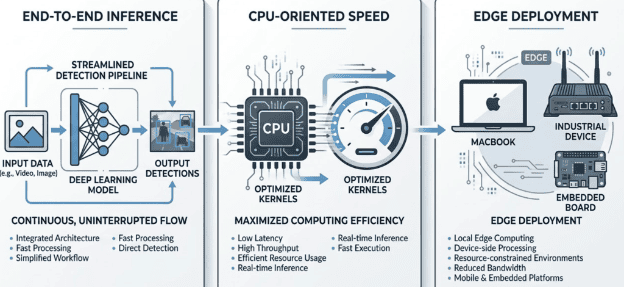
YOLO26 is interesting because it is not just another checkpoint refresh. Ultralytics presents it as an end-to-end detector with NMS-free inference by default, along with changes aimed at faster central processing unit (CPU) execution and cleaner edge deployment. Those claims matter because many real-world YOLO systems for real-time object detection do not run on large data center graphics processing units (GPUs). They run on laptops, edge boxes, personal computers (PCs), robotics platforms, and embedded devices where simplicity and latency matter.
In this lesson, you will answer 4 practical questions:
- What changed in YOLO26 compared with earlier Ultralytics YOLO releases?
- How do you run YOLO26 on macOS for images, videos, and webcam streams?
- What do the YOLO26 model outputs actually look like in Python?
- How does YOLO26 vs YOLO12 performance stack up on a MacBook?
By the end of this lesson, you will have a grounded understanding of what YOLO26 is, a reproducible benchmark workflow, and concrete numbers showing YOLO26 object detection running nearly 30% faster than YOLO12n on video.
Why YOLO26 Matters for Real-Time Object Detection
The easiest way to misunderstand a new detector release is to treat it like a version number bump and move on. That misses the point.
What makes the Ultralytics YOLO26 release worth paying attention to is not just accuracy. It is the combination of 3 practical ideas.
End-to-End Detection
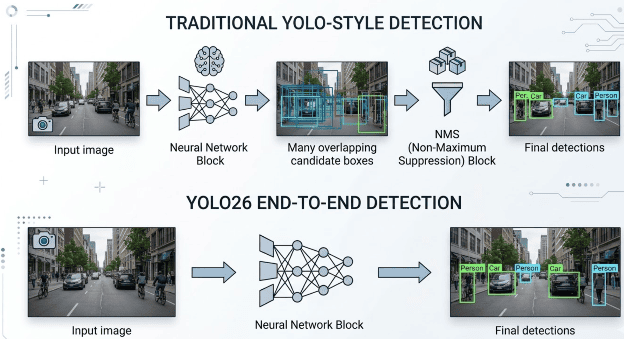
Traditional real-time detectors usually produce many overlapping candidate boxes and then rely on non-maximum suppression (NMS) to prune duplicates. That works well, but it adds a post-processing stage and a few more tuning knobs.
Ultralytics documents YOLO26 as using an end-to-end path by default, which means the standard inference path no longer depends on NMS in the same way earlier pipelines did. In plain English, the model is designed to produce a more direct set of final detections.
Why NMS Becomes a Performance Tax
NMS sounds simple in theory, but in practice it behaves like an extra tax on every frame. After the model generates candidate boxes, the pipeline still has to filter them, sort them, and suppress overlaps based on intersection over union (IoU). That adds more work after the neural network has already done its main job.
On desktop GPUs, that cost may be easy to hide. On CPUs and edge accelerators, it can become much more visible. Even worse, it can complicate deployment because post-processing is not always handled by the same optimized runtime that executes the network itself.
Why Latency Variability Matters
NMS is also scene-dependent. A sparse image with very few confident detections is cheap to process. A crowded frame with many overlapping candidates demands more sorting and more overlap checks. That means latency can fluctuate based on what the camera sees.
For robotics, industrial inspection, and real-time video systems, predictable timing matters. Even if YOLO26 does not make every environment perfectly deterministic, removing NMS from the standard inference path reduces one major source of latency jitter.
Faster CPU-Oriented Deployment
On paper, the official YOLO26 documentation emphasizes stronger CPU performance, especially for deployment scenarios where a heavy GPU stack is not the main story. That matters on macOS because many of you prototype on Apple laptops and often need a reliable local baseline before thinking about mobile, edge, or cloud deployment.
Cleaner Edge Story
YOLO26 is also positioned as an edge-first release. That does not mean it is only for edge devices. It means the design decisions try to reduce deployment friction across hardware and export formats.
If you are building applications for robotics, industrial inspection, or always-on video analytics, those changes are not academic. They directly affect latency, integration complexity, and operational cost.
What Changed in the Ultralytics YOLO26 Architecture
Now let us make that concrete.
End-to-End, NMS-Free Inference by Default
According to the public Ultralytics documentation, YOLO26 uses a one-to-one head by default for end-to-end prediction, and this default path does not require NMS. Ultralytics also notes that you can still switch back to a more traditional path by setting end2end=False for workflows that need compatibility with NMS-based post-processing.
That distinction is worth understanding.
Traditional Detector Pipeline
In a traditional pipeline, the detector produces many candidate boxes. Post-processing then removes duplicates and overlapping boxes with NMS. The final detection quality can depend on the confidence score and IoU thresholds.
YOLO26 Default Pipeline
In the default YOLO26 path, the detector is configured to produce final detections directly enough that NMS is not part of the standard prediction path. This reduces post-processing overhead and simplifies deployment logic.
For you as a practitioner, the biggest takeaway is simple: fewer moving parts after the forward pass usually makes inference pipelines easier to reason about and easier to deploy.
The One-to-Many Legacy
Earlier YOLO-style detectors typically learn through a one-to-many assignment strategy, where multiple predictions may be associated with the same ground-truth object during training. That is useful for optimization and recall, but it also leaves the model with a dense set of redundant candidates that need cleanup afterward.
YOLO26 moves the default inference story closer to one-to-one prediction. Instead of asking post-processing to resolve a large pile of overlapping candidates, the deployed model is designed to produce a cleaner final set of object hypotheses.
DFL Removal and Export Friendliness
Ultralytics also highlights Distribution Focal Loss (DFL) removal as a major change in YOLO26. The practical benefit is not that you need to memorize every detail of the underlying loss formulation. The practical benefit is cleaner export behavior and wider edge compatibility.
That matters if you eventually want to move from PyTorch to Open Neural Network Exchange (ONNX), Core ML, NCNN, or another deployment target without spending your entire week debugging export quirks.
It also matters because older regression heads often require extra decoding logic after the raw network output. By simplifying that path, YOLO26 makes the exported graph easier to deploy and easier to inspect.
Training-Side Changes
Ultralytics documents several training-related updates for YOLO26, including Progressive Loss (ProgLoss), Small-Target-Aware Label Assignment (STAL), and a MuSGD optimizer. You do not need to dive deep into those right now because this lesson is centered on inference and benchmarking, not custom training. Still, it is useful to know that YOLO26 is not only an inference story. Some of its improvements are tied to how the model was trained in the first place.
Why One-to-One Training Is Hard
One reason NMS-free detection took time to mature is that strict one-to-one supervision is harder to optimize. If the model is forced to commit to one prediction per object too early, the learning signal can become sparse and unstable.
Dual-Head Intuition
The broader end-to-end YOLO line addresses that problem by combining rich training supervision with a cleaner deployment path. The key intuition is that the model can still learn from denser training signals internally while using a one-to-one style head for final inference.
You do not need every implementation detail in this lesson, but it helps to know that YOLO26 is not simply “YOLO with NMS turned off.” The clean inference behavior is supported by training design.
What to Defer to Lesson 2
We should keep the deeper training mechanics for Lesson 2. That is the right place to discuss how label assignment, optimizer choice, and architecture decisions affect custom training results.
CPU Speed Improvements
Ultralytics specifically claims large CPU-side gains for YOLO26. That is one of the main reasons this lesson focuses on a MacBook workflow. If a detector says it is edge-first and CPU-aware, it should be able to prove that in a benchmark you can reproduce locally.
Configuring Your Development Environment
To follow this guide, you need to have the Ultralytics package installed on your system.
Luckily, Ultralytics is pip-installable:
$ pip install -U ultralytics
If you need help configuring your development environment for Ultralytics and YOLO26, we highly recommend creating a fresh virtual environment first.
Need Help Configuring Your Development Environment?

All that said, are you:
- Short on time?
- Learning on your employer’s administratively locked system?
- Wanting to skip the hassle of fighting with the command line, package managers, and virtual environments?
- Ready to run the code immediately on your Windows, macOS, or Linux system?
Then join PyImageSearch University today!
Gain access to Jupyter Notebooks for this tutorial and other PyImageSearch guides pre-configured to run on Google Colab’s ecosystem right in your web browser! No installation required.
And best of all, these Jupyter Notebooks will run on Windows, macOS, and Linux!
Project Structure
The following is a short directory structure:
.
├── benchmark_yolo_macos.py
├── yolo26n.pt
├── yolo12n.pt
└── <your_test_images_or_video>/
    └── traffic_clip.mp4
The benchmark_yolo_macos.py script is the main workhorse. The model checkpoints are downloaded automatically by Ultralytics the first time you reference them.
Installing the Ultralytics YOLO26 Model on macOS
Let us move from theory to practice.
Create a Clean Python Environment
If you already have a computer vision environment on your Mac, resist the temptation to pile more packages into it. Use a fresh environment.
python3 -m venv .venv
source .venv/bin/activate
python -m pip install --upgrade pip
Install Ultralytics
With the environment active, install the Ultralytics package:
pip install -U ultralytics
At the time of writing, this is the cleanest way to access YOLO26 through the official Python and CLI interfaces.
Verify the Installation
You can verify the install in either Python or the command-line interface (CLI).
CLI Check
yolo version
Python Check
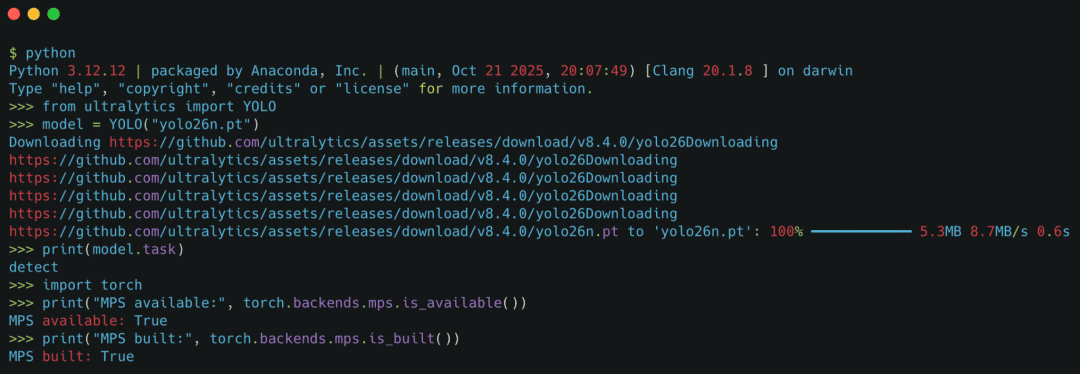
from ultralytics import YOLO

model = YOLO("yolo26n.pt")
print(model.task)
The first time you load a pretrained checkpoint, Ultralytics will download it automatically if it is not already present on your machine.
Optional: Check for Apple Silicon Acceleration
If you are on Apple Silicon, it is useful to know whether the Metal Performance Shaders (MPS) backend is available.
import torch

print("MPS available:", torch.backends.mps.is_available())
print("MPS built:", torch.backends.mps.is_built())
If MPS is available, you can run predictions with device="mps". If not, stay on CPU and keep the benchmark methodology consistent.
Running YOLO26 Object Detection on Images, Video, and Webcam Streams
Now you are ready to run the model.
First Image Inference
The smallest useful example is a single image.
from ultralytics import YOLO

model = YOLO("yolo26n.pt")
results = model("image.jpg")
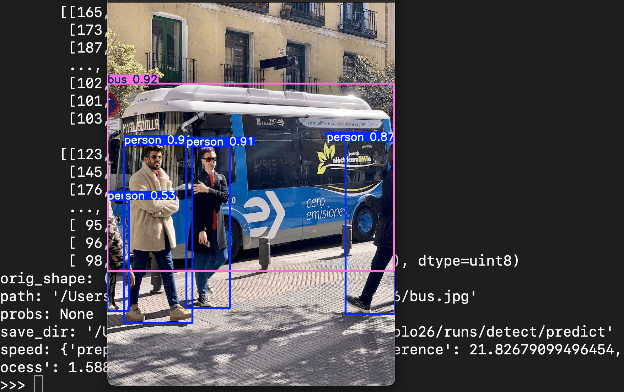
That line performs the entire inference pass and returns a list of Results objects, one per image.
If you want to be explicit about the prediction application programming interface (API) and device choice, do this instead:
from ultralytics import YOLO

model = YOLO("yolo26n.pt")
results = model.predict(
    source="image.jpg",
    imgsz=640,
    conf=0.25,
    device="mps",  # use "cpu" if MPS is unavailable
)
Running on a Folder of Images
When you pass a directory, Ultralytics will iterate through the media automatically.
from ultralytics import YOLO

model = YOLO("yolo26n.pt")
results = model.predict(source="images/", imgsz=640, conf=0.25, device="mps")
This is a fast way to build a qualitative feel for the model before you benchmark it.
Running on a Video File
For video inference, the API stays almost identical.
from ultralytics import YOLO

model = YOLO("yolo26n.pt")
results = model.predict(source="sample_video.mp4", show=True, device="mps")
If you want saved output rather than a live preview window, add save=True.
Running Real-Time Webcam Detection
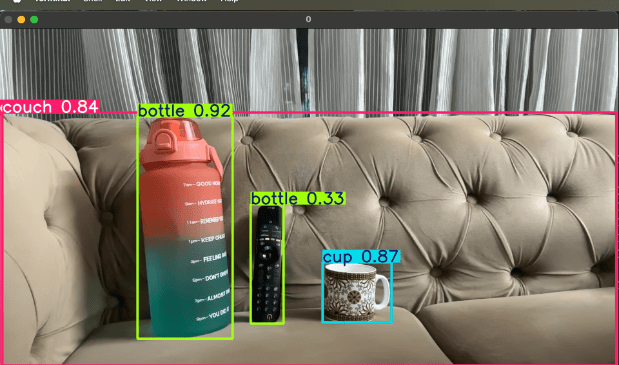
Webcam inference is where macOS users get an immediate feel for real-world responsiveness.
from ultralytics import YOLO

model = YOLO("yolo26n.pt")
model.predict(source=0, show=True, device="mps")
Understanding YOLO26 Prediction Outputs
Running inference is only half the story. If you are going to build with YOLO26, you also need to understand what comes back.
The Results Object
A prediction call returns a list of Results objects. In the single-image case, you usually care about results[0].
from ultralytics import YOLO

model = YOLO("yolo26n.pt")
results = model("image.jpg")
result = results[0]
Inspect Boxes, Classes, and Confidences
The boxes are stored in result.boxes.
boxes = result.boxes

print("Number of detections:", len(boxes))
print("Classes:", boxes.cls)
print("Confidences:", boxes.conf)
print("XYXY boxes:", boxes.xyxy)
In practice, the most useful fields are the following.
boxes.xyxy
Bounding boxes in corner format: (x1, y1, x2, y2).
boxes.conf
Confidence scores for each detection.
boxes.cls
Predicted class IDs.
Map Class IDs Back to Labels
Ultralytics stores class name metadata on the model.
names = result.names

for box in result.boxes:
    class_id = int(box.cls.item())
    confidence = float(box.conf.item())
    label = names[class_id]
    print(label, confidence)
Inspect Preprocessing, Inference, and Postprocessing Time
Ultralytics Results objects also expose timing information.
print(result.speed)
This usually gives you a dictionary with timings for preprocessing, inference, and postprocessing, measured in milliseconds per image. That is very useful for debugging, but for a fair benchmark we still want a consistent, external timing harness around repeated runs.
What True End-to-End Export Looks Like
One practical way to verify the deployment story is to export the model and inspect the graph.
If you export YOLO26 to ONNX and open it in Netron, the goal is not to memorize every operator. The goal is to confirm that the exported graph is much closer to the final inference path used by the application than older detector exports that still depend on heavier post-processing outside the network.
Older YOLO-Style Export
The exported graph often ends in dense predictions that still need external filtering, decoding, or NMS-like logic before they become a clean set of final detections.
YOLO12 vs. YOLO26: ONNX Export Comparison
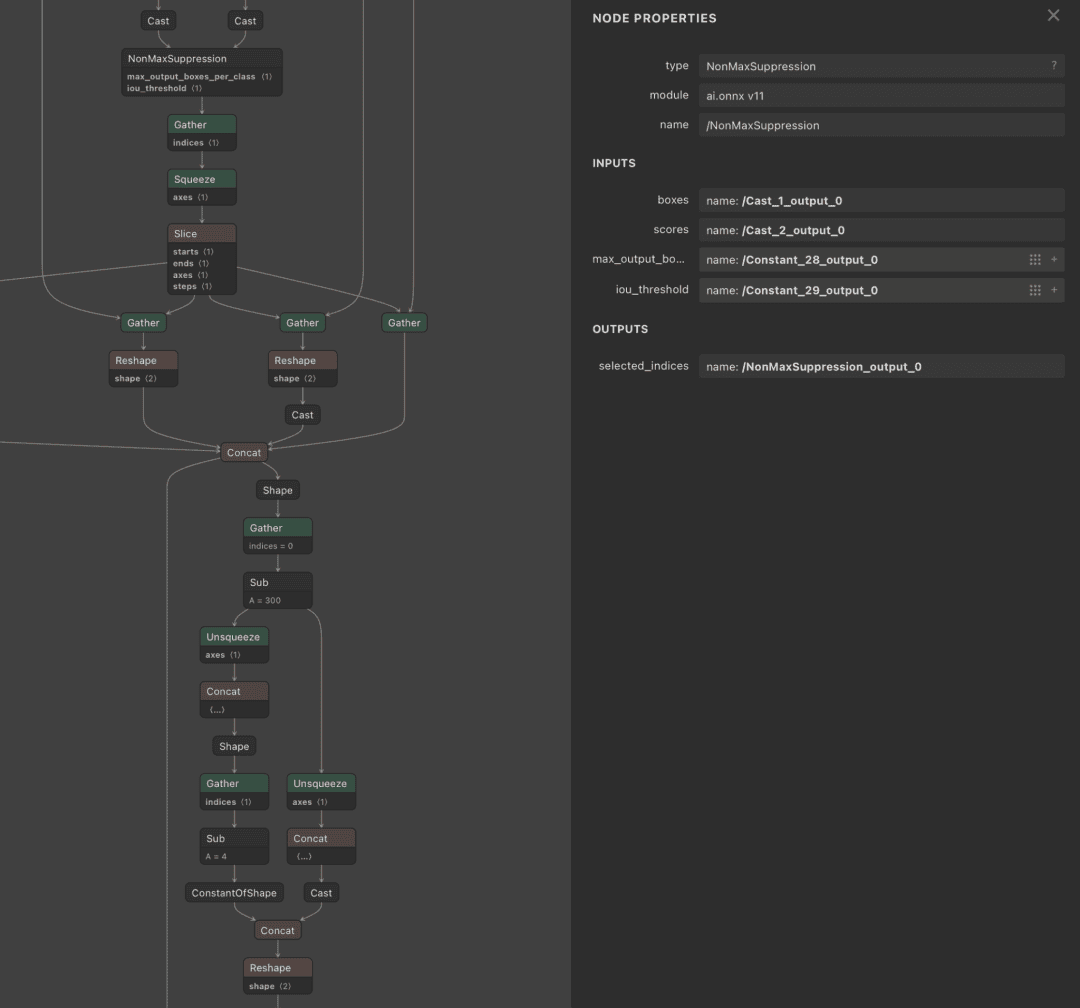
In YOLO12, the ONNX export shown in Figure 6 includes non-maximum suppression (NMS) directly inside the model graph. The graph contains an explicit NonMaxSuppression node followed by a sequence of Gather, Slice, and Concat operations to filter and format the final detections.
This design produces ready-to-use outputs but tightly couples post-processing with the model itself. As a result, it becomes harder to customize thresholds, experiment with alternative filtering strategies, or adapt the pipeline for different deployment environments.
Additionally, embedding NMS inside the graph introduces extra operations during inference, which can contribute to higher latency depending on the execution backend and hardware.
In contrast, YOLO26 removes non-maximum suppression from the model graph entirely. As illustrated in Figure 7, the exported ONNX graph produces a single consolidated output tensor without any embedded NMS logic.
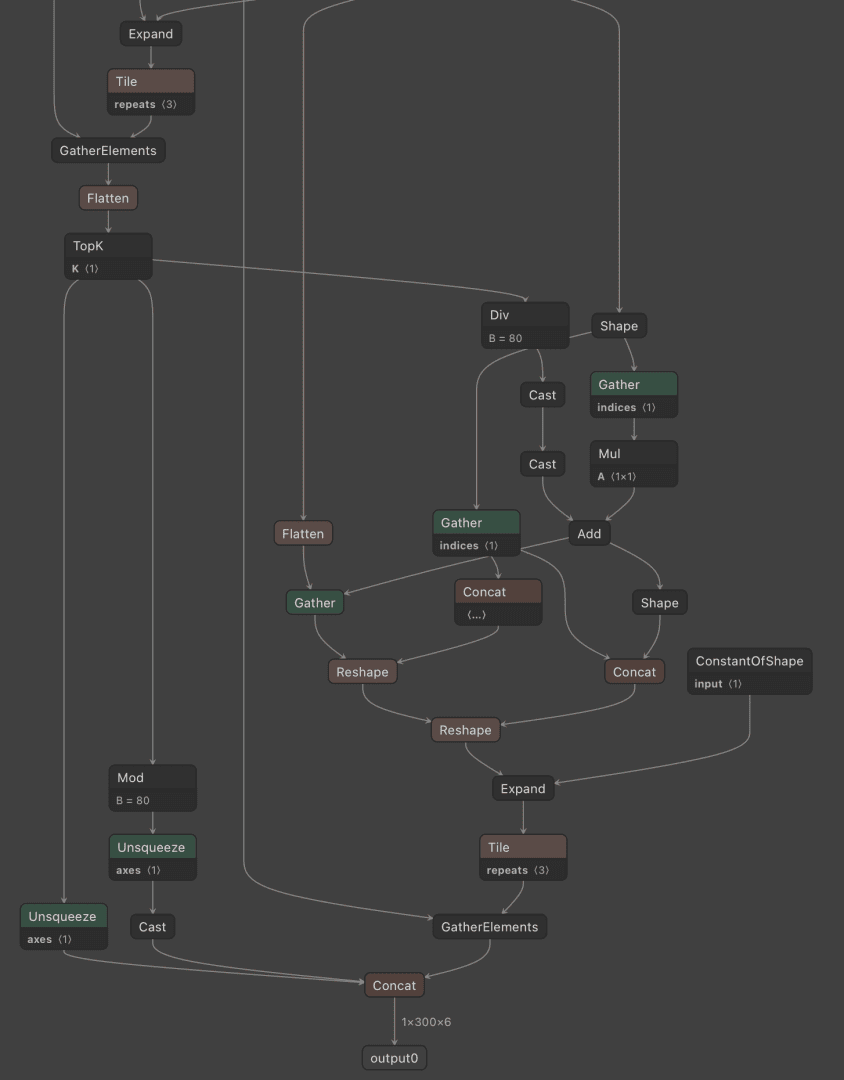
This design shifts post-processing outside the model, resulting in a cleaner and more modular pipeline. Developers can control filtering, thresholding, and downstream processing explicitly, making the system easier to optimize, debug, and integrate with tracking and analytics systems.
In practice, this separation can also improve end-to-end latency, especially when using optimized or hardware-accelerated post-processing outside the model graph.
The exported graph is much closer to the final detection representation consumed by the application. This is what is typically meant when describing the model as end-to-end for inference.
The key difference is not just the model architecture, but where post-processing is performed inside the graph versus in the surrounding application pipeline.
YOLO26 Benchmarking Methodology on a MacBook
This is the section that separates a useful lesson from a casual demo.
What You Want to Measure
For Lesson 1, focus on 4 metrics:
- Median latency per image
- Throughput in frames per second (FPS)
- Model size on disk
- Parameter count
Memory usage is also valuable, but it is easier to measure unreliably. If you include it, document exactly how you measured it.
Keep Your Benchmark Honest
When people publish model comparisons, they often change too many variables at once. Do not do that.
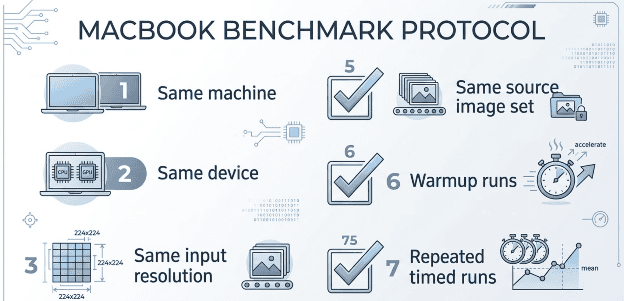
Keep these fixed across both models:
- Same machine
- Same device target, either CPU or MPS
- Same input image size
- Same batch size
- Same test image or test image set
- Same number of warmup iterations
- Same number of timed iterations
If you cannot control those variables, your comparison becomes anecdotal.
A Practical Benchmark Harness for YOLO Real-Time Object Detection
To make this lesson fully reproducible, we have included a companion script called benchmark_yolo_macos.py. You can use it to benchmark any combination of YOLO checkpoints on your own machine.
At a high level, the script does the following:
- Loads one or more Ultralytics YOLO checkpoints
- Performs warmup runs to stabilize the runtime
- Measures wall-clock latency over repeated predictions
- Reports median latency and FPS
- Extracts parameter counts from the loaded model
- Reports checkpoint file size on disk
Here is the full script:
import argparse
import statistics
import time
from pathlib import Path

from ultralytics import YOLO


def parse_args():
    parser = argparse.ArgumentParser(description="Benchmark YOLO models on macOS.")
    parser.add_argument("--models", nargs="+", required=True, help="Model weights to benchmark.")
    parser.add_argument("--source", required=True, help="Image, folder, or video source for inference.")
    parser.add_argument("--imgsz", type=int, default=640, help="Inference image size.")
    parser.add_argument("--device", default="cpu", help="Inference device, e.g. cpu or mps.")
    parser.add_argument("--conf", type=float, default=0.25, help="Confidence threshold.")
    parser.add_argument("--warmup", type=int, default=5, help="Warmup iterations.")
    parser.add_argument("--runs", type=int, default=30, help="Timed iterations.")
    parser.add_argument(
        "--max-items",
        type=int,
        default=None,
        help="Maximum number of frames/items to process per run for videos, folders, or streams.",
    )
    return parser.parse_args()


def get_param_count(model):
    if hasattr(model.model, "parameters"):
        return sum(parameter.numel() for parameter in model.model.parameters())
    return None


def format_params(param_count):
    if param_count is None:
        return "n/a"
    return f"{param_count / 1_000_000:.2f}M"


def format_size(weights_path):
    path = Path(weights_path)
    if path.exists() and path.is_file():
        return f"{path.stat().st_size / (1024 * 1024):.2f} MB"
    return "downloaded/cache-managed"


IMAGE_SUFFIXES = {".jpg", ".jpeg", ".png", ".bmp", ".tif", ".tiff", ".webp"}
VIDEO_SUFFIXES = {".mp4", ".mov", ".m4v", ".avi", ".mkv", ".webm", ".mpg", ".mpeg"}


def classify_source(source):
    source_str = str(source)
    if source_str.isdigit():
        return "stream"

    path = Path(source_str).expanduser()
    if path.is_dir():
        return "collection"

    suffix = path.suffix.lower()
    if suffix in IMAGE_SUFFIXES:
        return "image"
    if suffix in VIDEO_SUFFIXES:
        return "video"
    return "collection"


def timed_predict(model, source, imgsz, conf, device, max_items=None):
    source_kind = classify_source(source)
    start = time.perf_counter()
    if source_kind == "image":
        model.predict(source=source, imgsz=imgsz, conf=conf, device=device, verbose=False)
        items_processed = 1
    else:
        items_processed = 0
        for _ in model.predict(source=source, imgsz=imgsz, conf=conf, device=device, verbose=False, stream=True):
            items_processed += 1
            if max_items is not None and items_processed >= max_items:
                break
    end = time.perf_counter()
    return {
        "elapsed_ms": (end - start) * 1000.0,
        "items_processed": items_processed,
        "source_kind": source_kind,
    }


def benchmark_model(weights, source, imgsz, conf, device, warmup, runs, max_items=None):
    model = YOLO(weights)

    for _ in range(warmup):
        timed_predict(model, source, imgsz, conf, device, max_items=max_items)

    timings = [timed_predict(model, source, imgsz, conf, device, max_items=max_items) for _ in range(runs)]
    elapsed_values = [timing["elapsed_ms"] for timing in timings]
    items_processed = timings[-1]["items_processed"] if timings else 0
    source_kind = timings[-1]["source_kind"] if timings else classify_source(source)
    median_latency_ms = statistics.median(elapsed_values)
    fps = 1000.0 / median_latency_ms if median_latency_ms > 0 else 0.0
    median_ms_per_item = median_latency_ms / items_processed if items_processed > 0 else None
    item_rate = (1000.0 * items_processed / median_latency_ms) if median_latency_ms > 0 and items_processed > 0 else 0.0

    return {
        "model": weights,
        "device": device,
        "imgsz": imgsz,
        "source_kind": source_kind,
        "items_processed": items_processed,
        "median_latency_ms": median_latency_ms,
        "median_ms_per_item": median_ms_per_item,
        "fps": fps,
        "item_rate": item_rate,
        "params": format_params(get_param_count(model)),
        "size": format_size(weights),
    }


def print_results(results):
    header = (
        f"{'Model':<20} {'Device':<8} {'Source':<10} {'Items':<8} {'Median Total (ms)':<20} "
        f"{'ms/item':<12} {'item/s':<10} {'Params':<12} {'Size':<20}"
    )
    print(header)
    print("-" * len(header))
    for result in results:
        ms_per_item = f"{result['median_ms_per_item']:.2f}" if result["median_ms_per_item"] is not None else "n/a"
        print(
            f"{result['model']:<20} {result['device']:<8} {result['source_kind']:<10} {result['items_processed']:<8} "
            f"{result['median_latency_ms']:<20.2f} {ms_per_item:<12} {result['item_rate']:<10.2f} "
            f"{result['params']:<12} {result['size']:<20}"
        )


def main():
    args = parse_args()
    results = [
        benchmark_model(
            weights=model_name,
            source=args.source,
            imgsz=args.imgsz,
            conf=args.conf,
            device=args.device,
            warmup=args.warmup,
            runs=args.runs,
            max_items=args.max_items,
        )
        for model_name in args.models
    ]
    print_results(results)


if __name__ == "__main__":
    main()
Let us walk through the key parts of this script so you understand exactly what is happening.
parse_args: sets up the CLI. You pass in one or moremodels(e.g.,yolo26n.ptandyolo12n.pt), asourceimage or video, and optional knobs for image size, device, warmup iterations, and timed runs. Themax-itemsflag is especially useful for video benchmarks, it caps how many frames get processed per run so you are not sitting through an entire clip.classify_source: figures out whether your input is a single image, a video, a directory of images, or a live stream. This matters because image inference runs in one shot, while video and streams use Ultralytics’stream=Truegenerator to process frames lazily.timed_predict: is the core timing function. It wraps a single prediction pass withtime.perf_counter()calls. For images, it runs a standardmodel.predict(...). For videos and streams, it iterates through the streaming generator and counts frames, optionally stopping early atmax_items. The function returns elapsed time, items processed, and source type.benchmark_model: orchestrates the full benchmark for one model. It loads the checkpoint, runs the specified number of warmup iterations (to reduce first-run overhead such as graph compilation and cache effects), then collects timing data over the timed runs. From the raw timings, it computes median latency, FPS, per-item throughput, parameter count, and file size.print_results: formats everything into a readable terminal table so you can eyeball the comparison immediately.
Here is the core usage pattern:
python benchmark_yolo_macos.py \
  --models yolo26n.pt yolo12n.pt \
  --source traffic_clip.mp4 \
  --imgsz 640 \
  --device mps \
  --warmup 5 \
  --runs 30 \
  --max-items 300
In this lesson, we use yolo12n.pt as the baseline because it is the most recent predecessor available through the Ultralytics package before YOLO26. The benchmark methodology matters more than the exact baseline label, as long as the comparison stays controlled, you get an honest picture of where YOLO26 stands.
If you want a second benchmark perspective, cite the official Ultralytics CPU ONNX and T4 TensorRT numbers alongside your MacBook measurements. That gives your readers both a vendor-published reference point and a local reproducible benchmark.
Why You Should Use Median Latency
Always use median latency instead of a single run or a raw average from a tiny sample. Your first run may include checkpoint download, graph setup, cache effects, or backend warmup. Median latency after warmup gives you a more stable number.
CPU versus MPS
On a MacBook, you should benchmark both if time permits.
CPU Benchmark
CPU numbers help you evaluate edge-style deployment behavior and align well with Ultralytics’ published CPU ONNX comparisons.
MPS Benchmark
MPS numbers tell you how the model feels on Apple Silicon in day-to-day local development.
Those 2 measurements answer different questions, so it is okay to report both as long as you keep the methodology clear.
YOLO26 vs YOLO12: Benchmark Results on macOS
Now let us look at the actual numbers.
What We Compared
For this lesson, we ran the YOLO26 vs YOLO12 comparison on the same MacBook using the companion script. The focus is on the video benchmark because that is where you will see the real difference in a streaming workload.
Video Benchmark on MPS (YOLO26 vs YOLO12)
Source: the first 300 frames of traffic.mp4 using --max-items 300 so the benchmark reflects a real streaming-style workload.
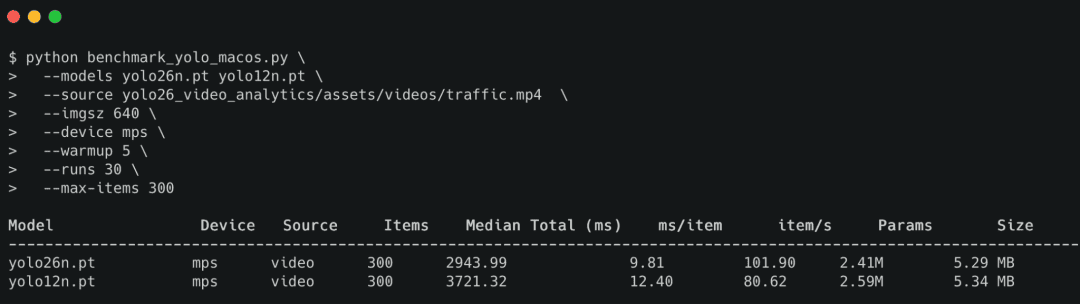
This is where the YOLO26 model really shines. Across 300 frames of video, YOLO26n runs at 9.81 ms/frame compared to 12.40 ms/frame for YOLO12n. In throughput terms, that is roughly a 30% advantage for YOLO26n, going from 80.62 FPS to 101.90 FPS on the same Apple Silicon hardware.
That is not a rounding error. That is the kind of gain you will actually feel in a real-time object detection pipeline, especially when you are processing continuous video streams.
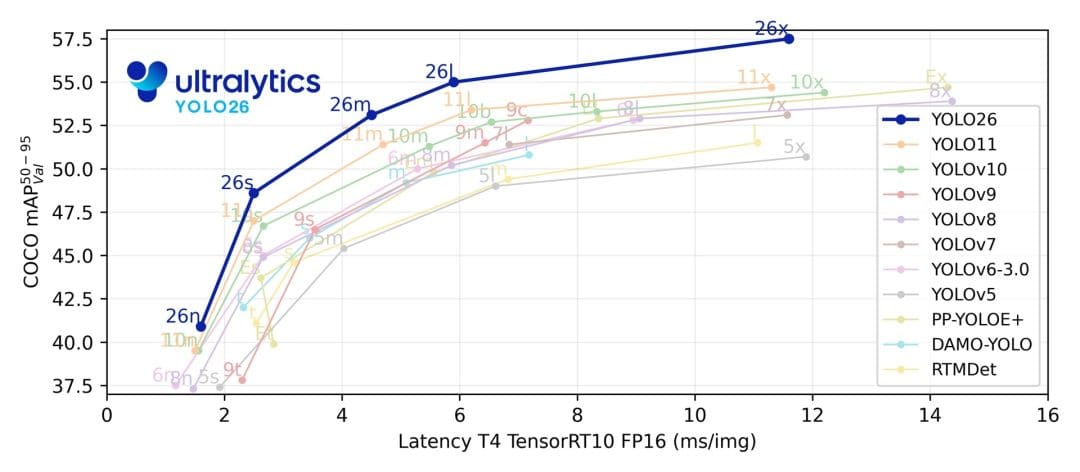
As shown in Figure 10 from Ultralytics, YOLO26 achieves a superior accuracy–latency trade-off, delivering higher mean average precision (mAP) at comparable or lower inference latency than previous YOLO versions.
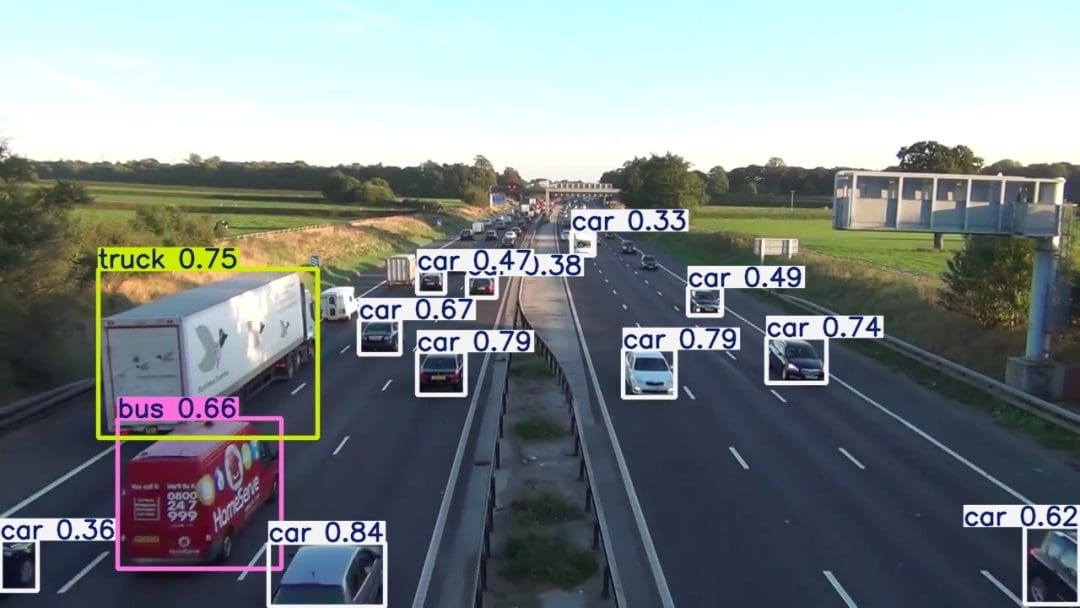
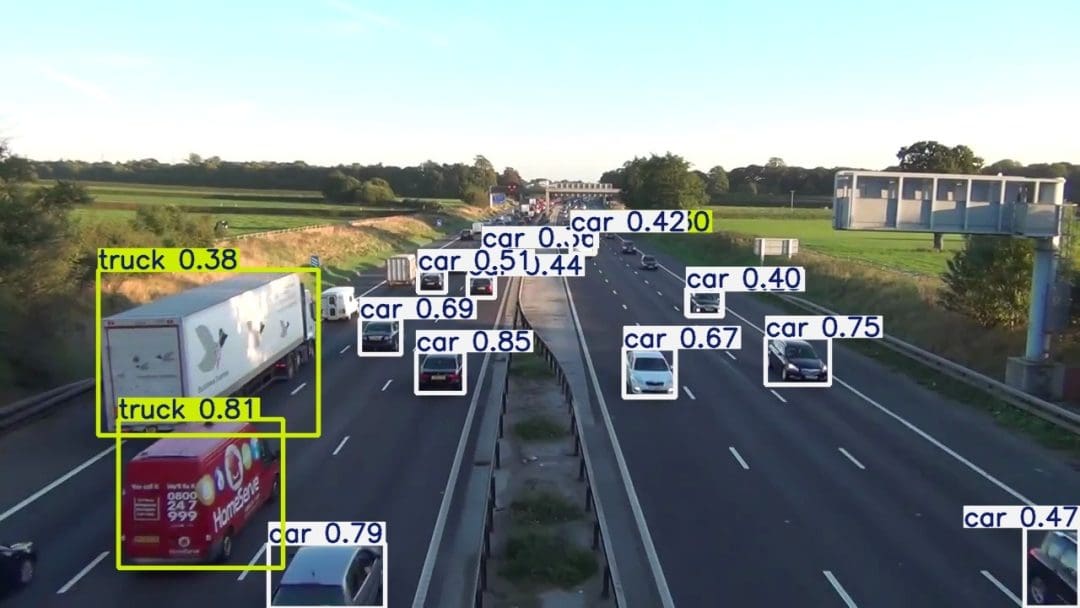
YOLO26 vs YOLO12: Visual Detection Quality Comparison
Benchmarks matter, but they do not tell the full story. A fast detector that misses obvious objects is not useful.
What to Look For
When you inspect predictions, look for the following.
Missed Detections
Does one model consistently ignore small or partially occluded objects?
Duplicate Detections
This is especially interesting in the context of end-to-end detection. If the pipeline is NMS-free by default, the model still needs to remain visually clean and stable.
Box Tightness
Are the boxes reasonably aligned to the target object, or do they feel loose and noisy?
Confidence Behavior
Are confidence scores calibrated sensibly, or does one model appear overconfident on poor detections?
These qualitative observations help readers connect the benchmark table to what they would actually see in a deployment pipeline.
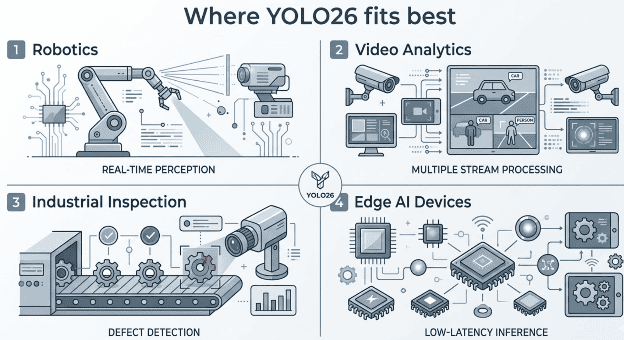
When to Use the YOLO26 Model
By this point, the more important question is not whether YOLO26 is new. It is whether it fits your project.
When YOLO26 Is a Strong Fit
Edge and On-Device Deployment
If you want a detector designed with export and deployment in mind, YOLO26 is a compelling candidate.
Simpler Inference Pipelines
If reducing post-processing complexity helps your stack, the end-to-end default path is a real advantage.
Fast Local Prototyping on macOS
If your day-to-day development machine is a MacBook, YOLO26 gives you a practical way to prototype, test, and benchmark without immediately moving to a remote GPU workflow.
When to Benchmark Carefully Before Committing
Your Deployment Backend Is Highly Specialized
If your production stack depends on a very specific runtime, export path, or hardware accelerator, always verify real performance on that target rather than assuming the default PyTorch experience will transfer directly.
You Already Have a Tuned Baseline
If an older YOLO variant is already integrated, optimized, and stable in your stack, YOLO26 should earn its place with measurable gains in speed, simplicity, or accuracy.
What's next? We recommend PyImageSearch University.

120+ total classes • 115+ hours of on-demand code walkthrough videos • Last updated: October 2026
★★★★★ 4.84 (128 Ratings) • 16,000+ Students Enrolled
I strongly believe that if you had the right teacher you could master computer vision and deep learning.
Do you think learning computer vision and deep learning has to be time-consuming, overwhelming, and complicated? Or has to involve complex mathematics and equations? Or requires a degree in computer science?
That’s not the case.
All you need to master computer vision and deep learning is for someone to explain things to you in simple, intuitive terms. And that’s exactly what I do. My mission is to change education and how complex Artificial Intelligence topics are taught.
If you're serious about learning computer vision, your next stop should be PyImageSearch University, the most comprehensive computer vision, deep learning, and OpenCV course online today. Here you’ll learn how to successfully and confidently apply computer vision to your work, research, and projects. Join me in computer vision mastery.
Inside PyImageSearch University you'll find:
- ✓ 120+ courses on essential computer vision, deep learning, and OpenCV topics
- ✓ 94+ Certificates of Completion
- ✓ 115+ hours of on-demand video
- ✓ Brand new courses released regularly, ensuring you can keep up with state-of-the-art techniques
- ✓ Pre-configured Jupyter Notebooks in Google Colab
- ✓ Run all code examples in your web browser — works on Windows, macOS, and Linux (no dev environment configuration required!)
- ✓ Access to centralized code repos for all 540+ tutorials on PyImageSearch
- ✓ Easy one-click downloads for code, datasets, pre-trained models, etc.
- ✓ Access on mobile, laptop, desktop, etc.
Summary
In this lesson, you moved beyond the standard “pip install and predict” workflow and explored YOLO26 as both a model and an engineering release.
You learned what changed in the Ultralytics YOLO26 architecture compared to its predecessors, why those changes matter for real-time object detection, and how to verify the differences on your own hardware.
You installed the Ultralytics YOLO26 model on macOS, ran inference on images, video, and a live webcam feed, and examined the prediction outputs to understand what the model actually returns.
You also looked at the architectural changes under the hood, including end-to-end NMS-free inference, DFL removal for cleaner exports, and the training-side improvements that contribute to faster CPU deployment.
The central focus of this lesson was reproducible benchmarking. You used a companion script, benchmark_yolo_macos.py, to measure YOLO26n against YOLO12n on the same Apple Silicon hardware under identical conditions.
Over 300 frames of traffic video on MPS, YOLO26n reached 101.90 FPS compared to 80.62 FPS for YOLO12n, a nearly 30% throughput advantage. That gap is not a rounding error. It is the kind of gain you will actually feel in a streaming pipeline.
You walked through the benchmark script function by function, from argument parsing and source classification to timed prediction and formatted result output. That walkthrough gave you the tools to adapt the script for your own models, your own video sources, and your own hardware configurations.
By the end of this lesson, you did not just run YOLO26 on a few images. You built a clear, evidence-based understanding of where YOLO26 fits in the Ultralytics lineup, what it does better than YOLO12, and how to measure that improvement yourself.
This foundation prepares you for the next lesson, where you will use YOLO26 as the detection backbone in a full real-time video analytics pipeline with ByteTrack multi-object tracking, line-crossing analytics, and people counting.
Citation Information
Singh, V. “YOLO26 Object Detection Tutorial: Benchmarking on macOS,” PyImageSearch, S. Huot, A. Sharma, and P. Thakur, eds., 2026, https://pyimg.co/8p0ln
@incollection{Singh_2026_yolo26-object-detection-benchmarking-macos,
  author = {Vikram Singh},
  title = {{YOLO26 Object Detection Tutorial: Benchmarking on macOS}},
  booktitle = {PyImageSearch},
  editor = {Susan Huot and Aditya Sharma and Piyush Thakur},
  year = {2026},
  url = {https://pyimg.co/8p0ln},
}
To download the source code to this post (and be notified when future tutorials are published here on PyImageSearch), simply enter your email address in the form below!

Download the Source Code and FREE 17-page Resource Guide
Enter your email address below to get a .zip of the code and a FREE 17-page Resource Guide on Computer Vision, OpenCV, and Deep Learning. Inside you'll find my hand-picked tutorials, books, courses, and libraries to help you master CV and DL!


Comment section
Hey, Adrian Rosebrock here, author and creator of PyImageSearch. While I love hearing from readers, a couple years ago I made the tough decision to no longer offer 1:1 help over blog post comments.
At the time I was receiving 200+ emails per day and another 100+ blog post comments. I simply did not have the time to moderate and respond to them all, and the sheer volume of requests was taking a toll on me.
Instead, my goal is to do the most good for the computer vision, deep learning, and OpenCV community at large by focusing my time on authoring high-quality blog posts, tutorials, and books/courses.
If you need help learning computer vision and deep learning, I suggest you refer to my full catalog of books and courses — they have helped tens of thousands of developers, students, and researchers just like yourself learn Computer Vision, Deep Learning, and OpenCV.
Click here to browse my full catalog.