
Table of Contents
Fine-Tuning Gemma 4 with QLoRA for Customer Support
Large language models such as Gemma 4 are capable of handling a wide range of natural-language tasks out of the box. But when building a specialized application, general-purpose language understanding is only part of the problem.
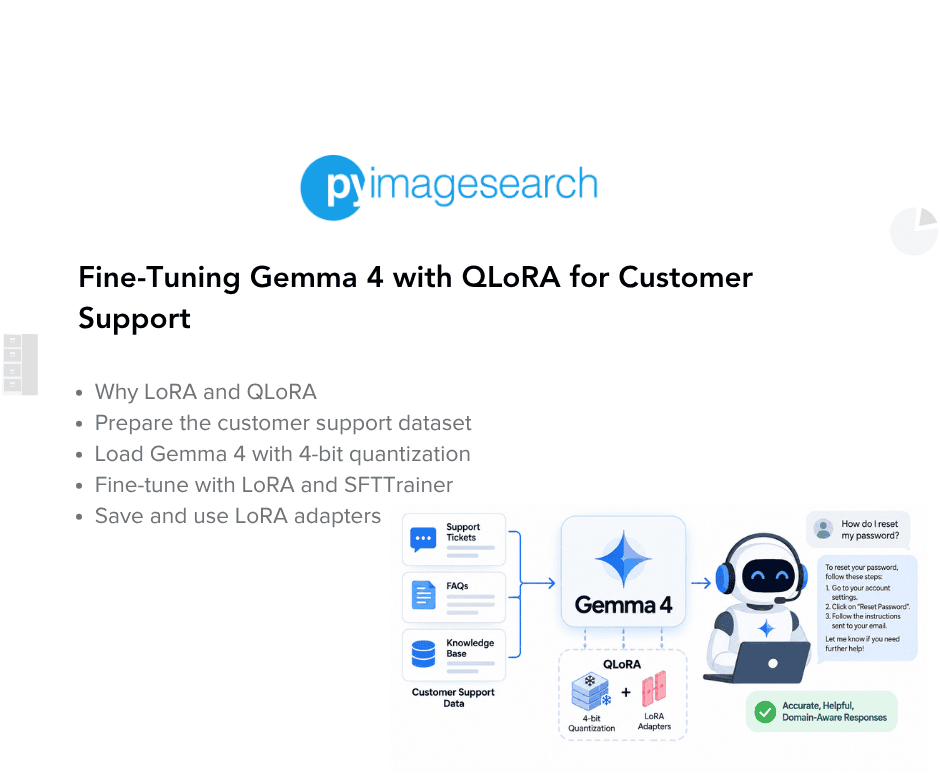
Consider a customer support assistant for an online store. Customers might ask about orders, refunds, cancellations, invoices, shipping policies, or account-related issues. While Gemma 4 can generate reasonable responses to many of these questions, its pretrained knowledge does not include the specific products, policies, terminology, or communication style of a particular business.
One way to address this is through prompt engineering. By providing additional instructions, examples, and domain-specific context in every prompt, we can guide the model toward the desired behavior. However, as an application becomes more complex, these prompts can become increasingly long and difficult to maintain. They also consume context length and increase inference costs because the same instructions have to be supplied repeatedly.
Fine-tuning provides another approach. Instead of repeatedly explaining the desired behavior through prompts, we can adapt the model itself using examples from the target domain. The resulting model can learn patterns such as the appropriate tone, response style, and domain-specific behavior, allowing it to produce more specialized responses without relying on lengthy instructions for every interaction.
In this lesson, we will fine-tune Gemma 4 E2B-IT for customer support using the Bitext Customer Support dataset. We will use QLoRA (Dettmers et al., 2023), which combines 4-bit quantization with Low-Rank Adaptation (LoRA; Hu et al., 2021) to make parameter-efficient fine-tuning substantially more memory efficient. Rather than updating the billions of parameters in the original model, we will train a lightweight set of LoRA adapter parameters while keeping the pretrained weights frozen.
We will then use the TRL SFTTrainer to perform supervised fine-tuning on customer-support conversations. By the end of this lesson, we will have a lightweight, domain-adapted Gemma 4 model capable of generating professional customer-support responses.
Note: This lesson focuses specifically on domain adaptation through supervised fine-tuning. In the next lesson, we will build on this foundation and teach the model how to work with external tools and handle agentic customer-support workflows.
This lesson is the 1st in a 2-part series on Fine-Tuning Gemma 4 with QLoRA:
- Fine-Tuning Gemma 4 with QLoRA for Customer Support (this tutorial)
- Lesson 2
To learn how to fine-tune Gemma 4 with QLoRA for Customer Support, just keep reading.

Why Not Fine-Tune the Entire Model?
A natural question is: if we want Gemma 4 to learn a new domain, why not simply update all of its parameters?
Traditional fine-tuning updates the model’s parameters through backpropagation. For a model with billions of parameters, however, this can require substantial graphics processing unit (GPU) memory for the model weights, gradients, and optimizer states maintained during training. As model size increases, full fine-tuning quickly becomes impractical for many developers and may require multiple high-memory GPUs.
Fortunately, we do not necessarily need to modify the entire model to adapt it to a new task.
Many domain-specific behaviors can be learned by updating only a small number of additional parameters while leaving the pretrained model unchanged. This approach is known as Parameter-Efficient Fine-Tuning (PEFT).
Instead of creating a completely new model, PEFT methods learn lightweight task-specific parameters that work alongside the original pretrained model. This has another useful property: the same base model can support multiple specialized adapters without requiring a separate full copy of the model for every task or domain.
One of the most widely used PEFT techniques is Low-Rank Adaptation, or LoRA.
Understanding LoRA
LoRA adapts a pretrained model by keeping its original weights frozen and introducing small trainable matrices into selected linear layers. Instead of directly modifying the original weight matrix, LoRA learns a low-rank update that represents the changes required during fine-tuning.
The key idea is simple:
Freeze the large pretrained model: train a much smaller set of adapter parameters.
Because the adapter contains only a small fraction of the model’s total parameters, LoRA can significantly reduce the memory and computational requirements of fine-tuning.
This gives us several practical advantages:
- The original Gemma 4 weights remain frozen.
- Only a small number of parameters need to be optimized.
- Fine-tuning requires substantially less GPU memory.
- Different task-specific adapters can share the same base model.
- The resulting adapters are lightweight and easy to save, share, and deploy.
From the model’s perspective, the pretrained knowledge remains intact while the LoRA adapter learns how to specialize that knowledge for the target task. This makes LoRA particularly attractive when we want to adapt a relatively large language model without the cost of full fine-tuning.
Understanding QLoRA
LoRA reduces the number of parameters we need to train, but we still need to load the pretrained model into GPU memory.
This is where QLoRA comes in.
Quantized Low-Rank Adaptation (QLoRA) combines LoRA with 4-bit quantization. Instead of loading the pretrained model weights in their full precision, the base model is loaded in 4-bit precision while the LoRA adapters remain trainable.
This reduces the memory required to hold the frozen base model and makes it much more practical to fine-tune billion-parameter models on a single modern GPU.
The distinction is therefore important:
- LoRA: reduces the number of parameters we need to train.
- 4-bit quantization: reduces the memory required to store the pretrained model.
- QLoRA: combines both techniques for memory-efficient fine-tuning.
For our Gemma 4 customer-support model, this means we can keep the original model’s knowledge intact while training only a small adapter on top of a 4-bit-quantized base model.
What We Will Build
In this lesson, we will focus on the first stage of adapting Gemma 4 to customer support: supervised fine-tuning.
We will start with the Bitext Customer Support dataset, which contains customer instructions, intent information, and human-written support responses. We will convert these examples into the conversational format expected by Gemma 4 and use them to teach the model the desired customer-support behavior.
The workflow will look like this:
Bitext Customer Support Dataset
↓
Convert to Gemma 4 Chat Format
↓
Load Gemma 4 in 4-bit Precision
↓
Attach LoRA Adapters
↓
Supervised Fine-Tuning with TRL's SFTTrainer
↓
Save the Fine-Tuned LoRA Adapter
The objective is straightforward: given a customer request, the fine-tuned model should generate an appropriate customer-support response. This stage focuses on learning the domain, conversational style, professional tone, and response patterns present in the training data.
By the end of the lesson, we will have a lightweight LoRA adapter that can be loaded with the original Gemma 4 model to reproduce the fine-tuned customer-support behavior without fine-tuning the base model again. The existing workflow already saves the adapter and tokenizer together for this purpose.
Would you like immediate access to 3,457 images curated and labeled with hand gestures to train, explore, and experiment with … for free? Head over to Roboflow and get a free account to grab these hand gesture images.
Configuring Your Development Environment
Before we begin fine-tuning Gemma 4, let us set up our development environment. We will use Google Colab with an NVIDIA A100 GPU, which provides ample GPU memory for fine-tuning the Gemma 4 E2B-IT model with QLoRA.
We will first install the required libraries and then verify that the expected GPU has been allocated.
Installing Dependencies
The following command installs the libraries required to load Gemma 4, prepare the dataset, configure LoRA adapters, perform 4-bit quantization, and train the model with the Transformers Reinforcement Learning (TRL) library’s SFTTrainer.
!pip install -q -U transformers accelerate peft trl bitsandbytes datasets huggingface_hub
Each library plays a specific role in the fine-tuning pipeline:
transformers: provides the pretrained Gemma 4 model, tokenizer, and model-loading utilities.accelerate: simplifies training and device management across different hardware configurations.peft: provides parameter-efficient fine-tuning (PEFT) methods such as LoRA.trl: providesSFTTrainer, which simplifies supervised fine-tuning of language models.bitsandbytes: provides the 4-bit quantization functionality used by QLoRA and the 8-bit optimizer used during training.datasets: provides utilities for downloading and preprocessing the Bitext Customer Support dataset.huggingface_hub: provides authentication and access to models and datasets hosted on the Hugging Face Hub.
Checking GPU Availability
Before loading the model, it is a good practice to verify that Colab has allocated the expected GPU and to inspect its available memory.
!nvidia-smi --query-gpu=name,memory.total,memory.used --format=csv
A sample output from the A100 runtime is shown below.
Output
name, memory.total [MiB], memory.used [MiB]
NVIDIA A100-SXM4-80GB, 81920 MiB, 0 MiB
The output confirms that our Colab runtime is using an NVIDIA A100-SXM4-80GB GPU with 80 GB of video random-access memory (VRAM). This provides more than enough memory to fine-tune Gemma 4 E2B-IT using QLoRA and gives us room to experiment with the training configuration.
Need Help Configuring Your Development Environment?

All that said, are you:
- Short on time?
- Learning on your employer’s administratively locked system?
- Wanting to skip the hassle of fighting with the command line, package managers, and virtual environments?
- Ready to run the code immediately on your Windows, macOS, or Linux system?
Then join PyImageSearch University today!
Gain access to Jupyter Notebooks for this tutorial and other PyImageSearch guides pre-configured to run on Google Colab’s ecosystem right in your web browser! No installation required.
And best of all, these Jupyter Notebooks will run on Windows, macOS, and Linux!
Setup and Imports
With the environment ready, let us import the libraries we will use throughout the fine-tuning pipeline.
import torch

from datasets import load_dataset
from google.colab import userdata
from huggingface_hub import login
from peft import (
   LoraConfig,
   get_peft_model,
   prepare_model_for_kbit_training,
)
from transformers import (
   AutoModelForCausalLM,
   AutoTokenizer,
   BitsAndBytesConfig,
)
from trl import SFTConfig, SFTTrainer
For this first lesson, we only import the components required for dataset preparation, model loading, QLoRA configuration, authentication, and supervised fine-tuning.
torch provides the underlying deep learning framework and gives us access to the bfloat16 data type used during training.
From the Hugging Face ecosystem, load_dataset loads the Bitext dataset, while login and Colab’s userdata allow us to authenticate securely with the Hugging Face Hub.
From PEFT, LoraConfig defines the LoRA configuration, prepare_model_for_kbit_training prepares the quantized model for training, and get_peft_model attaches the LoRA adapters to the base model.
Finally, AutoTokenizer and AutoModelForCausalLM load the Gemma 4 tokenizer and model, BitsAndBytesConfig configures 4-bit quantization, and TRL’s SFTConfig and SFTTrainer define and execute the supervised fine-tuning process.
Authenticating with Hugging Face
Gemma 4 is hosted on the Hugging Face Hub, so we will authenticate our Colab session before downloading the model.
The following code first looks for a Hugging Face access token stored in Google Colab Secrets. If one is not available, it falls back to securely requesting the token through getpass().
try:
   hf_token = userdata.get('HF_TOKEN')
except Exception:
   hf_token = None

if not hf_token:
   from getpass import getpass
   hf_token = getpass("Paste your Hugging Face token: ")

login(token=hf_token)
This gives us 2 convenient authentication options:
- Store the token as
HF_TOKENin Google Colab Secrets. - Enter the token manually when prompted.
Using getpass() ensures that a manually entered token is not displayed in the notebook output.
Before running the notebook, make sure you have accepted the Gemma 4 model license on the Hugging Face Hub and created a Hugging Face access token with the required permissions.
Once authenticated, the notebook can download the Gemma 4 checkpoint and access other Hugging Face resources required by the tutorial.
Supervised Fine-Tuning Gemma 4 on the Bitext Customer Support Dataset
The first step in adapting Gemma 4 for customer support is Supervised Fine-Tuning (SFT). In this lesson, we will train Gemma 4 on synthetic customer-support queries and their corresponding responses, teaching the model how to communicate as a helpful and professional support representative.
Rather than learning to interact with external tools or application programming interfaces (APIs), the model learns the relationship between a customer’s request and an appropriate support response. This gives us a strong baseline for the assistant, helping it learn the desired tone, response style, and customer-support patterns from the training data.
We will use QLoRA to make this adaptation efficient: the pretrained Gemma 4 weights remain frozen while a small set of LoRA parameters is trained on the customer-support dataset.
Loading and Exploring the Bitext Customer Support Dataset
With authentication configured, let us load the dataset we will use for supervised fine-tuning.
The Bitext Customer Support LLM Chatbot Training Dataset contains synthetic customer-support queries paired with expected responses across a variety of e-commerce scenarios.
The following code downloads the training split and inspects its structure.
raw_ds = load_dataset(
   "bitext/Bitext-customer-support-llm-chatbot-training-dataset", split="train"
)
print(raw_ds)
print(raw_ds[0])
print(sorted(set(raw_ds["intent"])))
Running the code produces the following output.
Dataset({
    features: ['flags', 'instruction', 'category', 'intent', 'response'],
    num_rows: 26872
})
{'flags': 'B', 'instruction': 'question about cancelling order {{Order Number}}', 'category': 'ORDER', 'intent': 'cancel_order', 'response': "I've understood you have a question regarding canceling order {{Order Number}}, and I'm here to provide you with the information you need. Please go ahead and ask your question, and I'll do my best to assist you."}
['cancel_order', 'change_order', 'change_shipping_address', 'check_cancellation_fee', 'check_invoice', 'check_payment_methods', 'check_refund_policy', 'complaint', 'contact_customer_service', 'contact_human_agent', 'create_account', 'delete_account', 'delivery_options', 'delivery_period', 'edit_account', 'get_invoice', 'get_refund', 'newsletter_subscription', 'payment_issue', 'place_order', 'recover_password', 'registration_problems', 'review', 'set_up_shipping_address', 'switch_account', 'track_order', 'track_refund']
The dataset contains 26,872 examples with the following fields:
['flags', 'instruction', 'category', 'intent', 'response']
A sample looks like this:
{
    'flags': 'B',
    'instruction': 'question about cancelling order {{Order Number}}',
    'category': 'ORDER',
    'intent': 'cancel_order',
    'response': "I've understood you have a question regarding..."
}
The fields have different purposes:
instruction: contains the customer’s request.response: contains the corresponding customer-support response.intent: identifies the underlying customer intent, such astrack_orderorcancel_order.category: groups related intents into broader areas such as orders or accounts.flags: contain metadata provided by the dataset authors.
The dataset covers a broad range of support scenarios, including order tracking, refunds, payments, shipping, account management, and customer-service requests. This variety gives the model many examples of how customer-support conversations should be handled.
For this lesson, we will primarily use the instruction and response fields. The intent and category information are useful for understanding the dataset, but they are not directly provided to the model during this supervised fine-tuning stage.
Converting the Dataset into Gemma 4’s Chat Format
The Bitext dataset stores each example as separate instruction and response fields. However, instruction-tuned models like Gemma 4 expect conversations to follow a structured chat format, where each message is assigned a specific role, such as system, user, or assistant.
To prepare the dataset for supervised fine-tuning, we will convert every example into a list of chat messages.
#@title 5. Reshape into chat format
SYSTEM_PROMPT = (
   "You are a helpful, friendly customer support agent for an e-commerce company. "
   "Be concise, empathetic, and accurate."
)

def to_plain_chat(example):
   return {
       "messages": [
           {"role": "system", "content": SYSTEM_PROMPT},
           {"role": "user", "content": example["instruction"]},
           {"role": "assistant", "content": example["response"]},
       ]
   }

plain_ds = raw_ds.map(to_plain_chat, remove_columns=raw_ds.column_names)

# Keep this notebook fast to run end-to-end; increase for a real training run
plain_ds = plain_ds.shuffle(seed=42).select(range(min(4000, len(plain_ds))))
plain_ds = plain_ds.train_test_split(test_size=0.05, seed=42)
print(plain_ds)
print(plain_ds["train"][0])
Let us understand what happens in this preprocessing step.
First, we define a system prompt that establishes the assistant’s behavior. It instructs Gemma 4 to act as a friendly and professional customer support representative, encouraging responses that are concise, empathetic, and accurate. Because this prompt is included in every training example, the model consistently learns the desired conversational style throughout fine-tuning.
Next, the to_plain_chat() function transforms each dataset record into a conversation containing 3 messages:
- system: defines the assistant’s role.
- user: contains the customer’s query from the
instructionfield. - assistant: contains the expected response from the
responsefield.
This structure matches the conversational format expected by modern chat models like Gemma 4, allowing the model to learn from complete dialogues instead of isolated text pairs.
After converting the dataset, we randomly shuffle the examples using a fixed seed to ensure reproducibility. To keep this notebook lightweight and suitable for Google Colab, we then select the first 4,000 shuffled examples. While this smaller subset allows the tutorial to run quickly, you can remove this sampling step and train on the full dataset for better performance.
Finally, we split the data into 3,800 training examples and 200 test examples, reserving 5% of the data for evaluation. This held-out test set helps us assess how well the fine-tuned model generalizes to unseen customer queries.
The resulting dataset looks as follows:
DatasetDict({
    train: Dataset({
        features: ['messages'],
        num_rows: 3800
    })
    test: Dataset({
        features: ['messages'],
        num_rows: 200
    })
})
{'messages': [{'role': 'system', 'content': 'You are a helpful, friendly customer support agent for an e-commerce company. Be concise, empathetic, and accurate.'}, {'role': 'user', 'content': 'contacting human agent'}, {'role': 'assistant', 'content': "We value your outreach! I'm in tune with the fact that you're seeking assistance and would like to contact a human agent. Your journey with us is incredibly important, and our team is here to provide you with the support you need. Please allow me a moment while I connect you with one of our knowledgeable representatives who will be able to assist you further. Your message has been received and we appreciate your patience as we transition you to a human agent."}]}
Loading Gemma 4 with 4-bit Quantization (QLoRA)
Now that our dataset is ready, we can load the pretrained Gemma 4 E2B-IT model. Since large language models require a significant amount of GPU memory, we will use QLoRA, which combines 4-bit quantization with LoRA to make fine-tuning much more memory efficient.
Instead of storing the model weights in full precision, QLoRA loads them in 4-bit precision, dramatically reducing memory usage while still achieving performance comparable to full-precision fine-tuning. This makes it possible to fine-tune billion-parameter models on a single GPU.
model_id = "google/gemma-4-E2B-it"  #@param {type:"string"}

bnb_config = BitsAndBytesConfig(
   load_in_4bit=True,
   bnb_4bit_quant_type="nf4",
   bnb_4bit_compute_dtype=torch.bfloat16,
   bnb_4bit_use_double_quant=True,
)

tokenizer = AutoTokenizer.from_pretrained(model_id)

model = AutoModelForCausalLM.from_pretrained(
   model_id,
   quantization_config=bnb_config,
   device_map="auto",
   attn_implementation="eager",
   torch_dtype=torch.bfloat16,
)
model.config.use_cache = False
Let us briefly understand what is happening in this code.
We begin by specifying the Hugging Face model identifier. This loads the instruction-tuned Gemma 4 E2B-IT model, which serves as the base model for our customer support assistant.
Next, we configure bitsandbytes to load the model weights at 4-bit precision. Here, load_in_4bit=True instructs the model to load its weights using 4-bit quantization instead of full precision, substantially reducing GPU memory consumption.
The remaining parameters further optimize quantization:
bnb_4bit_quant_type="nf4": uses the NormalFloat4 (NF4) quantization scheme, which is specifically designed for normally distributed neural network weights and is the recommended choice for QLoRA.bnb_4bit_compute_dtype=torch.bfloat16: performs computations in bfloat16 precision, offering an excellent balance between speed, numerical stability, and memory efficiency on modern GPUs such as the NVIDIA A100.bnb_4bit_use_double_quant=True: enables double quantization, an additional optimization that further compresses the quantization constants and reduces memory usage with minimal impact on model quality.
After configuring quantization, we load the tokenizer. The tokenizer converts raw text into token IDs that Gemma 4 can process during both training and inference.
Then, we load the pretrained model. Here, quantization_config applies the 4-bit configuration we defined earlier. Setting device_map="auto" automatically places the model on the available GPU, while torch_dtype=torch.bfloat16 ensures computations are performed in bfloat16 precision. We also specify attn_implementation="eager" to use PyTorch’s eager attention implementation, which is fully compatible with our fine-tuning setup.
Finally, we disable the model’s key-value cache. The key-value cache is useful during text generation because it speeds up autoregressive decoding. However, it is unnecessary during training and can interfere with gradient checkpointing, so we disable it before fine-tuning.
At this point, Gemma 4 has been loaded in 4-bit precision and is ready for LoRA-based fine-tuning. In the next step, we will configure the LoRA adapters that allow us to efficiently adapt the model using only a small number of trainable parameters.
Configuring LoRA
With the quantized Gemma 4 model loaded, the next step is to configure Low-Rank Adaptation (LoRA). Instead of updating all 5 billion model parameters during training, LoRA freezes the pretrained weights and learns a much smaller set of trainable adapter weights. This significantly reduces both GPU memory consumption and training time while maintaining strong performance.
#@title 7. LoRA config
model = prepare_model_for_kbit_training(model)

peft_config = LoraConfig(
   r=16,
   lora_alpha=32,
   lora_dropout=0.05,
   bias="none",
   task_type="CAUSAL_LM",
   target_modules="all-linear",
)

model = get_peft_model(model, peft_config)
model.print_trainable_parameters()
Let us briefly understand what this code does.
First, we prepare the quantized model for training. This helper function configures the 4-bit model for parameter-efficient fine-tuning. It freezes the pretrained weights where appropriate and applies several internal modifications that improve training stability when using quantized models.
Next, we define the LoRA configuration. Each parameter controls how the LoRA adapters are constructed:
r=16: specifies the rank of the low-rank adapter matrices. Larger values increase the model’s capacity to learn new tasks but also introduce more trainable parameters. A rank of 16 provides a good balance between efficiency and performance for many instruction-tuning tasks.lora_alpha=32: is a scaling factor applied to the LoRA updates. It controls the magnitude of the learned weight modifications during training.lora_dropout=0.05: applies a small dropout rate to the LoRA layers, helping reduce overfitting and improving generalization.bias="none": leaves the original bias parameters unchanged, meaning only the LoRA adapter weights are trained.task_type="CAUSAL_LM": tells the PEFT library that we are fine-tuning a causal language model.target_modules="all-linear": automatically inserts LoRA adapters into all linear layers of Gemma 4, eliminating the need to manually specify each projection layer.
Finally, we attach the LoRA adapters to the base model. The get_peft_model() function wraps the pretrained Gemma 4 model with the LoRA adapters, while print_trainable_parameters() summarizes how many parameters will actually be updated during training.
Running the code produces the following output.
trainable params: 37,920,768 || all params: 5,142,218,272 || trainable%: 0.7374
Although Gemma 4 contains more than 5.1 billion parameters, only about 37.9 million parameters, or roughly 0.74% of the model, are trainable. The remaining 99.26% of the pretrained weights remain frozen throughout fine-tuning.
This dramatic reduction in trainable parameters is one of the key advantages of LoRA. It enables us to efficiently adapt large language models on a single GPU while producing lightweight adapter checkpoints that can be easily shared, stored, or swapped for different downstream tasks.
Training the Model with TRL’s SFTTrainer
With the dataset prepared and the LoRA adapters attached, we are ready to fine-tune Gemma 4 using the TRL SFTTrainer. The SFTTrainer is designed specifically for supervised fine-tuning of instruction-following language models, eliminating much of the boilerplate code required for the training loop.
We begin by defining the training configuration.
#@title 8. Train (Part A: plain SFT)
sft_config = SFTConfig(
   output_dir="gemma-4-support-plain",
   num_train_epochs=2,
   per_device_train_batch_size=2,
   per_device_eval_batch_size=2,
   gradient_accumulation_steps=8,
   gradient_checkpointing=True,
   learning_rate=2e-4,
   lr_scheduler_type="cosine",
   warmup_ratio=0.03,
   logging_steps=10,
   eval_strategy="steps",
   eval_steps=50,
   save_strategy="steps",
   save_steps=50,
   save_total_limit=2,
   bf16=True,
   optim="paged_adamw_8bit",
   max_length=768,
   packing=False,
   report_to="none",
)

trainer = SFTTrainer(
   model=model,
   args=sft_config,
   train_dataset=plain_ds["train"],
   eval_dataset=plain_ds["test"],
   processing_class=tokenizer,
)
The configuration controls various aspects of the training process:
output_dir: specifies where checkpoints and logs will be stored.num_train_epochs=2: trains the model for two complete passes over the dataset.per_device_train_batch_size=2andper_device_eval_batch_size=2: define the number of examples processed by the GPU at a time.gradient_accumulation_steps=8: accumulates gradients across 8 mini-batches before updating the model, giving an effective batch size of 16 without requiring additional GPU memory.gradient_checkpointing=True: trades a small amount of computation for significantly lower memory usage by recomputing intermediate activations during the backward pass.learning_rate=2e-4: sets the optimizer’s learning rate, which is commonly used for LoRA fine-tuning.lr_scheduler_type="cosine": gradually decreases the learning rate using a cosine decay schedule after the warm-up phase.warmup_ratio=0.03: slowly increases the learning rate during the first 3% of training, improving optimization stability.logging_steps=10: reports training metrics every 10 optimization steps.eval_strategy="steps"andeval_steps=50: evaluate the model every 50 training steps.save_strategy="steps"andsave_steps=50: save model checkpoints every 50 steps, whilesave_total_limit=2retains only the 2 most recent checkpoints to conserve disk space.bf16=True: performs training using bfloat16 precision, which is well supported on modern GPUs such as the NVIDIA A100.optim="paged_adamw_8bit": uses an 8-bit optimizer from BitsAndBytes, further reducing memory consumption.max_length=768: truncates or pads each training example to a maximum sequence length of 768 tokens.packing=False: keeps each conversation as an independent training sample instead of packing multiple conversations into a single sequence.report_to="none": disables integrations with experiment tracking platforms such as Weights & Biases.
Next, we initialize the trainer. Here, we provide the LoRA-enabled Gemma 4 model, the training configuration, the training and evaluation datasets, and the tokenizer. The SFTTrainer automatically handles tokenization, batching, loss computation, evaluation, and checkpoint management throughout training.
Finally, we start the fine-tuning process.
trainer.train()
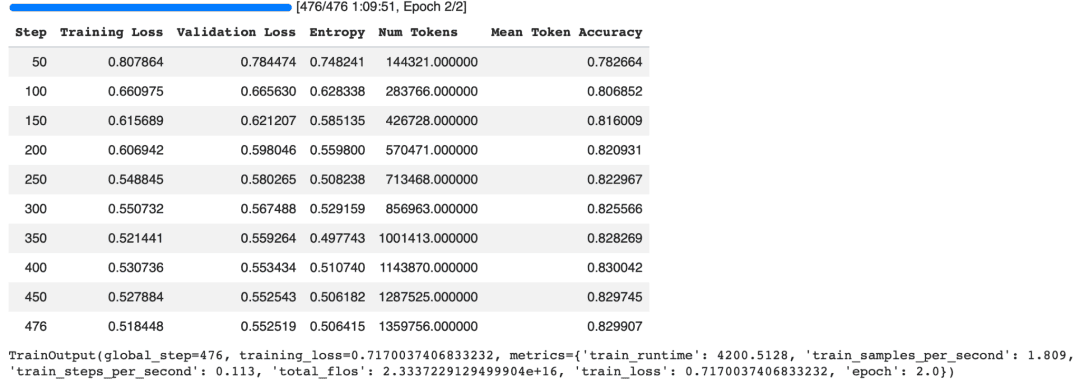
Training for 2 epochs on the sampled dataset completes in roughly 70 minutes on an NVIDIA A100 GPU. Throughout training, the trainer periodically reports metrics such as the training loss, validation loss, entropy, and token-level accuracy.
As shown in Figure 1, both the training and validation losses steadily decrease as training progresses. The training loss drops from approximately 0.81 to 0.52, while the validation loss decreases from 0.78 to 0.55. At the same time, the token-level accuracy improves from about 78% to nearly 83%, indicating that the model is successfully learning the customer support response patterns without exhibiting obvious signs of overfitting.
These results suggest that the LoRA adapters have effectively adapted Gemma 4 to the customer support domain while updating less than 1% of the model’s parameters. In the next section, we will evaluate the fine-tuned model by comparing its responses against those of the original pretrained model.
Saving the Fine-Tuned LoRA Adapter
Once training is complete, it is important to save the fine-tuned LoRA adapter and tokenizer so they can be reloaded later for inference or further training.
#@title 9. Save the Part A adapter
trainer.save_model("gemma-4-support-plain/final_adapter")
tokenizer.save_pretrained("gemma-4-support-plain/final_adapter")
The first line saves the LoRA adapter weights learned during fine-tuning. Since we are using LoRA, only the adapter parameters are stored rather than the entire 5-billion-parameter Gemma 4 model. This keeps the checkpoint lightweight and makes it easy to share or deploy.
The second line saves the tokenizer configuration alongside the adapter. Keeping the tokenizer and adapter together ensures that the model processes text exactly as it did during training, avoiding potential inconsistencies during inference.
After running the code, you will see output similar to the following.
('gemma-4-support-plain/final_adapter/tokenizer_config.json',
 'gemma-4-support-plain/final_adapter/chat_template.jinja',
 'gemma-4-support-plain/final_adapter/tokenizer.json')
The saved directory now contains the LoRA adapter files, tokenizer configuration, and the chat template used during training.
At this point, we have completed the first stage of the project: Gemma 4 E2B-IT has been adapted to the customer-support domain using QLoRA and supervised fine-tuning.
In the next lesson, we will take this idea further and explore how to teach a language model to work with external tools, allowing it to move beyond generating support responses and toward agentic customer-support workflows.
What's next? We recommend PyImageSearch University.
120+ total classes • 115+ hours of on-demand code walkthrough videos • Last updated: September 2026
★★★★★ 4.84 (128 Ratings) • 16,000+ Students Enrolled
I strongly believe that if you had the right teacher you could master computer vision and deep learning.
Do you think learning computer vision and deep learning has to be time-consuming, overwhelming, and complicated? Or has to involve complex mathematics and equations? Or requires a degree in computer science?
That’s not the case.
All you need to master computer vision and deep learning is for someone to explain things to you in simple, intuitive terms. And that’s exactly what I do. My mission is to change education and how complex Artificial Intelligence topics are taught.
If you're serious about learning computer vision, your next stop should be PyImageSearch University, the most comprehensive computer vision, deep learning, and OpenCV course online today. Here you’ll learn how to successfully and confidently apply computer vision to your work, research, and projects. Join me in computer vision mastery.
Inside PyImageSearch University you'll find:
- ✓ 120+ courses on essential computer vision, deep learning, and OpenCV topics
- ✓ 94+ Certificates of Completion
- ✓ 115+ hours of on-demand video
- ✓ Brand new courses released regularly, ensuring you can keep up with state-of-the-art techniques
- ✓ Pre-configured Jupyter Notebooks in Google Colab
- ✓ Run all code examples in your web browser — works on Windows, macOS, and Linux (no dev environment configuration required!)
- ✓ Access to centralized code repos for all 540+ tutorials on PyImageSearch
- ✓ Easy one-click downloads for code, datasets, pre-trained models, etc.
- ✓ Access on mobile, laptop, desktop, etc.
Summary
In this lesson, we fine-tuned Gemma 4 E2B-IT for customer support using Supervised Fine-Tuning (SFT) and QLoRA. Rather than updating all of the model’s parameters, we loaded the base model in 4-bit precision and trained lightweight LoRA adapters, reducing the number of trainable parameters to less than 1% of the model.
We started by preparing the Bitext Customer Support LLM dataset, converting its instruction-response pairs into a conversational format suitable for Gemma 4. We then configured 4-bit quantization with bitsandbytes, attached LoRA adapters using the PEFT library, and fine-tuned the model with the TRL SFTTrainer.
Using a subset of 4,000 examples, the model was trained for two epochs on an NVIDIA A100 GPU. The training loss decreased throughout the run, while the validation loss and token-level accuracy also showed improvement, indicating that the model was learning the customer-support patterns present in the training data.
Finally, we saved the trained LoRA adapter and tokenizer separately from the base model. This lightweight adapter can be loaded on top of the original Gemma 4 checkpoint whenever we want to use the customer-support specialization.
The key takeaway is that QLoRA makes it possible to efficiently adapt a multi-billion-parameter language model to a specialized task without performing full fine-tuning. The resulting model provides a foundation that we can extend further for more sophisticated customer-support workflows.
In the next lesson, we will build on this foundation and explore how to extend the model with tool-aware, agentic behavior, including synthetic tool-call trajectories and scenarios where the model must decide whether to call a tool or respond directly.
Citation Information
Thakur, P. “Fine-Tuning Gemma 4 with QLoRA for Customer Support,” PyImageSearch, S. Huot, G. Kudriavtsev, and A. Sharma, eds., 2026, https://pyimg.co/1cgmp
@incollection{Thakur_2026_fine-tuning-gemma-4-qlora-customer-support,
  author = {Piyush Thakur},
  title = {{Fine-Tuning Gemma 4 with QLoRA for Customer Support}},
  booktitle = {PyImageSearch},
  editor = {Susan Huot and Georgii Kudriavtsev and Aditya Sharma},
  year = {2026},
  url = {https://pyimg.co/1cgmp},
}
To download the source code to this post (and be notified when future tutorials are published here on PyImageSearch), simply enter your email address in the form below!

Download the Source Code and FREE 17-page Resource Guide
Enter your email address below to get a .zip of the code and a FREE 17-page Resource Guide on Computer Vision, OpenCV, and Deep Learning. Inside you'll find my hand-picked tutorials, books, courses, and libraries to help you master CV and DL!


Comment section
Hey, Adrian Rosebrock here, author and creator of PyImageSearch. While I love hearing from readers, a couple years ago I made the tough decision to no longer offer 1:1 help over blog post comments.
At the time I was receiving 200+ emails per day and another 100+ blog post comments. I simply did not have the time to moderate and respond to them all, and the sheer volume of requests was taking a toll on me.
Instead, my goal is to do the most good for the computer vision, deep learning, and OpenCV community at large by focusing my time on authoring high-quality blog posts, tutorials, and books/courses.
If you need help learning computer vision and deep learning, I suggest you refer to my full catalog of books and courses — they have helped tens of thousands of developers, students, and researchers just like yourself learn Computer Vision, Deep Learning, and OpenCV.
Click here to browse my full catalog.